
miisso 5K95
Miisso 10000 mAh Portable Power Bank
Instruction Manual
Introduction
Thank you for choosing the Miisso 10000 mAh Portable Power Bank. This compact and versatile power bank is designed to provide reliable on-the-go charging for your mobile devices, including iPhones, Android phones, smartwatches, and earbuds. Its integrated cable and multiple output ports ensure broad compatibility and convenience.

Image: The Miisso 10000 mAh Portable Power Bank, showcasing its compact size next to a modern smartphone.
Setup
Charging the Power Bank
Before first use, fully charge your Miisso power bank. Connect a 2A charger to the power bank's USB-C input port. A full charge typically takes approximately 6 to 8 hours. The indicator lights on the power bank will show the charging progress.
Connecting Devices
The Miisso power bank offers multiple ways to charge your devices:
- Built-in Cable: For iPhone series devices, simply connect the integrated cable directly to your iPhone's charging port. No additional cables are needed.
- USB-A Output Port: Use your device's original USB-A charging cable and connect it to the power bank's USB-A output port.
- USB-C In/Output Port: For devices with a USB-C charging port, use a compatible USB-C to USB-C cable (not included) to connect to the power bank's USB-C port. This port also functions as an input for charging the power bank itself.
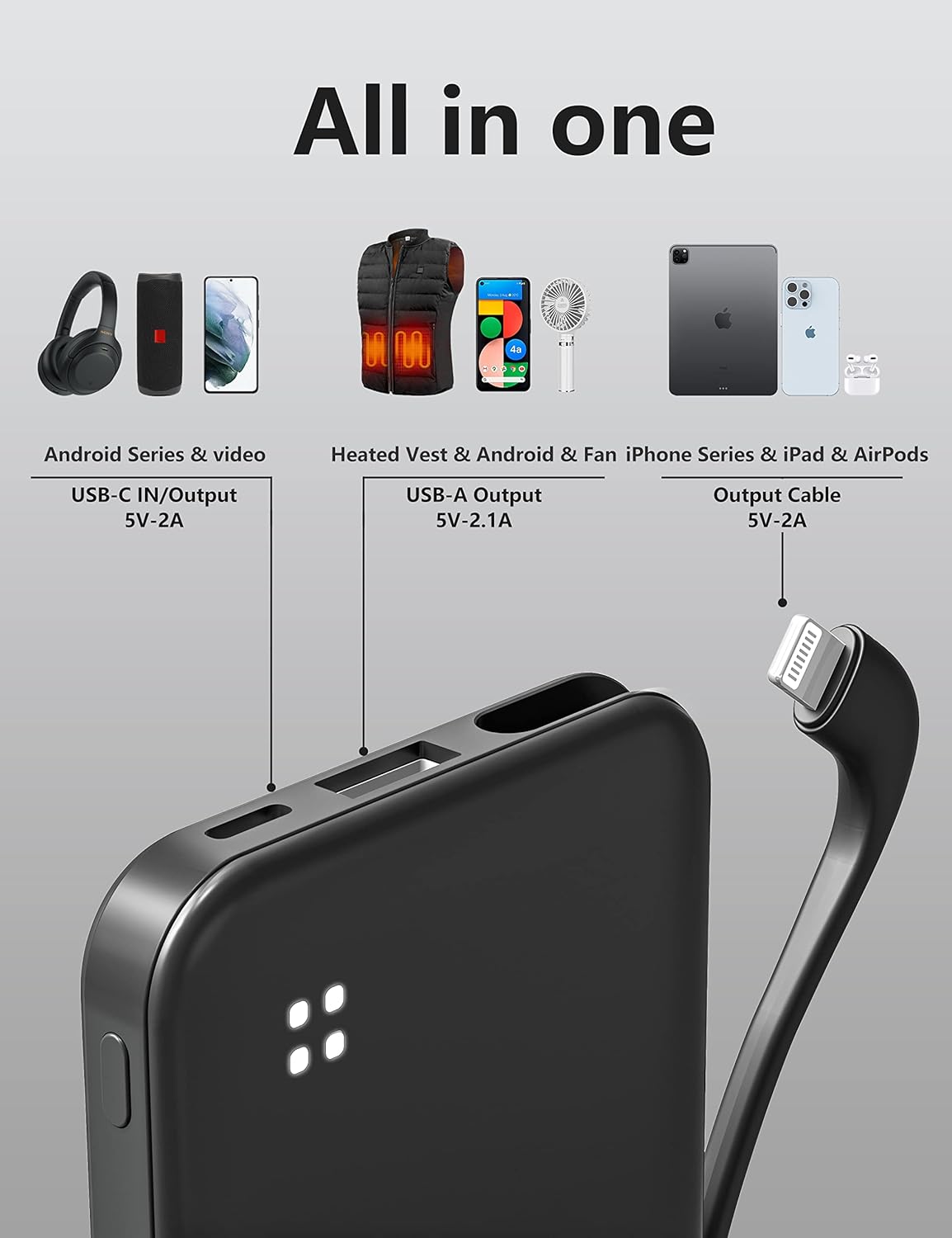
Image: Detailed view of the Miisso power bank's various ports, including the built-in cable, USB-A output, and USB-C input/output.
Operating
To begin charging a device, simply connect it to the appropriate port on the power bank. The power bank will automatically detect the device and begin charging. The indicator lights will illuminate to show the remaining battery level of the power bank.
Charging Multiple Devices
The Miisso power bank is capable of charging up to three devices simultaneously. You can use the built-in cable, the USB-A output port, and the USB-C output port at the same time to charge multiple smartphones, tablets, or other compatible gadgets.
- Output Cable: 5V-2.0A
- USB Output: 5V-2.1A
- Type-C In/Output: 5V-2.0A

Image: The Miisso power bank demonstrating its ability to charge three devices concurrently, including a smartphone and a tablet.

Image: A user's hands holding a smartphone connected to the Miisso power bank, illustrating convenient charging.
Features
Compact and Portable Design
The Miisso power bank is designed to be highly portable, with a card-sized body that fits easily into pockets or small bags. Its dimensions are approximately 10.49 x 6.6 x 1.3 cm, and it weighs only 141 grams.

Image: Visual representation of the Miisso power bank's compact dimensions and light weight, comparing it to a credit card.
High Capacity for Multiple Charges
With a 10000 mAh battery capacity, the power bank can provide multiple charges for various devices:
- Approximately 4.4 recharges for an iPhone 8
- Approximately 3 recharges for an iPhone X
- Approximately 1.2 recharges for a Samsung Galaxy S9
- Approximately 1.2 recharges for an iPhone 14 Pro
- Approximately 1.2 recharges for a Samsung S20
- Approximately 12 charges for an Apple Watch
- Approximately 15 charges for AirPods Pro

Image: The Miisso power bank positioned among various devices, illustrating its high capacity and ability to charge multiple types of electronics.
Maintenance
To ensure the longevity and optimal performance of your Miisso power bank, follow these maintenance guidelines:
- Storage: Store the power bank in a cool, dry place away from direct sunlight and extreme temperatures.
- Cleaning: Use a soft, dry cloth to clean the exterior of the power bank. Do not use harsh chemicals or abrasive materials.
- Avoid Moisture: Keep the power bank away from water and high humidity. Do not immerse it in any liquid.
- Handle with Care: Avoid dropping or subjecting the power bank to strong impacts, as this can damage internal components.
- Regular Use: If the power bank is not used for extended periods, it is recommended to fully charge and discharge it at least once every three months to maintain battery health.
Troubleshooting
If you encounter issues with your Miisso power bank, refer to the following common problems and solutions:
- Power Bank Not Charging:
- Ensure the charging cable is securely connected to both the power bank's USB-C input and the power adapter.
- Verify that the power adapter is functioning correctly and plugged into a live power outlet.
- Use a 5V/2A or higher output charger for optimal charging speed.
- Device Not Charging from Power Bank:
- Check if the power bank has sufficient charge indicated by its LED lights.
- Ensure the charging cable connecting the device to the power bank is securely plugged in at both ends.
- Try a different charging cable or a different output port on the power bank.
- Confirm that your device is compatible with the power bank's output specifications (5V).
- Slow Charging:
- Ensure you are using a high-quality charging cable.
- Verify that the power bank itself is fully charged.
- Charging multiple devices simultaneously may reduce the charging speed for individual devices.
Specifications
| Feature | Detail |
|---|---|
| Model Number | 5K95 |
| Battery Capacity | 10000 mAh (Milliampere Hour) |
| Dimensions | 10.49 x 6.6 x 1.3 cm |
| Weight | 141 g |
| Color | Black |
| Input (Type-C) | 5V-2.0A |
| Output (Built-in Cable) | 5V-2.0A |
| Output (USB-A) | 5V-2.1A |
| Battery Type | Lithium Polymer |
Warranty and Support
For any questions, technical assistance, or support regarding your Miisso 10000 mAh Portable Power Bank, please contact Miisso customer service. Refer to the product packaging or the retailer's website for specific contact information and details regarding warranty coverage.
Ask a question about this manual
Ask about setup, troubleshooting, compatibility, parts, safety, or missing instructions. Manuals+ will review the question and use this page’s manual context to help answer it.