
Tiger ADC-A060-TD
TIGER Coffee Maker ADC-A060TD Instruction Manual
Model: ADC-A060-TD
Introduction
Thank you for purchasing the TIGER ADC-A060TD Coffee Maker. This manual provides essential information for the safe and efficient operation, maintenance, and troubleshooting of your new coffee machine. Please read this manual thoroughly before first use and keep it for future reference.
Important Safety Information
Always follow basic safety precautions when using electrical appliances to reduce the risk of fire, electric shock, and/or injury to persons.
- Read all instructions before using the appliance.
- Do not touch hot surfaces. Use handles or knobs.
- To protect against fire, electric shock, and injury to persons, do not immerse cord, plugs, or the appliance in water or other liquid.
- Close supervision is necessary when any appliance is used by or near children.
- Unplug from outlet when not in use and before cleaning. Allow to cool before putting on or taking off parts, and before cleaning the appliance.
- Do not operate any appliance with a damaged cord or plug or after the appliance malfunctions, or has been damaged in any manner.
- The use of accessory attachments not recommended by the appliance manufacturer may result in fire, electric shock, or injury to persons.
- Do not use outdoors.
- Do not let cord hang over edge of table or counter, or touch hot surfaces.
- Do not place on or near a hot gas or electric burner, or in a heated oven.
- Always attach plug to appliance first, then plug cord into the wall outlet. To disconnect, turn any control to "off", then remove plug from wall outlet.
- Do not use appliance for other than intended use.
- This appliance is for household use only.
- Ensure the voltage matches the rating label on the appliance (220 Volts).
Parts Identification
Familiarize yourself with the components of your TIGER Coffee Maker.

Figure 1: Front view of the TIGER ADC-A060TD Coffee Maker, showing the main unit, carafe, and control switch.
- Water Tank: Located at the back, for filling with water.
- Filter Basket: Holds the reusable filter and ground coffee.
- Reusable Filter: Included component for filtering coffee grounds.
- Carafe: Stainless steel carafe for collecting brewed coffee.
- Brewing Head: Dispenses hot water over coffee grounds.
- ON/OFF Switch: Located on the front for operating the machine.
- Warming Plate: Keeps the carafe warm after brewing.
Setup
Before first use, and for daily setup:
- Unpack: Carefully remove all packaging materials and inspect the coffee maker for any damage.
- Clean: Wash the carafe, reusable filter, and filter basket in warm, soapy water. Rinse thoroughly and dry.
- Placement: Place the coffee maker on a flat, stable, heat-resistant surface, away from the edge of the counter. Ensure adequate ventilation.
- First Brew Cycle (Cleaning):
- Fill the water tank with clean water up to the maximum fill line.
- Place the empty carafe on the warming plate.
- Turn the coffee maker ON and allow it to complete a full brewing cycle with only water.
- Discard the hot water. This cleans the internal components and removes any manufacturing residue.
Operating Instructions
Follow these steps to brew a fresh pot of coffee:
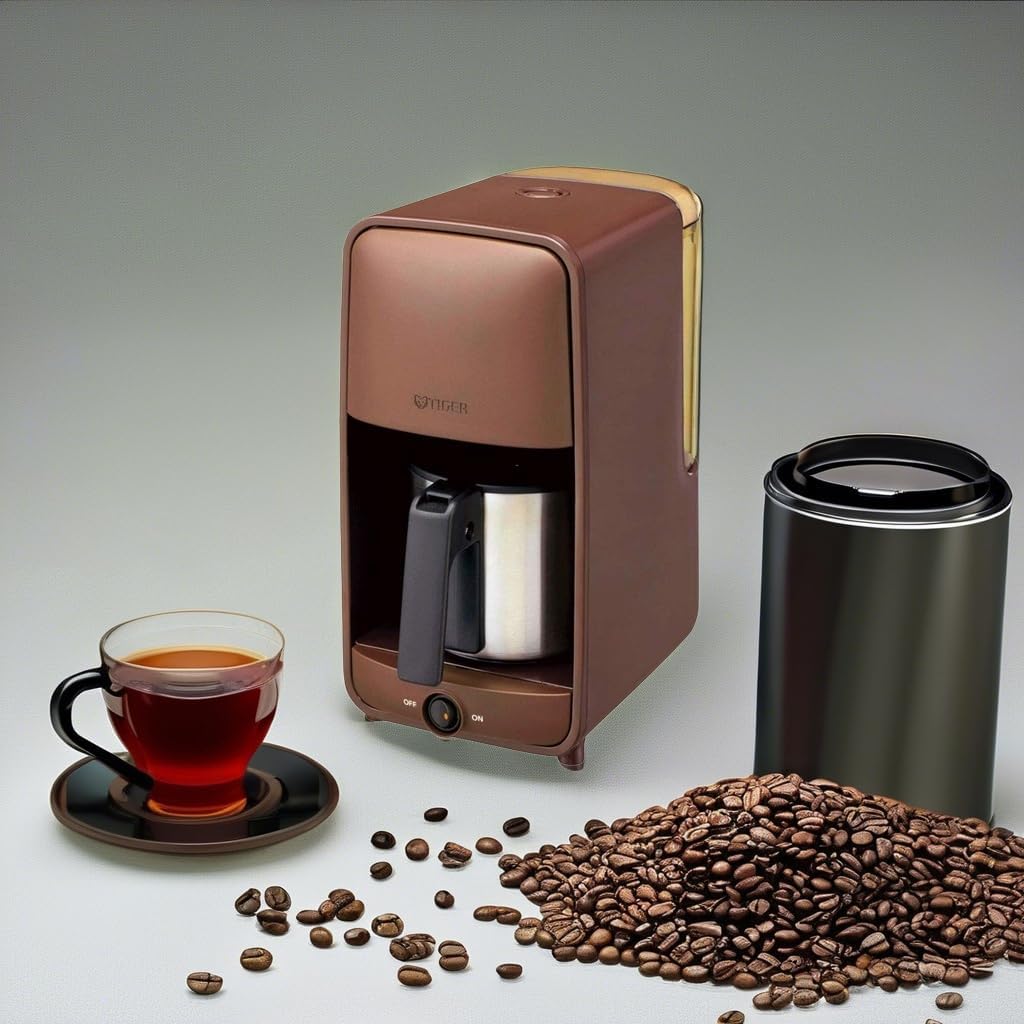
Figure 2: The TIGER ADC-A060TD Coffee Maker ready for brewing, accompanied by coffee beans and a cup of brewed coffee.
- Fill Water Tank: Open the water tank lid and fill the tank with fresh, cold water to your desired level, not exceeding the MAX fill line.
- Add Coffee Grounds: Place the reusable filter into the filter basket. Add your desired amount of ground coffee into the filter. For best results, use medium-ground coffee.
- Position Carafe: Ensure the empty carafe is correctly placed on the warming plate.
- Start Brewing: Plug the power cord into a 220V electrical outlet. Flip the ON/OFF switch to the "ON" position. The indicator light will illuminate, and brewing will begin.
- Brewing Complete: Once the brewing cycle is complete, the coffee maker will automatically switch to the "keep warm" function. The indicator light will remain on.
- Serve: Carefully remove the carafe to pour coffee. The drip-stop feature will temporarily prevent coffee from dripping when the carafe is removed.
- Turn Off: After serving, return the carafe to the warming plate. When finished, flip the ON/OFF switch to the "OFF" position and unplug the appliance.
Maintenance and Cleaning
Regular cleaning ensures optimal performance and extends the life of your coffee maker.
Daily Cleaning:
- Always unplug the coffee maker and allow it to cool completely before cleaning.
- Remove the reusable filter and discard used coffee grounds.
- Wash the carafe, reusable filter, and filter basket in warm, soapy water. These parts are fully washable.
- Wipe the exterior of the coffee maker with a soft, damp cloth. Do not use abrasive cleaners or scouring pads.
- Do not immerse the main unit, cord, or plug in water or any other liquid.
- Dry all parts thoroughly before reassembling or storing.
Descaling (Monthly or as needed):
Mineral deposits from water can build up over time, affecting performance. Descale your coffee maker regularly.
- Prepare a descaling solution: Mix white vinegar and water in a 1:2 ratio (e.g., 1 cup vinegar to 2 cups water).
- Pour the solution into the water tank.
- Place the empty carafe on the warming plate.
- Run a full brewing cycle with the descaling solution.
- After the cycle, turn off the coffee maker and let it sit for 15-30 minutes.
- Discard the solution and rinse the carafe and filter basket thoroughly.
- Run 2-3 cycles with fresh, clean water to rinse out any remaining vinegar taste.
Troubleshooting
Refer to this section for common issues and their solutions.
| Problem | Possible Cause | Solution |
|---|---|---|
| Coffee does not brew. |
|
|
| Coffee tastes weak or too strong. |
|
|
| Coffee overflows from filter basket. |
|
|
| Unit leaks. |
|
|
Specifications
| Feature | Detail |
|---|---|
| Brand | Tiger |
| Model Name | ADC-A060-TD |
| Color | Brown (Dark Brown exterior finish) |
| Coffee Maker Type | Drip Coffee Machine |
| Filter Type | Reusable |
| Operation Mode | Manual |
| Voltage | 220 Volts |
| Product Dimensions | 10.71 x 6.06 x 11.85 inches |
| Item Weight | 5.19 pounds |
| Included Components | Filter |
| Special Feature | Reusable filter type and Fully Automatic operation |
Warranty and Support
For warranty information or technical support, please refer to the warranty card included with your product or visit the official Tiger website. Keep your purchase receipt as proof of purchase for warranty claims.
You can also visit the Tiger Store on Amazon for more product information and support resources.
Related documentsADC-A060-TD


Ask a question about this manual
Ask about setup, troubleshooting, compatibility, parts, safety, or missing instructions. Manuals+ will review the question and use this page’s manual context to help answer it.