
1. Introduction
Thank you for choosing the TMEZON 4-Channel HD Security Camera System. This manual provides detailed instructions for the installation, operation, and maintenance of your new surveillance system. Please read this manual thoroughly before use to ensure proper setup and functionality.

Figure 1.1: TMEZON 4-Channel HD Security Camera System Overview
2. Package Contents
Please check the package contents carefully. If any items are missing or damaged, please contact TMEZON customer support.
- 1 x 4-Channel 1080N HD-TVI Digital Video Recorder (DVR)
- 4 x 720P Weatherproof CCTV Cameras
- 4 x 18.3 Meter BNC Video/Power Cables
- 1 x USB Mouse
- 1 x 4-Way Power Splitter Cable
- 1 x Power Adapter for DVR
- Mounting Screws and Wall Plugs
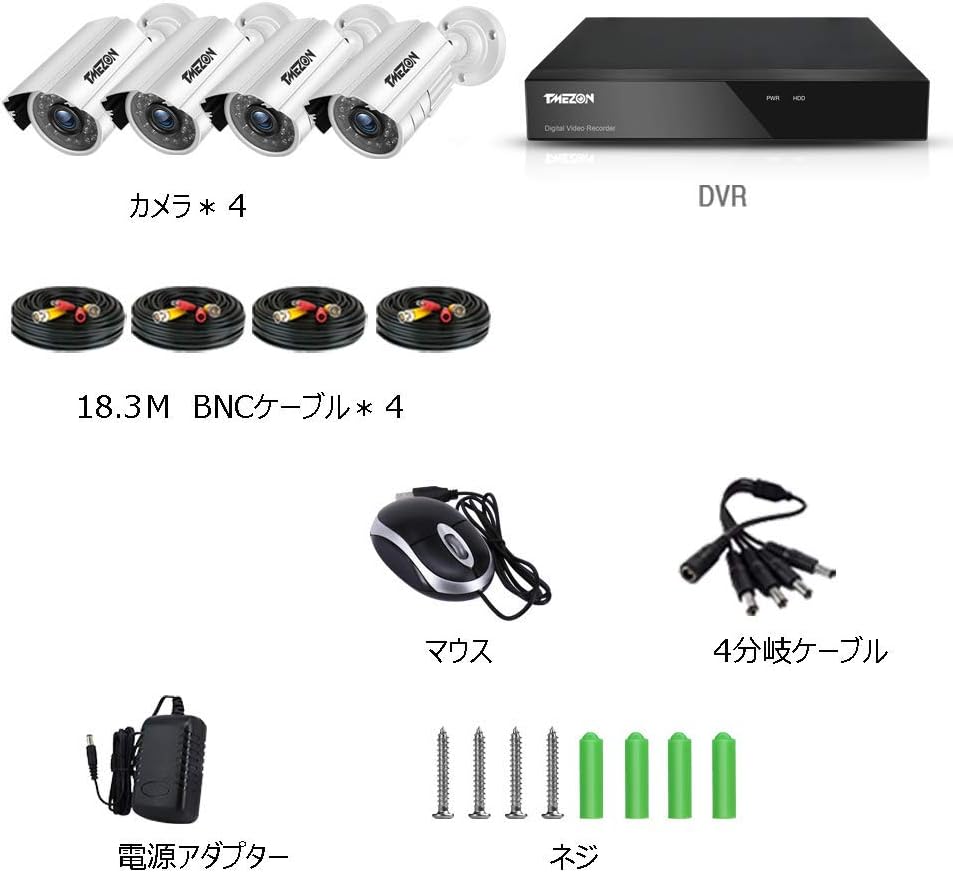
Figure 2.1: Included Components
3. Product Features
- High-Definition Video: The system includes a 4-channel 1080N HD-TVI DVR and four 720P weatherproof cameras. Cameras are equipped with automatic IR-cut filters for clear and sharp images both day and night.
- Anytime, Anywhere Monitoring: Utilize the free 'XMEYE' mobile application for live viewing and playback on your smartphone (iPhone, Android) or tablet. Remote access is available from home or office with an internet connection via Wi-Fi, 2G/3G/4G networks.
- Customizable Motion Detection and Alerts: Receive smart notifications with images pushed to your iPhone/Android app when unexpected motion is detected. You can configure specific detection areas from the DVR to minimize false alarms and protect privacy by blocking certain regions from recording.

Figure 3.1: Night Vision and Weatherproof Design

Figure 3.2: Remote Monitoring Capabilities
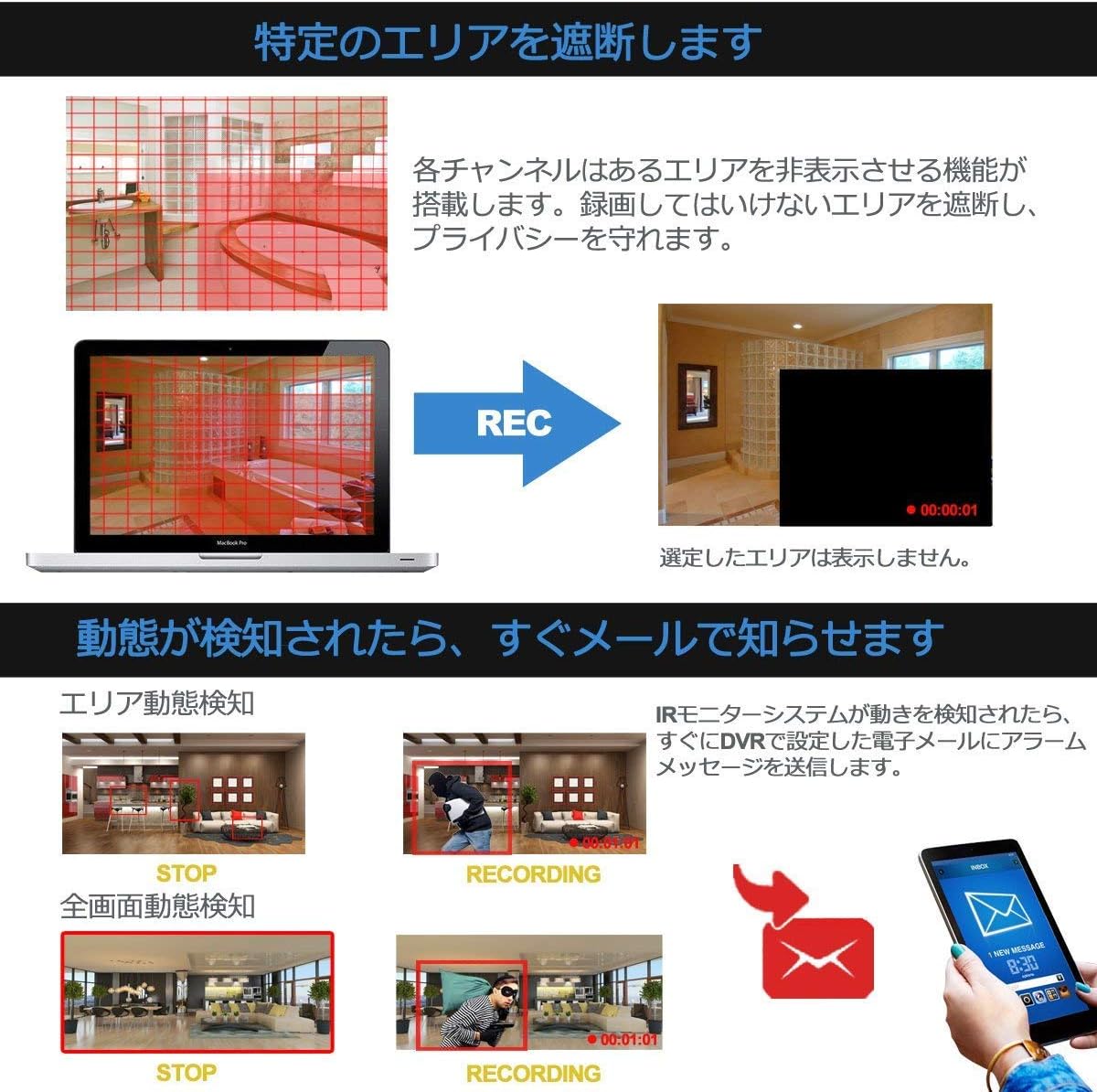
Figure 3.3: Motion Detection Area Configuration

Figure 3.4: Motion Detection Alert Example
4. Setup Guide
Follow these steps to set up your TMEZON security camera system:
- Connect Cameras to DVR: Connect each camera to the DVR using the provided BNC video/power cables. Ensure the BNC connector is securely twisted onto the DVR's video input port and the camera's video output.
- Connect Power: Use the 4-way power splitter cable to power all four cameras from a single power adapter. Connect the camera power cables to the splitter, and then connect the splitter to the camera power adapter. Connect the DVR's power adapter to the DVR and then to a power outlet.
- Connect Monitor: Connect a monitor (HDMI or VGA) to the corresponding output port on the DVR.
- Connect Mouse: Plug the USB mouse into one of the USB ports on the DVR.
- Network Connection (Optional for Remote Viewing): For remote viewing, connect the DVR to your router using an Ethernet cable.

Figure 4.1: DVR Connection Ports
5. Operating Instructions
5.1. Initial Setup and DVR Interface
Upon first power-up, the DVR will guide you through an initial setup wizard. Use the connected mouse to navigate the on-screen menus. You can configure settings such as date/time, network settings, and recording preferences.
5.2. Live View and Playback
- Live View: Once cameras are connected, their feeds will appear on the connected monitor. You can switch between single-camera view and multi-camera grid view.
- Playback: Access the playback menu on the DVR to review recorded footage. You can search by date, time, and event (e.g., motion detection).
5.3. Remote Monitoring via XMEYE App
To access your cameras remotely, download the free 'XMEYE' app from your smartphone's app store (available for iPhone and Android). Follow the in-app instructions to add your DVR device using its serial number or QR code. Once added, you can view live feeds, play back recordings, and receive alerts from anywhere with an internet connection.
5.4. Motion Detection Configuration
The DVR allows you to set up motion detection for each camera. Navigate to the 'Alarm' or 'Motion Detection' settings in the DVR menu. You can define specific areas within the camera's view where motion should trigger an alert. This helps reduce false alarms from irrelevant movements. You can also configure the system to send email alerts or push notifications to your mobile app when motion is detected.
6. Maintenance
- Regular Cleaning: Periodically clean the camera lenses with a soft, damp cloth to ensure clear image quality.
- Check Connections: Ensure all cables and connections are secure and free from damage.
- Software Updates: Check the TMEZON website or contact support for any available firmware updates for your DVR to ensure optimal performance and security.
- Hard Drive Health: If an HDD is installed (not included in this specific model), regularly check its health status through the DVR's menu to prevent data loss.
7. Troubleshooting
| Problem | Possible Cause | Solution |
|---|---|---|
| No image on monitor | Loose video cable, incorrect monitor input, DVR not powered on. | Check all cable connections, ensure monitor is on correct input (HDMI/VGA), verify DVR power. |
| No recording | No HDD installed, HDD full, recording schedule not set. | Install compatible HDD (if not already), check HDD space, configure recording schedule in DVR settings. |
| Cannot access remotely | No network connection, incorrect app settings, firewall issues. | Ensure DVR is connected to the internet, verify app settings (device ID, password), check router/firewall settings. |
| Motion detection not working | Motion detection disabled, sensitivity too low, detection area not configured. | Enable motion detection in DVR settings, adjust sensitivity, configure detection areas. |
8. Specifications
| Feature | Specification |
|---|---|
| Manufacturer | TMEZON(JP) |
| Model Number | MZ-HD1004M-K4-00/JP |
| Package Dimensions | 33.8 x 31 x 20 cm |
| Color | Orange |
| Package Weight | 3.88 Kilograms |
| Battery Usage | No |
| Brand Name | TMEZON |
| ASIN | B07H625VGJ |
| Photosensor Technology | CMOS |
| Supported File Format | MP4 |
| Image Stabilization | Digital |
| Connectivity Technology | Wireless |
| Shooting Mode | Custom |
| Video Capture Resolution | 1080p |
9. Warranty and Support
TMEZON offers a 2-year warranty and a 30-day money-back guarantee for this product. If you encounter any issues during use, or if you require special discounts for bulk purchases (2 sets or more), please do not hesitate to contact our customer support team.
Email: tmezoncctvsystem@yahoo.com


