
Introduction
Thank you for choosing the everActive UC-4000 Universal Battery Charger. This advanced microprocessor-controlled charger is designed for safe and efficient charging, discharging, refreshing, and testing of various rechargeable battery types, including Ni-MH (AA, AAA, C, D) and Li-ion (18650, 14500, 16340, 20700, 21700, etc.). Please read this manual thoroughly before operating the device to ensure proper use and maximize battery lifespan.
Important Safety Information
- Use only with compatible rechargeable batteries. Do not attempt to charge non-rechargeable batteries.
- Ensure correct battery polarity (+/-) when inserting batteries into the charging slots.
- Operate the charger in a well-ventilated area, away from direct sunlight, high temperatures, and humidity.
- Do not disassemble or modify the charger. Refer all servicing to qualified personnel.
- Keep the charger and batteries out of reach of children and pets.
- Unplug the charger from the power source when not in use or before cleaning.
- The charger features microprocessor control to prevent overcharging and overheating. However, always monitor the charging process.
- Do not expose the charger to water or other liquids.
Product Overview
The everActive UC-4000 is a professional, advanced battery charger designed for versatility and precision. It features four independent charging channels, allowing individual processing for each battery. The large LCD screen provides real-time information on the charging status, voltage, current, and capacity.
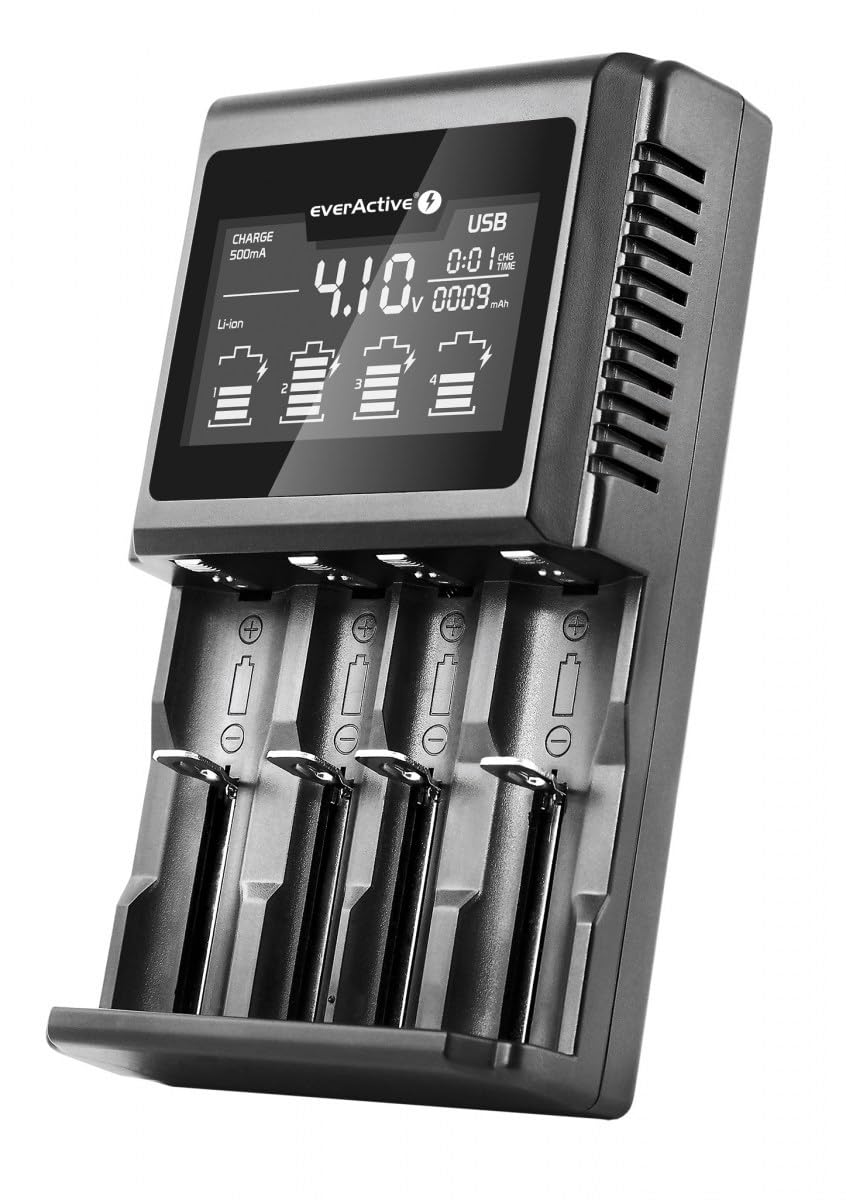
Image: The everActive UC-4000 charger displaying battery status on its LCD screen.
Key Features:
- Microprocessor Control: Ensures safe and optimized charging, preventing overcharge and overheating.
- Independent Charging Channels: Each of the four slots operates independently, allowing mixed battery types and sizes.
- Large LCD Display: Provides detailed information for each channel, including voltage, current, time, and charged capacity.
- Multiple Operating Modes: Charge, Discharge, Refresh, Capacity Test, and Quick Test (IR).
- Wide Battery Compatibility: Supports Ni-MH (AA, AAA, C, D) and Li-ion (18650, 14500, 16340, 20700, 21700, etc.).
- 0V Battery Reactivation: Capable of reactivating deeply discharged 0V Li-ion batteries.
- USB Output: 5V DC, 1000mA for charging external devices.

Image: Detailed view of the charger's LCD screen, displaying charging current, voltage, and capacity for multiple battery slots.
Setup and First Use
- Unpack the Charger: Carefully remove the UC-4000 charger and its accessories from the packaging.
- Connect Power: Connect the provided AC power adapter to the DC input port on the back of the charger. Plug the adapter into a standard wall outlet (100V-240V). The LCD screen will illuminate.
- Insert Batteries: Insert one or more compatible rechargeable batteries into the charging slots. Ensure correct polarity (+ and - terminals match the markings on the charger). The charger will automatically detect the battery type (Ni-MH or Li-ion) and display initial information.
- Select Mode (Optional): By default, the charger will begin charging. To select a different operating mode (Discharge, Refresh, Test), press the corresponding button for the desired slot within a few seconds of inserting the battery.

Image: Contents of the everActive UC-4000 package, including the charger, power adapter, and user manual.
Operating Modes
The UC-4000 offers five distinct operating modes to manage your batteries effectively. Each mode can be selected independently for each charging slot.
1. Charge Mode
This is the default mode. The charger will automatically detect the battery type and begin charging at a suitable current. You can manually adjust the charging current (200-400-600-800-1000 mA) for Li-ion batteries (up to 1A per slot for 4 batteries, or 500mA if preferred) and Ni-MH batteries. The LCD will display the current, voltage, and charged capacity.
2. Discharge Mode
In this mode, the charger discharges the battery before recharging it. This can help reduce the memory effect in Ni-MH batteries. Discharge current can be set (100-200-300-400-500 mA).
3. Refresh Mode
This mode cycles the battery through multiple charge-discharge cycles to optimize its capacity and potentially restore older batteries. This process can take several hours or even days depending on the battery condition.
4. Capacity Test Mode
The charger fully charges the battery, then discharges it to measure its actual capacity, and finally recharges it. This provides an accurate reading of the battery's real capacity.
5. Quick Test (IR) Mode
This mode quickly measures the internal resistance (IR) of the battery. A lower internal resistance generally indicates a healthier battery. This is a rapid diagnostic tool.
Battery Compatibility
The everActive UC-4000 is a highly versatile charger, compatible with a wide range of rechargeable battery sizes and chemistries. It supports both Ni-MH and Li-ion battery types.
Supported Battery Types:
- Ni-MH / Ni-CD: AA (R6), AAA (R03), C (R14), D (R20) - Note: C and D cells require optional adapters and only 1-2 cells can be charged simultaneously due to size.
- Li-ion / LiFePO4: 10440, 14500, 16340 (RCR123), 17500, 17670, 18350, 18500, 18650, 20700, 21700, 22650, 26500, 26650.

Image: Visual representation of compatible battery types, including Li-ion, LiFePO4, Ni-MH, and various sizes like AA, AAA, 18650, 21700.
The charger's intelligent system automatically identifies the battery chemistry and applies the appropriate charging algorithm.
Maintenance
- Cleaning: Disconnect the charger from the power source before cleaning. Use a soft, dry cloth to wipe the exterior. Do not use abrasive cleaners or solvents.
- Storage: Store the charger in a cool, dry place when not in use. Avoid extreme temperatures and humidity.
- Contact Points: Periodically check the charging contacts for any dirt or corrosion. Clean gently with a cotton swab if necessary.
Troubleshooting
- Charger not turning on:
- Ensure the power adapter is securely connected to both the charger and a working wall outlet. Check if the outlet has power.
- Battery not charging:
- Verify that the battery is inserted with correct polarity. Ensure the battery is a compatible rechargeable type. Try cleaning the battery contacts and charger contacts. If the battery is severely over-discharged (0V), the charger has a reactivation function, but some batteries may be beyond recovery.
- Incorrect capacity reading during test:
- Ensure the battery has undergone a full charge-discharge-charge cycle (Refresh or Capacity Test mode) for accurate measurement. Battery age and condition can affect actual capacity.
- Charger or batteries feel warm:
- It is normal for the charger and batteries to become slightly warm during operation. If they become excessively hot, immediately disconnect the power and remove the batteries. Ensure adequate ventilation around the charger.
- USB output not working when unplugged from AC:
- The USB power bank function of the UC-4000 requires the charger to be connected to its AC power adapter. It does not operate as a portable power bank using only inserted batteries.
Technical Specifications
| Brand | everActive |
| Model Number | EVUC4000 (UC-4000) |
| Input Voltage | 12V DC, 1.5A (via included AC adapter 100V-240V) |
| Charging Current (Li-ion) | 200-400-600-800-1000 mA (per slot) |
| Charging Current (Ni-MH) | 200-400-600-800-1000 mA (per slot) |
| Discharge Current | 100-200-300-400-500 mA (per slot) |
| USB Output | 5V DC, 1000 mA |
| Number of Slots | 4 independent channels |
| Compatible Battery Types | Ni-MH/Ni-CD (AA, AAA, C, D), Li-ion/LiFePO4 (10440, 14500, 16340, 18650, 20700, 21700, etc.) |
| Dimensions | 9P x 16l x 5H centimeters (approx.) |
| Certifications | CE |
Warranty and Support
For warranty information and technical support, please refer to the documentation included with your purchase or contact everActive customer service through their official website. Keep your proof of purchase for warranty claims.
Manufacturer: Baltrade, Poland


