
CHAMBERLAIN RJO20
Chamberlain Smart Garage Door Opener - Model RJO20
Wall Mounted - myQ Smartphone Controlled - Ultra Quiet Space Saving Direct Drive
Product Overview
The Chamberlain RJO20 Wall Mount Garage Opener is designed to discretely mount on the wall next to your garage door, freeing up overhead space. It features advanced myQ technology for smartphone monitoring and control, Security+2.0 for enhanced security, and a direct-drive system for ultra-quiet operation. This manual provides detailed instructions for installation, operation, and maintenance.
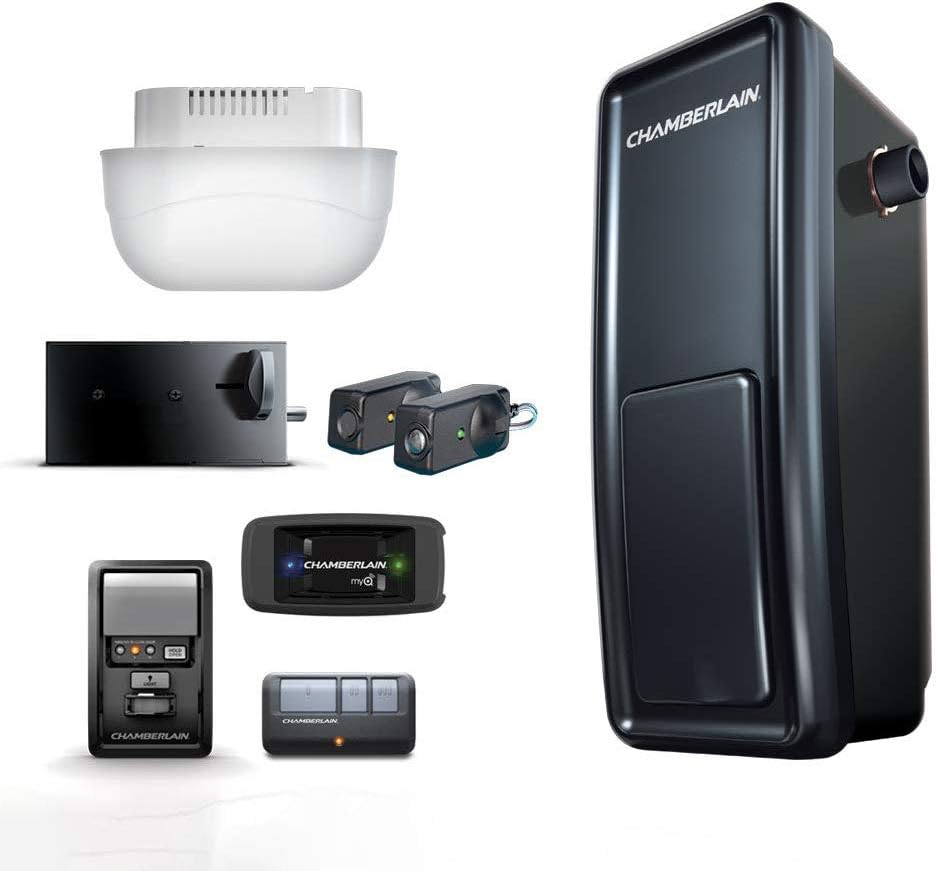
Figure 1: Chamberlain RJO20 Smart Garage Door Opener with included components.

Figure 2: The RJO20 installed, showcasing the freed overhead space.
Safety Information
Always ensure safety precautions are followed during installation, operation, and maintenance. Read all instructions carefully before beginning. Keep children and pets away from the garage door area. Do not allow children to operate the garage door opener. Regularly inspect the garage door system for proper balance and operation.
WARNING: Garage door springs are under extreme tension. Do NOT attempt to adjust, repair, or remove springs or associated hardware. Only qualified personnel should perform these adjustments.
What's Included
Your Chamberlain RJO20 package includes the following components:
- RJO Heavy-Duty Garage Door Opener
- Automatic Garage Door Lock
- Remote Light
- The Protector System Safety Sensors
- (1) Three-Button Tri-Band Remote
- Multi-function Wall Control
- Warning Label and Instruction Manual

Figure 3: The Automatic Garage Door Lock, which secures the door every time it closes.
Setup & Installation
Installation of the Chamberlain RJO20 requires careful attention to detail. Ensure you have all necessary tools and follow the steps below. For visual guidance, refer to the official installation video.
Video 1: Official Chamberlain Wall Mount Smart Garage Opener (RJO20) overview. This video provides a general introduction to the product and its features.
1. Mounting the Main Unit
The main opener unit mounts directly to the wall next to the garage door's torsion bar. Ensure the wall is structurally sound to support the unit's weight and operational forces. The unit should be positioned to allow proper engagement with the torsion bar.
2. Installing the Automatic Garage Door Lock
The automatic garage door lock is a key security feature. It installs on the garage door track and engages a bolt into the track when the door is closed, providing enhanced security. Follow the provided template for precise drilling and mounting.
3. Installing the Cable Tension Monitor
The cable tension monitor ensures the garage door cables maintain proper tension for safe and smooth operation. Mount this unit on the wall, ensuring the cable rests correctly on the monitor's arm. This device helps prevent issues caused by slack or overtightened cables.
4. Wiring the Wall Control Button
Connect the multi-function wall control to the main opener unit using the provided low-voltage wiring. Ensure all connections are secure and wires are routed safely away from moving parts of the garage door.
5. Wiring the Safety Sensors
The Protector System Safety Sensors are crucial for preventing the door from closing on obstructions. Install these sensors on either side of the garage door opening, approximately 6 inches above the floor. Ensure they are properly aligned and connected to the main unit. The indicator lights on the sensors will confirm proper alignment.
6. Setting Limits
After all components are installed and wired, you must set the open and close limits for the garage door. This process involves holding down specific buttons on the main unit or wall control to teach the opener the full travel range of your door. Refer to the detailed steps in the included manual for precise limit setting instructions.
Operating Instructions
1. Using the Remote Control
Press the large button on your three-button remote control to open or close the garage door. Pressing it again while the door is in motion will stop the door. The smaller buttons can be programmed for additional Chamberlain openers or myQ accessories.
2. Using the Wall Control
The multi-function wall control allows you to open/close the door, turn the light on/off, and access programming features. Press the main button to operate the door. Use the light button to control the remote light.
3. Using the myQ App
The myQ app provides smartphone control and monitoring capabilities. Download the myQ app from your device's app store and follow the in-app instructions to connect your RJO20. You can open/close your garage door from anywhere, receive real-time status notifications, and set custom schedules.

Figure 4: Control your garage door from anywhere using the myQ smartphone app.

Figure 5: The myQ system allows for seamless integration and control of your garage door.
4. Manual Release
In case of a power outage or malfunction, you can manually open or close the garage door. Pull the red emergency release cord located on the main unit to disengage the opener from the door. This allows you to operate the door by hand.
Maintenance
Regular maintenance ensures the longevity and safe operation of your garage door opener. Perform the following checks periodically:
- Monthly: Test the safety reversal system by placing an object (like a 2x4) in the door's path. The door should reverse upon contact.
- Monthly: Inspect the garage door springs, cables, rollers, and other hardware for signs of wear or damage. Do not attempt to repair these components yourself.
- Annually: Lubricate the garage door rollers, hinges, and bearings with a garage door lubricant. Do not lubricate the tracks.
- Annually: Check the door balance. If the door is unbalanced, it may put undue strain on the opener.
Troubleshooting
If you encounter issues with your Chamberlain RJO20, refer to the common troubleshooting tips below:
- Opener does not operate: Check power supply, ensure safety sensors are aligned (green light on both), and verify the remote control battery.
- Door reverses unexpectedly: Check for obstructions in the door's path or misaligned safety sensors.
- Remote control not working: Replace battery, reprogram the remote to the opener, or check for signal interference.
- Door opens/closes by itself: Check for stuck remote buttons, interference from other devices, or accidental myQ app activation.
For more detailed troubleshooting or complex issues, consult the full instruction manual or contact Chamberlain customer support.
Specifications
| Feature | Specification |
|---|---|
| Brand | CHAMBERLAIN |
| Model Number | RJO20 |
| Item Weight | 30.7 pounds |
| Dimensions (LxWxH) | 6.85 x 6.01 x 16.25 inches |
| Connectivity Protocol | Wi-Fi |
| Control Method | App |
| Special Feature | Remote Operated |
| Lock Type | Keypad |
| Batteries | 1 Lithium Metal batteries required (included) |
Warranty & Support
The Chamberlain RJO20 Smart Garage Door Opener comes with a comprehensive warranty:
- Lifetime Motor Warranty
- Lifetime Belt Warranty
- 5 Year Parts Warranty
- 1 Year Accessories Warranty
For technical support, visit the official Chamberlain website or refer to the contact information provided in your product packaging.
Related documentsRJO20


Ask a question about this manual
Ask about setup, troubleshooting, compatibility, parts, safety, or missing instructions. Manuals+ will review the question and use this page’s manual context to help answer it.