
Introduction
This manual provides detailed instructions for the safe installation, operation, and maintenance of your Efperfect 52-Inch Industrial Ceiling Fan with Light. Please read this manual thoroughly before installation and retain it for future reference.
Important Safety Information
- Always disconnect power at the circuit breaker before installation or servicing.
- Ensure all electrical connections comply with local codes and ordinances.
- Consult a qualified electrician if you are unfamiliar with electrical wiring.
- Mount the fan to a ceiling joist or support structure capable of supporting the fan's weight.
- Keep hands clear of fan blades during operation.
Package Contents
Verify that all components are present before beginning installation:
- Ceiling Fan Unit (Motor, Blades, Light Kit)
- Remote Control
- 2 Downrods (4-inch and 8-inch)
- Mounting Hardware
- Instruction Manual

Image: Exploded view of the ceiling fan components, showing the durable canopy, genuine walnut blades, A-grade IP plating black metal cage, E26 light sockets, and the noise-free reversible copper motor. Two downrods (4-inch and 8-inch) are also depicted.
Setup and Installation
Professional installation is recommended. Ensure power is disconnected at the circuit breaker before proceeding.
- Mounting Bracket Installation: Secure the mounting bracket to a ceiling joist or a fan-rated outlet box. Ensure it is firmly attached to support the fan's weight.
- Downrod Assembly: Select the appropriate downrod (4-inch or 8-inch) for your ceiling height. Feed the electrical wires through the downrod and attach it to the fan motor assembly.
- Wiring Connections: Connect the fan's electrical wires to the household wiring according to the wiring diagram provided in the original manual. Ensure all connections are secure.
- Canopy Installation: Carefully lift the fan assembly and hang it on the mounting bracket. Secure the canopy to cover the wiring connections.
- Blade Attachment: Attach the five wood blades to the motor housing using the provided screws. Ensure all blades are securely fastened.
- Light Kit Installation: Install the metal cage light kit. The fan requires five E26 base bulbs (not included). Compatible bulb types include LED, incandescent, CFL, RGB, and Halogen. If using dimmable bulbs, ensure your wall switch is compatible with a dimmer.

Image: The Efperfect 52-Inch Industrial Ceiling Fan with Light, showcasing its five dark wood blades and metal cage light fixture with five exposed bulbs, installed on a ceiling.

Image: A close-up view of the E26 light sockets inside the metal cage of the ceiling fan, showing the bulb bases.
Operating Instructions
The fan is operated using the included remote control. Ensure batteries are installed in the remote control.
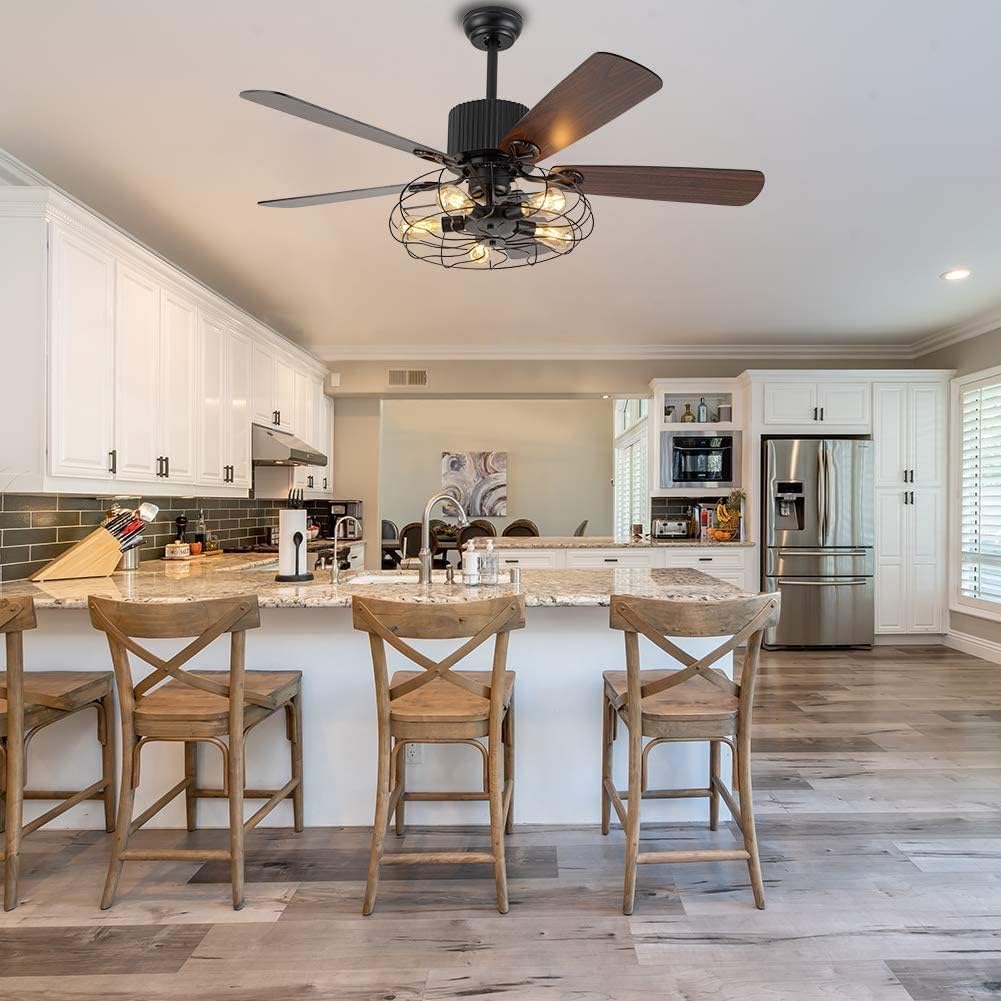
Image: The remote control for the Efperfect ceiling fan, with buttons labeled for 3-speed control, light on/off, fan off, and timing off (1H, 2H, 4H, 8H).
- Fan Speed Control: Use the speed buttons (Low, Mid, High) on the remote to adjust the fan's rotation speed.
- Light Control: Press the "Light on/off" button to turn the light fixture on or off.
- Timer Function: Set the fan to automatically turn off after 1, 2, 4, or 8 hours using the timer buttons.
- Reverse Function: The fan features a reversible motor suitable for all seasons. A switch on the motor housing (or a button on the remote, if applicable to this model) controls the direction of blade rotation. In warm weather, blades should rotate counter-clockwise to create a downdraft. In cool weather, blades should rotate clockwise to create an updraft, circulating warm air.
Video: Demonstration of the Efperfect 52-Inch Industrial Ceiling Fan with Light in operation, showing the fan blades rotating and the lights turning on and off. This video highlights the fan's functionality and aesthetic in a room setting.
Maintenance
- Cleaning: To clean the fan, wipe with a soft, damp cloth. Do not use abrasive cleaners or solvents. Ensure power is off before cleaning.
- Bulb Replacement: When replacing bulbs, ensure the power is off. Use E26 medium base bulbs, up to 36 watts total for the light kit.
- Blade Balance: If the fan wobbles, check that all blade screws are tight and that blades are not bent or damaged.
Troubleshooting
| Problem | Possible Cause | Solution |
|---|---|---|
| Fan does not operate | No power; loose wiring; remote control issues. | Check circuit breaker. Ensure all wiring connections are secure. Verify remote control batteries and pairing. |
| Lights do not turn on | Bulbs not installed or faulty; loose wiring; remote control issue. | Install or replace bulbs. Check light kit wiring. Verify remote control functionality. |
| Fan wobbles excessively | Loose blades or mounting hardware; unbalanced blades. | Ensure all blade screws and mounting hardware are tight. Use a balancing kit if necessary. |
| Fan airflow is weak | Incorrect blade rotation direction; fan speed setting too low. | Check the reverse switch on the motor housing and adjust for seasonal airflow. Increase fan speed using the remote control. |
| Noise during operation | Loose screws; motor issue. | Tighten all screws. If noise persists, contact customer support. The motor is designed for quiet operation. |
Product Specifications
| Feature | Detail |
|---|---|
| Brand | Efperfect |
| Model Number | 639846963981 |
| Product Dimensions | 52"L x 52"W x 20"H |
| Item Weight | 24.5 pounds |
| Color | Black |
| Material | Metal, Walnut wood, Copper |
| Style | Industrial, Vintage |
| Power Source | Hardwire |
| Voltage | 110 Volts |
| Number of Blades | 5 |
| Light Source Type | Incandescent or LED (E26) |
| Bulb Base | E26 Medium |
| Number of Light Sources | 5 |
| Wattage (Light Kit) | 36 watts (total) |
| Control Method | Remote Control |
| Special Features | Reverse function, 3 Speeds, Timer |
| Indoor/Outdoor Usage | Indoor |

Image: A diagram illustrating the dimensions of the 52-inch ceiling fan, including its width, height, and the lengths of the included 4-inch and 8-inch downrods.
Warranty Information
Efperfect provides the following warranty for this product:
- Manufacturer Defects: 60 days from the date of purchase.
- Unsatisfied Return/Replacement: 30 days from the date of purchase.
- Motor Guarantee: Life-time motor guarantee.
Please retain your proof of purchase for warranty claims.
Customer Support
For technical assistance, warranty claims, or any questions regarding your Efperfect ceiling fan, please contact our customer support team. Refer to the contact information provided with your purchase documentation or visit the official Efperfect website.
Manufacturer: EFPERFECT
We are committed to your 100% satisfaction.


