
Introduction
This manual provides detailed instructions for the installation, operation, and maintenance of your VTech DS6151-11 2-Line Cordless Phone System, which includes the DS6151-11 base unit and up to four DS6101-11 accessory handsets. This system features DECT 6.0 technology for clear communication, a 2-line operation capability, and an integrated digital answering system.
Package Contents
Verify that your package contains the following items:
- 1 x DS6151-11 Cordless Base Unit with Cordless Handset
- 4 x DS6101-11 Cordless Handsets
- 5 x Handset Chargers
- 2 x AC Power Adapters (for base and chargers)
- 2 x Telephone Line Cords
- 9 x AAA Rechargeable Batteries (for handsets)
- User's Manual (this document)
Setup
1. Battery Installation
Each cordless handset requires three AAA rechargeable batteries. Follow these steps to install them:
- Open the battery compartment cover on the back of the handset.
- Insert three AAA rechargeable batteries, observing the correct polarity (+ and - markings).
- Close the battery compartment cover securely.
2. Connecting the Base Unit
Connect the base unit to your telephone line and power outlet:
- Plug one end of the telephone line cord into the TEL LINE jack on the back of the base unit.
- Plug the other end of the telephone line cord into a telephone wall jack.
- Plug the small end of the AC power adapter into the POWER jack on the back of the base unit.
- Plug the large end of the AC power adapter into a standard electrical outlet.
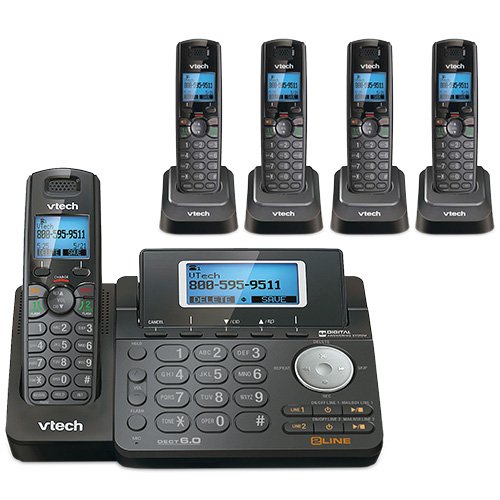
Figure 1: VTech DS6151-11 Base Unit. This image shows the main base unit with its keypad, LCD screen, and digital answering system controls. The base unit is dark gray with silver buttons and a blue backlit screen displaying "VTech 800-595-9511".
3. Charging Handsets
Place each handset into its respective charger. The CHARGE indicator on the handset will illuminate, indicating it is charging. Allow at least 16 hours for the batteries to fully charge before initial use.

Figure 2: VTech DS6101-11 Handset in Charging Cradle. This image displays a cordless handset securely placed in its compact charging cradle. The handset is dark gray with a black keypad and a VTech logo on the cradle.
Operating Instructions
Making and Receiving Calls
- To Make a Call: Press LINE 1 or LINE 2, then dial the number. Alternatively, dial the number first and then press LINE 1 or LINE 2.
- To Answer a Call: When the phone rings, press any key from LINE 1, LINE 2, or TALK.
- To End a Call: Press OFF or place the handset back in the charger.
- Speakerphone: During a call, press the SPEAKER button to switch to speakerphone mode. Press it again to return to handset mode.
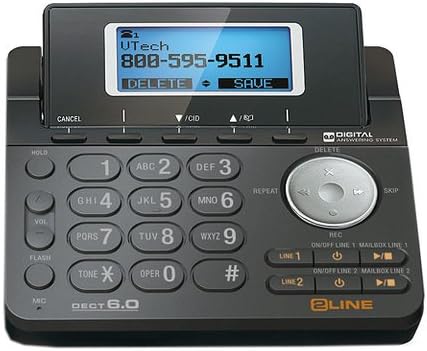
Figure 3: VTech DS6101-11 Cordless Handset. This image shows the full cordless handset, highlighting its ergonomic design, keypad, and display screen. The handset is dark gray with a black keypad and a blue backlit screen.
Caller ID and Call Waiting
This system supports Caller ID and Call Waiting services. To use these features, you must subscribe to them through your telephone service provider.
- Caller ID Display: Incoming call information (name and number) will appear on the handset's LCD screen.
- Call Waiting: If you are on a call and another call comes in, you will hear a tone. Press FLASH to switch between calls.
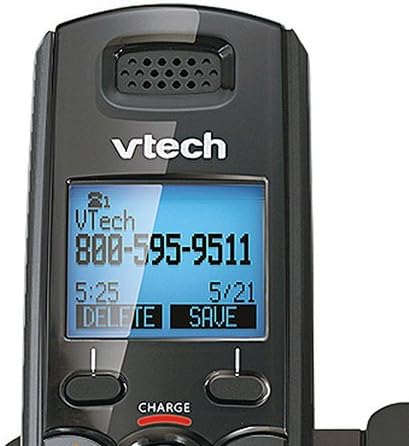
Figure 4: VTech DS6101-11 Handset LCD Screen. A close-up view of the handset's blue backlit LCD screen, displaying caller information such as "VTech 800-595-9511" along with time and date. The screen shows options like "DELETE" and "SAVE".
Phonebook Directory
The system can store up to 50 names and numbers in its phonebook directory. Refer to the detailed instructions in the full user manual for adding, editing, and deleting entries.
Adjusting Volume
During a call, press the VOL button on the side of the handset or the VOL buttons on the base unit to adjust the listening volume.
Handset Locator / Paging
To locate a misplaced handset, press the PAGE button on the base unit. All registered handsets will ring.
Digital Answering System
The VTech DS6151-11 base unit includes a digital answering system with approximately 13 minutes of recording time. It features a dedicated mailbox for each line.
- Turning On/Off: Use the ON/OFF LINE 1 and ON/OFF LINE 2 buttons on the base unit to activate or deactivate the answering system for each line.
- Playing Messages: Press the PLAY/STOP button on the base unit to listen to messages. Use the SKIP and REPEAT buttons to navigate messages.
- Retrieving Messages Remotely: You can access your messages from an outside line using a remote access code. Refer to the full manual for detailed instructions on setting up and using remote access.
Maintenance
Cleaning
Clean the phone's surfaces with a soft, damp cloth. Do not use cleaning sprays or harsh chemicals. Avoid getting moisture into any openings.
Battery Care
To ensure optimal battery life, always return the handset to its charger when not in use. If the phone will be unused for an extended period, remove the batteries to prevent leakage.
Troubleshooting
If you experience issues with your phone system, try the following common solutions:
- No Dial Tone:
- Ensure the base unit's power adapter is securely plugged into an electrical outlet.
- Verify that the telephone line cord is properly connected to both the base unit and the wall jack.
- Test the wall jack with another working phone.
- Poor Sound Quality:
- Move the handset closer to the base unit.
- Ensure there are no large metal objects or other electronic devices interfering with the signal.
- Check for fully charged batteries in the handset.
- Handset Not Charging:
- Ensure the handset is correctly seated in the charger.
- Verify the charger's power adapter is plugged into a working electrical outlet.
- Clean the charging contacts on both the handset and charger with a dry cloth.
- Answering System Not Recording:
- Check if the answering system for the respective line is turned ON.
- Ensure there is sufficient recording time available (13 minutes total).
For more detailed troubleshooting, please refer to the comprehensive user manual or visit the VTech support website.
Specifications
| Feature | Specification |
|---|---|
| Brand | VTech |
| Model Numbers | DS6151-11 (Base), DS6101-11 (Handset) |
| Telephone Type | Cordless |
| Technology | DECT 6.0 (1.9GHz) |
| Number of Lines | 2-Line Operation |
| Expandability | Up to 12 Handsets |
| Answering System Type | Digital |
| Recording Capacity | 13 Minutes |
| Caller ID / Call Waiting | Yes (Subscription required) |
| Phonebook Directory | 50 Name/Number Stations |
| Display | Large Backlit LCD Display |
| Keypad | Backlit Keypad |
| Batteries | 9 AAA rechargeable batteries required (3 per handset) |
| Material | Plastic |
| Color | Black |
| UPC | 650415512850 |
| ASIN | B07H291DZ5 |
Warranty and Support
For warranty information, technical support, or to purchase accessories, please visit the official VTech website or contact VTech customer service. Keep your purchase receipt as proof of purchase for warranty claims.
VTech Official Store: VTech on Amazon


