
1. Introduction
Thank you for choosing the TFA Dostmann 30.3064.01 Wireless Thermometer Spira. This device provides accurate indoor and outdoor temperature readings with a clear color display. This manual will guide you through the setup, operation, and maintenance of your new thermometer to ensure optimal performance.
2. Package Contents
- Main Unit (with color display)
- Wireless Outdoor Sensor
- 4 x AA Batteries (for main unit and sensor)
- User Manual
3. Product Overview
The TFA Dostmann 30.3064.01 consists of a main unit with a color display for indoor use and a wireless outdoor sensor for external temperature measurement. The main unit displays indoor temperature, outdoor temperature, time, and date. The outdoor sensor transmits temperature data wirelessly to the main unit.
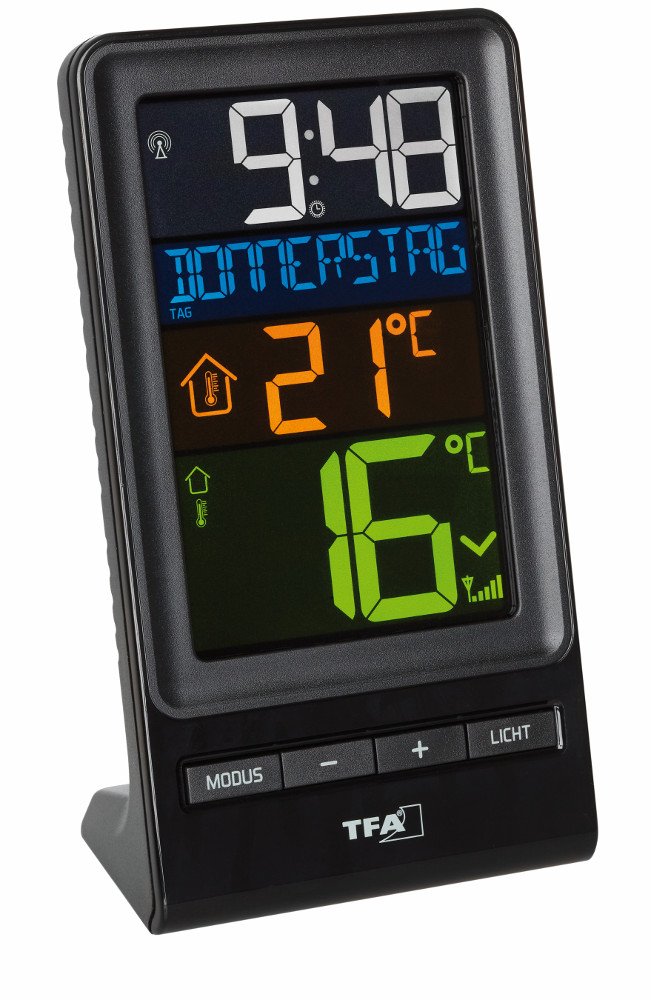
Figure 1: This image displays the white outdoor sensor for the TFA Dostmann Wireless Thermometer. It features a red indicator light and ventilation slots, indicating its operational status and environmental sensing capabilities.
4. Setup
4.1 Battery Installation
- Open the battery compartment on the back of the main unit.
- Insert 2 x AA batteries, observing the correct polarity (+/-).
- Close the battery compartment.
- Repeat steps 1-3 for the wireless outdoor sensor, inserting 2 x AA batteries.
Note: Always insert batteries into the outdoor sensor first, then the main unit, to ensure proper synchronization.
4.2 Sensor Placement
- Place the outdoor sensor in a shaded, dry location, protected from direct sunlight and precipitation.
- Ensure the sensor is within the wireless range of the main unit (typically up to 100 meters in open air).
- Avoid placing the sensor near large metal objects or electrical appliances that may cause interference.
4.3 Initial Synchronization
After inserting batteries, the main unit will automatically search for the outdoor sensor. This process may take a few minutes. Once connected, the outdoor temperature will appear on the main unit's display.
5. Operating Instructions
5.1 Display Information
The color display typically shows:
- Indoor Temperature: Current temperature measured by the main unit.
- Outdoor Temperature: Current temperature transmitted by the wireless sensor.
- Time: Current time (often radio-controlled for accuracy).
- Date/Day of Week: Depending on the display mode, either the date or the day of the week will be shown.
5.2 Button Functions
While specific button functions may vary slightly, common controls include:
- MODE/SET: Used to switch between display modes (e.g., date/day) or enter settings mode.
- UP/DOWN (or +/-): Used to adjust values during settings or view MIN/MAX temperature records.
- CHANNEL: If multiple outdoor sensors are supported, this button switches between channels.
5.3 Temperature Units (°C/°F)
To switch between Celsius (°C) and Fahrenheit (°F), locate the dedicated button (often labeled °C/°F) or press and hold a specific button (e.g., DOWN) in normal display mode. Refer to the quick start guide included with your product for exact instructions.
6. Maintenance
6.1 Cleaning
- Wipe the main unit and sensor with a soft, damp cloth.
- Do not use abrasive cleaners or solvents.
- Ensure no moisture enters the battery compartments or electronic components.
6.2 Battery Replacement
When the battery indicator appears on the display, replace all batteries in both the main unit and the outdoor sensor with new AA batteries. Follow the battery installation steps in Section 4.1.
7. Troubleshooting
| Problem | Possible Cause | Solution |
|---|---|---|
| No display on main unit | Dead or incorrectly inserted batteries | Check battery polarity; replace batteries. |
| No outdoor temperature reading | Sensor out of range, interference, or dead sensor batteries | Relocate sensor closer to main unit; replace sensor batteries; avoid interference sources. |
| Inaccurate temperature readings | Sensor exposed to direct sunlight/rain, or near heat sources | Relocate sensor to a shaded, protected area. |
| Time/Date incorrect | Radio signal interference or manual setting required | Move main unit to a location with better signal reception; manually set time/date if necessary. |
8. Specifications
- Model Number: 30.3064.01
- Brand: TFA Dostmann
- Product Dimensions: 40 x 10 x 8 cm (Main Unit, approximate); 577 g (Total weight)
- Power Requirements: 4 x AA batteries (2 for main unit, 2 for outdoor sensor)
- Wireless Range: Up to 100 meters (open air, may vary with obstacles)
- Display Type: Color Display
9. Warranty and Support
TFA Dostmann products are manufactured with quality and reliability in mind. For warranty information, technical support, or service inquiries, please refer to the warranty card included with your product or visit the official TFA Dostmann website. Keep your purchase receipt as proof of purchase.
Manufacturer: TFA Dostmann GmbH & Co. KG