
1. Introduction
This manual provides instructions for the UpStart Components Replacement Samsung BN59-01178W TV Remote Control. This remote is designed to function as a direct replacement for your original Samsung TV remote, offering similar operation without the need for complex programming.
Important Note: This product is a replacement part manufactured by UpStart Components and is not an OEM (Original Equipment Manufacturer) product. Any warranties for this product are provided solely by UpStart Components. Mentions of original brand names and model descriptions are for compatibility illustration only.
1.1. Compatibility
This remote control is compatible with various Samsung TV models, including but not limited to:
- UN55MU6300FXZA
- UN75MU6300FXZA
- UN40H5203AF
- UN50H5203AF
- UN40H5203
- UN32H5203AF
- UN28H4500
- UN40H5201AF
- UN55H6350AF
- UN60H6350AF
2. Setup
2.1. Battery Installation
The remote control requires two (2) AAA batteries (not included) for operation. Follow these steps to install the batteries:
- Locate the battery compartment cover on the back of the remote control.
- Press down on the tab and slide the cover downwards to open the compartment.
- Insert two AAA batteries, ensuring the positive (+) and negative (-) terminals align correctly with the markings inside the compartment.
- Slide the battery compartment cover back into place until it clicks securely.
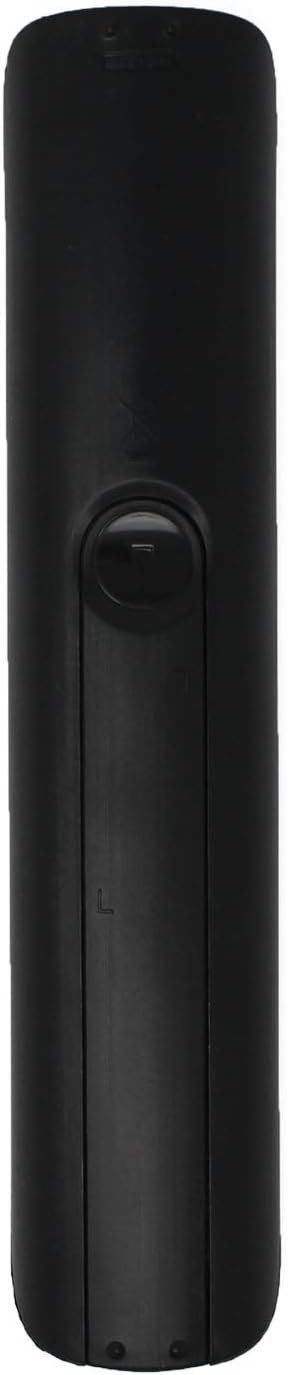
Image: Back of the remote control, showing the battery compartment. To install batteries, slide the cover off, insert two AAA batteries according to polarity, and then replace the cover.
Once batteries are installed, the remote is ready for use. No programming is required.
3. Operating Instructions
This remote control is designed to replicate the functions of your original Samsung TV remote. Simply point the remote at your television and press the desired button.

Image: Front view of the remote control, displaying all buttons for TV operation.
3.1. Basic Functions
- TV Power (TV POWER): Turns the television on or off.
- STB Power (STB POWER): Turns a connected Set-Top Box (STB) on or off.
- SOURCE: Cycles through available input sources (HDMI, AV, Component, etc.).
- Number Pad (0-9): Directly enters channel numbers.
- VOL (+/-): Adjusts the volume level.
- CH (up/down): Changes the television channel.
- MUTE: Silences the television audio.
3.2. Advanced Functions
- MENU: Accesses the television's main menu.
- GUIDE: Displays the electronic program guide (if available).
- SMART HUB: Opens the Smart Hub interface for smart TV features.
- TOOLS: Provides quick access to common functions or settings.
- INFO: Displays information about the current program or input.
- Navigation Pad (Up, Down, Left, Right, Enter): Navigates through menus and selects options.
- RETURN: Returns to the previous screen or menu.
- EXIT: Exits the current menu or application.
- Colored Buttons (A, B, C, D): Functions vary depending on the context or application.
- E-MANUAL: Accesses the television's electronic manual.
- P.SIZE (Picture Size): Adjusts the aspect ratio or picture size.
- MTS (Multi-channel Television Sound): Selects audio tracks or languages.
- CC (Closed Caption): Toggles closed captions on or off.
- Playback Controls (Rewind, Play/Pause, Fast Forward, Stop): Controls media playback for connected devices or smart TV apps.
4. Maintenance
4.1. Cleaning
To clean your remote control, gently wipe it with a soft, dry cloth. For stubborn dirt, slightly dampen the cloth with water. Avoid using harsh chemicals, abrasive cleaners, or excessive moisture, as these can damage the remote's surface or internal components.
4.2. Battery Replacement
Replace batteries when the remote's response becomes sluggish or stops working. Always replace both batteries at the same time with new AAA batteries. Do not mix old and new batteries, or different types of batteries, as this can lead to leakage or improper function.
5. Troubleshooting
If you experience issues with your remote control, please refer to the following common solutions:
- Remote not responding:
- Ensure batteries are correctly installed with proper polarity.
- Replace old batteries with fresh AAA batteries.
- Check for any obstructions between the remote control and the television's infrared sensor.
- Ensure you are within the effective range and pointing the remote directly at the TV.
- Specific buttons not working:
- Clean the remote control, especially around the affected buttons, to remove any dirt or debris that might be preventing proper contact.
- If only certain buttons are unresponsive after checking batteries and cleaning, the remote may require replacement.
- Interference:
- Bright lights or other electronic devices can sometimes interfere with the remote's signal. Try operating the remote in a different environment or by temporarily turning off other devices.
6. Specifications
| Feature | Detail |
|---|---|
| Model Number | BN59-01178W (RC-BN59-01178W) |
| Brand | UpStart Components |
| Compatible Devices | Samsung Televisions |
| Power Source | 2 x AAA Batteries (not included) |
| Dimensions | Approximately 8.2 x 2 x 0.98 inches |
| Color | Black |
7. Warranty and Support
This UpStart Components replacement remote control is covered by a warranty provided by UpStart Components. For specific warranty terms, conditions, and support inquiries, please refer to the documentation included with your purchase or contact UpStart Components directly.
For further assistance or to report issues, please visit the UpStart Components brand page or contact your retailer.