
Introduction
This manual provides instructions for the AIDITIYMI RMT-JR01 replacement remote control, designed for various JVC LED LCD TV models. This remote functions as a direct replacement for your original JVC RMT-JR01, RMT-JR02, and RMT-JR04 remotes.
No programming or pairing is required. Simply install batteries to begin operation.
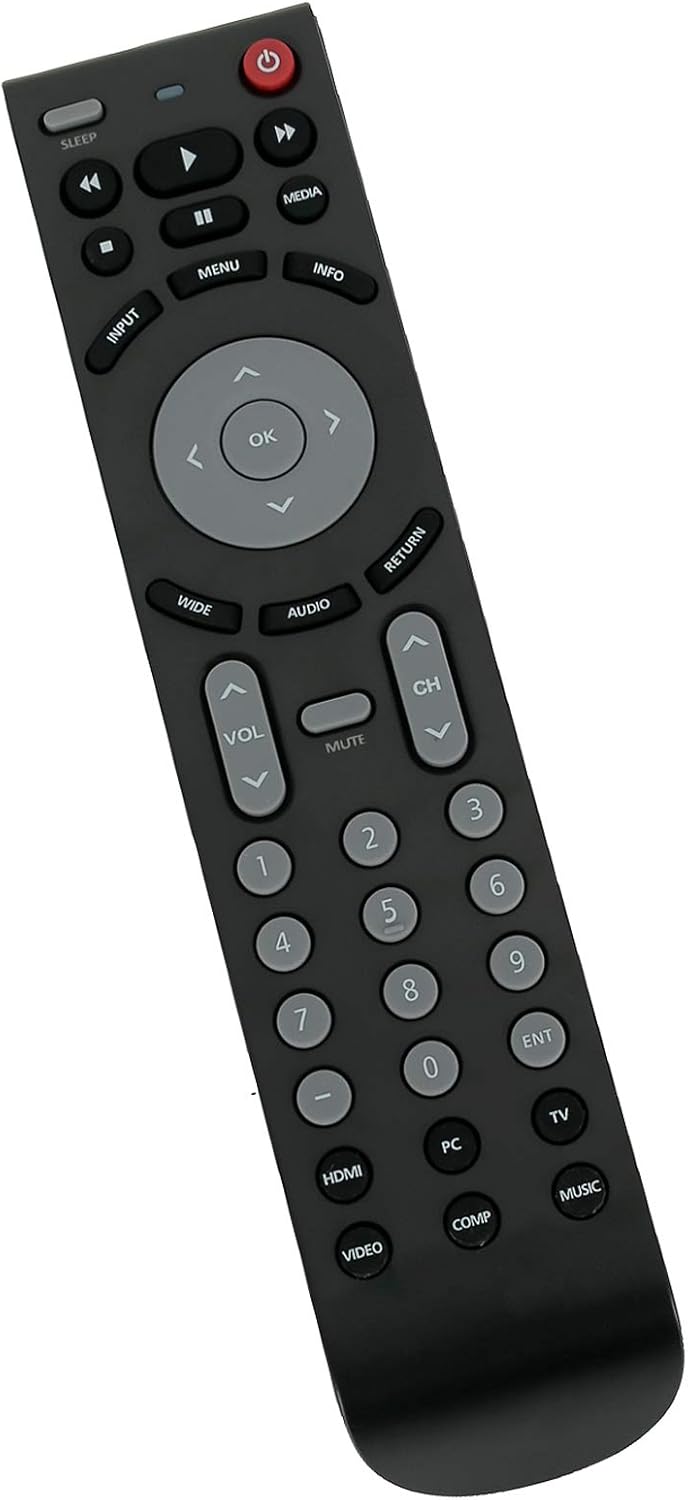
This image displays the front of the AIDITIYMI RMT-JR01 remote control, highlighting its ergonomic design and the arrangement of all functional buttons, including power, input, volume, channel, menu, and number keys.
Setup: Battery Installation
The RMT-JR01 remote control requires two (2) 1.5V AA alkaline batteries (not included).
- Locate the battery compartment cover on the back of the remote control.
- Press down on the tab and slide the cover off.
- Insert two AA batteries, ensuring the positive (+) and negative (-) terminals align with the markings inside the compartment.
- Slide the battery compartment cover back into place until it clicks securely.

This image shows the rear of the AIDITIYMI RMT-JR01 remote control with the battery cover removed, revealing the compartment designed to hold two AA batteries. The positive and negative terminals are visible, indicating correct battery insertion.
Operating Instructions
This remote control is designed to function identically to your original JVC remote. Point the remote directly at your JVC TV's infrared sensor.
Key Functions:
- Power Button: Turns the TV on or off.
- Input Button: Selects video input sources (HDMI, Video, PC, etc.).
- Menu Button: Accesses the TV's on-screen menu.
- Navigation Buttons (Up/Down/Left/Right): Navigates through menus.
- OK Button: Confirms selections in menus.
- Volume Up/Down: Adjusts the TV's volume.
- Channel Up/Down: Changes TV channels.
- Mute Button: Silences the TV audio.
- Number Buttons (0-9): Directly enters channel numbers.
- Return Button: Returns to the previous screen or menu.
- Media Buttons (Play, Pause, Rewind, Fast Forward): Controls media playback if supported by the TV.
Compatible JVC TV Models:
This remote control is compatible with the following JVC LED LCD TV models:
- BC50R, EM28T, EM32FL, EM32T, EM32TS, EM37T, EM39FT, EM39T, EM55FT
- JLC32BC3000, JLC32BC3002, JLC37BC3000, JLC37BC3002, JLC42BC3000, JLC42BC3002, JLC47BC3000, JLC47BC3002
- JLE32BC3001, JLE37BC3001, JLE42BC3001, JLE42BC3500, JLE47BC3001, JLE47BC3500
Maintenance
To ensure the longevity and proper function of your remote control:
- Cleaning: Wipe the remote with a soft, dry cloth. Avoid using liquid cleaners or abrasive materials.
- Battery Replacement: Replace batteries when the remote's response becomes sluggish or stops working. Always replace both batteries at the same time with new ones.
- Storage: If the remote will not be used for an extended period, remove the batteries to prevent leakage, which can damage the device.
- Avoid Exposure: Keep the remote away from direct sunlight, heat sources, and moisture.
Troubleshooting
Remote Not Responding:
- Check Batteries: Ensure batteries are inserted correctly with the correct polarity (+/-). Replace old batteries with new 1.5V AA alkaline batteries.
- Line of Sight: Make sure there are no obstructions between the remote control and the TV's infrared sensor.
- Remote Sensor: Confirm the TV's remote sensor is not blocked or dirty.
- TV Power: Ensure the TV is powered on and not in standby mode.
Limited Range:
- Battery Level: Weak batteries can reduce the remote's effective range. Replace them.
- Interference: Strong light sources or other infrared devices might interfere with the signal.
Specifications
| Feature | Detail |
|---|---|
| Brand | AIDITIYMI |
| Model Name | RMT-JR01 |
| Connectivity Technology | Infrared (IR) |
| Compatible Devices | JVC LED LCD Televisions |
| Battery Type | 2 x 1.5V AA Alkaline Batteries (not included) |
| Maximum Range | Up to 32 feet (10 meters) |
| Item Weight | Approximately 2.88 ounces (81.6 grams) |
| Dimensions (L x W x H) | 8" x 2" x 0.6" (20.3 cm x 5.1 cm x 1.5 cm) |
| Color | Black |
Warranty and Support
Warranty: This product comes with a 1-year warranty from the date of purchase. Please retain your proof of purchase for warranty claims.
Customer Support: For any questions, issues, or support needs regarding your AIDITIYMI RMT-JR01 remote control, please contact the seller or manufacturer directly. They are available to assist you.