
BoxWave bw-1173-16092-8831
BoxWave SlimKeys Bluetooth Keyboard User Manual
Model: bw-1173-16092-8831
Introduction
The BoxWave SlimKeys Bluetooth Keyboard is a portable, ultra-thin keyboard designed for seamless connectivity with your Bluetooth-enabled devices, including the Samsung Galaxy A6 (2018). Its chiclet-style keys provide a comfortable typing experience, making it ideal for productivity on the go. This manual provides detailed instructions for setting up, operating, maintaining, and troubleshooting your SlimKeys Bluetooth Keyboard.
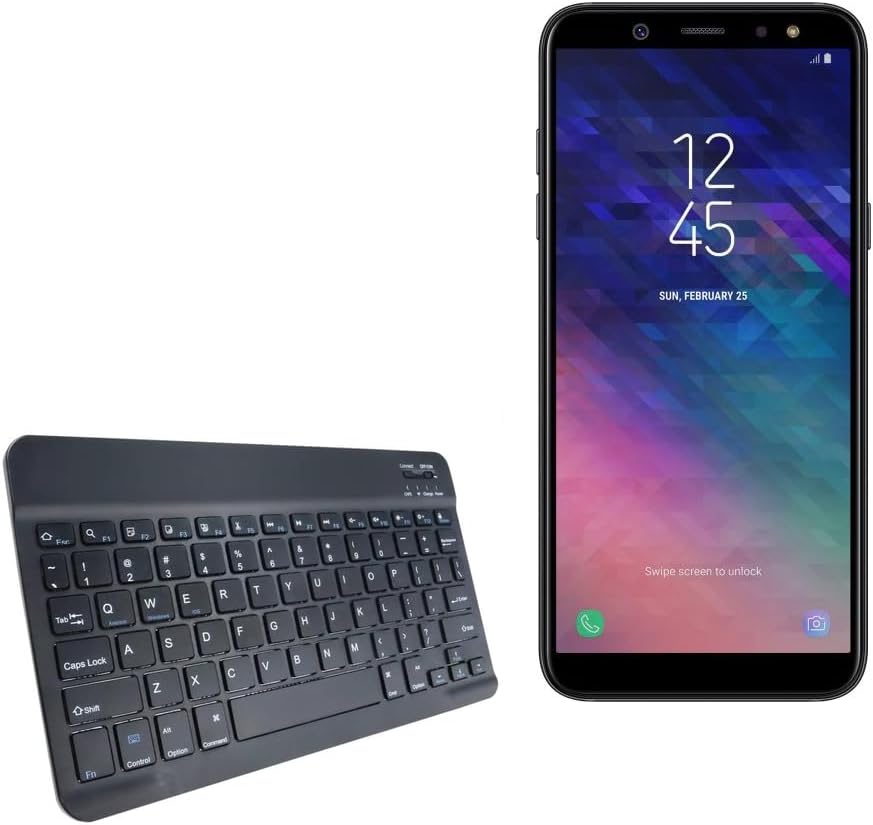
Image: The SlimKeys Bluetooth Keyboard shown alongside a compatible Samsung Galaxy A6 (2018) device, highlighting its compact size.
Setup
Charging the Keyboard
Before initial use, ensure your SlimKeys Bluetooth Keyboard is fully charged. Use the included charging cable to connect the keyboard to a USB power source (e.g., computer USB port, USB wall adapter). The charging indicator light will illuminate during charging and turn off when fully charged.

Image: A detailed view of the keyboard's charging port, demonstrating how to connect the charging cable for its long-lasting battery.
Bluetooth Pairing
- Power On: Locate the ON/OFF switch on the keyboard (usually on the top right) and slide it to the 'ON' position. The power indicator light will briefly illuminate.
- Enter Pairing Mode: Press the 'Connect' button (often located near the ON/OFF switch or as a dedicated key). The Bluetooth indicator light will start blinking, indicating the keyboard is in pairing mode.
- Enable Bluetooth on Your Device: On your Samsung Galaxy A6 (2018) or other compatible device, go to 'Settings' > 'Connections' > 'Bluetooth' and turn Bluetooth ON.
- Select Keyboard: Your device will scan for available Bluetooth devices. Select 'BoxWave SlimKeys Keyboard' (or similar name) from the list.
- Confirm Pairing: Follow any on-screen prompts to complete the pairing process. You may be asked to enter a code displayed on your device using the keyboard and then press Enter. Once paired, the Bluetooth indicator light on the keyboard will stop blinking.
The keyboard supports Bluetooth 3.0 for quick and reliable pairing across Android, Windows, and iOS platforms.
Operating Instructions
Basic Usage
Once paired, the SlimKeys Bluetooth Keyboard functions like a standard keyboard. Simply open any application that requires text input (e.g., messaging app, word processor) and begin typing. The chiclet-style keys are designed for quiet and comfortable typing.

Image: A user's hands demonstrating comfortable and efficient typing on the SlimKeys keyboard.
Specialized Function Keys
The SlimKeys Bluetooth Keyboard includes specialized function keys (F1-F12) that provide quick access to common commands. These functions are typically accessed by pressing the Fn key simultaneously with the desired function key.
| Key Combination | Function |
|---|---|
| Fn + Esc (F1) | Home |
| Fn + F2 | Search |
| Fn + F3 | Select All |
| Fn + F4 | Copy |
| Fn + F5 | Cut |
| Fn + F6 | Skip Back |
| Fn + F7 | Play / Pause |
| Fn + F8 | Skip Forward |
| Fn + F9 | Volume Down |
| Fn + F10 | Volume Up |
| Fn + F11 | Brightness Down |
| Fn + F12 | Brightness Up |
| Fn + Delete | Lock |

Image: A visual guide to the specialized function keys available on the SlimKeys keyboard for quick access to various commands.
Maintenance
Cleaning
To clean your keyboard, gently wipe the surface with a soft, lint-free cloth. For stubborn dirt or grime, slightly dampen the cloth with water or a mild, non-abrasive cleaning solution. Avoid excessive moisture and do not spray cleaners directly onto the keyboard.
Storage
When not in use, store the keyboard in a cool, dry place away from direct sunlight and extreme temperatures. Its ultra-thin design allows for easy storage in bags or cases, making it ideal for travel.

Image: The SlimKeys keyboard being stored in a bag, emphasizing its convenience for travel and compact design.
Troubleshooting
- Keyboard not connecting/pairing:
- Ensure the keyboard is charged and powered on.
- Make sure Bluetooth is enabled on your device.
- Ensure the keyboard is in pairing mode (Bluetooth indicator blinking).
- Forget the device on your phone's Bluetooth settings and try pairing again.
- Restart both the keyboard (turn off/on) and your device.
- Keys not responding:
- Check if the keyboard is still connected via Bluetooth.
- Ensure the keyboard has sufficient battery charge.
- Try re-pairing the keyboard with your device.
- Lag or delayed input:
- Ensure there are no strong interferences (e.g., other Bluetooth devices, Wi-Fi routers) nearby.
- Move closer to your device.
- Recharge the keyboard.
Specifications
- Model Number: bw-1173-16092-8831
- Connectivity Technology: Bluetooth 3.0
- Keyboard Description: Wireless, Chiclet-Style Keys
- Color: Jet Black
- Item Weight: 7.7 ounces
- Package Dimensions: 11.06 x 6.81 x 0.55 inches
- Special Feature: Lightweight, Ultra-Thin Design (3/16 inch thick)
- Batteries: 1 Product Specific battery (included)
- Manufacturer: BoxWave
- Country of Origin: China

Image: A diagram illustrating the precise dimensions of the SlimKeys keyboard, emphasizing its compact and lightweight form factor.
Warranty and Support
For warranty information or technical support, please contact BoxWave Corporation directly. Refer to the product packaging or the official BoxWave website for the most current contact details and warranty terms.
BoxWave Corporation
Website: www.boxwave.com
Ask a question about this manual
Ask about setup, troubleshooting, compatibility, parts, safety, or missing instructions. Manuals+ will review the question and use this page’s manual context to help answer it.