
1. Product Overview
The Feyachi RSL-18 Reflex Sight is designed for rapid target acquisition and enhanced situational awareness. It features multiple reticle patterns, dual red and green illumination, and an integrated red laser sight. This manual provides detailed instructions for proper installation, operation, and maintenance of your RSL-18 Reflex Sight.
2. Safety Information
WARNING: LASER RADIATION - AVOID DIRECT EYE EXPOSURE.
This product contains a Class 3R laser with an output power of less than 5mW and a wavelength of 650nm. Improper use of this device can result in permanent eye damage. Always follow these safety guidelines:
- Never look directly into the laser beam.
- Do not aim the laser at people or animals.
- Ensure the laser is off when not in use.
- Store the device out of reach of children.
- Always wear appropriate eye protection when operating firearms.
Always handle your firearm safely and ensure it is unloaded before installing or adjusting the sight.
3. Package Contents
Verify that all items are present in your package:
- Feyachi RSL-18 Reflex Sight with Integrated Red Laser
- CR2032 Battery (for reflex sight)
- LR44 Batteries (for laser sight, typically 3 included)
- Allen Wrenches (for mounting and adjustments)
- Lens Cleaning Cloth
- Protective Lens Cover

4. Product Features
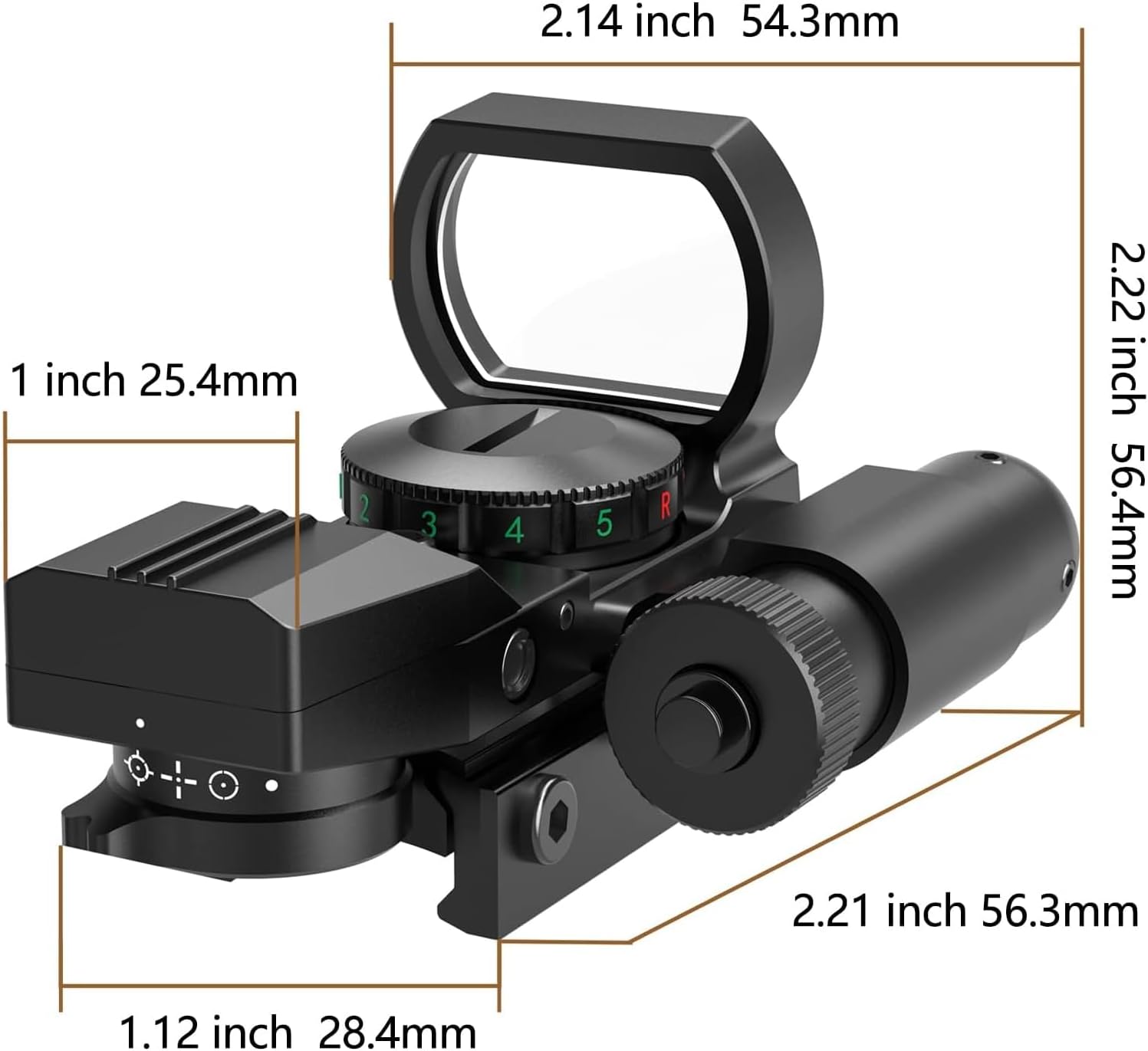
- Multi-Reticle System: Offers 4 distinct reticle patterns (Dot, Circle Dot, Crosshair, and Crosshair Dot) for various shooting preferences and scenarios.
- Dual Illumination: Red and green reticle illumination with 5 brightness settings for optimal visibility in different lighting conditions.
- Integrated Red Laser Sight: A fully adjustable red laser for quick target acquisition, independently controlled. (Laser Class: 3R(IIIa), Wavelength: 650nm, Output Power: Less than 5mW).
- Wide Field of View: A 33mm objective lens provides a broad field of view, aiding in situational awareness.
- Durable Construction: Made from high-grade aluminum alloy for robust performance.
- Built-in Mount: Designed with an integrated mount for standard 20mm Picatinny/Weaver rails.
- Parallax Corrected & Unlimited Eye-Relief: Ensures accuracy regardless of eye position relative to the sight.

5. Setup
5.1. Battery Installation
The reflex sight and laser sight use separate batteries.
- For Reflex Sight: Unscrew the battery cap located on the top of the sight (often marked 'R' or 'G' for red/green). Insert one CR2032 battery with the positive (+) side facing up. Securely screw the cap back on.
- For Laser Sight: Unscrew the cap at the rear of the laser module. Insert three LR44 batteries with the positive (+) side facing the cap. Screw the cap back on.
5.2. Mounting the Sight
The RSL-18 Reflex Sight is designed for standard 20mm Picatinny or Weaver rails.
- Loosen the mounting screws on the side of the sight's base using the provided Allen wrench.
- Place the sight onto your firearm's Picatinny or Weaver rail. Position it to your preferred eye relief.
- Ensure the sight is seated firmly against the rail. Tighten the mounting screws evenly until secure. Do not overtighten.


6. Operating Instructions
6.1. Turning On/Off and Brightness Adjustment (Reflex Sight)
The rotary switch on the top of the sight controls power and brightness for the reflex reticle:
- Rotate the switch clockwise from 'OFF' to select green illumination and increase brightness (settings 1-5).
- Rotate the switch counter-clockwise from 'OFF' to select red illumination and increase brightness (settings 1-5).
- Return the switch to the 'OFF' position to power down the reflex sight.
6.2. Reticle Pattern Selection
The reticle selector knob, located at the rear of the sight, allows you to choose between four different reticle patterns:
- Dot
- Circle Dot
- Crosshair
- Crosshair Dot
Rotate the knob to cycle through the available patterns until your desired reticle is displayed.
6.3. Laser Sight Operation
The integrated red laser sight is controlled by a separate switch, typically located on the side of the laser module. Press the switch to turn the laser on or off.

6.4. Sighting In (Zeroing)
Zeroing your sight is crucial for accuracy. This process involves adjusting the reticle and laser to align with your point of impact at a specific distance.
- Windage Adjustment: Use an Allen wrench to turn the windage adjustment screw (typically on the right side of the sight) to move the point of impact left or right.
- Elevation Adjustment: Use an Allen wrench to turn the elevation adjustment screw (typically on the top of the sight) to move the point of impact up or down.
- Laser Adjustment: The laser has separate windage and elevation adjustment screws, usually smaller and located on the laser module itself. Adjust these to align the laser dot with your point of impact.
Note: Make small, controlled adjustments and fire test shots to confirm changes. Repeat until both the reticle and laser are zeroed to your desired distance.
7. Maintenance
7.1. Cleaning
- Use the provided lens cleaning cloth to gently wipe the objective and ocular lenses. Avoid using abrasive materials or harsh chemicals.
- For the sight body, wipe with a soft, damp cloth.
7.2. Battery Replacement
Replace batteries when the reticle or laser illumination dims or fails to turn on. Refer to Section 5.1 for battery installation instructions.
7.3. Storage
When not in use, store the sight in a cool, dry place. Remove batteries if storing for extended periods to prevent leakage.
8. Troubleshooting
| Problem | Possible Cause | Solution |
|---|---|---|
| Reticle does not illuminate | Dead battery; Battery inserted incorrectly; Switch in OFF position | Replace CR2032 battery; Reinsert battery correctly; Turn rotary switch to R or G setting |
| Laser does not illuminate | Dead batteries; Batteries inserted incorrectly; Laser switch off | Replace LR44 batteries; Reinsert batteries correctly; Press laser switch to ON |
| Reticle appears blurry or distorted | Lens is dirty; Eye relief issue; Astigmatism (user specific) | Clean lenses with provided cloth; Adjust head position; Consult an eye care professional if persistent |
| Sight does not hold zero | Mounting screws loose; Improper mounting; Defective unit | Ensure mounting screws are tight; Re-mount sight correctly; Contact customer support if issue persists |
9. Specifications
- Model: RSL-18
- Brand: Feyachi
- Material: Aluminum Alloy
- Objective Lens Diameter: 33mm
- Magnification: 1x
- Reticle Type: 4 Patterns (Dot, Circle Dot, Crosshair, Crosshair Dot)
- Illumination: Red and Green, 5 Brightness Settings
- Laser Class: 3R(IIIa)
- Laser Wavelength: 650nm
- Laser Output Power: Less than 5mW
- Mounting Type: Integrated Picatinny/Weaver Mount (20mm)
- Product Dimensions: 5.61 x 2.54 x 2.54 cm (2.21 x 1.00 x 1.00 inches)
- Item Weight: 150.25 g (5.3 Ounces)
- Compatible Devices: Rifle, Shotgun, Handgun
10. Warranty and Support
Feyachi products are manufactured to high-quality standards. For warranty information, product support, or service inquiries, please contact Feyachi customer service directly. Details can typically be found on the manufacturer's official website or through your point of purchase.
Please retain your proof of purchase for any warranty claims.
