
Phonak RIC
Phonak Charger Case RIC User Manual
Model: RIC | Brand: Phonak
Introduction
This manual provides essential information for the proper use and maintenance of your Phonak Charger Case RIC. This charger case is designed for use with the Phonak Audeo B-R line of hearing aids, providing a convenient and efficient way to recharge your devices. A full charge typically takes three hours and provides approximately 20-30 hours of hearing aid operation.
Product Overview
The Phonak Charger Case RIC is a compact and portable charging solution. Familiarize yourself with its components:

Figure 1: Phonak Charger Case RIC, including the charging unit, power adapter, and USB charging cable.
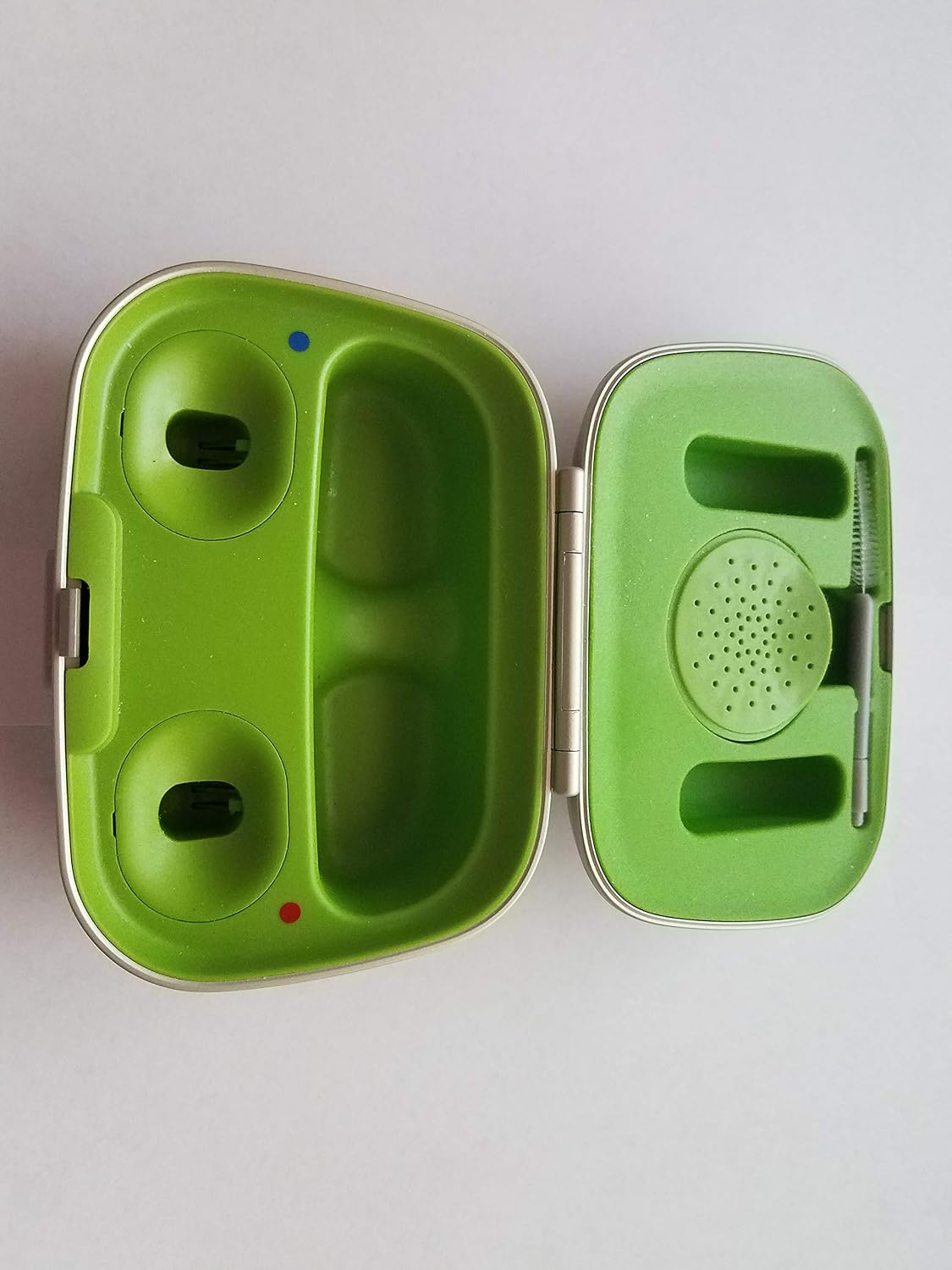
Figure 2: Interior view of the open Phonak Charger Case RIC, displaying the two hearing aid charging slots (left and right, indicated by blue and red dots respectively) and the integrated cleaning tool compartment on the right.
Components:
- Charger Case: The main unit for holding and charging your hearing aids.
- Power Adapter: Used to connect the charger case to a power outlet.
- USB Charging Cable: Connects the charger case to the power adapter.
- Charging Slots: Designated receptacles within the case for left (blue dot) and right (red dot) hearing aids.
- Integrated Cleaning Tool: A small tool located within the case for basic hearing aid maintenance.
Setup
- Connect the Power Adapter: Insert the small end of the USB charging cable into the charging port on the back of the Phonak Charger Case RIC.
- Plug into Power: Connect the larger end of the USB cable to the power adapter, then plug the power adapter into a standard electrical outlet.
- Initial Charge: For first-time use, it is recommended to fully charge the case and any hearing aids placed inside. The charging indicator lights on the hearing aids (if applicable) or the case will show charging status.
Operating Instructions
- Open the Charger Case: Gently open the lid of the Phonak Charger Case RIC.
- Insert Hearing Aids: Carefully place your Phonak Audeo B-R hearing aids into their respective charging slots. Ensure the left hearing aid (typically marked with a blue dot) goes into the left slot and the right hearing aid (red dot) into the right slot. The hearing aids should sit securely in the slots, making proper contact with the charging pins.
- Close the Case: Close the lid of the charger case. Charging will begin automatically.
- Monitor Charging: Refer to your hearing aid's user manual for specific charging indicator light behavior. Generally, a solid light indicates charging, and a blinking light or change in color indicates a full charge.
- Charging Duration: A complete charge from empty typically takes approximately three hours. Once fully charged, your hearing aids will provide 20-30 hours of use.
- Remove Hearing Aids: Once charging is complete, open the case and gently remove your hearing aids.
Maintenance
Regular cleaning ensures optimal performance and longevity of your charger case.
- Cleaning the Case: Use a soft, dry cloth to wipe the exterior of the charger case. Do not use water, cleaning solvents, or abrasive materials.
- Cleaning Charging Contacts: Periodically inspect the charging contacts inside the slots for dust or debris. Use a dry cotton swab or the integrated cleaning tool to gently clean the contacts. Ensure the case is unplugged before cleaning.
- Storage: When not in use, store the charger case in a cool, dry place, away from direct sunlight and extreme temperatures.
Troubleshooting
If you encounter issues with your Phonak Charger Case RIC, try the following solutions:
- Hearing Aids Not Charging:
- Ensure the power adapter is securely plugged into both the wall outlet and the charger case.
- Verify that the hearing aids are correctly seated in their respective charging slots and making proper contact.
- Check for any debris or corrosion on the charging contacts of both the hearing aids and the charger case. Clean if necessary.
- Try a different power outlet.
- Slow Charging:
- Ensure you are using the original Phonak power adapter and USB cable.
- Avoid charging in extremely hot or cold environments, as this can affect charging efficiency.
- Case Indicator Lights Not Working:
- Confirm the case is connected to a live power source.
- If the issue persists, contact customer support.
If these steps do not resolve the issue, please contact your hearing care professional or Phonak customer support.
Specifications
| Feature | Detail |
|---|---|
| Model | Phonak Charger Case RIC |
| Manufacturer | PhonakAG |
| Compatibility | Phonak Audeo B-R line of hearing aids |
| Full Charge Time | Approximately 3 hours |
| Hearing Aid Operation Time (Full Charge) | 20-30 hours |
| Special Feature | Rechargeable |
| Package Dimensions | 6.3 x 3.86 x 2.83 inches |
| Weight | 7.02 ounces |
| ASIN | B07GVRWBQ9 |
| GTIN | 07613389087802 |
Warranty and Support
For detailed warranty information, please refer to the warranty card included with your product packaging or visit the official Phonak website. For technical support, service, or further inquiries, please contact your authorized Phonak hearing care professional or visit the Phonak global website for contact details in your region.
Note: This manual provides general guidance. Specific features and troubleshooting steps for your hearing aids should be referenced in their respective user manuals.
Related documentsRIC


Ask a question about this manual
Ask about setup, troubleshooting, compatibility, parts, safety, or missing instructions. Manuals+ will review the question and use this page’s manual context to help answer it.