
1. Product Overview
The SHW 48-Inch Electric Height Adjustable Standing Desk is designed to enhance your workspace with ergonomic flexibility and smart organization. Featuring a smooth electric lift system, programmable memory presets, and integrated storage solutions, this desk allows for seamless transitions between sitting and standing positions, promoting a healthier and more productive work environment.
Key Features:
- Smooth Electric Height Adjustment: Effortlessly switch between sitting and standing with a quiet motorized lift system.
- Programmable Digital Controller: Intuitive LED handset with four memory presets for quick access to preferred height settings.
- Optimized Workspace: A 48-inch surface provides ample space for essential tech setups in home offices or collaborative environments.
- Integrated Storage & Management: Includes a built-in drawer, cable management tray, and utility hooks to keep your workspace tidy.
- Durable Construction: Sturdy metal frame with an engineered wood top, designed for stability and longevity.
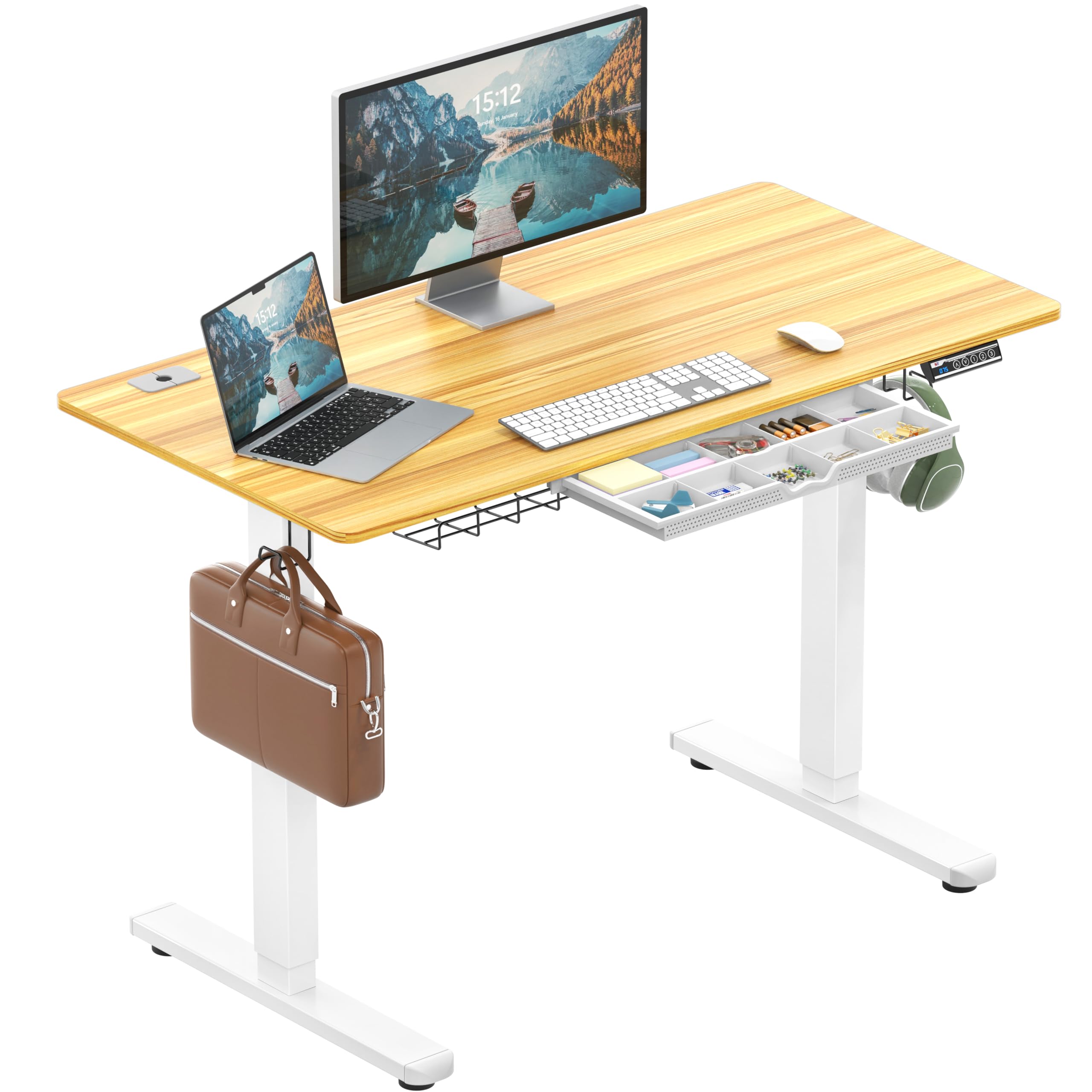
Figure 1: SHW 48-Inch Electric Height Adjustable Standing Desk in Oak.
2. Safety Information
Please read and understand all safety instructions before assembly and operation to prevent injury or damage to the product.
- This product has an approximate weight of 69.4 pounds. Handle with care during assembly and movement.
- As an electric adjustable desk, follow all safety instructions and precautions provided in this manual.
- For proper ergonomic use, alternate between sitting and standing positions and take regular breaks.
- Ensure all cables are properly managed to avoid tripping hazards or interference with desk movement.
- Do not overload the desk. The strong lifting system supports up to 110 lbs.

Figure 2: The desk's strong lifting system supports up to 110 lbs.
3. Package Contents
Verify that all components are present before beginning assembly. If any parts are missing or damaged, please contact customer support.
- Desk Top (Oak, 48-Inch)
- Electric Lift Legs (Metal)
- Digital Control Panel with Memory Presets
- Integrated Drawer
- Cable Management Tray
- Utility Hooks (x2)
- All necessary assembly tools
- Assembly Instructions Manual
4. Setup and Assembly
The desk requires assembly. All necessary tools are included. Follow the provided instructions for safe and proper assembly. It is recommended for 1 person to assemble.
Assembly Steps:
- Unpack all components and verify against the package contents list.
- Attach the electric lift legs to the desk top using the provided hardware.
- Install the digital control panel to the underside of the desk.
- Mount the cable management tray and utility hooks as desired.
- Connect all power cables and ensure they are neatly routed through the cable management system.
- Adjust the leveling glides on the desk feet to ensure stability on uneven surfaces.

Figure 3: Desk dimensions and adjustable height range (28" to 45").

Figure 4: Visual representation of the desk's height adjustment capabilities.
5. Operating Instructions
Height Adjustment:
- Use the Up (▲) and Down (▼) arrows on the digital control panel to manually adjust the desk height.
- The LED display will show the current height in inches or centimeters.
Setting Memory Presets:
The desk features four programmable memory presets (1, 2, 3, 4) to save your preferred sitting and standing heights.
- Adjust the desk to your desired height using the Up/Down arrows.
- Press the M button. The display will flash.
- Immediately press one of the number buttons (1, 2, 3, or 4) to save the current height to that preset. The display will flash again to confirm.
- To recall a saved height, simply press the corresponding number button (1, 2, 3, or 4). The desk will automatically move to the saved position.

Figure 5: Digital control panel for height adjustment and memory presets.
Video 1: Demonstration on how to set up height presets on the SHW desk.
Resetting Memory Presets:
If you need to reset all memory presets, press and hold both the Up (▲) and Down (▼) arrows simultaneously for approximately 3 seconds. The display will flash to confirm the reset.
Video 2: Instructions on how to reset the desk's memory presets.
6. Features Overview
Integrated Drawer:
The desk includes a built-in drawer with adjustable compartments, perfect for organizing small office supplies like pens, scissors, and electronic accessories, keeping your desktop clutter-free.

Figure 6: Integrated drawer with adjustable compartments for organization.
Cable Management:
A dedicated cable management tray and grommet holes help to neatly organize and conceal power cords and other cables, maintaining a clean and professional appearance.

Figure 7: Cable management clamps for organizing wires.

Figure 8: Grommet for routing cables through the desk surface.
Utility Hooks:
Two utility hooks are included, providing convenient storage for headphones, bags, or other items, keeping them within reach but off the desk surface.

Figure 9: Utility hook for hanging headphones or bags.
7. Maintenance
To maintain the appearance and functionality of your SHW Electric Height Adjustable Standing Desk, follow these simple cleaning instructions:
- Clean the desk surfaces with a damp or dry cloth.
- Avoid using harsh chemicals or abrasive cleaners, as these may damage the finish.
- Regularly check all screws and connections to ensure they remain tight.
8. Troubleshooting
If you encounter any issues with your desk, please refer to the following common troubleshooting tips:
- Desk not moving: Ensure the power cord is securely plugged into both the desk and a working electrical outlet. Check if the control panel display is active.
- Error code on display: Refer to the full product manual (if provided separately) for specific error code meanings and solutions. Often, unplugging the desk for 10-15 seconds and plugging it back in can resolve minor electronic glitches.
- Uneven height: If the desk appears uneven, check the leveling glides on the feet and adjust them to stabilize the desk.
- Memory presets not working: Follow the instructions in Section 5 to re-program your memory presets or perform a full reset if necessary.
9. Specifications
| Feature | Detail |
|---|---|
| Brand | SHW |
| Model Number | OD-009-1 |
| Product Dimensions (D x W x H) | 24"D x 48"W x 28"H |
| Color | Oak |
| Style | Modern |
| Minimum Height | 28 Inches |
| Maximum Height | 45 Inches |
| Maximum Weight Capacity | 110 Pounds |
| Top Material Type | Engineered Wood |
| Base Material | Metal |
| Number of Drawers | 1 |
| Included Components | Cable Management Tray, Utility Hooks (x2) |
| Required Assembly | Yes |
| Includes All Assembly Tools | Yes |
10. Warranty and Support
Warranty Information:
This SHW Electric Height Adjustable Standing Desk comes with a limited warranty. For specific details regarding coverage (parts, labor, duration), please refer to the warranty card included with your product or contact SHW customer support.
Customer Support:
For any questions, assistance with assembly, troubleshooting, or warranty claims, please visit the official SHW website or contact their customer service department. Contact information can typically be found on the product packaging or the SHW brand store on Amazon.