
1. Introduction and Overview
The Marantz SR7013 AV Receiver is engineered to deliver a superior and powerful listening experience for movies and music. It incorporates precision audio engineering and tuning, featuring advanced decoding technologies such as Dolby Atmos, DTS:X, Auro-3D, and DTS Virtual:X for immersive home theater sound. Proprietary HDAM circuit boards ensure detailed and dynamic audio reproduction. The receiver is equipped with eight HDMI inputs, fully compatible with the latest specifications including 4K Ultra High Definition video, 60Hz video, HDR, Dolby Vision, Hybrid Log-Gamma, and eARC for 3D audio transmission. Enjoy seamless music streaming from smart devices via Bluetooth, AirPlay 2, or the HEOS app. Voice control is supported through Amazon Alexa, allowing users to manage playback, switch inputs, and adjust volume.
2. Key Features
- Exceptional Visual Clarity: Full-rate pass-through, SD/HD video upscaling to Ultra HD, 4:4:4 Pure Color, HDR10, BT.2020, 3D, 21:9 video, Dolby Vision, HLG, and eARC for 3D audio transmission via HDMI.
- Cinematic Audio Experience: 125W per channel, supporting standard 9.2, 7.1.2, or 5.1.4 3D systems with Dolby Atmos elevation speakers. Extend audio to up to 3 rooms with 5.1 (zone 1), 2.1 (zone 2 & zone 3) configurations.
- Voice Control Integration: Compatible with Amazon Alexa, Google Assistant, Apple Siri, and Josh Smart Home for hands-free control of music playback, input switching, and volume adjustments.
- Wireless Streaming: Stream unlimited music and videos via Bluetooth, AirPlay 2, or the HEOS app from your smart devices.
- Smart Home Automation: Seamlessly integrates with smart home automation systems like Josh or Control4, enabling remote monitoring of connected devices.
- High-Grade Audio Components: Features Marantz's exclusive HDAM technology and custom-designed components for exceptional stereo listening and an immersive home theater experience.
3. Setup
3.1. Unboxing and Included Accessories
Carefully remove all components from the packaging. Ensure all items listed below are present:
- 9.2ch AV receiver
- 6' AC power cord
- Remote controller
- 2 WLAN/Bluetooth antennas
- Two "AAA" batteries
- Sound calibration microphone (ACM1HB)
- Microphone stand
- FM wire antenna
- AM loop antenna
- Quick start guide
3.2. Physical Placement
Place the Marantz SR7013 on a stable, flat surface with adequate ventilation. Avoid placing it in enclosed cabinets without proper airflow to prevent overheating. Ensure sufficient space around the unit for heat dissipation.
3.3. Connecting Speakers
The SR7013 supports various speaker configurations, including 9.2, 7.1.2, and 5.1.4 setups. Connect your speakers to the corresponding terminals on the rear panel of the receiver. Ensure correct polarity (+ to + and - to -) for each speaker. For optimal sound, use high-quality speaker cables.
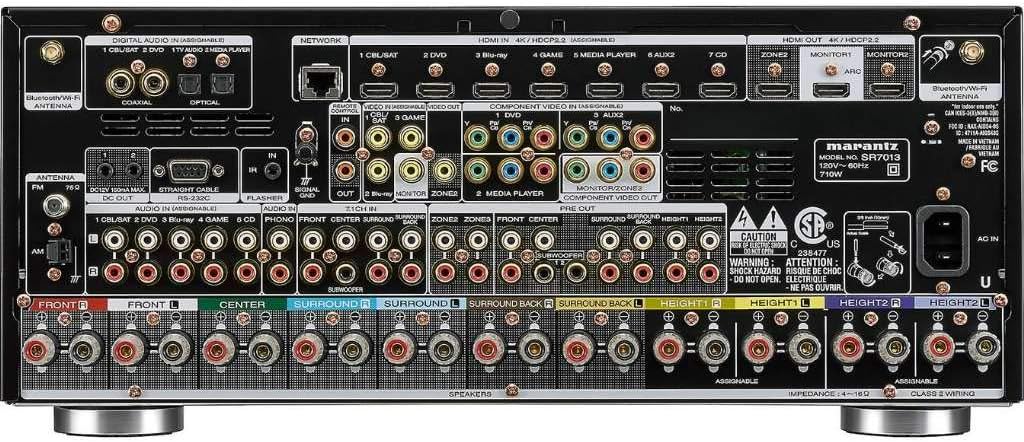
Image: Rear panel of the Marantz SR7013 AV Receiver, illustrating the various speaker terminals and input/output ports for comprehensive connectivity.
For Dolby Atmos or DTS:X setups, connect height speakers or Dolby Atmos-enabled speakers as per your desired configuration. Refer to the quick start guide for detailed wiring diagrams for specific setups.
3.4. Connecting Audio/Video Devices
Connect your audio and video sources (e.g., Blu-ray player, game console, cable box) to the HDMI input ports on the rear panel. The SR7013 features eight HDMI inputs supporting 4K UHD, HDR, and other advanced video formats. Connect your TV or projector to the HDMI OUT (MONITOR 1 or 2) port. For eARC functionality, ensure your TV supports eARC and connect to the designated HDMI OUT port.

Image: Front view of the Marantz SR7013 AV Receiver, showcasing its sleek design with a central display and prominent control knobs.
Additional audio inputs (analog, optical, coaxial) are available for other devices. Connect the included WLAN/Bluetooth antennas to the rear panel for wireless connectivity.
3.5. Initial Configuration and Room Calibration
After connecting all devices and speakers, power on the receiver and your TV. Follow the on-screen setup assistant for initial configuration. Use the supplied sound calibration microphone (ACM1HB) and microphone stand to perform Audyssey MultEQ XT32 room correction. This process automatically detects speaker configuration, distance, and levels, optimizing sound performance for your specific listening environment.
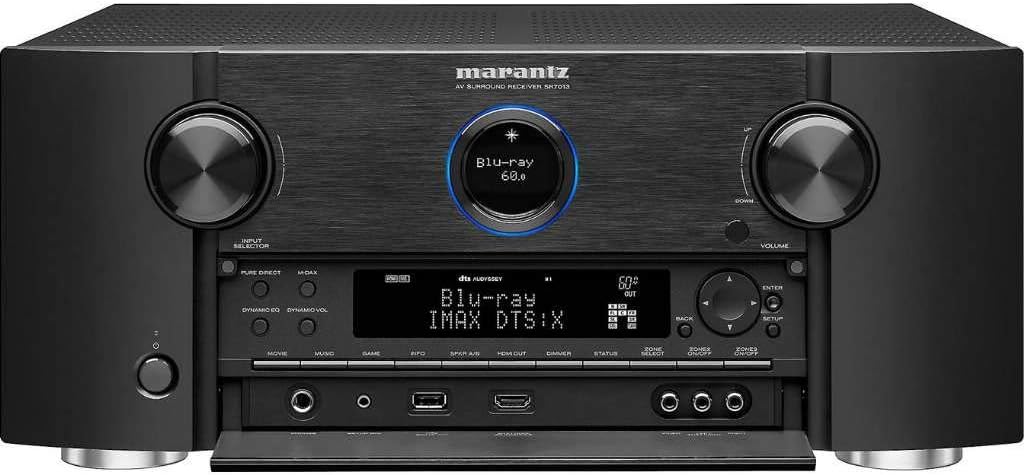
Image: Front panel of the Marantz SR7013 AV Receiver with the lower flap open, revealing additional control buttons and front-facing input ports for convenience.
4. Operating Instructions
4.1. Basic Operation
Use the remote control or the front panel buttons to power on/off the receiver, select input sources, and adjust volume. The main display provides information on the current input, volume level, and audio format.
4.2. Audio Modes and Sound Settings
The SR7013 offers various audio modes, including Stereo, Multi-Channel Stereo, Direct, Pure Direct, and surround sound modes (Dolby Atmos, DTS:X, etc.). Select the desired mode based on your content and listening preference. Access advanced sound settings through the on-screen menu to fine-tune equalization, speaker levels, and crossover frequencies.
4.3. Network and Streaming Features
Connect the receiver to your home network via Ethernet or Wi-Fi. Utilize the built-in HEOS technology for multi-room audio and access various streaming services. Bluetooth and AirPlay 2 allow direct streaming from compatible devices. Download the HEOS app for comprehensive control and access to streaming platforms.
4.4. Voice Control
Enable the HEOS Home Entertainment skill for Amazon Alexa or integrate with Google Assistant, Apple Siri, or Josh Smart Home. Use voice commands to control basic receiver functions such as power, volume, input selection, and music playback.
4.5. Multi-Zone Audio
The SR7013 supports up to three audio zones. Configure Zone 2 and Zone 3 outputs to enjoy different audio sources in separate rooms. Control each zone independently using the remote control or the HEOS app.
5. Maintenance
- Cleaning: Use a soft, dry cloth to clean the exterior of the receiver. Avoid abrasive cleaners or solvents.
- Ventilation: Ensure ventilation openings are not blocked to prevent overheating. Regularly check for dust accumulation.
- Firmware Updates: Periodically check for and install firmware updates to ensure optimal performance and access to new features. Updates can typically be performed via the network connection.
6. Troubleshooting
- No Power: Check the power cord connection and ensure the outlet is functional.
- No Sound: Verify speaker connections, input source selection, and volume level. Check audio mode settings.
- No Video: Confirm HDMI cable connections between source, receiver, and TV. Ensure correct input selection on both receiver and TV.
- Network Connection Issues: Check network cable or Wi-Fi settings. Restart your router and the receiver.
- Remote Control Not Working: Replace batteries. Ensure no obstructions between the remote and the receiver's IR sensor.
For more detailed troubleshooting, refer to the full user manual available on the Marantz support website.
7. Specifications
| Product Dimensions | 15.83 x 17.32 x 7.28 inches |
| Item Weight | 31.1 pounds |
| Manufacturer | Marantz |
| Item Model Number | SR7013 |
| Batteries | 2 AAA batteries required (included) |
| Connectivity Technology | Ethernet, Wireless (Wi-Fi, Bluetooth, AirPlay 2) |
| Controller Type | Amazon Alexa, Google Assistant, Apple Siri, Josh Smart Home |
| Special Features | Alexa, eARC, Dolby Atmos, DTS:X, Auro-3D, IMAX Enhanced, HEOS |
| Compatible Devices | Smartphone, Television, Speaker |
| Total HDMI Ports | 11 (8 In / 3 Out) |
| Audio Encoding | Stereo, Dolby Digital, DTS, Auro-3D |
| Audio Output Mode | Stereo, Surround |
| Surround Sound Channel Configuration | 5.1.4, 7.1.2, 9.2 |
8. Warranty and Support
For warranty information and technical support, please refer to the official Marantz website or contact their customer service. Keep your purchase receipt for warranty claims.
Manufacturer: Marantz
Date First Available: September 12, 2018


