
WMF 0412300011
WMF Lono Filter Coffee Machine
User Manual
1. Introduction
Thank you for choosing the WMF Lono Filter Coffee Machine. This elegant coffee maker, crafted from high-quality Cromargan stainless steel, is designed to deliver exceptional coffee with its Aroma Perfection system. This manual provides essential information for the safe and efficient operation, setup, maintenance, and troubleshooting of your new appliance. Please read it thoroughly before first use and keep it for future reference.
The WMF Lono coffee machine features a removable water tank for easy filling, a pivoting filter holder for convenient coffee powder addition, and an automatic descaling program for consistent performance and taste. Its intuitive control panel ensures simple operation for a quick and enjoyable coffee experience.
2. Safety Instructions
Always observe the following safety instructions to prevent personal injury or damage to the appliance:
- Read all instructions carefully before using the appliance.
- Do not immerse the appliance, power cord, or plug in water or other liquids.
- Ensure the voltage indicated on the rating label matches your mains voltage.
- Keep the appliance out of reach of children and persons with reduced physical, sensory, or mental capabilities.
- Do not operate the appliance if the power cord or plug is damaged, or if the appliance malfunctions or has been damaged in any way.
- Always unplug the appliance from the power outlet before cleaning and when not in use.
- Avoid contact with hot surfaces. The heating plate and glass carafe become very hot during and after operation. Use handles and knobs.
- Do not place the appliance on or near a hot gas or electric burner, or in a heated oven.
- Use only cold water in the water tank.
- Do not overfill the water tank beyond the "MAX" mark.
- Ensure the glass carafe is correctly placed on the heating plate before brewing.
- This appliance is intended for household use only.
3. Product Overview (Components)
Familiarize yourself with the various parts of your WMF Lono Filter Coffee Machine:

Figure 3.1: Front view of the WMF Lono Filter Coffee Machine with the glass carafe in place. This image shows the overall sleek design and the main components including the water tank, filter holder, and control panel.

Figure 3.2: Front view of the coffee machine base without the glass carafe, highlighting the heating plate and the compact footprint of the appliance.

Figure 3.3: Close-up of the glass carafe with its ergonomic handle and lid. The carafe has clear markings for up to 10 cups (125 ml each).
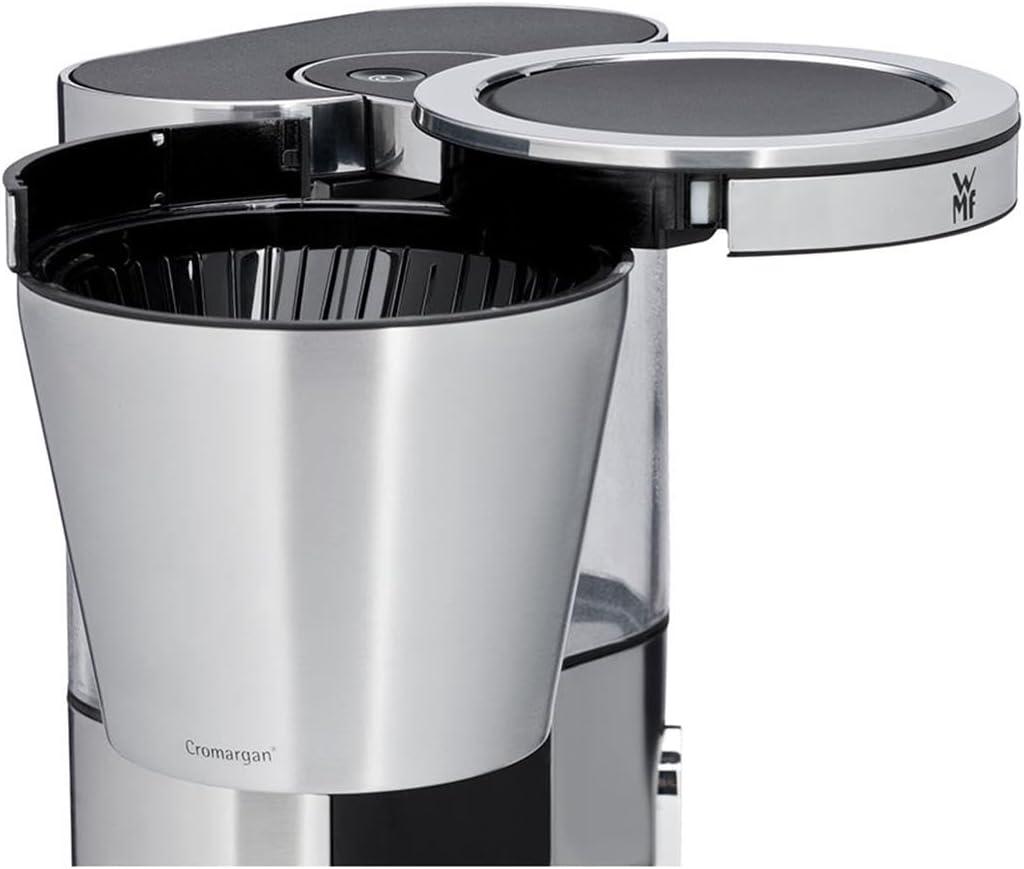
Figure 3.4: View of the pivoting filter holder, designed for easy insertion and removal of coffee filters and grounds. This feature simplifies the brewing process and cleaning.
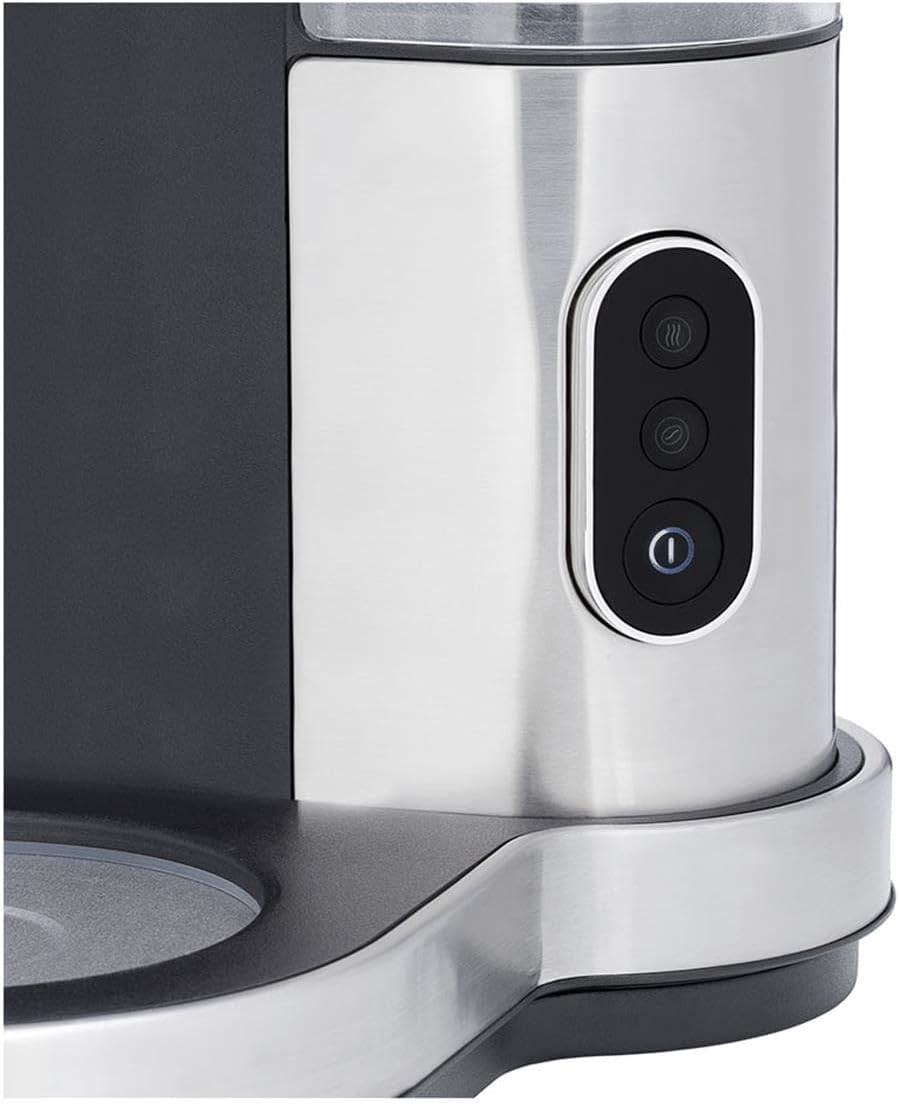
Figure 3.5: Detailed view of the intuitive control panel, featuring buttons for power, brewing strength (Aroma Perfection), and potentially other functions like descaling indicator.

Figure 3.6: Close-up of the removable water tank, showing the clear water level indicator for precise filling up to 10 cups. The tank is made from BPA-free Tritan material.
4. Setup
- Unpacking: Carefully remove the coffee machine and all accessories from the packaging. Retain the packaging for future storage or transport.
- Initial Cleaning: Before first use, clean all removable parts (glass carafe, filter holder, water tank) with warm water and a mild detergent. Rinse thoroughly and dry. Wipe the main unit with a damp cloth.
- Positioning: Place the coffee machine on a stable, flat, heat-resistant surface, away from direct sunlight and heat sources. Ensure there is enough space around the appliance for proper ventilation.
- First Brew Cycle (Cleaning):
- Fill the removable water tank with cold water up to the "MAX 10" mark.
- Place an empty paper filter (size 1x4) into the filter holder. Do not add coffee grounds.
- Ensure the glass carafe is correctly positioned on the heating plate.
- Plug the appliance into a grounded power outlet.
- Press the power button to start a brewing cycle. Let the full tank of water run through the machine.
- Discard the water and the paper filter. Repeat this process once or twice to thoroughly clean the internal components.
5. Operating Instructions
- Filling the Water Tank: Remove the water tank from the machine. Fill it with fresh, cold water according to the desired number of cups, using the clear markings on the tank. Reattach the water tank securely to the machine.
- Adding Coffee Grounds: Pivot the filter holder outwards. Insert a paper filter (size 1x4) into the filter holder. Add the desired amount of ground coffee (approximately 6-7 grams per cup, adjust to taste). Pivot the filter holder back into its closed position.
- Placing the Carafe: Ensure the glass carafe is empty and correctly placed on the heating plate.
- Starting the Brewing Process: Press the power button (usually indicated by a power symbol) on the control panel. The indicator light will illuminate, and the brewing process will begin.
- Aroma Perfection Function: To enhance the coffee aroma, especially for smaller quantities, press the "Aroma Perfection" button (often indicated by a coffee bean symbol) before starting the brew. This function optimizes the brewing process for a richer flavor.
- Keep Warm Function: After brewing, the heating plate will automatically keep the coffee warm for a certain period (typically 40 minutes). The machine will automatically switch off after this period. You can manually stop the warming function by pressing the power button again.
- Serving Coffee: Once brewing is complete, carefully remove the carafe from the heating plate to pour coffee. The drip-stop feature will prevent coffee from dripping onto the heating plate when the carafe is removed.
6. Maintenance and Cleaning
Regular cleaning and maintenance will ensure the longevity and optimal performance of your WMF Lono coffee machine.
- Daily Cleaning:
- Always unplug the appliance and allow it to cool completely before cleaning.
- Remove the used paper filter and discard coffee grounds.
- Wash the glass carafe, filter holder, and removable water tank with warm soapy water. Rinse thoroughly and dry. These parts are generally not dishwasher safe unless specified otherwise in the product manual (refer to original WMF manual for specific dishwasher compatibility).
- Wipe the exterior of the machine with a soft, damp cloth. Do not use abrasive cleaners or scouring pads.
- Descaling Program:
The WMF Lono coffee machine features an automatic descaling program to maintain optimal performance and coffee taste. The frequency of descaling depends on the hardness of your water and frequency of use. A descaling indicator light may illuminate when descaling is required.
- Consult the original WMF manual for specific instructions on activating and performing the automatic descaling program. Generally, this involves filling the water tank with a descaling solution (e.g., WMF descaling agent or a mixture of water and white vinegar) and running a special cycle.
- After descaling, run at least two full cycles with fresh, clean water to rinse out any descaling solution residue.
7. Troubleshooting
If you encounter issues with your WMF Lono coffee machine, refer to the following table for common problems and solutions:
| Problem | Possible Cause | Solution |
|---|---|---|
| Coffee does not brew. |
|
|
| Coffee tastes weak. |
|
|
| Coffee overflows from filter. |
|
|
| Water leaks from machine. |
|
|
If the problem persists after trying these solutions, please contact WMF customer support.
8. Specifications
| Feature | Detail |
|---|---|
| Brand | WMF |
| Model Number | 0412300011 |
| Color | Cromargan (Stainless Steel) |
| Dimensions (L x W x H) | 31.6 x 21.2 x 33 cm |
| Weight | 2.74 Kilograms |
| Capacity | 1.25 Litres (approx. 10 cups) |
| Power | 1000 Watts |
| Voltage | 230 Volts |
| Material | Cromargan (18/10 Stainless Steel) |
| Special Features | Automatic Descaling Program, Aroma Perfection System, Automatic Shut-off, Removable Water Tank, Intuitive Control Panel |
| Filter Type | Reusable (Paper filter size 1x4 recommended) |
9. Warranty and Support
Your WMF Lono Filter Coffee Machine comes with a 2-year warranty. WMF also offers 15 years of repairability for this product, demonstrating their commitment to quality and sustainability.
For warranty claims, technical support, or spare parts, please contact WMF customer service. You can usually find contact information on the official WMF website or on the product packaging. Please have your model number (0412300011) and proof of purchase ready when contacting support.
For more information, visit the official WMF website: www.wmf.com
Ask a question about this manual
Ask about setup, troubleshooting, compatibility, parts, safety, or missing instructions. Manuals+ will review the question and use this page’s manual context to help answer it.