
meross MSS310R
Meross Smart Wi-Fi Plug User Manual
Model: MSS310R
1. Introduction
Thank you for choosing the Meross Smart Wi-Fi Plug. This device allows you to control your home appliances remotely, monitor energy consumption, and set schedules, all through your smartphone or voice commands. This manual provides detailed instructions for setting up, operating, and maintaining your smart plug to ensure optimal performance and safety.

Image: The Meross Smart Wi-Fi Plug, an Italian Type L plug, featuring a power button and a three-pin socket.
2. Important Safety Information
- Do not disassemble or modify the device.
- Do not expose the device to water or high humidity.
- Do not use the device in environments with high temperatures or near flammable materials.
- Ensure the connected appliance's power rating does not exceed the smart plug's maximum load (16A, 3840W).
- For indoor use only.
- Keep out of reach of children.
3. Package Contents
- 1 x Meross Smart Wi-Fi Plug (Model: MSS310R)
- 1 x User Manual
4. Product Overview
The Meross Smart Wi-Fi Plug (MSS310R) is designed for Italian Type L sockets. It features a compact design with a power button and an LED indicator. The plug allows for remote control, voice control, and energy monitoring of connected devices.
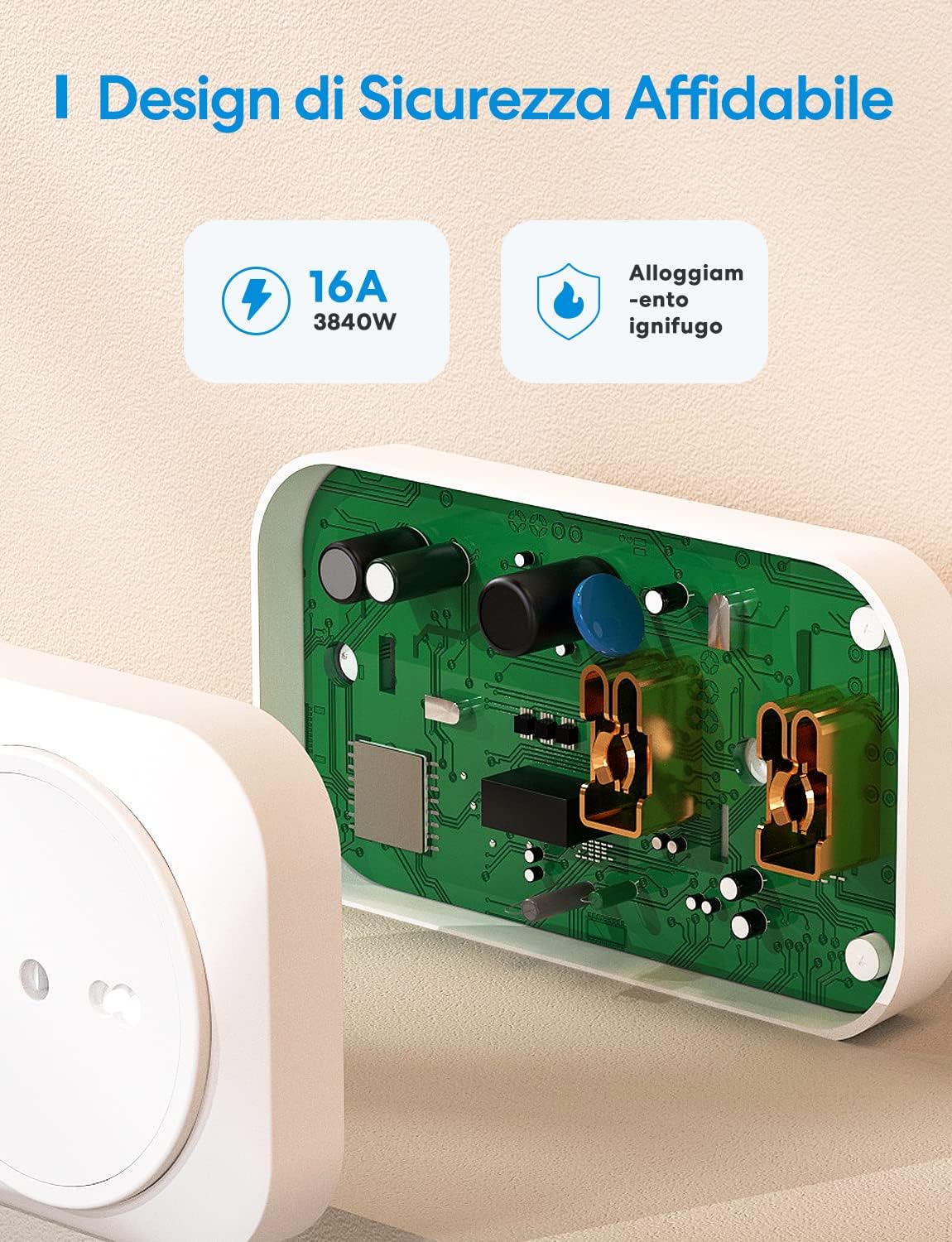
Image: An internal view of the Meross Smart Plug, highlighting its robust and fire-retardant housing, designed for safety and durability.
5. Setup Guide
Follow these steps to set up your Meross Smart Wi-Fi Plug:
- Download the Meross App: Search for "Meross" in the Apple App Store or Google Play Store and download the app.
- Register/Log In: Open the Meross app and register for a new account or log in with your existing credentials.
- Plug In the Device: Insert the Meross Smart Plug into an Italian Type L wall socket. The LED indicator on the plug should start blinking.
- Add Device in App: In the Meross app, tap the "+" icon in the top right corner to add a new device. Select "Smart Plug" from the list.
- Connect to Wi-Fi: Follow the in-app instructions to connect the smart plug to your 2.4GHz Wi-Fi network. Note: The Meross Smart Plug only supports 2.4GHz Wi-Fi.
- Name Your Device: Once connected, you can assign a name to your smart plug (e.g., "Living Room Lamp").
Your Meross Smart Plug is now ready for use!
6. Operating Instructions
6.1 Remote Control
Control your appliances from anywhere using the Meross app. Simply open the app, select your smart plug, and toggle its power on or off. This feature allows you to manage devices even when you are away from home, provided you have an internet connection.

Image: A man using the Meross app on his smartphone to remotely control devices connected to the smart plug, demonstrating the convenience of remote operation.
6.2 Voice Control
The Meross Smart Plug is compatible with Amazon Alexa and Google Assistant. Link your Meross account to your voice assistant app to enable voice commands.
- For Amazon Alexa: "Alexa, turn on the living room lamp."
- For Google Assistant: "Hey Google, turn off the fan."

Image: Two smart speakers (Amazon Echo Dot and Google Home Mini) positioned near a television, illustrating how voice commands can be used to control the Meross Smart Plug.
6.3 Timer and Schedule Function
Set schedules and timers for your appliances to automate their operation. This can help save energy and provide convenience.
- Scheduling: Program devices to turn on or off at specific times, such as turning on a coffee maker every morning.
- Sunrise/Sunset Routines: Configure the plug to activate or deactivate based on local sunrise or sunset times, ideal for lighting.
- Countdown Timer: Set a countdown for a device to turn off after a certain period.

Image: A smartphone screen displaying the Meross app's scheduling interface, with options for sunrise, sunset, and custom routines, next to a smart plug controlling a bedside lamp.
6.4 Energy Monitoring
The Meross Smart Plug provides real-time energy consumption data and historical records for connected devices. This feature helps you track and manage your energy usage, potentially leading to energy savings.
- View current power (W) and total consumption (kWh).
- Access daily, weekly, monthly, and yearly energy reports.

Image: A smartphone screen showing the Meross app's energy monitoring interface, displaying real-time power consumption and historical data, with a smart plug connected to a fireplace heater in the background.
6.5 Offline Control
Even if your internet connection is down, you can still control your Meross Smart Plug locally via your home Wi-Fi network, provided your smartphone and the smart plug are on the same network.

Image: A diagram showing a house with a Wi-Fi router, illustrating that devices can still be controlled via the Meross app locally even if the internet connection is unavailable.
7. Maintenance
- Keep the device clean and dry. Use a soft, dry cloth to wipe the surface.
- Avoid using harsh chemicals or abrasive cleaners.
- Ensure the plug is disconnected from the power outlet before cleaning.
8. Troubleshooting
| Problem | Possible Solution |
|---|---|
| Device cannot connect to Wi-Fi. |
|
| Device is offline in the app. |
|
| Voice control is not working. |
|
| Energy monitoring data is incorrect or missing. |
|
9. Specifications
| Feature | Detail |
|---|---|
| Model Number | MSS310R |
| Manufacturer | meross |
| Product Dimensions (L x W x H) | 11 x 6 x 3.2 cm |
| Weight | 118 Grams |
| Color | White |
| Style | Italian Smart Plug (Type L) |
| Voltage | 240 Volts |
| Power | 16 Watts |
| Max Load | 16A / 3840W |
| Connectivity | Wi-Fi (2.4GHz only) |
| Compatibility | Amazon Alexa, Google Assistant, SmartThings |
| Hub Required | No |
10. Warranty and Support
Meross provides a standard warranty for its products. For detailed warranty information, please refer to the warranty card included with your product or visit the official Meross website.
If you encounter any issues or have questions regarding your Meross Smart Wi-Fi Plug, please contact Meross Customer Support:
- Official Website: www.meross.com
- Email Support: Refer to the Meross app or official website for the latest support email address.
- In-App Support: Many common issues can be resolved through the help section within the Meross app.
If you have any problems with the product, please contact the seller directly. We will respond with a satisfactory solution.
Related documentsMSS310R


Ask a question about this manual
Ask about setup, troubleshooting, compatibility, parts, safety, or missing instructions. Manuals+ will review the question and use this page’s manual context to help answer it.