
1. Introduction
This manual provides detailed instructions for the installation, operation, and maintenance of your GENBOLT 4G LTE Outdoor Security Camera (Model GB213H-4G). Please read this manual thoroughly before use to ensure proper functionality and safety. This camera is designed for outdoor surveillance, offering advanced features such as 4G LTE connectivity, AI human detection, color night vision, and two-way audio.

Figure 1: GENBOLT 4G LTE Outdoor Security Camera with included SIM card.
2. Setup
2.1 Package Contents
Verify that all components are present in the package:
- GENBOLT 4G LTE Outdoor Security Camera
- Power Adapter
- Mounting Screws and Anchors
- Waterproof Kit for Network Cable
- SIM Card (pre-installed or included separately)
- User Manual
2.2 Camera Components Overview

Figure 2: Detailed view of the camera's external components and ports.
Familiarize yourself with the camera's parts:
- Antenna: For 4G LTE signal reception.
- Bracket: For mounting the camera.
- Plastic Housing: Durable outer casing.
- IR Sensor: Detects ambient light for night vision activation.
- Microphone: For audio input.
- HD Lens: Captures high-definition video.
- LED Lights: For illumination in color night vision mode.
- Infrared Lights: For black and white night vision.
- Reset Button: To restore factory settings.
- Speaker: For two-way audio output and siren.
- MicroSD Card Slot: For local video storage (supports up to 128GB).
- SIM Card Slot: For 4G LTE SIM card.
- POE Network Port: For Power over Ethernet connection.
- Power Port: For DC power adapter connection.
2.3 SIM Card Installation
The camera operates using a 4G LTE SIM card, eliminating the need for a Wi-Fi network. A dedicated SIM card may be included. Ensure the SIM card is correctly inserted into the designated slot. The camera's APN settings are typically pre-configured, requiring no separate contract for basic use.

Figure 3: Benefits of the GENBOLT 4G SIM card, including dedicated data and pre-configured settings.
2.4 Powering the Camera
The camera supports two power modes:
- PoE (Power over Ethernet): Connect the camera to a PoE switch using a CAT5e network cable. This allows both power and data transmission through a single cable, simplifying installation up to 200 meters.
- DC Power: Use the provided 12V2A power adapter to connect the camera to a standard electrical outlet.

Figure 4: Illustration of PoE and DC power options for the camera, showing a PoE switch connection.
2.5 App Installation and Initial Connection
Download the official GENBOLT CAM application from your smartphone's app store. Follow the in-app instructions to add your camera. Ensure your phone has an active internet connection during the initial setup process.
3. Operating the Camera
3.1 Live View and Playback
Access the GENBOLT CAM app to view the live feed from your camera. You can also review recorded footage stored on the microSD card or in cloud storage (if subscribed).
3.2 Pan, Tilt, and Zoom (PTZ) Control
The camera offers extensive movement capabilities:
- Pan: 330° horizontal rotation.
- Tilt: 90° vertical movement.
- Digital Zoom: 4x digital zoom to magnify details in the live or recorded view.
Use the controls within the GENBOLT CAM app to adjust the camera's viewing angle and zoom level. The camera supports up to 8 preset positions for quick navigation to specific areas of interest.

Figure 5: The camera's pan (330°) and tilt (90°) capabilities, providing comprehensive coverage.
3.3 Two-Way Audio Communication
The built-in microphone and speaker enable two-way audio. You can listen to the camera's surroundings and speak through the camera using the app on your smartphone. This feature is useful for communicating with visitors or deterring intruders.

Figure 6: Demonstrating two-way audio functionality with a delivery person.
3.4 Recording and Storage
The camera supports local storage via a microSD card (up to 128GB) and optional cloud storage. Recordings can be triggered by motion detection or set for continuous recording. The app allows you to manage and view recorded footage.
4. Key Features
4.1 4G LTE Connectivity (No Wi-Fi Required)
The camera's integrated 4G LTE module allows it to operate independently of a Wi-Fi network. This makes it ideal for remote locations such as construction sites, warehouses, farms, parking lots, and areas prone to illegal dumping where Wi-Fi access is unavailable.
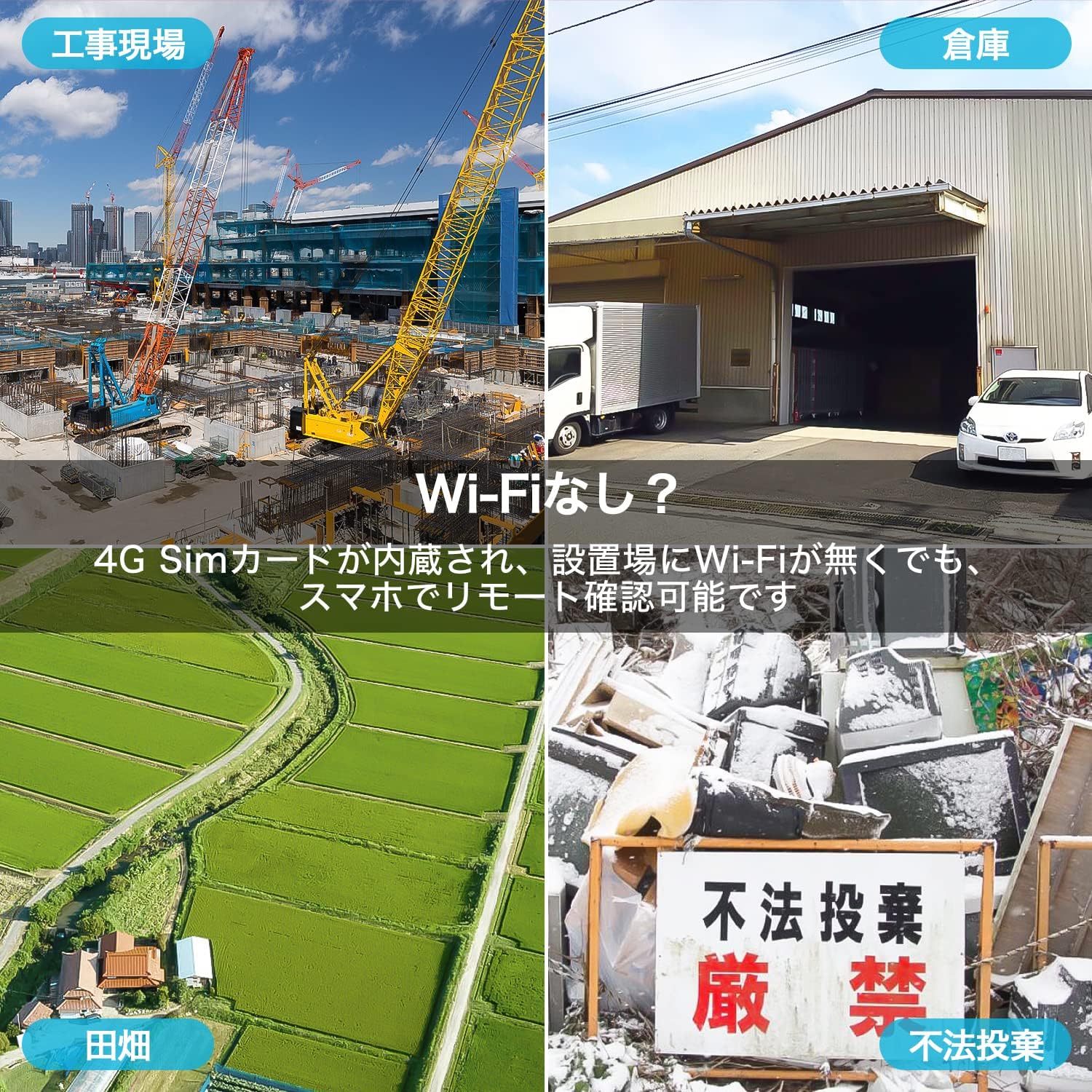
Figure 7: Examples of locations where the 4G LTE camera can be deployed without Wi-Fi.
4.2 AI Human Detection and Auto Tracking
Equipped with advanced AI human detection technology, the camera accurately identifies human shapes, significantly reducing false alarms caused by animals, vehicles, or environmental factors like leaves. When a human is detected, the camera can automatically track their movement within the surveillance area.

Figure 8: AI human detection in action, tracking a person in a field.
4.3 Color Night Vision and Siren Alarm
The camera features both infrared (black and white) and full-color night vision modes. In low-light conditions, it can automatically switch to color night vision (up to 10m) using its high-brightness LEDs, providing clearer images. It also includes a customizable siren alarm and light alarm that can be triggered upon motion detection to deter intruders. You can customize the siren sound via the app, for example, to a dog barking sound.

Figure 9: Visual comparison between color night vision and traditional infrared night vision.
4.4 IP66 Weatherproof Design
The camera is rated IP66, ensuring it is fully protected against dust and powerful water jets. This robust design allows it to withstand various outdoor weather conditions, providing reliable surveillance year-round.
5. Maintenance
- Lens Cleaning: Regularly clean the camera lens with a soft, dry cloth to ensure clear image quality. Avoid abrasive cleaners.
- Firmware Updates: Check the GENBOLT CAM app periodically for firmware updates. Keeping the firmware updated ensures optimal performance and security.
- Connection Check: Periodically inspect all cable connections (power, network) for any signs of wear or damage, especially in outdoor environments.
- Physical Inspection: Ensure the camera's mounting is secure and free from obstructions.
6. Troubleshooting
6.1 No Connection / Offline
- Check SIM Card: Ensure the 4G SIM card is correctly inserted and has an active data plan.
- Signal Strength: Verify that the camera is in an area with good 4G LTE signal coverage.
- Power Supply: Confirm the camera is receiving power, either via DC adapter or PoE. Check power cables and outlets.
- Reset Camera: Use the reset button to restart the camera. If issues persist, perform a factory reset (refer to app instructions for details).
6.2 Poor Image Quality
- Clean Lens: Clean the camera lens as described in the Maintenance section.
- Lighting Conditions: Ensure adequate lighting for optimal image quality, especially at night.
- Resolution Settings: Check the video resolution settings in the app; higher resolution requires more data.
6.3 False Alarms
- Adjust Sensitivity: Reduce the motion detection sensitivity in the app settings.
- Detection Zone: Configure specific detection zones to exclude areas with frequent non-human movement.
- AI Human Detection: Ensure AI human detection is enabled to filter out non-human triggers.
7. Specifications
| Feature | Specification |
|---|---|
| Model Number | GB213H-4G |
| Wireless Communication Technology | 3G/4G LTE |
| Night Vision Range | 20 meters |
| Material | Plastic |
| Color | 4G-200 Megapixel Security Camera |
| Waterproof Rating | IP66 |
| Special Features | Smartphone compatible, ONVIF, Military-grade anti-hacker technology, 200 Megapixel, Home surveillance, Two-way audio, Free APP (GENBOLT CAM), Remote monitoring, Night vision shooting, Motion detection alarm, Recording, Multi-device connection |
| Indoor/Outdoor Use | Outdoor |
| Compatible Devices | Smartphone |
| Power Source | 12V2A Outlet |
| Connection Protocol | 3G/4G LTE; SIM communication |
| Video Capture Resolution | 1080p |
8. Warranty and Support
GENBOLT is committed to providing reliable products and excellent customer service.
- 12-Month Service Warranty: Your surveillance camera comes with a 12-month warranty period.
- 30-Day Money-Back Guarantee: We offer a 30-day refund guarantee.
- Lifetime Technical Support: Enjoy lifetime technical support for your product.
For detailed instructions and app downloads, please visit our website: www.genbolt.com/download.
If you have any questions or require assistance, please contact us:
- Email: jk@genbolt.com
- LINE: GENBOLT
- Phone: 050-5840-2687 (Monday - Friday, 10:00 - 18:00 JST)