Introduction
This manual provides essential information for setting up, operating, maintaining, and troubleshooting your Lenovo ThinkCentre M720q Tiny Desktop Computer. Please read these instructions carefully before using your device.

Figure 1: Lenovo ThinkCentre M720q Tiny Desktop Computer - Front View
Setup Instructions
1. Unpacking
Carefully remove the computer and all accessories from the packaging. Ensure the following items are present:
- Lenovo ThinkCentre M720q Tiny Desktop Computer
- Power Adapter
- Documentation (this manual, warranty information)
2. Connecting Peripherals
Connect your monitor, keyboard, and mouse to the appropriate ports on the computer.
- Display: Connect your monitor using a DisplayPort or HDMI cable. The system supports resolutions up to 3840x2160.
- Keyboard and Mouse: Connect USB keyboard and mouse to any available USB ports. The device features multiple USB 3.0 ports.
- Network: For wired network access, connect an Ethernet cable to the RJ-45 port. For wireless, ensure your Wi-Fi network is available.
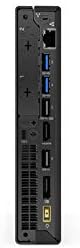
Figure 2: Rear ports of the ThinkCentre M720q, including display outputs and USB ports.

Figure 3: Front ports of the ThinkCentre M720q, including USB and audio jacks.
3. Power Connection
Connect the power adapter to the computer's power input, then plug the power cord into a wall outlet.
4. Initial Boot and Operating System Setup
Press the power button located on the front of the computer. The system will boot into Windows 10 Pro. Follow the on-screen instructions to complete the initial setup, including language selection, network connection, and user account creation.
Operating Instructions
Power On/Off
- To Power On: Press the power button on the front panel.
- To Shut Down: Click the Start button in Windows, then select Power > Shut down.
- To Restart: Click the Start button in Windows, then select Power > Restart.
Network Connectivity
- Wired Network: If an Ethernet cable is connected, the system should automatically detect the network.
- Wireless Network (Wi-Fi): The ThinkCentre M720q supports 802.11ac wireless. To connect, click the Wi-Fi icon in the system tray, select your network, and enter the password if prompted.
Using USB Devices
The computer is equipped with multiple USB 3.0 ports. Simply plug your USB devices (e.g., external hard drives, flash drives, printers) into any available USB port. Windows will typically install necessary drivers automatically.
Display Configuration
The ThinkCentre M720q supports multiple displays. You can configure display settings (resolution, orientation, extended/duplicated desktop) through the Windows Display Settings. Right-click on the desktop and select "Display settings".
Maintenance
Cleaning the Computer
- Always power off the computer and disconnect it from the power outlet before cleaning.
- Use a soft, lint-free cloth slightly dampened with water or a mild cleaning solution to wipe the exterior surfaces.
- Do not use harsh chemicals, abrasive cleaners, or solvents.
- Use compressed air to gently clear dust from vents and ports.
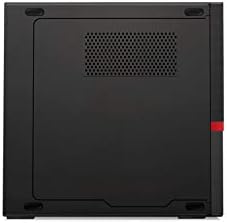
Figure 4: Top view of the ThinkCentre M720q, highlighting ventilation areas.
Software Updates
Regularly update your Windows operating system and drivers to ensure optimal performance and security. Windows Update can be accessed via Settings > Update & Security > Windows Update.
Troubleshooting
If you encounter issues with your ThinkCentre M720q, refer to the following common solutions:
- No Power: Ensure the power adapter is securely connected to both the computer and a working electrical outlet. Try a different outlet.
- No Display: Verify that the monitor is powered on and correctly connected to the computer. Check the input source on your monitor.
- System Slowdown: Close unnecessary applications. Check for background processes using Task Manager. Ensure sufficient free space on the SSD.
- Peripheral Not Detected: Try connecting the peripheral to a different USB port. Ensure drivers are installed (if required).
- Network Connectivity Issues: For wired connections, check the Ethernet cable. For Wi-Fi, ensure the network is available and you have the correct password. Restart your router if necessary.
For more complex issues, consult the Lenovo support website or contact their customer service.
Specifications
| Feature | Detail |
|---|---|
| Brand | Lenovo |
| Series | ThinkCentre M720q |
| Item Model Number | ThinkCentre M720q |
| Operating System | Windows 10 Pro |
| Processor | Intel Core i5 (1.7 GHz) |
| RAM | 8 GB DDR3 (2666 MHz Memory Speed) |
| Hard Drive | 256 GB SSD (Serial ATA-300 Interface) |
| Graphics Coprocessor | Intel Turbo Boost Technology 2 |
| Graphics Card Description | Integrated |
| Max Screen Resolution | 3840x2160 |
| Wireless Type | 802.11ac |
| Number of USB 3.0 Ports | 3 |
| Item Weight | 3 pounds |
| Product Dimensions (LxWxH) | 7 x 1.4 x 7.2 inches |
| Color | Black |
Warranty Information
For detailed warranty terms and conditions, please refer to the official Lenovo warranty documentation included with your product or visit the official Lenovo support website. Warranty coverage typically includes defects in materials and workmanship for a specified period from the date of purchase.
Customer Support
If you require technical assistance, have questions about your product, or need to report an issue, please contact Lenovo customer support through their official channels. You can find contact information and online resources on the official Lenovo website.
Lenovo Official Website: www.lenovo.com


