
1. Product Overview
The PQWT-M100 is an automatic mobile mapping water detector designed for groundwater exploration and geological prospecting. It utilizes the Earth's electromagnetic field to identify underground geological structures and locate water resources. This instrument connects to a smartphone application to generate real-time curve graphs and profile maps, simplifying the process of finding suitable well drilling locations.
Key features include:
- Automatic mobile mapping with real-time curve graphs and profile maps.
- Smartphone app integration for simple operation via Bluetooth.
- Data storage on phone for easy analysis and export.
- Suitable for various terrains (mountains, plateaus, plains, hills, basins).
- Detection depth up to 100 meters (M100 model).
1.1 Detection Depth Capability

Figure 1: Illustration of the PQWT-M series detection depth capabilities, ranging from 100m to 400m depending on the model. The PQWT-M100 model detects up to 100 meters.
1.2 Product Components

Figure 2: Main components of the PQWT-M100 kit, including the host machine, alloy electrode bars, copper electrodes, connection cable, belt, and charger.
2. Setup Instructions
2.1 Mobile App Installation
The PQWT-M100 operates via a dedicated mobile application. Follow these steps to install the app:
- Scan the QR code located on the side of the host machine using your smartphone's camera or a QR code scanner app.
- Open the download link in your browser.
- Install the package named "PQWT water finder".

Figure 3: QR code on the PQWT-M100 host for downloading the mobile application. The app is compatible with Android devices.
Alternatively, you can download the app directly from this link: PQWT Mobile App Download
2.2 Instrument Assembly and Connection
Before beginning measurements, assemble the electrodes and connect them to the host machine.
- Pass the copper electrode through the copper hole of the measuring wire.
- Tighten the alloy electrode rod onto the copper electrode.
- Push the main line of the measuring cable into the host machine terminal and lock it securely.
- Connect the antenna to the host machine.
- Press and hold the ON/OFF switch button on the host machine to power it on.

Figure 4: Detailed view of connecting the measuring cable and electrodes to the PQWT-M100 host machine.
2.3 App Connection and Initial Settings
Once the hardware is assembled and powered on, connect the app via Bluetooth and configure settings.
- Open the "PQWT Water Finder" software on your mobile phone.
- Allow Bluetooth access when prompted.
- The app will scan for devices. Select "PQWT-M100" from the scan list to enter the software operation interface. The app should display "Connected".
- Click "Settings" within the app.
- Choose "Profile survey" mode. Set the measurement line to "1" (default) and gain to "0" (default). Click "OK".

Figure 5: Screenshot of the PQWT app interface on a smartphone, showing successful connection and settings options.
3. Operating Instructions
3.1 Field Preparation and Electrode Placement
Proper field setup is crucial for accurate measurements.
- Wire the cable and use a 50-meter tape measure to define a straight line at the location where detection is needed.
- Mark the starting point (0m position).
- Insert the M pole (connected to the host machine) near the end of the host machine into the 0m position of the tape measure.
- Insert the N pole at the other end into the 10m position of the tape measure.
- Before measurement, ensure the two connected electrodes (M and N) are together. Press and hold the "TEST" line detection button on the host. A green test light indicates the line is normal.
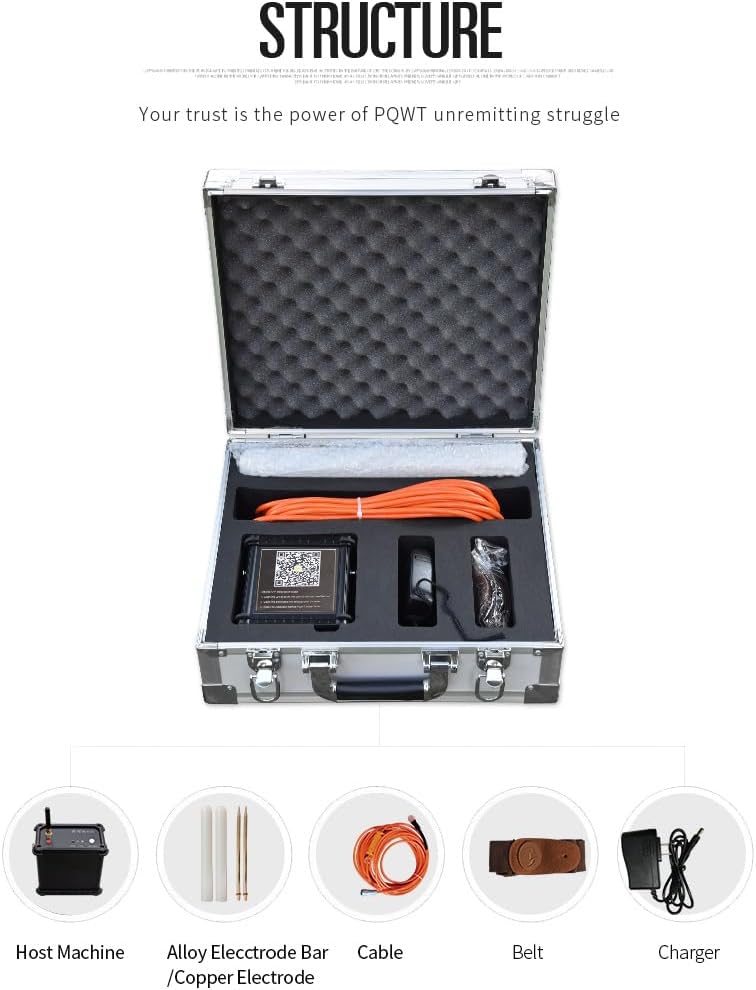
Figure 6: Field setup for groundwater detection, showing the placement of electrodes along a measurement line.
3.2 Data Acquisition
Follow these steps to acquire data points:
- Click the "Record" button in the app to measure the first point.
- After the data measurement is completed, the mobile phone interface will prompt "Record completed" with an audible sound from the host.
- Move both electrodes one meter away at the same time.
- Click the "Record" button again to perform the second point of data acquisition.
- Repeat this process for subsequent measurement points. Each measurement point is at the midpoint of the two electrodes. For example, the first point is at the 5-meter tape position (midpoint of 0m and 10m).
3.3 Data Analysis and Interpretation
The mobile app will generate graphs and profiles in real-time. These visual representations help in analyzing the geological structure and determining aquifer formations.

Figure 7: Example of real-time graphs and geological profile map generated by the PQWT app, showing potential groundwater flow.
3.4 Instructional Videos
For a visual guide on setup and operation, please refer to the following official instructional videos:
Full Instructional Video: M Series Mobile Automatic Mapping Water-Finding Instruments
Video 1: A comprehensive guide demonstrating the setup, connection, and operation of the PQWT M-Series mobile automatic mapping water-finding instruments, including app usage and data interpretation.
Quick Guide: Mobile Water Detector
Video 2: A concise overview of the mobile water detector, highlighting key features and basic operational steps for quick reference.
4. Maintenance
To ensure the longevity and optimal performance of your PQWT-M100 Groundwater Detector, follow these maintenance guidelines:
- Cleaning: Wipe the host machine and electrodes with a soft, dry cloth after each use to remove dirt and moisture. Avoid using abrasive cleaners or solvents.
- Battery Care: The device uses 2 Lithium Ion batteries. Ensure they are fully charged before extended use. If storing the device for a long period, charge the batteries to about 50% and recharge every 3-6 months to prevent deep discharge.
- Storage: Store the instrument in its original case in a cool, dry place, away from direct sunlight and extreme temperatures. Ensure all components are dry before storage.
- Cable Inspection: Regularly inspect the measuring cables for any signs of wear, cuts, or damage. Replace damaged cables immediately to maintain measurement accuracy and safety.
- Software Updates: Periodically check the PQWT website or app store for any available software updates for the mobile application to ensure you have the latest features and bug fixes.
5. Troubleshooting
If you encounter issues with your PQWT-M100, refer to the following common problems and solutions:
| Problem | Possible Cause | Solution |
|---|---|---|
| Device not powering on. | Low or depleted battery. | Charge the device using the provided charger. Ensure the charger is properly connected. |
| App not connecting to the device via Bluetooth. | Bluetooth is off on the phone/tablet; device is out of range; app permissions not granted. | Ensure Bluetooth is enabled on your mobile device. Bring the device closer to the host. Check app permissions for Bluetooth access. Restart both the app and the host machine. |
| Inaccurate or inconsistent readings. | Poor electrode contact; environmental interference; incorrect setup. | Ensure electrodes are firmly inserted into the ground. Avoid measuring near high-voltage lines or large metal objects. Verify correct cable connections and measurement line setup. |
| "TEST" light not green. | Faulty cable connection or damaged cable. | Check all cable connections. Ensure the measuring wire is pushed and locked into the host machine terminal. Inspect cables for damage and replace if necessary. |
| App crashes or freezes. | Software bug; insufficient device memory. | Restart the app and your mobile device. Ensure your mobile device meets the app's system requirements. Check for app updates. |
6. Technical Specifications
The following table outlines the technical specifications for the PQWT-M100 Groundwater Detector:

Figure 8: Technical parameters for the PQWT-M series, including product model, measuring depth, data unit, range, accuracy, and other specifications.
| Parameter | Value (PQWT-M100) |
|---|---|
| Product Model | PQWT-M100 |
| Measuring Depth | Up to 100 meters |
| Measurement Data Unit | Electric field component of different frequencies of the Earth electromagnetic field ΔVs (mV) |
| Measuring Range | 0mV-1000mV (instrument automatically converts range) |
| Measurement Accuracy | 0.001mV |
| Channel Gain | 1-200,000 times |
| Measurement Frequency | 30/36/48 frequency |
| Weight (Host) | 0.55 kg (1.21 lbs) |
| Power | 18650*2 3000mAh rechargeable lithium battery |
| Display | LED indicator |
| A/D Conversion | 8-bit 1Msps |
| Input Impedance | ≥10MΩ |
| Relative Humidity | ≤85% |
| Power Consumption | About 1W |
| Working Environment Temperature | -20°C ~ +50°C |
| Product Dimensions | 9.84 x 7.87 x 11.81 inches |
| Compatible Devices | Android |
7. Warranty and Support
7.1 Warranty Information
The PQWT-M100 Groundwater Detector host machine is backed by maintenance for the entire instrument kit. This ensures long-term reliability for users in their water search and exploration work. Please retain your proof of purchase for warranty claims.
7.2 Customer Support
For any technical assistance, inquiries, or support needs, please contact Hunan Puqi Geologic Exploration Equipment Institute directly. As the manufacturer, they provide reliable products and support for custom requirements, dealer partnerships, and various field applications.
Contact information can typically be found on the official PQWT website or through your purchase channel.


