
Introduction and Overview
The JAVA WSD18-010A is a fully automatic espresso machine designed for ease of use and versatility. It allows you to prepare a variety of coffee beverages, including espresso, cappuccino, and latte, using either whole coffee beans or pre-ground coffee powder. This machine integrates advanced features such as a 15-bar pressure system, a rapid instant boiler, and an Italian conical grinder to ensure optimal flavor and efficiency.
This manual provides essential information for the safe and efficient operation, maintenance, and troubleshooting of your JAVA WSD18-010A espresso machine. Please read it thoroughly before first use and keep it for future reference.

Figure 1: Front view of the JAVA WSD18-010A Automatic Espresso Machine.
Key Features:
- Adjustable Six-Level Coffee Grinder: Accommodates both coffee beans and ground coffee, offering six different particle sizes to suit various taste preferences.
- LCD Display and Solid Knob Control: Features a liquid crystal display and a robust control knob for intuitive operation and tactile feedback.
- Adjustable Spout Height and Dual Cup Selection: The coffee outlet height can be adjusted to prevent splashing, and the dual-export design allows for preparing one or two cups of Italian coffee simultaneously.
- Cappuccino Frothing Function: Easily create dense and delicate milk foam with a single push, no professional training required.
- Automatic Cleaning System: The machine includes a built-in automatic cleaning system that activates after each use, ensuring hygiene and consistent flavor.
- Separable 1.9-Liter Water Tank: Designed for easy removal and cleaning.
- Instant Boiler: Heats cold water rapidly (within 1 second) for quick and healthy coffee preparation.
- Italian Conical Grinder: Ensures fine grinding for optimal coffee flavor and durability.
- NTC Temperature Control: Real-time temperature sensing for precise coffee temperature.
- Automatic Cooling Function: The pump automatically draws water to cool the heater, enhancing safety and speeding up the production process.
Setup Instructions
- Unpacking: Carefully remove the espresso machine and all accessories from the packaging. Retain packaging for future transport or storage.
- Placement: Place the machine on a stable, level, and heat-resistant surface, away from water sources and direct sunlight. Ensure adequate ventilation around the machine.
- Initial Cleaning: Before first use, wipe the exterior of the machine with a damp cloth. Remove the water tank and drip tray, wash them with mild detergent and warm water, then rinse thoroughly and dry.
- Fill Water Tank: Remove the 1.9-liter water tank from the machine. Fill it with fresh, cold drinking water up to the MAX line. Reinsert the water tank securely into its position.
- Fill Bean Hopper: Open the lid of the coffee bean hopper. Pour fresh, whole coffee beans into the hopper. Do not overfill. If using pre-ground coffee, refer to the "Operating" section for specific instructions.
- Power Connection: Plug the power cord into a grounded electrical outlet. The machine will typically perform an initial self-check and rinse cycle.
- First Use Rinse: It is recommended to run a few cycles of hot water without coffee to prime the system and clean any manufacturing residues. Refer to the "Operating" section for how to dispense hot water.

Figure 2: Angled view of the JAVA WSD18-010A, showing the overall design.
Operating Instructions
1. Basic Coffee Preparation (Espresso)
- Power On: Press the power button (usually marked with ⏻) on the control panel. The LCD will display the machine's status.
- Place Cup: Position one or two espresso cups under the coffee spout. Adjust the spout height as needed to minimize splashing.
- Select Coffee Type: Use the control knob or dedicated buttons to select your desired coffee strength and volume. The LCD will guide you through the options.
- Start Brewing: Press the brew button (often marked with a coffee cup icon). The machine will grind the beans (if selected), brew the coffee, and dispense it into your cup(s).
- Enjoy: Your espresso is ready.
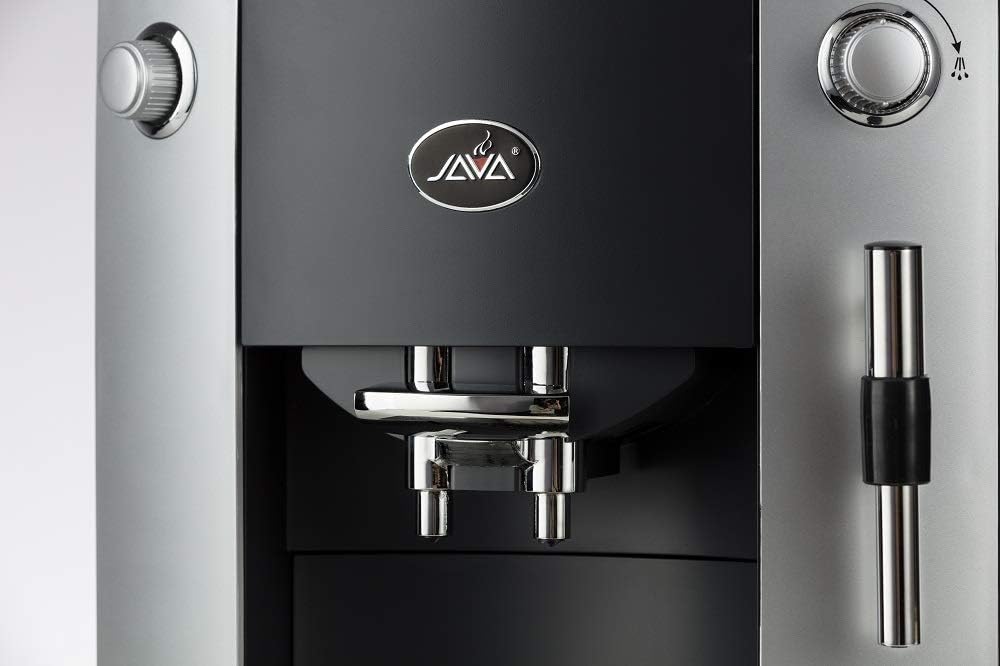
Figure 3: Detailed view of the adjustable coffee spout and drip tray.
2. Using Pre-Ground Coffee
- Ensure the machine is powered on.
- Locate the pre-ground coffee chute (refer to the machine diagram if available).
- Add one scoop of pre-ground coffee into the chute for a single serving. Do not add more than one scoop at a time to prevent blockages.
- Proceed with basic coffee preparation steps (place cup, select coffee type, start brewing).
3. Adjusting Grind Settings
- The machine features an adjustable grinder with six settings.
- To adjust, locate the grind setting dial, usually inside the bean hopper or near it.
- Important: Adjust the grind setting only when the grinder is operating (i.e., while the machine is actively grinding beans for a brew cycle). Adjusting it when the grinder is idle can damage the mechanism.
- Turn the dial to your desired setting: finer for stronger espresso, coarser for a milder taste.

Figure 4: Detail of the control panel with the solid knob and LCD display.
4. Preparing Cappuccino/Latte (Milk Frothing)
- Prepare Espresso: First, brew an espresso shot into your cup as described above.
- Prepare Milk: Fill a milk pitcher with cold milk (dairy or non-dairy) to just below the spout.
- Activate Steam: Turn the steam knob or press the dedicated steam button. Wait for the machine to reach steaming temperature (indicated on the LCD or by a light).
- Froth Milk: Immerse the steam wand tip just below the surface of the milk. Open the steam valve fully. Move the pitcher up and down slightly to create foam. Once desired foam consistency and temperature are reached, close the steam valve.
- Clean Wand: Immediately wipe the steam wand with a damp cloth to prevent milk residue from drying. Briefly open the steam valve again to clear any milk from inside the wand.
- Combine: Pour the frothed milk over your espresso.

Figure 5: Detail of the steam wand for milk frothing.
Maintenance
1. Automatic Cleaning System
- The JAVA WSD18-010A features an integrated automatic cleaning system.
- The machine will typically perform a rinse cycle upon power-on and power-off, and after each brew cycle.
- Ensure the drip tray is in place to collect rinse water.
- Follow any prompts on the LCD display for specific cleaning cycles or descaling procedures.
2. Daily Cleaning
- Drip Tray and Coffee Grounds Container: Empty and clean the drip tray and the used coffee grounds container daily or when indicated by the machine. Wash with warm, soapy water, rinse, and dry thoroughly.
- Water Tank: Remove, rinse, and refill the water tank daily with fresh water. Clean it with mild detergent weekly.
- Coffee Spout: Wipe the coffee spout area with a damp cloth to remove any coffee residue.
- Steam Wand: As mentioned in the operating instructions, clean the steam wand immediately after each use.
3. Descaling
- The machine will prompt you when descaling is required.
- Use a descaling solution specifically designed for espresso machines. Follow the instructions provided with the descaling agent.
- Pour the descaling solution into the water tank (diluted as per descaler instructions).
- Initiate the descaling program as per the machine's LCD prompts or user manual.
- After descaling, rinse the water tank thoroughly and run several cycles with fresh water to flush out any remaining descaling solution.
Troubleshooting
| Problem | Possible Cause | Solution |
|---|---|---|
| Machine does not power on. | Power cord not properly connected; no power at outlet. | Check power cord connection. Test outlet with another appliance. |
| Coffee is too weak or watery. | Grind setting too coarse; insufficient coffee dose; water tank empty. | Adjust grind to a finer setting (while grinder is running). Ensure adequate coffee beans/powder. Refill water tank. |
| Coffee is too bitter or too hot. | Grind setting too fine; water temperature too high. | Adjust grind to a coarser setting (while grinder is running). Check machine settings for temperature adjustment if available. |
| No coffee dispenses. | Water tank empty; coffee beans/powder empty; brewing unit clogged; descaling needed. | Refill water tank/beans. Clean brewing unit. Perform descaling if prompted. |
| Milk frother not producing foam. | Steam wand clogged; milk not cold enough; insufficient steam pressure. | Clean steam wand thoroughly. Use cold milk. Ensure machine has reached steaming temperature. |
| LCD display shows an error message. | Specific internal error. | Refer to the machine's on-screen error code for specific instructions. Power cycle the machine (turn off, unplug, wait 30 seconds, plug in, turn on). If the issue persists, contact customer support. |
Specifications
- Brand:
- JAVA
- Model Number:
- WSD18-010A
- Capacity:
- 1.9 Liters (Water Tank)
- Color:
- Black
- Special Feature:
- Programmable
- Coffee Maker Type:
- Espresso Machine
- Material:
- Glass (Note: This likely refers to internal components or display, as the main body is typically plastic/metal.)
- Style:
- Classic
- Product Specific Uses:
- Latte, Cappuccino, Espresso
- Recommended Uses:
- Home coffee preparation
- Product Weight:
- 20.94 Pounds (approx. 9.5 kg)
- Operation:
- Fully Automatic
- Human Interface Input:
- Buttons
- Output Pressure:
- 15 Bar
- Coffee Input Type:
- Coffee beans and powder
- Smart Home Compatibility:
- Not compatible with smart home systems
- Power Source Type:
- Electric
- Compatible Coffee Pods:
- Nespresso Vertuo Espresso (Note: This machine is designed for whole beans and ground coffee. Please verify compatibility with pods if this feature is desired.)
- Filter Type:
- Metal
- External Finish:
- Black
- Dishwasher Safe:
- No
- Included Components:
- Separable water tank
- Manufacturer:
- Wan Shida
Warranty and Support
Specific warranty details for the JAVA WSD18-010A espresso machine are typically provided with your purchase documentation or can be obtained directly from the retailer or manufacturer. Please retain your proof of purchase for warranty claims.
For technical support, service, or to inquire about replacement parts, please contact the customer service department of your retailer or the manufacturer, Wan Shida. Contact information can usually be found on the product packaging or the manufacturer's official website.
When contacting support, please have your model number (WSD18-010A) and purchase date readily available.

