1. Introduction
This manual provides essential information for setting up, operating, maintaining, and troubleshooting your Lenovo IdeaPad 530s 81EU0008US laptop. Please read this guide thoroughly to ensure proper use and to maximize the performance and longevity of your device.
2. Package Contents
Verify that all items are present in your product packaging:
- Lenovo IdeaPad 530s-15 81EU0008US Laptop
- Lenovo Lithium Ion Battery (integrated)
- Lenovo AC Adapter
- Lenovo Instruction Manual (this document)
3. Initial Setup
3.1. Charging the Battery
Before first use, connect the AC adapter to your laptop and a power outlet. Allow the battery to charge fully. The battery indicator light will change to indicate a full charge.
3.2. Powering On
Open the laptop lid. Press the power button, typically located on the right side of the keyboard deck, to turn on the laptop. The system will boot into Windows 10 Home.

Image: Lenovo IdeaPad 530s laptop displaying the Windows 10 desktop after powering on.
3.3. Initial Windows Setup
Follow the on-screen prompts to complete the Windows 10 Home setup process. This includes selecting your region, language, connecting to a Wi-Fi network, and creating a user account.
3.4. Connecting to Wi-Fi
During the initial setup or at any time, click the Wi-Fi icon in the taskbar (bottom right of the screen), select your desired network, and enter the password if prompted.
4. Components Overview
4.1. Front View
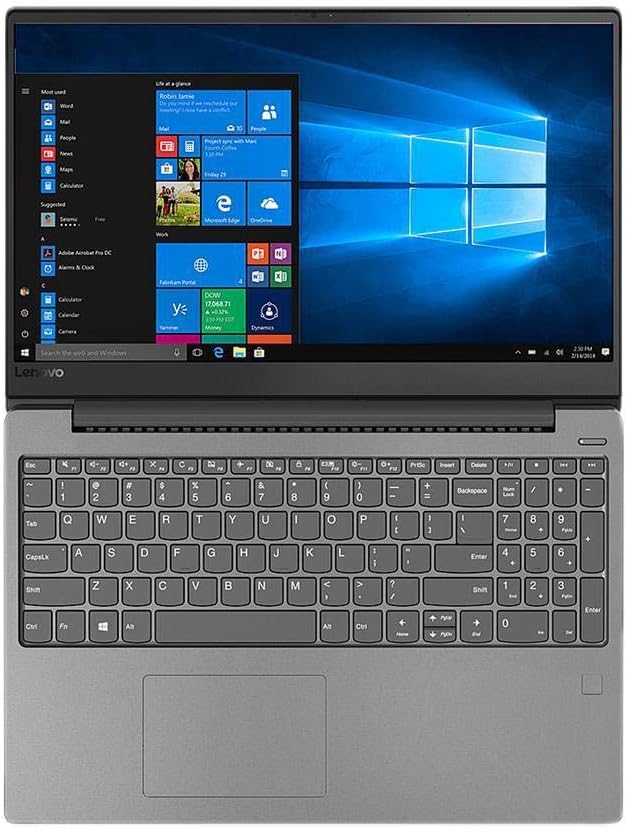
Image: Top-down view of the laptop's keyboard and screen.
- Display: 14-inch Full HD (1920 x 1080) IPS LCD with LED backlight (anti-glare).
- Webcam: Integrated webcam located above the display.
- Keyboard: Full-size keyboard for typing.
- Touchpad: Multi-touch gesture supported touchpad below the keyboard.
4.2. Side Views (Ports)

Image: Side view of the laptop highlighting the available ports.
- USB 3.0 Ports: Two (2) ports for connecting USB devices.
- USB 3.1 Type-C Port: One (1) port for modern USB-C devices.
- HDMI Port: One (1) port for connecting an external display.
- Headphone/Microphone Combo Jack: One (1) port for audio input/output.
- Card Reader: 4-in-1 (SD, SDHC, SDXC, MMC) for memory cards.
5. Operating Instructions
5.1. Power Management
- Sleep Mode: Close the lid or press the power button briefly to enter sleep mode.
- Shut Down: Click the Windows Start button, then Power > Shut down.
- Restart: Click the Windows Start button, then Power > Restart.
5.2. Using the Touchpad
The touchpad supports various multi-touch gestures for navigation. Refer to Windows settings for customization options.
- Tap: Single finger tap for left-click.
- Two-finger tap: For right-click.
- Two-finger scroll: Drag two fingers up or down to scroll.
- Pinch-to-zoom: Pinch two fingers together or spread them apart to zoom in or out.
5.3. Connecting External Devices
Connect USB devices such as mice, keyboards, or external storage to the available USB 3.0 or USB 3.1 Type-C ports. For external monitors, use the HDMI port.
6. Maintenance
6.1. Cleaning Your Laptop
- Screen: Use a soft, lint-free cloth lightly dampened with water or a screen cleaner. Do not spray liquid directly onto the screen.
- Keyboard and Chassis: Use a soft, dry cloth. For stubborn dirt, a slightly damp cloth can be used. Avoid harsh chemicals.
6.2. Battery Care
To prolong battery life, avoid extreme temperatures and do not allow the battery to fully discharge frequently. For long-term storage, charge the battery to about 50-60%.
6.3. Software Updates
Regularly check for and install Windows updates and Lenovo driver updates to ensure optimal performance and security. Access Windows updates via Settings > Update & Security.
7. Troubleshooting
This section addresses common issues you might encounter.
7.1. Laptop Does Not Power On
- Ensure the AC adapter is securely connected to both the laptop and a working power outlet.
- Verify the power outlet is functional by plugging in another device.
- If the battery is completely drained, it may take a few minutes of charging before the laptop can power on.
7.2. No Wi-Fi Connection
- Check if Wi-Fi is enabled in Windows settings (Settings > Network & Internet > Wi-Fi).
- Ensure your router is powered on and functioning correctly.
- Try restarting your laptop and your Wi-Fi router.
7.3. Slow Performance
- Close unnecessary applications running in the background.
- Check for and install any pending Windows updates.
- Ensure your storage (SSD) is not critically full.
- Run a virus scan to check for malware.
8. Specifications
Detailed technical specifications for the Lenovo IdeaPad 530s 81EU0008US:
| Feature | Specification |
|---|---|
| Model Number | 81EU0008US |
| Processor | Intel Core i5-8250U Quad-Core (1.6 GHz base, up to 3.4 GHz) |
| RAM | 8GB DDR4 2400MHz SDRAM |
| Storage | 256GB PCIe-SSD |
| Graphics | Intel UHD Graphics 620 (Integrated) |
| Display | 14-inch FHD (1920 x 1080) IPS LCD with LED backlight (anti-glare) |
| Operating System | Windows 10 Home 64-bit |
| Ports | 2 x USB 3.0, 1 x USB 3.1 Type-C, 1 x HDMI, 1 x Headphone/Microphone combo jack |
| Card Reader | 4-in-1 (SD, SDHC, SDXC, MMC) |
| Wireless Connectivity | 802.11AC Wireless LAN, Bluetooth 4.1 |
| Audio | Built-in Harman 2 x speakers (2W) |
| Webcam | Yes |
| Battery Life | Up to 8 hours (average) |
| Dimensions (W x D x H) | 12.73" x 8.9" x 0.65" (32.33 cm x 22.61 cm x 1.65 cm) |
| Weight | 3.5 lbs (1.59 kg) |
9. Warranty and Support
9.1. Product Warranty
Your Lenovo IdeaPad 530s 81EU0008US laptop comes with a 1-Year USA Warranty. Please retain your proof of purchase for warranty claims. The warranty covers manufacturing defects and hardware failures under normal use conditions.
9.2. Technical Support
For technical assistance, driver downloads, or further information, please visit the official Lenovo support website. You can typically find support resources by searching for your specific model number (81EU0008US) on the Lenovo support portal.
Online Support: support.lenovo.com


