
1. Introduction
Tekken 6 for the Sony PSP is a fighting game featuring a diverse roster of characters. Players engage in one-on-one combat, utilizing various martial arts styles. This renewed product has been tested and certified to function like new, offering the full game experience.

Image 1.1: The official game cover for Tekken 6 on Sony PSP, featuring several key characters.
2. Setup
To begin playing Tekken 6 on your Sony PSP, follow these steps:
- Power On PSP: Ensure your Sony PSP console is charged and powered on.
- Insert UMD: Open the UMD drive cover on the back of your PSP. Carefully insert the Tekken 6 UMD disc with the label facing upwards until it clicks into place. Close the UMD drive cover securely.
- Select Game: Navigate to the Game menu on your PSP's XMB (XrossMediaBar) interface. Select the Tekken 6 icon to start the game.
- Initial Load: The game will load. Follow any on-screen prompts for initial setup, such as language selection or saving data.
3. Operating and Gameplay
Tekken 6 offers various modes and features to enhance the fighting experience.
3.1. Basic Controls
The game utilizes the standard PSP control scheme:
- Directional Pad/Analog Stick: Character movement.
- Face Buttons (▲, ○, □, ✖): Attack commands (punches, kicks).
- Shoulder Buttons (L, R): Guard, special moves, or combinations.
- Start Button: Pause menu.
- Select Button: Varies by mode, often for camera or specific actions.
3.2. Game Modes
- VS Mode: Engage in classic one-on-one battles against the AI or other players online.
- Scenario Campaign Mode: Venture through a story-driven campaign, playable in single-player or two-player online co-op. This mode features intense drama and large-scale battles.
- Online Co-op Battles: Team up with friends globally to fight against AI-controlled enemies.
3.3. Character Customization
Tekken 6 allows for extensive character customization. Players can create new characters or modify existing ones by changing hairstyles, apparel, fashion accessories, and tattoos. Customized fighters can be used in VS mode or Co-Op mode.

Image 3.1: In-game combat showcasing two characters exchanging blows.
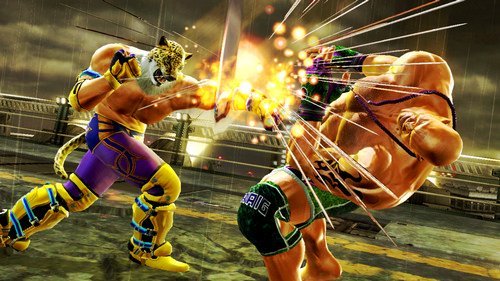
Image 3.2: Dynamic gameplay screenshot featuring a unique character.
4. Maintenance
Proper care of your Tekken 6 UMD disc and Sony PSP console will ensure continued enjoyment.
- UMD Care: Keep the UMD disc clean and free from dust, fingerprints, and scratches. Handle the disc by its edges. Store it in its case when not in use.
- Console Care: Keep your PSP console clean and dry. Avoid exposing it to extreme temperatures or direct sunlight.
- Software Updates: Ensure your PSP system software is up to date for optimal performance and compatibility.
5. Troubleshooting
If you encounter issues while playing Tekken 6, consider the following:
- Game Not Loading:
- Ensure the UMD disc is inserted correctly and the drive cover is closed.
- Check the UMD disc for visible scratches or dirt. Clean gently with a soft, lint-free cloth if necessary.
- Restart your PSP console.
- Controls Unresponsive:
- Verify that your PSP's buttons and analog stick are functioning correctly outside of the game.
- Restart the game or console.
- Freezing/Crashing:
- Ensure your PSP has sufficient battery charge.
- Try restarting the game or console.
- If the issue persists, it may indicate a problem with the UMD disc or the PSP console itself.
6. Specifications
| Feature | Detail |
|---|---|
| Product Title | Tekken 6 - Sony PSP (Renewed) |
| Compatible Console | Sony PlayStation Portable |
| Manufacturer | Namco |
| UPC | 748926476201 |
| ASIN | B07GRGYD8F |
| Product Dimensions | 7.03 x 4.11 x 0.59 inches |
| Item Weight | 8 ounces |
| Rated | Teen |
| Date First Available | August 22, 2018 |
7. Warranty and Support
As a Certified Refurbished product, Tekken 6 for Sony PSP is tested and certified to look and work like new. It comes with a minimum 90-day warranty, covering functionality testing, basic cleaning, inspection, and repackaging. For support regarding this renewed product, please refer to the seller's contact information provided at the time of purchase or the Amazon Renewed program guidelines.
The refurbishing process ensures the product meets performance standards. Any issues within the warranty period should be directed to the seller for a refund or replacement.


