
1. Overview
The U-Reach UB300 USB Flash 1-2 Portable Copier is a compact and efficient device designed for high-speed duplication of USB flash drives. It operates standalone, requiring no connection to a PC, making it highly portable and convenient for various data duplication tasks. This device supports a wide range of data formats and ensures accurate bit-for-bit duplication.
Key Features
- Impeccable copy speed: up to 2 GB per minute for each port.
- Supports all types of data format copying, performing bit-for-bit duplication.
- Quick copy supports Linux (ext2/ext3/ext4) and NTFS, FAT16/32 file systems.
- Compatible with USB sticks of the largest capacities available on the market.
- Standalone operation, no PC required.

Image: The U-Reach UB300 USB Flash 1-2 Portable Copier, showing its compact design with three USB ports and an LCD display.
2. Setup Guide
The UB300 is designed for straightforward setup and operation. Follow these steps to prepare your device for use:
- Unpacking: Carefully remove the UB300 duplicator from its packaging. Ensure all components, including the power adapter, are present.
- Power Connection: Connect the provided power adapter to the DC input port on the UB300. Plug the other end of the power adapter into a standard electrical outlet.
- Power On: The device will typically power on automatically once connected to power. The LCD display will illuminate, indicating readiness.
- Initial Check: Observe the LCD display. It should show the main menu or a welcome message, indicating the device is ready for operation.
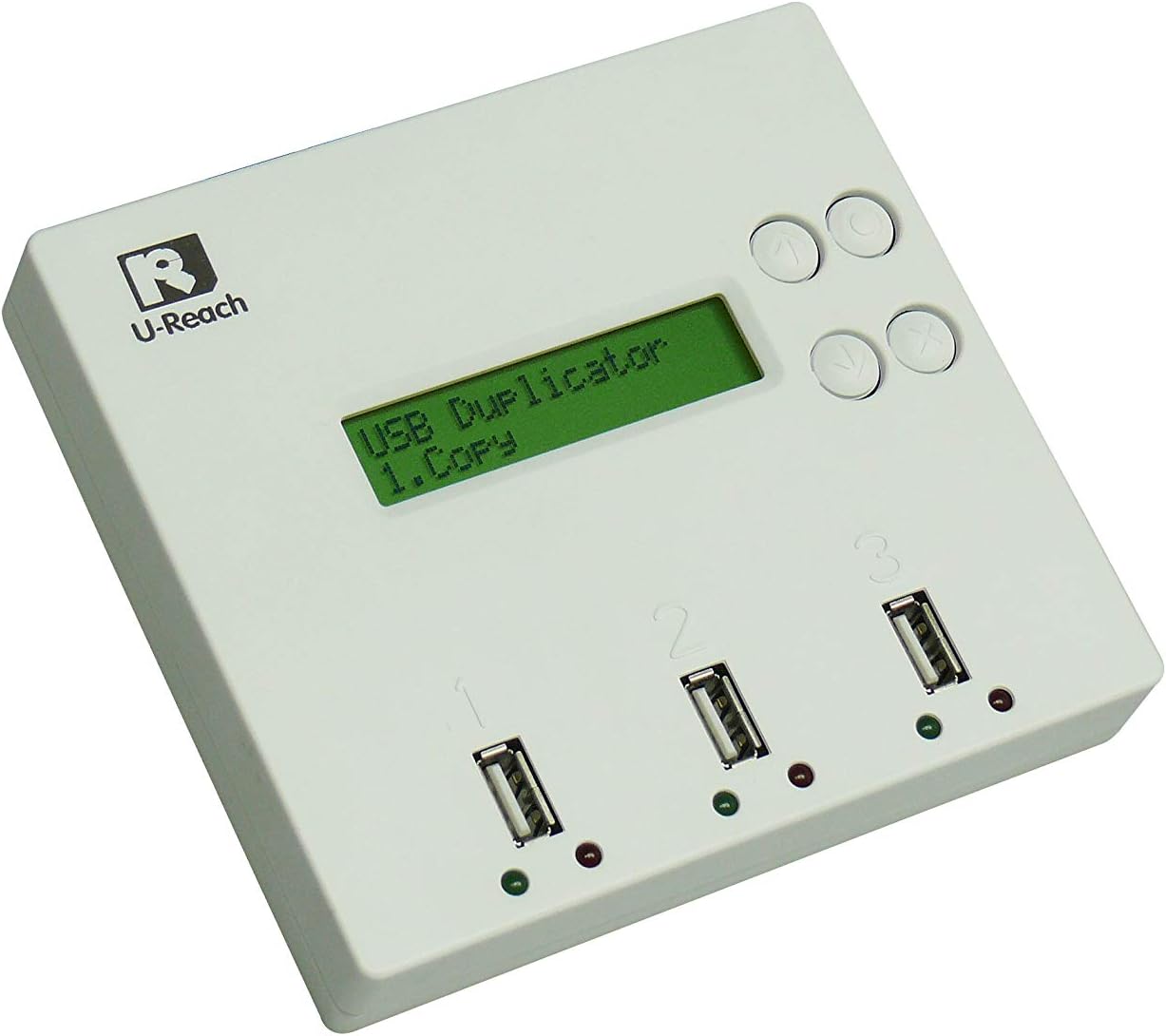
Image: A top-down view of the U-Reach UB300, highlighting its USB ports and control buttons.
3. Operating Instructions
The UB300 offers various duplication modes and features for efficient USB flash drive copying.
3.1. Copying Process
The UB300 supports high-speed duplication and various copying methods:
- Standard Copy: For general data duplication.
- Quick Copy: Optimized for specific file systems like Linux (ext2/ext3/ext4), NTFS, FAT16/32, significantly speeding up the process by only copying data areas.
- Bit-for-Bit Duplication: Ensures an exact, sector-by-sector copy of the source drive, regardless of the file system. This is ideal for forensic imaging or creating identical backups.
To perform a copy:
- Insert the source USB flash drive into the designated source port (usually Port 1 or clearly marked).
- Insert the target USB flash drives into the remaining available ports.
- Navigate the menu using the control buttons (UP, DOWN, OK, ESC) to select the desired copy mode (e.g., "1. Copy").
- Confirm your selection to begin the duplication process. The LCD will display the progress.

Image: Illustration showing the UB300 performing high-speed duplication at 1.5 GB/min.

Image: Diagram illustrating the accurate bit-by-bit comparison feature, ensuring 100% identical data between source and target.
3.2. Automatic Bad Sector Check
The UB300 automatically inspects for bad sectors during the copying process. This feature ensures that target drives obtain all the source data and helps identify problematic drives.

Image: Magnified view of a USB drive, illustrating the automatic bad sector detection process.
3.3. Software Encrypted Data Duplication
The UB300 is capable of duplicating software-encrypted data and Host Protected Area (HPA) files, providing comprehensive cloning capabilities.
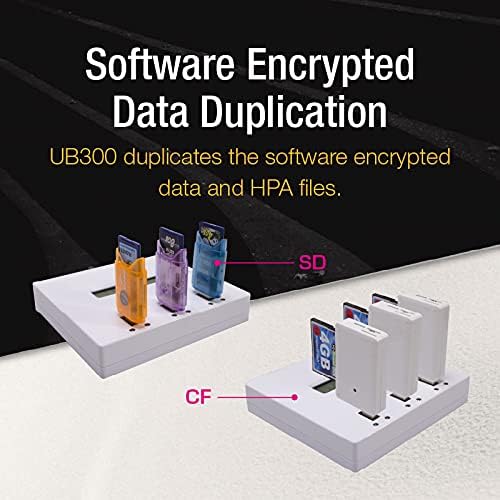
Image: The UB300 with various types of media (SD, CF) inserted via adapters, demonstrating its ability to duplicate software-encrypted data.
3.4. Compatible Devices and Media
The UB300 is highly versatile and compatible with various USB devices and flash media types, often through appropriate adapters.

Image: Grid showing compatibility with USB 2.0, USB 3.0, TF Card, CF, SD Card, and CF Card (via adapters).
4. Maintenance
Proper maintenance ensures the longevity and optimal performance of your UB300 duplicator.
- Cleaning: Use a soft, dry cloth to clean the exterior of the device. Avoid using liquid cleaners or abrasive materials.
- Port Care: Keep the USB ports free from dust and debris. Use compressed air if necessary to clear any obstructions.
- Storage: Store the device in a cool, dry place away from direct sunlight and extreme temperatures when not in use.
- Firmware Updates: Check the manufacturer's website periodically for any available firmware updates to ensure the device has the latest features and bug fixes.
5. Troubleshooting
If you encounter issues with your UB300 duplicator, refer to the following common problems and solutions:
| Problem | Possible Cause | Solution |
|---|---|---|
| Device does not power on. | Power adapter not connected or faulty outlet. | Ensure power adapter is securely connected. Try a different power outlet. |
| Copy process fails or stops. | Faulty source/target drive, insufficient power, or incorrect settings. | Check source and target drives for errors. Ensure stable power supply. Verify selected copy mode. |
| Target drive not detected. | Drive not properly inserted or incompatible. | Re-insert the drive firmly. Ensure the drive is compatible with USB standards. |
| Slow copy speed. | Drive performance limitations or non-optimized copy mode. | Use high-speed USB 3.0 drives. Select 'Quick Copy' mode if applicable for your file system. |
6. Technical Specifications
Detailed specifications for the U-Reach UB300 USB Flash 1-2 Portable Copier:
| Feature | Specification |
|---|---|
| Model Name | UB300 |
| Connectivity Technology | USB |
| Hardware Connectivity | USB Type A |
| Flash Memory Type Supported | Micro SD (via adapter), SD/SDHC/MMC/miniSD/microSD/CF (via USB card reader adapter) |
| Operating System | Linux (internal) |
| Item Weight | 1.19 pounds |
| Product Dimensions (LxWxH) | 5.12 x 4.72 x 0.98 inches |
| Memory Storage Capacity (Max) | Up to 2TB (Terabytes) |
| Read Speed | 25 Megabytes Per Second |
| Power Supply | 12V, 3A |
| Operating Temperature | -20°C ~ 85°C (-4°F ~ 185°F) |
| Storage Temperature | 5°C ~ 45°C (41°F ~ 113°F) |
| Operating Humidity | 5% ~ 95% (non-condensing) |
| Storage Humidity | 20% ~ 80% (non-condensing) |
| Display | 2*16 Monochromes LCD-Display |
| Input | 4 Push Buttons (UP, Down, OK, ESC) |
| LED Indicators | Red/Green LED on each slot |
| Supported Languages | English, Japanese, Chinese |
| Copy Modes | Only Data, Whole Media |
| Test Functions | Info, Capacity Check, Speed Check |

Image: Original technical data table, providing detailed specifications for the UB300 model.
7. Warranty and Support
U-Reach products are manufactured to high-quality standards. For specific warranty terms and conditions, please refer to the warranty card included with your product or visit the official U-Reach website. In case of technical issues or inquiries, please contact U-Reach customer support through their official channels.
U-Reach Official Website: www.u-reach.com


