
VTech ES1610-2A
VTech ES1610A-T Twin Bluetooth Mobile Connect Digital Cordless Phone Instruction Manual
Introduction
Welcome to your new VTech ES1610A-T Twin Bluetooth Mobile Connect Digital Cordless Phone. This manual provides essential information for setting up, operating, and maintaining your device. Please read these instructions carefully to ensure proper use and to take full advantage of your phone's features.
Setup
Unpacking and Initial Setup
Before using your phone, ensure all components are present and correctly connected.
- Connect the power adapter to the base unit and a wall outlet.
- Connect the telephone line cord to the base unit and a telephone wall jack.
- Insert the rechargeable batteries into each handset, observing polarity.
- Place each handset on its respective charging cradle to charge for at least 16 hours before first use.

Image: The power adapter with a UK plug and two telephone line cords with clear RJ11 connectors. This image illustrates the essential cables required for setting up the VTech ES1610A-T phone system.
Operating Instructions
Basic Phone Functions
Your VTech ES1610A-T phone offers a range of features for convenient communication.
- Making and Receiving Calls: Use the keypad to dial numbers. Press the talk button to answer incoming calls.
- Handset Speakerphone: Activate the high-quality speakerphone for hands-free conversations.
- Call Transfer: Transfer calls between handsets.
- Intercom: Communicate directly between handsets.
- 3-Way Conference Calls: Conduct conference calls with two external parties.
- Phonebook Directory: Store up to 20 names and numbers for quick dialing.
- Caller ID: View the last 10 incoming caller numbers.
- Ringer Melodies: Choose from 10 ringer melodies (5 polyphonic and 5 standard).
- Page/Handset Locator: Use the base unit to locate misplaced handsets.
- Alarm Function: Set alarms directly from the handset.
- Bluetooth Mobile Connect: Pair your mobile phone to make and receive mobile calls through your cordless handset.
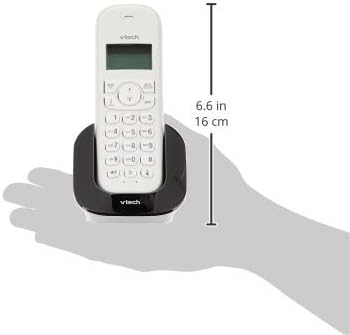
Image: A white VTech cordless handset resting in its black charging cradle, with a measurement indicating a height of 6.6 inches (16 cm). This image provides a visual reference for the handset's size and design.
Maintenance
Cleaning and Care
- Clean the phone's surfaces with a soft, damp cloth. Avoid using harsh chemicals or abrasive cleaners.
- Do not immerse the phone or its components in water.
- Keep the charging contacts on the handset and base unit clean to ensure proper charging.
- Store the phone in a cool, dry place away from direct sunlight and extreme temperatures.
Battery Information
- The phone operates with 4x AAA rechargeable batteries. Use only the specified type of rechargeable batteries.
- If the phone will not be used for an extended period, remove the batteries to prevent leakage.
- Dispose of used batteries according to local regulations.
Troubleshooting
If you encounter issues with your VTech ES1610A-T phone, refer to the following common solutions:
| Problem | Solution |
|---|---|
| No dial tone | Ensure the telephone line cord is securely connected to both the base unit and the wall jack. Check if the power adapter is connected and the base unit is powered on. |
| Handset not charging | Verify the handset is correctly seated in the charging cradle. Clean the charging contacts on both the handset and cradle. Ensure the power adapter is connected. |
| Poor call quality or limited range | Move closer to the base unit. Avoid placing the base unit near large metal objects, other electronic devices, or thick walls that may interfere with the signal. |
| Cannot pair Bluetooth mobile phone | Ensure your mobile phone's Bluetooth is enabled and discoverable. Follow the pairing instructions in the phone's menu. Make sure the mobile phone is within range of the VTech base unit. |
Specifications
- Model Number: ES1610-2A BK
- Brand: VTech
- Colour: Black
- Material: Plastic
- Telephone Type: Cordless
- Power Source: Corded Electric
- Dialler Type: Single Keypad
- Answering System Type: Digital
- Compatible Devices: Mobile Phones (Bluetooth)
- Conference Call Capability: 3-way
- Multiline Operation: Single-Line Operation
- Talk Range: Digital enhanced clarity 300m (outdoor)*
- Radiation Mode: Ultra-low Radiation Mode**
- Display: Large character and backlit LCD display
- Phonebook Capacity: 20 names and numbers
- Caller ID Memory: 10 caller numbers
- Ringer Melodies: 10 (5 polyphonic and 5 standard)
- Batteries: 4x AAA rechargeable batteries (per handset)
*Actual range may vary depending on environmental conditions.
**Ultra-low Radiation Mode operates with the lowest radiation when the handset is placed on the base unit.
Warranty and Support
For warranty information and technical support, please refer to the warranty card included with your product or visit the official VTech website. Keep your purchase receipt as proof of purchase.
Related documentsES1610-2A


Ask a question about this manual
Ask about setup, troubleshooting, compatibility, parts, safety, or missing instructions. Manuals+ will review the question and use this page’s manual context to help answer it.