
Introduction
The AIMILAR Digital Countdown Timer AY4034 is designed to help you track important events up to 9999 days. This manual provides detailed instructions for setting up and operating your countdown timer, ensuring you can effectively monitor your significant dates.
Safety Information
Please read and understand all instructions before using this device. Keep the device away from water and extreme temperatures. Do not attempt to disassemble or repair the unit yourself. Use only the specified battery type.
Package Contents
- AIMILAR Digital Countdown Timer AY4034
- Interchangeable background cards (e.g., Retirement, Wedding, Blank)
- User Manual
Product Overview
The AIMILAR Digital Countdown Timer features a large display for easy readability and several control buttons on the back for setting and adjusting the countdown. The front display shows days, hours, minutes, and seconds.

Figure 1: Front view of the AIMILAR Digital Countdown Timer.
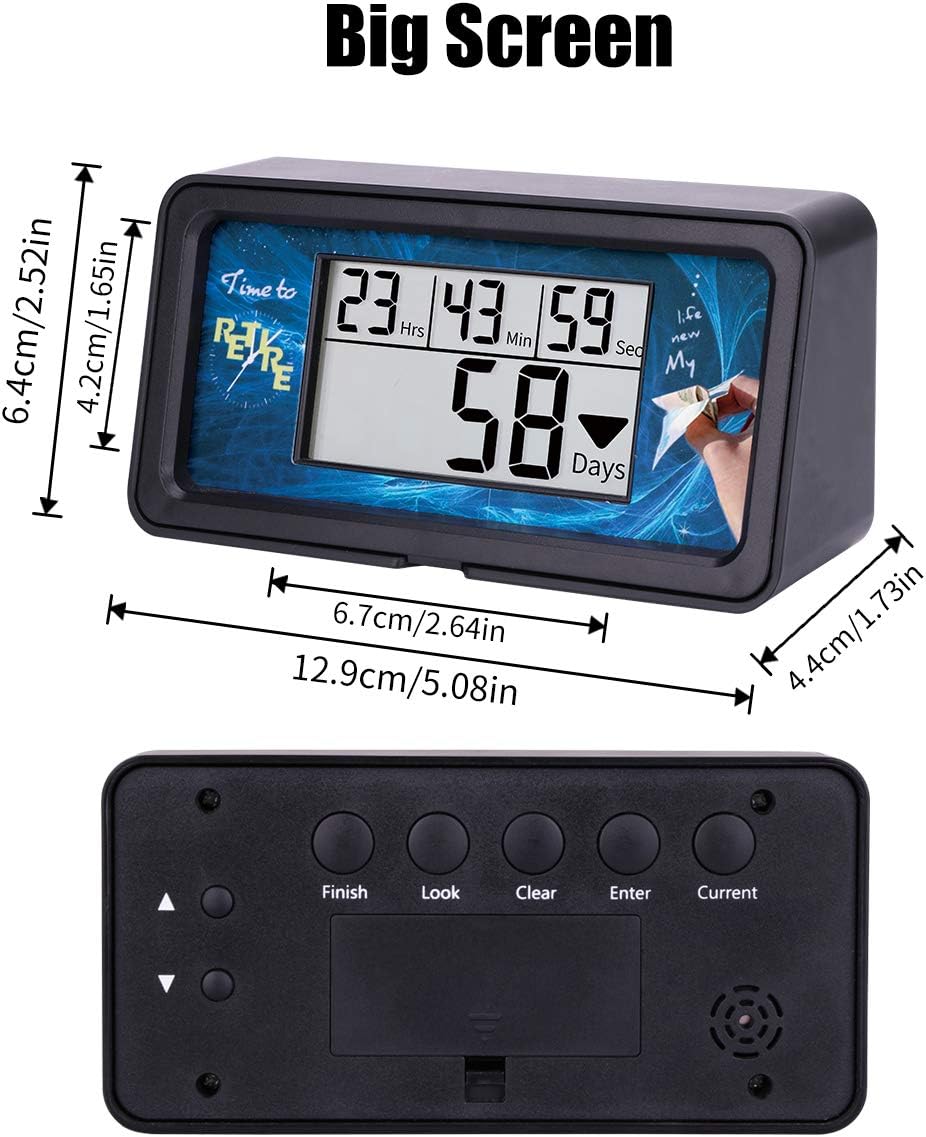
Figure 2: Back view showing control buttons (Finish, Look, Clear, Enter, Current) and dimensions.
Setup
1. Battery Installation
The timer requires two AAA batteries (not included). Open the battery compartment on the back of the device and insert the batteries, ensuring correct polarity.
2. Setting the Target Time (Finish Time)
- Press the Finish button.
- Use the arrow buttons (up/down) to adjust the year, month, day, hour, minute, and second for your target event.
- Press Enter to confirm each setting and move to the next.
3. Setting the Current Time
- Press the Current button.
- Use the arrow buttons (up/down) to adjust the current year, month, day, hour, minute, and second.
- Press Enter to confirm each setting and move to the next.
Once both target and current times are set, the timer will automatically calculate and display the remaining countdown time.
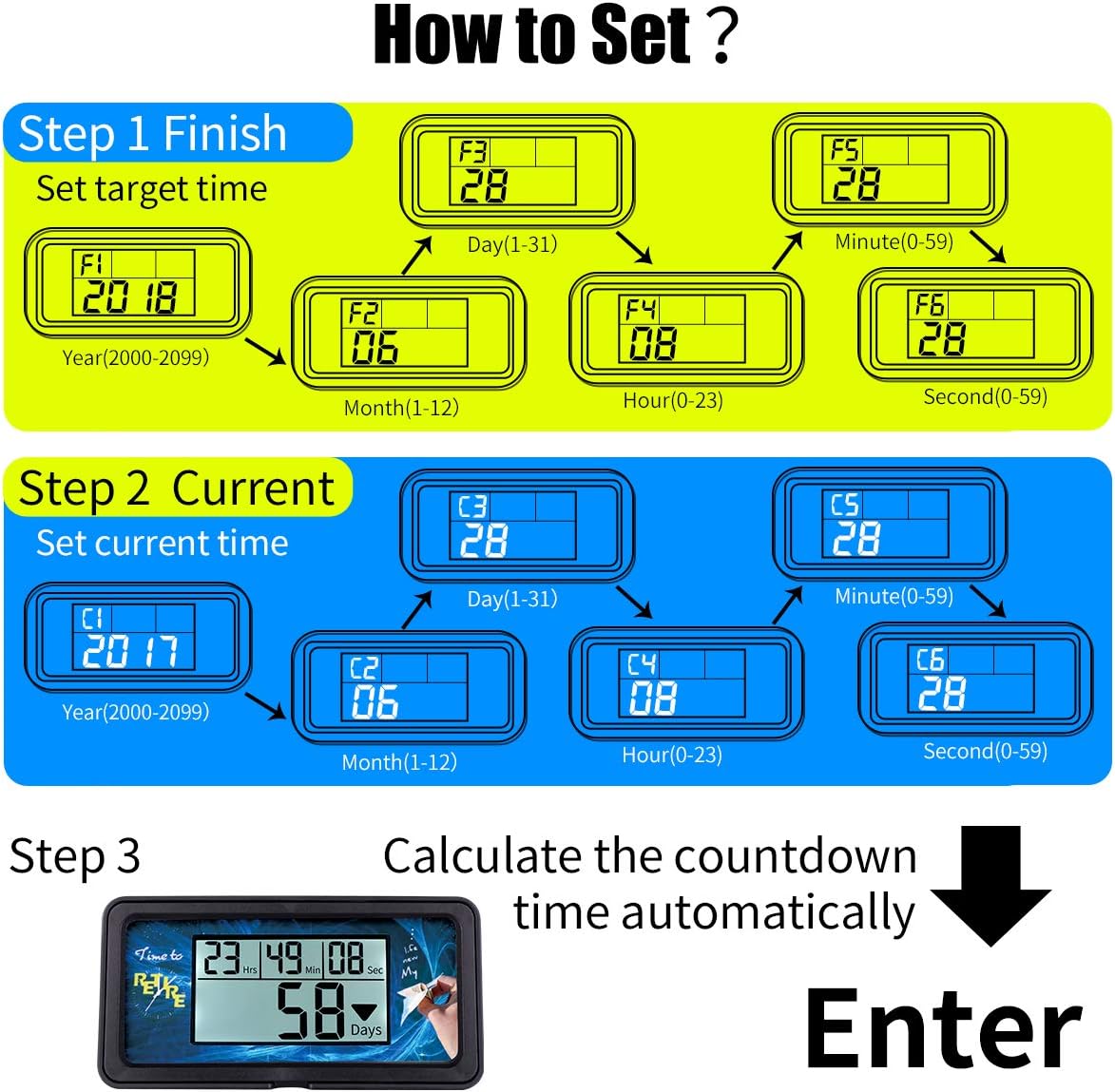
Figure 3: Visual guide for setting target and current times.
4. Video Guide: Setting the Countdown Timer
Video 1: Official AIMILAR guide on setting up the 9999 Days Countdown Timer (Model AY4034).
Operating Instructions
1. Backlight Function
Press any button to activate the backlight. The backlight will automatically turn off after 10 seconds of inactivity to conserve battery life.

Figure 4: Comparison of the timer display with and without backlight activated.
2. Memory Function
The timer retains your last countdown setting. To recall it:
- Hold the Clear button until all numbers display "0".
- Press the Enter button. The timer will resume counting down from your previously set target.

Figure 5: Steps to use the memory function to recall a previous countdown.
3. Checking Settings (Look Function)
While the timer is counting down, press the Look button to cycle through the different settings you have entered (e.g., target date, current date). This allows you to quickly review your programmed information.
4. Customizing the Display
The timer allows for interchangeable background cards. You can use the provided cards (e.g., Retirement, Wedding) or design your own custom card to personalize the timer for your specific event.

Figure 6: The timer with its removable frame and various background card options.
Maintenance
To clean the timer, gently wipe it with a soft, dry cloth. Do not use abrasive cleaners or immerse the device in water. Replace batteries when the display becomes dim or unresponsive.
Troubleshooting
| Problem | Solution |
|---|---|
| Display is dim or blank. | Replace the AAA batteries. Ensure batteries are inserted with correct polarity. |
| Timer not counting down correctly. | Verify that both the target time (Finish) and current time (Current) are set accurately. |
| Cannot clear previous settings. | Hold the Clear button for approximately 6 seconds until the display shows "0". |
| Display is hard to read. | Activate the backlight by pressing any button. Ensure the timer is placed at an optimal viewing angle. |
Specifications
- Brand: AIMILAR
- Model Number: AY4034
- Material: Acrylonitrile Butadiene Styrene
- Product Dimensions: 2.5"D x 5"W x 1.73"H (6.4cm D x 12.9cm W x 4.4cm H)
- Item Weight: 5.1 ounces (144.6 grams)
- Screen Size: 2.5 Inches
- Countdown Capacity: Up to 9999 days
- Batteries Required: Yes (AAA)
- UPC: 190835417583
Warranty and Support
This AIMILAR product comes with a 30-day money-back guarantee and a 2-year warranty. For technical support or warranty claims, please contact AIMILAR customer service through the retailer where the product was purchased or visit the official AIMILAR website.