1. Introduction
This manual provides detailed instructions for the DJI Mavic 2 Fly More Kit, an accessory bundle designed to enhance the flight experience and convenience for DJI Mavic 2 Pro and Mavic 2 Zoom drone users. The kit includes essential components for extended operation and portability.
2. What's in the Box
The DJI Mavic 2 Fly More Kit includes the following components:
- Two Intelligent Flight Batteries: High-capacity batteries for extended flight time.
- Car Charger: For charging batteries on the go.
- Battery Charging Hub: Manages sequential charging of multiple batteries.
- Battery to Power Bank Adapter: Converts intelligent flight batteries into portable power banks.
- Low-Noise Propellers: Designed for quieter flight.
- Shoulder Bag: A versatile bag for carrying the drone and accessories.
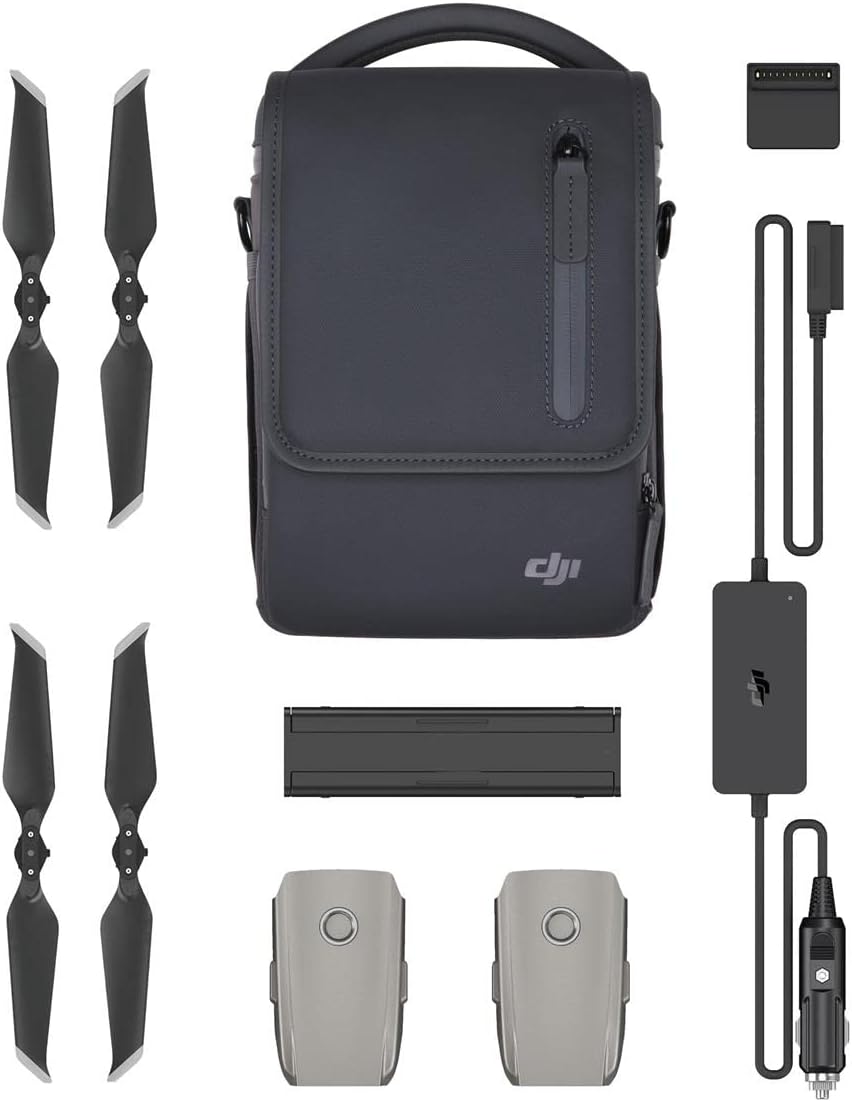
Image: Overview of the DJI Mavic 2 Fly More Kit components, including batteries, propellers, charging hub, car charger, power bank adapter, and shoulder bag.

Image: All components of the Fly More Kit, including the Mavic 2 drone (sold separately), laid out on a white surface.
3. Setup
3.1. Charging Intelligent Flight Batteries
The Intelligent Flight Batteries can be charged using the provided Car Charger or the Battery Charging Hub.
- Using the Car Charger: Connect the car charger to your vehicle's 12V power outlet. Connect the battery to the charger. The charger has a max output power of up to 80W and features low-voltage protection technology to prevent damage to your vehicle's battery.
- Using the Battery Charging Hub: Connect the charging hub to a compatible power adapter (not included in this kit, typically comes with the drone). Insert up to four Intelligent Flight Batteries into the hub. The hub enhances efficiency by charging batteries in sequence according to their remaining power level, with more fully-charged batteries receiving power first.
3.2. Attaching Low-Noise Propellers
The low-noise propellers are designed for quieter flight. Ensure the correct propellers are attached to the corresponding motor mounts (indicated by markings on the propellers and motors). Press down and twist to secure them.
3.3. Preparing the Shoulder Bag
The shoulder bag is designed to carry the Mavic 2 drone and its accessories. Organize the components within the bag's compartments for secure transport.

Image: A person holding the shoulder bag, illustrating its approximate dimensions (10 inches / 26 cm in height).
4. Operating Instructions
4.1. Intelligent Flight Batteries
The Intelligent Flight Batteries have a capacity of up to 59.29 Wh, providing a flight time of approximately 31 minutes. Battery status is monitored in real-time by the Intelligent Battery Management System, which communicates with the drone and remote controller.
4.2. Car Charger Usage
The car charger enables convenient charging of your Intelligent Flight Batteries while traveling. Connect it to your vehicle's power outlet and the battery. The low-voltage protection feature safeguards your car battery from excessive discharge.
4.3. Battery Charging Hub Operation
The charging hub streamlines the charging process for multiple batteries. Simply insert the batteries, and the hub will intelligently charge them one by one, prioritizing those with higher remaining power to get them ready for use faster.
4.4. Battery to Power Bank Adapter
This adapter transforms your Intelligent Flight Batteries into high-capacity power banks. It features two USB Type-A ports, offering a 10W dual output, suitable for charging mobile devices or the drone's remote controller.

Image: The Battery to Power Bank Adapter connected to an Intelligent Flight Battery, charging a smartphone via a USB cable.

Image: The Battery to Power Bank Adapter connected to an Intelligent Flight Battery, charging a DJI remote controller.
4.5. Low-Noise Propellers
The included low-noise propellers are engineered to reduce the acoustic footprint of the drone during flight, contributing to a quieter operation experience.
4.6. Shoulder Bag Use
The versatile shoulder bag provides a convenient and secure way to transport your Mavic 2 drone and all the components of the Fly More Kit. Its design ensures that all items are protected during transit.

Image: The DJI Mavic 2 Fly More Kit components, including the shoulder bag, laid out for display.
5. Maintenance
- Batteries: Store Intelligent Flight Batteries in a cool, dry place. Avoid fully discharging batteries for long-term storage. Periodically charge and discharge batteries to maintain their health.
- Propellers: Inspect propellers for any cracks, bends, or damage before each flight. Replace damaged propellers immediately. Keep them clean from dust and debris.
- Chargers and Adapters: Keep charging devices clean and dry. Avoid exposing them to extreme temperatures or moisture. Store cables neatly to prevent damage.
- Shoulder Bag: Clean the bag with a damp cloth as needed. Do not machine wash. Ensure the bag is dry before storing equipment.
6. Troubleshooting
- Battery Not Charging: Ensure all connections are secure. Check if the power source (car outlet or wall adapter) is functioning correctly. If using the charging hub, verify that the power adapter is compatible and providing sufficient power.
- Short Flight Time: Ensure batteries are fully charged before use. Battery performance can degrade over time; consider replacing older batteries. Environmental factors like cold weather can also affect battery life.
- Propeller Noise: While the included propellers are low-noise, excessive noise might indicate improper installation or damage. Re-install or replace propellers if necessary.
- Power Bank Adapter Not Charging Devices: Verify that the Intelligent Flight Battery connected to the adapter has sufficient charge. Ensure the USB cable and the device being charged are functioning correctly.
For more detailed troubleshooting or issues related to the drone itself, please refer to the DJI Mavic 2 drone's official user manual or contact DJI support.
7. Specifications
| Feature | Specification |
|---|---|
| Brand | DJI |
| Model Name | CP.MA.00000037.01 |
| Special Feature | Additional batteries, chargers, low-noise propellers, and a shoulder bag |
| Color | Gray |
| Material | Faux Leather (for bag) |
| Item Weight | 1.32 pounds (600 Grams) |
| Product Dimensions | 10.04"L x 5.98"W x 6.73"H |
| Batteries Included | Yes (3 Lithium Metal batteries required, 2 included in kit) |
| Battery Cell Composition | Lithium Ion |
| Manufacturer | DJI |
| First Available Date | August 23, 2018 |
8. Warranty and Support
For warranty information and technical support regarding your DJI Mavic 2 Fly More Kit, please refer to the official DJI website or contact DJI customer service directly. Keep your proof of purchase for warranty claims.
DJI Official Website: www.dji.com


