
Esperanza EP133K - 5901299940068
Esperanza Wireless Bluetooth LED Speaker User Manual
Model: EP133K
Introduction
Thank you for purchasing the Esperanza Wireless Bluetooth LED Speaker. This device combines a portable Bluetooth speaker with LED lighting, MicroSD card playback, FM radio, and a telephone function, offering a versatile audio experience. Please read this manual carefully before use to ensure proper operation and to maximize the lifespan of your device.
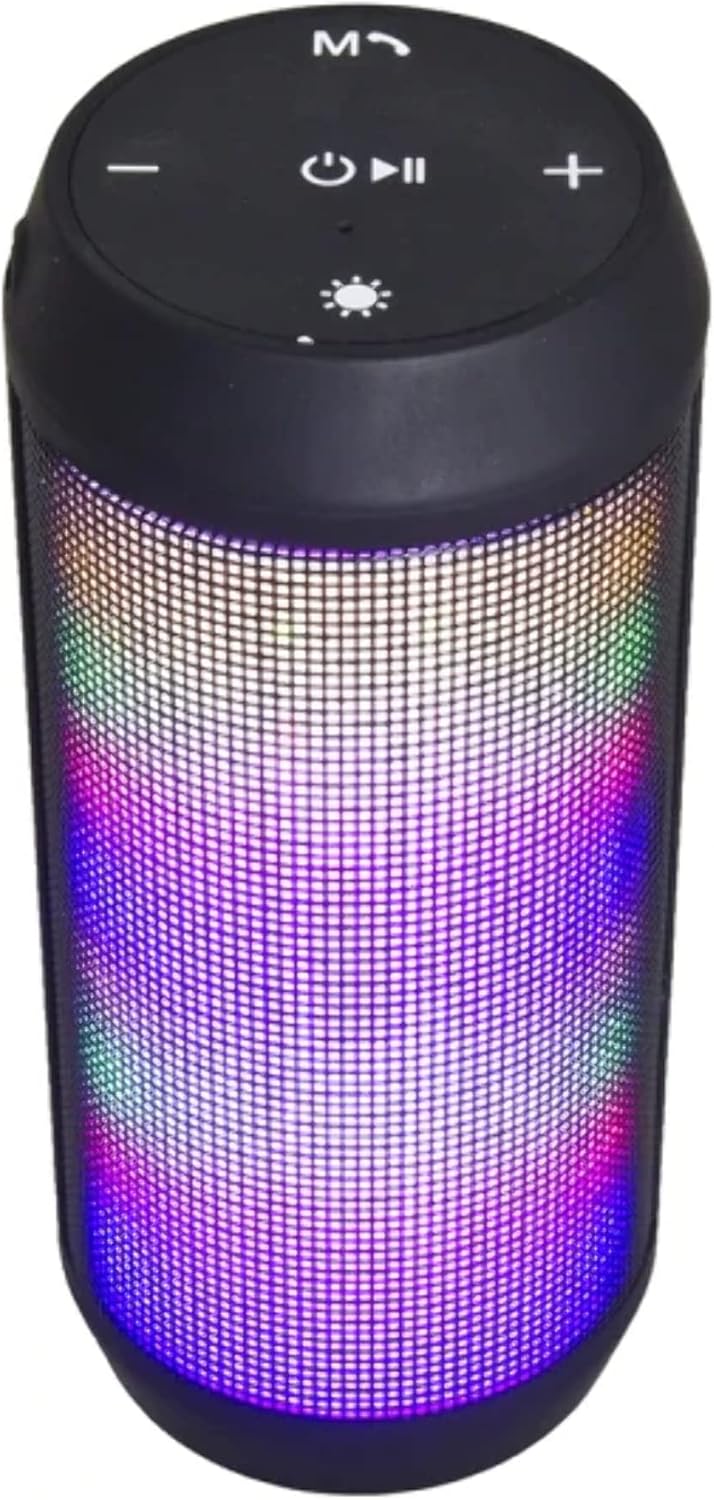
Image: The Esperanza EP133K speaker, cylindrical in shape, with its LED lights illuminated, showcasing its vibrant light display.
Safety Information
- Do not expose the device to extreme temperatures, direct sunlight, or high humidity.
- Avoid dropping or subjecting the speaker to strong impacts.
- Do not disassemble or attempt to repair the device yourself. This will void the warranty.
- Keep the speaker away from water and other liquids.
- Use only the specified charging cable and power adapter (if included) to charge the device.
- Dispose of batteries responsibly according to local regulations.
Package Contents
Please check the box for the following items:
- Esperanza Wireless Bluetooth LED Speaker (Model: EP133K)
- USB Charging Cable
- User Manual (this document)
- (Note: Specific accessories may vary. Please refer to product packaging.)
Product Overview
Familiarize yourself with the various parts and controls of your speaker.

Image: A side view of the Esperanza EP133K speaker, highlighting the control panel with buttons for power, mode, volume, and track navigation, alongside the LED light display.

Image: A detailed close-up of the speaker's control panel, showing the clearly labeled buttons for power/play/pause, mode, volume up/next track, volume down/previous track, and LED light control.
Control Panel Layout:
- Power / Play / Pause Button: Long press to power on/off. Short press to play/pause music.
- Mode (M) Button: Short press to switch between Bluetooth, FM Radio, MicroSD, and USB modes.
- Volume Down / Previous Track (-): Short press for previous track. Long press to decrease volume.
- Volume Up / Next Track (+): Short press for next track. Long press to increase volume.
- LED Light Button (Sun icon): Short press to change LED light modes. Long press to turn LED lights on/off.
- Call Button (Phone icon): Short press to answer/end calls. Long press to reject calls. Double press to redial last number.
Ports and Indicators:
- Micro USB Charging Port: For charging the speaker.
- MicroSD Card Slot: For playing music from a MicroSD card.
- USB-A Port: For playing music from a USB flash drive.
- LED Indicator Light: Shows charging status and connection status.
Setup
Charging the Speaker:
- Connect the Micro USB end of the charging cable to the speaker's charging port.
- Connect the USB-A end of the cable to a USB power adapter (5V/1A recommended) or a computer's USB port.
- The LED indicator light will illuminate during charging and turn off when fully charged.
- A full charge typically takes 2-3 hours.
Powering On/Off:
- To Power On: Long press the Power button (approximately 3 seconds) until you hear an audible prompt.
- To Power Off: Long press the Power button (approximately 3 seconds) again until you hear an audible prompt.
Operating Instructions
Bluetooth Pairing:
- Ensure the speaker is powered on and in Bluetooth mode (it usually defaults to Bluetooth mode upon power on, indicated by a flashing blue LED). If not, short press the 'M' (Mode) button to switch to Bluetooth mode.
- Enable Bluetooth on your smartphone, tablet, or other Bluetooth-enabled device.
- Search for available devices. You should see "EP133K" or "Esperanza Speaker" in the list.
- Select the speaker to connect. Once paired, the LED indicator will stop flashing and remain solid blue, and you will hear a confirmation sound.
- You can now play audio from your device through the speaker.
MicroSD Card Playback:
- Insert a MicroSD card (TF card) with MP3 audio files into the MicroSD card slot.
- The speaker will automatically switch to MicroSD mode and begin playing music. If not, short press the 'M' (Mode) button to switch to MicroSD mode.
- Use the '+' and '-' buttons for next/previous track, and the Power button for play/pause.
FM Radio Function:
- Short press the 'M' (Mode) button to switch to FM Radio mode.
- Long press the Power button (Play/Pause) to automatically scan and save available FM stations. The speaker will then start playing the first found station.
- Short press the '+' and '-' buttons to navigate between saved stations.
- For better reception, ensure the speaker is in an open area.
Telephone Function (Hands-free Calls):
- Ensure the speaker is connected to your phone via Bluetooth.
- Answering a Call: When a call comes in, short press the Call button (phone icon) to answer.
- Ending a Call: During a call, short press the Call button to end the conversation.
- Rejecting a Call: When a call comes in, long press the Call button to reject it.
- Redialing: Double press the Call button to redial the last dialed number.
USB Flash Drive Playback:
- Insert a USB flash drive with MP3 audio files into the USB-A port.
- The speaker will automatically switch to USB mode and begin playing music. If not, short press the 'M' (Mode) button to switch to USB mode.
- Use the '+' and '-' buttons for next/previous track, and the Power button for play/pause.
LED Light Modes:
- Short press the LED Light button (sun icon) to cycle through different light patterns and colors.
- Long press the LED Light button to turn the LED lights on or off.
Maintenance
- Clean the speaker with a soft, dry cloth. Do not use abrasive cleaners or solvents.
- Keep the ports free of dust and debris.
- Store the speaker in a cool, dry place when not in use for extended periods.
- Charge the battery at least once every three months to maintain battery health if not used regularly.
Troubleshooting
| Problem | Possible Cause | Solution |
|---|---|---|
| Speaker does not turn on. | Battery is low or depleted. | Charge the speaker fully. |
| Cannot pair via Bluetooth. | Speaker is not in pairing mode; Bluetooth is off on device; too far from speaker. | Ensure speaker is in Bluetooth mode (flashing blue LED). Turn on Bluetooth on your device. Move device closer to speaker (within 10 meters). |
| No sound. | Volume is too low; incorrect mode selected; device not playing. | Increase speaker and device volume. Press 'M' to select correct mode (Bluetooth, MicroSD, USB, FM). Ensure audio is playing on your connected device. |
| FM radio reception is poor. | Weak signal; interference. | Move the speaker to an open area, away from other electronic devices that may cause interference. |
| MicroSD/USB playback not working. | Card/drive not inserted correctly; unsupported file format; corrupted files. | Ensure card/drive is fully inserted. Check if files are in MP3 format. Try another card/drive or reformat. |
Specifications
- Model: EP133K
- Connectivity: Bluetooth, USB
- Audio Output Mode: Stereo
- Speaker Type: Soundbar (Portable)
- Speaker Maximum Output Power: 1000 Watts (Note: This is likely PMPO, not RMS. Actual RMS power will be lower.)
- Special Features: FM Radio, MicroSD Card Slot, LED Lighting, Hands-free Calling
- Battery: 1 Lithium Ion battery (internal, rechargeable)
- Product Dimensions: 10 x 48 x 50 cm (Note: Dimensions provided may refer to packaging or a different product. Typical portable speakers are much smaller.)
- Weight: 2 kg
- Compatible Devices: MP3 Player, Laptop, Gaming Console, Desktop, Tablet, Home Theater, Smartphone
Warranty and Support
Esperanza products are designed and manufactured to the highest quality standards. This product comes with a standard manufacturer's warranty against defects in materials and workmanship from the date of purchase.
For warranty claims, technical support, or general inquiries, please contact your retailer or visit the official Esperanza website for contact information. Please retain your proof of purchase for warranty service.
Manufacturer: Esperanza
Item Model Number: EP133K - 5901299940068
Related documentsEP133K - 5901299940068

Ask a question about this manual
Ask about setup, troubleshooting, compatibility, parts, safety, or missing instructions. Manuals+ will review the question and use this page’s manual context to help answer it.