
1. Product Overview
The Electro-Voice EVOLVE 50 is a three-component portable column loudspeaker system designed for professional audio applications. It features a 1000 W Class-D amplifier and is driven by Electro-Voice's QuickSmartDSP for advanced sound processing and control. This system delivers powerful, clear audio suitable for various events and performances.
Key Features:
- Powerful System: 1000 W Class-D amplifier with QuickSmartDSP.
- Wide Frequency Range: 12-inch subwoofer provides functional frequency output down to 37 Hz.
- Secure Assembly: Bi-directional aluminum pole connects to the subwoofer via magnet, and the column array is gravity-held.
- Bluetooth Connectivity: QuickSmart Mobile application uses Bluetooth Low Energy (BTLE) for wireless configuration, control, and monitoring of up to six EVOLVE 50 systems.
- High-Quality Bluetooth Audio: Convenient streaming of background music or musical accompaniment from mobile devices.
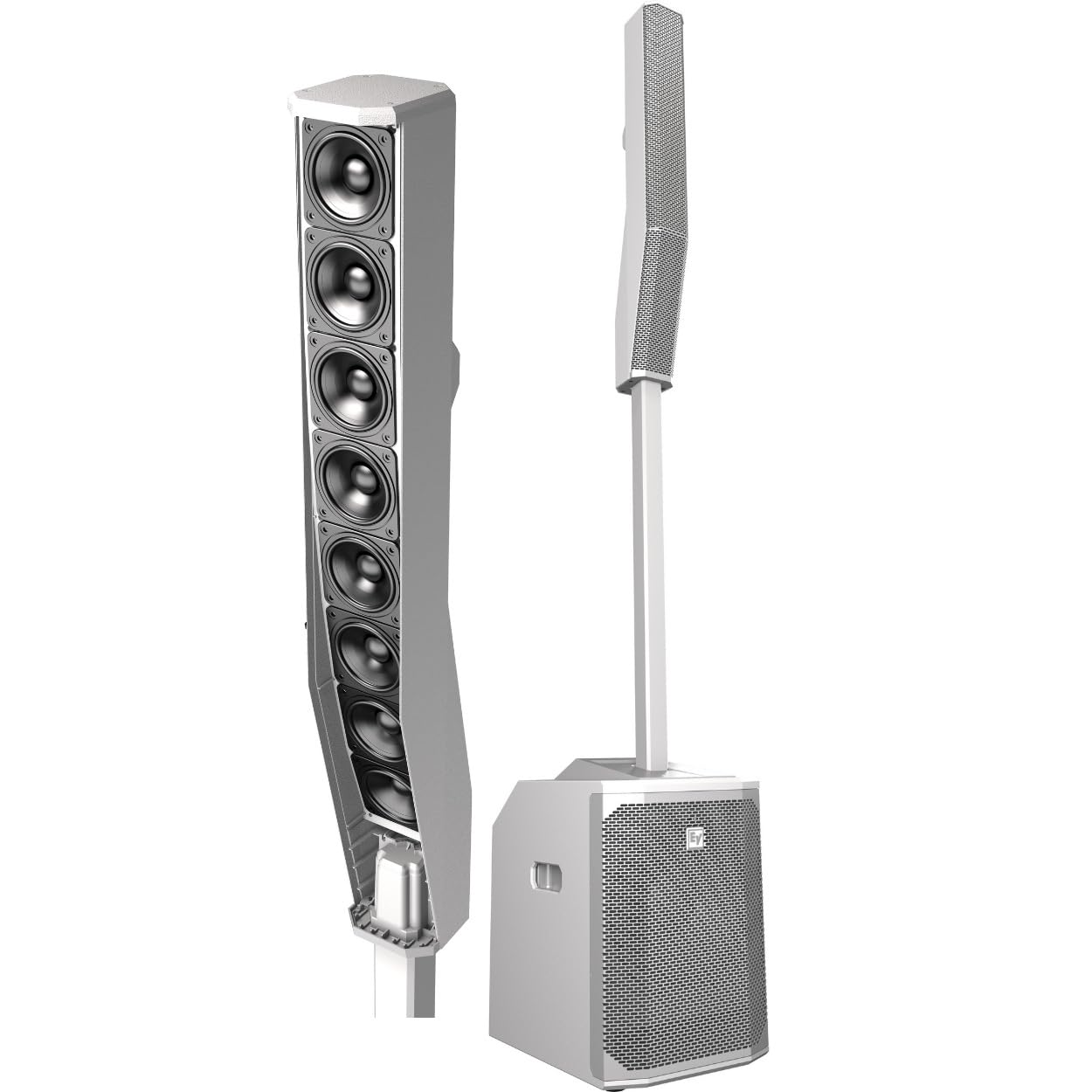
This image displays the fully assembled Electro-Voice EVOLVE 50 system, showing the subwoofer base, the connecting pole, and the column array speaker on top.
2. Setup Instructions
The EVOLVE 50 system is designed for quick and easy assembly. Follow these steps to set up your system:
- Unpack Components: Carefully remove the subwoofer, bi-directional aluminum pole, and column array from their packaging. A carrying bag is included for the subpole and column array.
- Position Subwoofer: Place the 15 mm wooden, ported, powered subwoofer enclosure on a stable, flat surface.
- Connect Pole: Insert the bi-directional aluminum pole into the designated slot on top of the subwoofer. The connection is secured using a magnet.
- Attach Column Array: Place the column array onto the top of the pole. The column array is gravity-held to the subpole, ensuring a secure fit. The signal is internally routed through the components.
- Power Connection: Connect the power cable to the subwoofer's power input and then to a suitable electrical outlet.
- Input Connections: Connect your audio sources (microphones, line-level devices, auxiliary inputs) to the appropriate input jacks on the subwoofer's control panel.
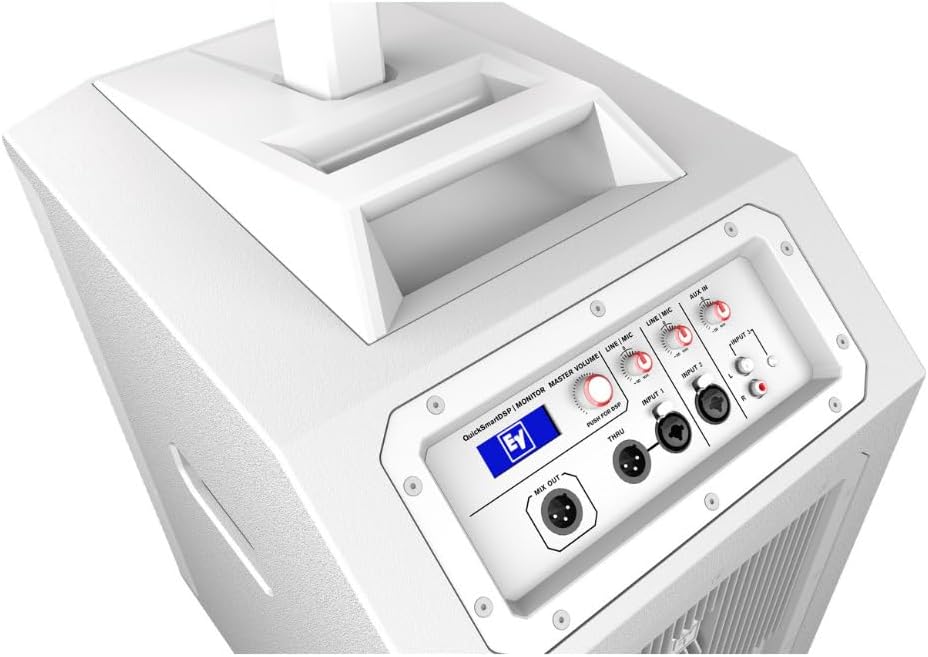
This image shows the top panel of the EVOLVE 50 subwoofer, highlighting the various input and output connections, as well as the QuickSmartDSP display and master volume control.
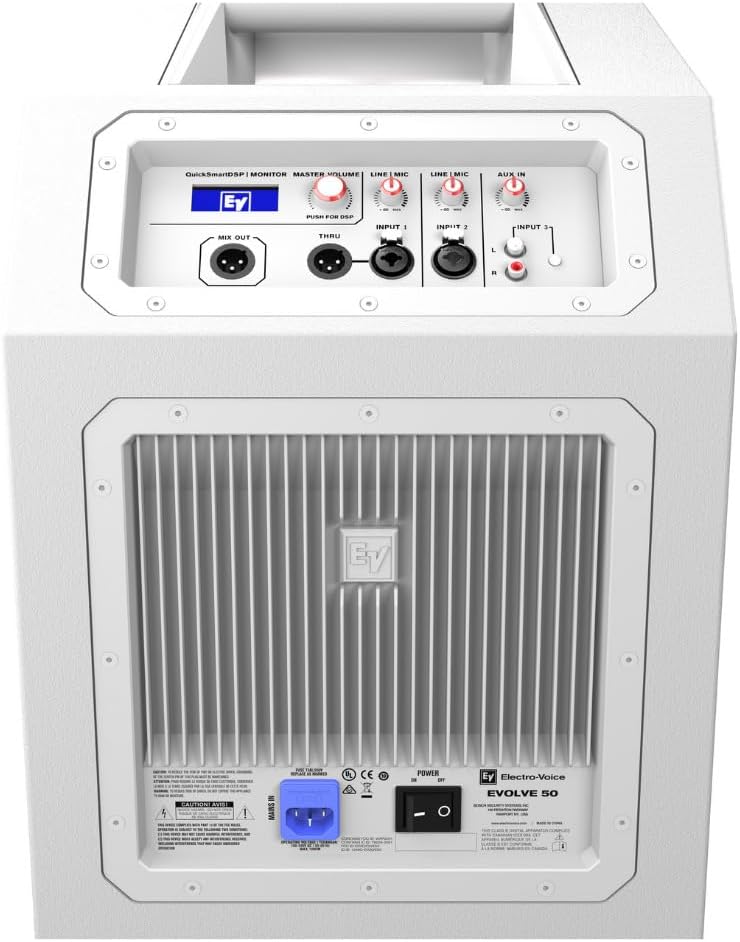
This image displays the rear panel of the EVOLVE 50 subwoofer, including the power input, cooling fins, and the Electro-Voice branding.
3. Operating Instructions
The EVOLVE 50 system offers intuitive controls and advanced DSP features for optimal sound performance.
3.1 QuickSmartDSP Control
The integrated QuickSmartDSP processing engine allows for easy setup and sound customization. Access the DSP settings via the control panel on the subwoofer.
- Presets: Select from four optimized presets: Music, Live, Speech, and Club to instantly adapt the sound profile to your application.
- Three-Band EQ: Adjust the low, mid, and high frequencies to fine-tune your sound.
- User-Programmable Presets: Store and recall up to five of your own custom sound settings.
- Output Delay: Adjust the delay for synchronized sound in multi-speaker setups.
- Phantom Power: Activate +15V phantom power for condenser microphones on relevant inputs.
- Monitoring: Visually monitor limiter status, input levels, and master volume to ensure optimal gain structure and prevent clipping.
3.2 Bluetooth Connectivity
The EVOLVE 50 features Bluetooth Low Energy (BTLE) for wireless control and high-quality audio streaming.
- Pairing: Activate Bluetooth on your mobile device and select the EVOLVE 50 from the list of available devices.
- QuickSmart Mobile App: Download the Electro-Voice QuickSmart Mobile application for comprehensive wireless configuration, control, and monitoring of up to six EVOLVE 50 systems simultaneously.
- Audio Streaming: Stream background music or musical accompaniment directly from any mobile device with high fidelity.
This video provides a brief overview of the usability and features of the Electro-Voice EVOLVE 50 system, demonstrating its ease of setup and operation.
4. Maintenance
Proper maintenance ensures the longevity and optimal performance of your EVOLVE 50 system.
- Cleaning: Use a soft, dry cloth to clean the exterior surfaces. Do not use abrasive cleaners or solvents.
- Storage: When not in use, store the system in a dry, temperate environment. Utilize the provided carrying bag for the subpole and column array to protect them during transport and storage.
- Inspection: Periodically check all cables and connections for any signs of wear or damage.
- Ventilation: Ensure the subwoofer's cooling fins are free from dust and obstructions to prevent overheating.
5. Troubleshooting
If you encounter issues with your EVOLVE 50 system, refer to the following common troubleshooting steps:
- No Power: Ensure the power cable is securely connected to both the subwoofer and a working electrical outlet. Check the power switch on the subwoofer.
- No Sound Output: Verify that all audio cables are correctly connected. Check input levels on the subwoofer and ensure the master volume is turned up. Confirm the correct input source is selected via the DSP.
- Distorted Sound: Reduce input levels to prevent clipping. Check for damaged cables. Ensure the column array is properly seated on the pole.
- Bluetooth Connection Issues: Ensure Bluetooth is enabled on your mobile device and the EVOLVE 50 is within range (up to 10 meters). Try unpairing and re-pairing the device.
- System Overheating: Check that the subwoofer's cooling fins are not obstructed. Ensure adequate ventilation around the unit.
If problems persist, contact customer support for further assistance.
6. Technical Specifications
| Feature | Specification |
|---|---|
| Brand | Electro-Voice |
| Model Name | EVOLVE 50 |
| Model Number | F.01U.335.099 |
| Speaker Maximum Output Power | 1000 Watts |
| Frequency Response | 37 Hz (functional output) |
| Connectivity Technology | Bluetooth |
| Audio Output Mode | Column Array |
| Mounting Type | Freestanding |
| Enclosure Material | Polypropylene (subwoofer) |
| Speaker Type | Subwoofer (12-inch), Column Array (8 x 3.5-inch neodymium drivers) |
| Additional Features | Portable, QuickSmartDSP, Built-in Multi-Channel Mixer |
| Color | White |
| Control Method | App Control (QuickSmart Mobile) |
| Bluetooth Range | 10 Meters |
| Item Weight | 35.8 Pounds |
| Power Source | Corded Electric |
| Included Media | Carrying Bag, Owner's Manual, Built-in Multi-Channel Mixer |

This image provides a view of the eight 3.5-inch neodymium drivers within the EVOLVE 50 column array, responsible for high-frequency output.
7. Warranty Information
The Electro-Voice EVOLVE 50 system comes with a Limited Warranty. For specific terms, conditions, and duration of the warranty, please refer to the official warranty documentation included with your product or visit the Electro-Voice official website. Keep your proof of purchase for warranty claims.
8. Customer Support
For technical assistance, service, or additional information regarding your Electro-Voice EVOLVE 50 system, please contact Electro-Voice customer support. Refer to the contact information provided in your product packaging or on the official Electro-Voice website.
- Online Resources: Visit the official Electro-Voice website for FAQs, software updates, and additional product documentation.
- Service Centers: Information on authorized service centers can be found on the Electro-Voice website.


