1. Introduction and Overview
The BONECO F100 Desktop Air Shower Fan is a compact and efficient air circulator designed to provide a refreshing 'air shower' feeling or direct cooling. Its innovative design ensures optimal air movement throughout your space, making it suitable for various rooms and year-round use. This manual provides essential information for the safe and effective operation, maintenance, and troubleshooting of your BONECO F100 fan.

Image: The BONECO F100 Desktop Air Shower Fan, showcasing its compact and modern design.
2. Important Safety Instructions
Please read and follow all safety instructions before using your BONECO F100 fan to prevent injury or damage.
- Always unplug the fan from the power outlet before cleaning, performing maintenance, or when not in use.
- Do not operate the fan with a damaged cord or plug. If the cord or plug is damaged, contact BONECO customer support for assistance.
- Do not place the fan in or near water or other liquids. Avoid using the fan in wet or damp environments.
- Keep fingers, hair, and loose clothing away from the fan blades and openings during operation.
- This appliance is not intended for use by persons (including children) with reduced physical, sensory or mental capabilities, or lack of experience and knowledge, unless they have been given supervision or instruction concerning use of the appliance by a person responsible for their safety.
- Ensure the fan is placed on a stable, flat surface to prevent it from tipping over.
- Do not block air openings or operate the fan near curtains or other materials that could obstruct airflow.
3. Product Features
The BONECO F100 is engineered with features designed for optimal air circulation and user convenience:
- Natural Air Shower Feeling: Designed to move a higher volume of air at faster speeds, creating a powerful stream for superb room circulation. It keeps the room's air in constant motion, creating a shower of air all around you.
- Smart, Modern, Compact Design: Features 3-speed levels, adjusted using a simple touch control with LED indicators. The elegantly shaped foot stand ensures stability on any tabletop or desktop.
- Use Throughout Whole House: Versatile for use at its highest level for the air shower feeling or lower quiet levels for direct cooling. Ideal for placement by a window, in the kitchen, garage, or on your desk.
- Easy Maintenance: This personal, compact vortex fan has a removable blade cover for simple and low maintenance access to the 6-inch fan blade.
- Use Year Round: Provides a year-round solution for temperature regulation, enhancing comfort in any season.

Image: Diagram illustrating the powerful air circulation created by the BONECO F100 fan.

Image: The BONECO F100 fan effectively circulating air throughout a living room space.
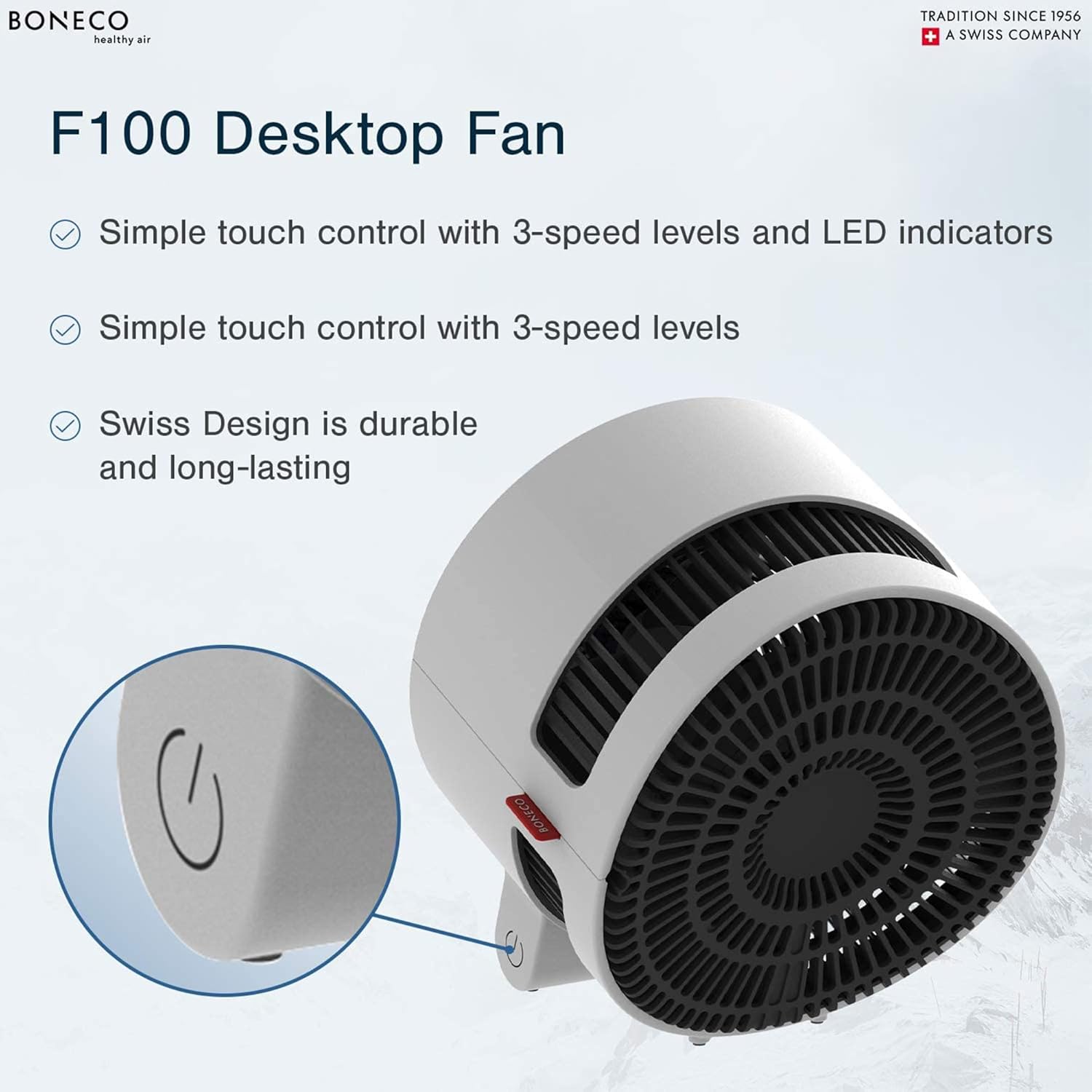
Image: Detail of the BONECO F100's touch control panel and sleek Swiss design.

Image: The BONECO F100 fan, emphasizing its compact size and energy efficiency.
4. Setup
Follow these steps to set up your BONECO F100 fan:
- Unpack: Carefully remove the fan and all packaging materials from the box. Retain packaging for future storage or transport.
- Placement: Place the fan on a firm, level surface. Ensure there is adequate space around the fan for optimal airflow, avoiding obstructions like walls, furniture, or curtains.
- Power Connection: Insert the power plug into a standard 120V / 60Hz electrical outlet.

Image: Rear view of the BONECO F100 fan, showing the power cord connection.
5. Operating Instructions
The BONECO F100 features simple touch controls for ease of use:
- Power On/Off: To turn the fan on, gently touch the power symbol on the base of the unit. The fan will start at the lowest speed setting. To turn the fan off, cycle through all speed settings until the fan powers down.
- Adjusting Speed: The fan has 3 speed levels. Each subsequent touch of the power symbol button will cycle through the speed settings (Low → Medium → High).
- LED Indicators: The LED lights on the base indicate the current speed setting. One light for low, two for medium, and three for high.
6. Maintenance
Regular cleaning ensures optimal performance and longevity of your BONECO F100 fan:
- General Cleaning: Wipe the exterior surfaces of the fan with a soft, damp cloth. Do not use abrasive cleaners or solvents.
- Blade Cleaning: The blade cover is removable for easy access to the fan blade. To remove, locate the screw on the back of the unit, unscrew it, and carefully detach the cover. Clean the fan blade with a soft cloth or brush. Ensure all parts are dry before reassembling.
- Storage: If storing the fan for an extended period, unplug it, clean it thoroughly, and store it in a cool, dry place, preferably in its original packaging.
7. Troubleshooting
If you encounter issues with your BONECO F100 fan, refer to the following common problems and solutions:
| Problem | Possible Cause | Solution |
|---|---|---|
| Fan does not turn on. | No power supply. Power button not pressed correctly. | Ensure the power cord is securely plugged into a working outlet. Press the touch control button firmly and directly. |
| Weak or no airflow. | Fan speed set too low. Air intake/output blocked. Fan blades are dirty. | Increase the fan speed using the touch control. Ensure no objects are blocking the front or rear grilles. Clean the fan blades as described in the Maintenance section. |
| Unusual noise during operation. | Fan not on a stable surface. Debris caught in fan blades. | Place the fan on a flat, stable surface. Unplug the fan and check for any foreign objects in the blades. Clean if necessary. |
If the problem persists after attempting these solutions, please contact BONECO customer support.
8. Specifications
Detailed technical specifications for the BONECO F100 Desktop Air Shower Fan:
| Specification | Value |
|---|---|
| Model Name | F100 |
| Dimensions (L x W x H) | 8 x 8.2 x 9.4 inches |
| Item Weight | 3.5 pounds (1.6 kg) |
| Blade Size | 5.9 inches / 150 mm |
| Power Source | Corded Electric |
| Voltage | 120 V |
| Frequency | 60 Hz |
| Wattage | 25 watts |
| Noise Level | 42 dB |
| Number of Power Levels | 3 |
| Control Method | Touch |
| Blade Material | Plastic |
| Indoor/Outdoor Usage | Indoor |
| Color | White |

Image: BONECO F100 fan with key dimensions highlighted.
9. Warranty and Support
Your BONECO F100 Desktop Air Shower Fan comes with a 3-year warranty from the date of purchase. This warranty covers defects in materials and workmanship under normal use.
For warranty claims, technical support, or any questions regarding your product, please contact BONECO North America Corp. customer service. Please have your model number (F100) and proof of purchase ready when contacting support.
BONECO North America Corp.
For contact information, please visit the official BONECO website or refer to the contact details provided with your product packaging.


