
WELCARE BC380
ACCUNIQ BC380 Body Composition Analyzer User Manual
Multi-Frequency Segmental Body Composition Analysis
1. Introduction
Thank you for choosing the ACCUNIQ BC380 Body Composition Analyzer. This device is designed to provide clinically accurate body composition results using multi-frequency segmental bioelectrical impedance analysis (BIA) technology. The BC380 offers a comprehensive analysis of various body components, aiding in effective health monitoring and management.
This manual provides essential information for the safe and effective operation, maintenance, and troubleshooting of your ACCUNIQ BC380. Please read it thoroughly before using the device.

Figure 1: ACCUNIQ BC380 Body Composition Analyzer
This image shows the complete ACCUNIQ BC380 device from the front, highlighting its sleek design and integrated display unit.
2. Safety Information
To ensure safe operation and prevent damage to the device or injury to users, please observe the following safety precautions:
- Do not use the device if you have an implanted medical electronic device such as a pacemaker or artificial lung.
- Do not use the device if you are pregnant.
- Ensure the device is placed on a stable, flat surface to prevent tipping.
- Keep the device away from water or excessive moisture.
- Do not attempt to disassemble or repair the device yourself. Contact qualified service personnel.
- Use only the power adapter supplied with the device.
- Keep children and pets away from the device during operation.
- Avoid using the device in direct sunlight or extreme temperatures.
3. Product Components
The ACCUNIQ BC380 consists of the following main components:
- Main Unit: The central body of the analyzer, housing the display and processing unit.
- Touch Panel & UI: A 7-inch wide color touchscreen for intuitive operation and on-screen instructions.
- Electrode Handles: Two handles with electrodes for upper body measurement, designed for improved grip.
- Foothold Electrodes: Large 18"x18" platform with electrodes for lower body measurement, ensuring easy access, comfort, and stability.
- Printer (Optional/Integrated): For printing detailed result sheets.

Figure 2: Close-up of the Touch Panel and Electrode Handles
This image provides a detailed view of the 7-inch color touchscreen display and the ergonomic electrode handles of the ACCUNIQ BC380.

Figure 3: Top View of the Foothold Electrodes
This image shows the large platform with integrated foothold electrodes, designed for user comfort and stable measurement.
4. Setup Instructions
Follow these steps to set up your ACCUNIQ BC380 for the first time:
- Unpacking: Carefully remove all components from the packaging. Retain packaging for future transport or storage.
- Placement: Place the main unit on a firm, level, and non-vibrating surface. Ensure there is sufficient space around the device for safe operation and user movement.
- Power Connection: Connect the power adapter to the power input port on the back of the main unit, then plug the adapter into a suitable electrical outlet.
- Initial Power On: Press the power button (usually located on the side or back of the main unit). The display will light up, and the system will perform a self-check.
- Language and Basic Settings: Follow the on-screen prompts to select your preferred language, date, and time settings.
5. Operating Instructions
The ACCUNIQ BC380 is designed for ease of use. Follow these steps to perform a body composition analysis:
- Preparation:
- Ensure your feet are clean and dry.
- Remove any metal objects (jewelry, watches) that might interfere with the measurement.
- For consistent results, it is recommended to measure at the same time of day, ideally in the morning before eating or exercising.
- Start Measurement:
- Step onto the foothold electrodes barefoot. Position your feet correctly on the designated areas.
- Grasp the electrode handles firmly with both hands. The measurement starts automatically without the need to push a button separately once you grab the handles.
- Stand still and maintain a natural posture during the measurement. Avoid talking or moving.
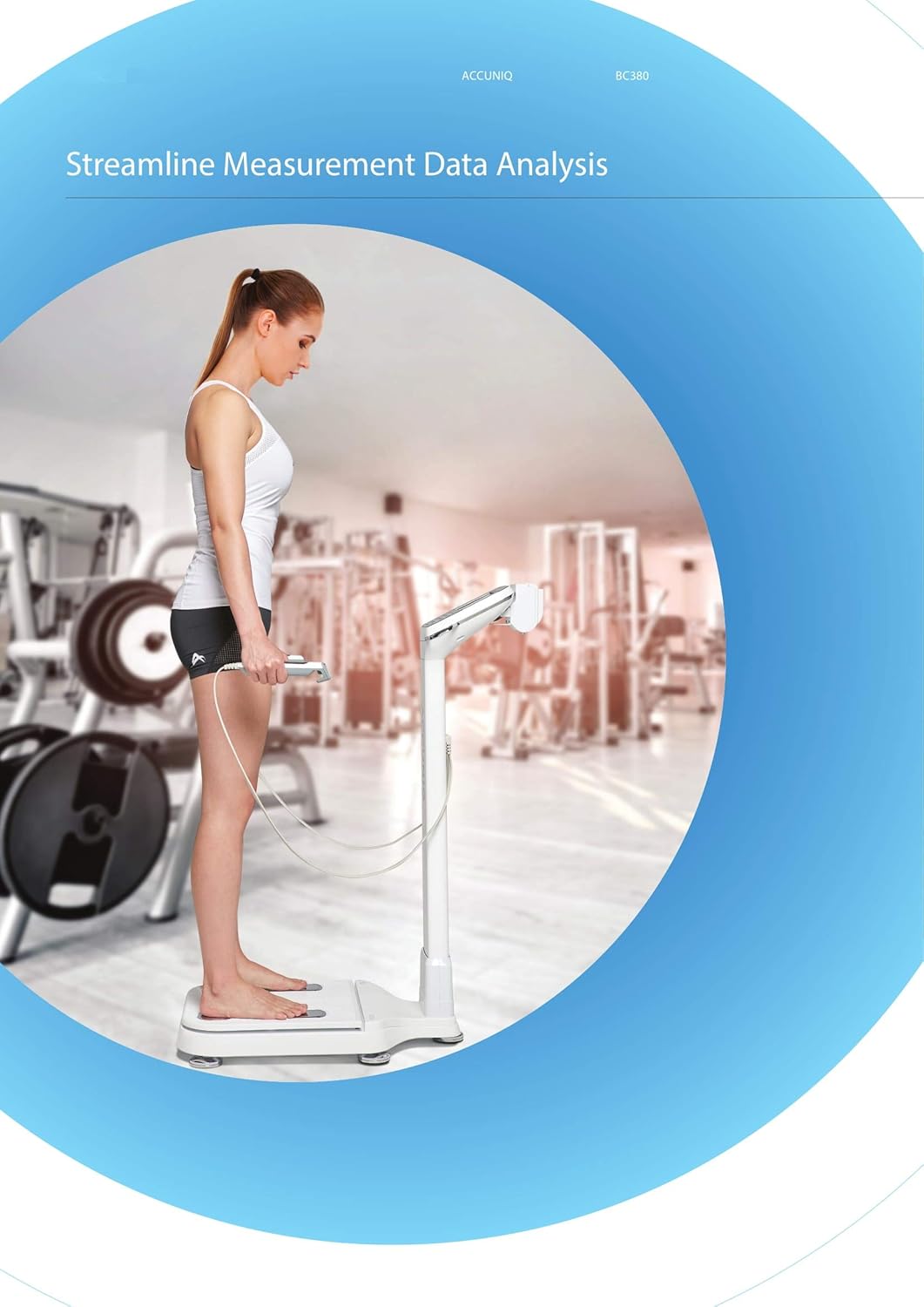
Figure 4: Proper Posture for Measurement
This image illustrates the correct posture for a user undergoing a body composition analysis on the ACCUNIQ BC380, showing proper hand and foot placement on the electrodes.
- Measurement Process: The device uses a Tetra-polar electrode method with 8 touch electrodes and operates at multiple frequencies (5, 50, 250 kHz). The measurement takes approximately 30 seconds.
- Results Display: Once the measurement is complete, your results will be displayed on the 7-inch touchscreen. Results are also printed in an easy-to-understand format with measurement comparison to healthy ranges.
6. Understanding Your Results
The ACCUNIQ BC380 provides a comprehensive analysis of your body composition. Key metrics include:
- Body Composition Analysis: Weight, Lean Body Mass, Body Fat Mass, Muscle Mass, Protein Mass, Mineral Mass, Total Body Water.
- Skeletal Muscle / Fat Analysis: Weight, Skeletal Muscle Mass, Body Fat Mass.
- Obesity Analysis: Body Mass Index (BMI), Body Fat Percentage, Degree of Obesity, Abdominal Circumference.
- Abdominal Obesity Analysis: Waist Hip Ratio, Visceral Fat Level, Visceral Fat Area, Visceral Fat Mass.
- Cumulative Body Change Graph: Tracks changes in Weight, Skeletal Muscle Mass, and Body Fat Percentage over time.
- Segmental Measurement: Provides detailed analysis for arms, legs, and trunk.
The printed report compares your measurements to healthy ranges, making analysis fast and concise. Consult with a healthcare professional for personalized interpretation of your results.

Figure 5: Sample Body Composition Analysis Report
This image displays a sample printout of the ACCUNIQ BC380's body composition analysis report, showing various metrics and their comparison to healthy ranges.
7. Maintenance
Proper maintenance ensures the longevity and accuracy of your ACCUNIQ BC380.
- Cleaning:
- Wipe the device surfaces, especially the electrodes, with a soft, damp cloth after each use.
- Do not use abrasive cleaners, solvents, or harsh chemicals.
- Ensure no liquid enters the device openings.
- Storage:
- Store the device in a cool, dry place, away from direct sunlight and extreme temperatures.
- Operating Environment Temperature: 5 - 40℃, relative humidity 15 - 93% (no condensation).
- Storage Environment Temperature: -25 - 70℃, relative humidity less than 93% (no condensation).
- Calibration: Regular calibration by authorized service personnel is recommended to maintain measurement accuracy.
8. Troubleshooting
If you encounter issues with your ACCUNIQ BC380, refer to the table below for common problems and solutions.
| Problem | Possible Cause | Solution |
|---|---|---|
| Device does not power on. | Power cable not connected properly; power outlet issue. | Check power cable connection; try a different power outlet. |
| Measurement error / Inaccurate readings. | Incorrect posture; electrodes not clean; user movement during measurement; environmental interference. | Ensure correct posture and firm grip; clean electrodes; remain still; avoid strong electromagnetic fields. |
| Printer not working. | Out of paper; paper jam; printer connection issue. | Check paper supply; clear any paper jams; ensure printer is properly connected. |
| Touchscreen unresponsive. | Temporary software glitch. | Restart the device. If the problem persists, contact customer support. |
If the problem persists after attempting these solutions, please contact customer support. Do not attempt to repair the device yourself.
9. Specifications
| ACCUNIQ BC380 Technical Specifications | |
|---|---|
| Model Number | BC380 |
| Measurement Method | Tetra-polar electrode method using 8 touch electrodes |
| Frequency Range | 5, 50, 250 kHz |
| Measurement Area | Whole body and Segmental measurement (arms, legs, and trunk) |
| Measurement Time | Approx. 30 seconds |
| Applicable Height | 50 - 220 cm |
| Measurement Height | 100 - 210 cm |
| Measurement Weight | 10 - 250 kg |
| Applicable Age | 1 - 99 years old |
| Dimensions (W×D×H) | 641 × 436 × 1029 mm (±10 mm) |
| Weight (Main Unit) | Approx. 18 kg |
| Power Consumption | 60 VA |
| Operating Environment Temperature | 5 - 40℃ |
| Operating Environment Humidity | 15 - 93% (no condensation) |
| Storage Environment Temperature | -25 - 70℃ |
| Storage Environment Humidity | Less than 93% (no condensation) |
10. Warranty and Support
For warranty information and customer support, please refer to the documentation provided with your purchase or contact your local distributor.
For service or technical assistance, please contact WELCARE customer service. Do not attempt to service the device yourself.
Manufacturer: ACCUNIQ
Brand: WELCARE
Related documentsBC380


Ask a question about this manual
Ask about setup, troubleshooting, compatibility, parts, safety, or missing instructions. Manuals+ will review the question and use this page’s manual context to help answer it.