
Introduction
This manual provides essential information for the safe and efficient operation, installation, and maintenance of your Simer 4075SS-01 3/4 HP Pressure Booster Pump. Please read this manual thoroughly before installation and use, and retain it for future reference.
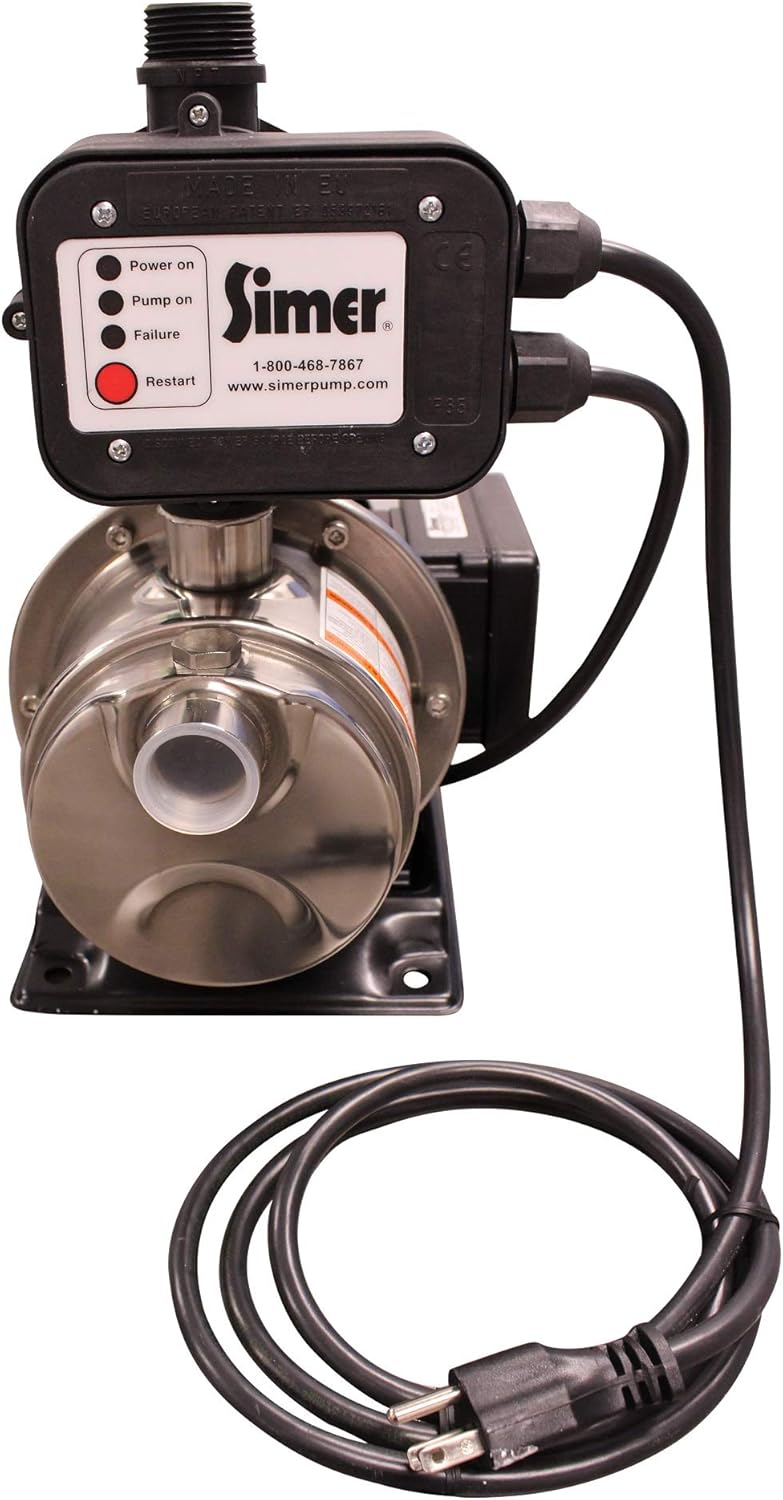
The Simer 4075SS-01 is designed to boost domestic water pressure, providing up to 40 PSI of additional pressure. It features a durable stainless steel construction, an automatic activation system, and comes pre-assembled for ease of installation. This pump is suitable for various household water pressure boosting applications.
Safety Information
Always adhere to local codes and regulations when installing and operating this pump. Failure to do so may result in property damage, serious injury, or death.
- Ensure the power supply is disconnected before performing any installation or maintenance.
- The pump is designed for use with clean water only. Do not use with flammable or corrosive liquids.
- Protect the pump from freezing temperatures.
- Ensure proper grounding to prevent electrical shock.
- Do not operate the pump dry. Always ensure water flow through the pump.
Product Overview




Setup and Installation
The Simer 4075SS-01 is designed for straightforward installation. It comes pre-assembled and ready to be integrated into your existing plumbing system.
Pre-Installation Checklist:
- Location: Choose a dry, well-ventilated area protected from freezing temperatures and direct sunlight. The pump should be installed as close as possible to the main water supply line.
- Power Supply: Ensure a dedicated 115-volt, 60 Hz electrical outlet is available. The pump includes a 6-foot power cord.
- Piping: The pump has 1" FNPT intake and 1" MNPT discharge pipes. Ensure you have appropriate fittings (e.g., 1" brass check valve, copper tubing, male fittings, female fittings, elbows, unions) and tools (e.g., adjustable wrench, tongue and groove pliers, PTFE pipe thread sealant, tape measure, pipe cutter) for connection.
- Bypass Line: It is highly recommended to install a bypass line around the pump. This allows water flow to the house even if the pump needs maintenance or fails.
- Shut-off Valves: Install shut-off valves on both the inlet and outlet sides of the pump for easy isolation during maintenance.
Installation Steps:
- Turn off Main Water Supply: Locate your main water shut-off valve and turn off the water supply to your home.
- Drain Water Lines: Open faucets to drain water from the pipes.
- Position the Pump: Place the pump on a stable, level surface. The pump features a stable mounting base.
- Connect Inlet Pipe: Connect the main water supply line to the pump's inlet (1" FNPT). Use appropriate fittings and thread sealant to ensure a watertight connection.
- Connect Outlet Pipe: Connect the pump's outlet (1" MNPT) to your home's plumbing system. Again, use appropriate fittings and thread sealant.
- Install Bypass (Recommended): If installing a bypass, connect it as shown in typical plumbing diagrams, ensuring proper valves are in place to direct water through the pump or bypass.
- Check for Leaks: Slowly turn on the main water supply and inspect all connections for leaks. Tighten any leaking connections.
- Prime the Pump: Before initial operation, ensure the pump is primed according to the operating instructions to prevent dry running.
- Connect Power: Plug the 6-foot 115-volt power cord into a grounded electrical outlet.
Video demonstrating the plumbing setup for the Simer 4075SS-01 Pressure Booster Pump, including the main pipe connection, bypass line, and shut-off valves. This video shows a customer's installation process and highlights a minor leak point.
Operating Instructions
The Simer 4075SS-01 features automatic activation, simplifying its operation.
Initial Startup:
- Ensure all plumbing connections are secure and leak-free.
- Open all shut-off valves on the pump's inlet and outlet.
- Priming: If the pump is not self-priming or if it has run dry, you may need to manually prime it by filling the pump casing with water through a dedicated priming port (if available) or by ensuring water flows through the system before starting.
- Plug the pump into the electrical outlet. The "Power On" indicator light should illuminate.
- Open a faucet in your home. The pump should detect the drop in pressure and automatically activate. The "Pump On" indicator light will illuminate.
- Allow water to flow until all air is purged from the system and a steady stream is achieved.
- Close the faucet. The pump should run for a short period to build pressure and then shut off automatically.
Normal Operation:
The pump will automatically activate when water pressure drops below a certain level (e.g., when a faucet is opened, a shower is used, or an appliance demands water). It will then shut off once the demand ceases and pressure is restored.
Indicator Lights:
- Power On: Indicates the pump is receiving electrical power.
- Pump On: Indicates the pump motor is actively running.
- Failure: Indicates an error condition (e.g., dry run, motor overload). Refer to the Troubleshooting section.
Restart Button:
If the "Failure" light is on, press the "Restart" button after resolving the issue (e.g., restoring water supply if it ran dry) to reset the pump.
Maintenance
Regular maintenance ensures the longevity and optimal performance of your Simer 4075SS-01 pump.
- Regular Inspection: Periodically check the pump and all connections for leaks, corrosion, or damage. Address any issues promptly.
- Cleanliness: Keep the pump area clean and free of debris to ensure proper ventilation and prevent obstruction of moving parts.
- Winterization: If the pump is installed in an area subject to freezing temperatures, it must be drained completely or protected from freezing. Freezing can cause severe damage to the pump and plumbing.
- Filter Maintenance: If an inline filter is installed before the pump, regularly clean or replace its cartridge as per the filter manufacturer's instructions.
- Motor Ventilation: Ensure the motor's cooling fins are free of dust and dirt to prevent overheating.
Troubleshooting
Before contacting customer support, review the following common issues and their solutions:
| Problem | Possible Cause | Solution |
|---|---|---|
| Pump does not start. | No power; tripped circuit breaker; faulty outlet; motor overload. | Check power connection, circuit breaker. Test outlet. Press "Restart" button on pump. |
| Pump runs but no water flow. | Pump not primed; air in system; closed valves; clogged inlet/filter; low water supply. | Prime the pump. Bleed air from lines. Open all valves. Check and clean filter/inlet. Verify water supply. |
| Low pressure or intermittent flow. | Partial clog; air in system; pump cavitation; worn impeller. | Check for clogs. Re-prime pump. Ensure adequate water supply. Contact qualified technician for internal inspection. |
| Pump runs continuously. | Leak in plumbing system; faulty pressure switch/sensor; constant water demand. | Inspect all plumbing for leaks. Check for running toilets or dripping faucets. If no leaks, pressure switch may need replacement by a professional. |
| Excessive noise or vibration. | Air in pump; cavitation; loose mounting; foreign object in pump. | Ensure pump is primed. Check water supply. Secure mounting bolts. Disconnect power and inspect pump for obstructions. |
Specifications
| Feature | Detail |
|---|---|
| Model Number | 4075SS-01 |
| Horsepower (HP) | 3/4 HP |
| Voltage | 115 Volts |
| Amperage | 6.8 AMP |
| Frequency | 60 Hz |
| Maximum Flow Rate | 24 Gallons Per Minute |
| Additional Pressure Provided | Up to 40 PSI |
| Material | Stainless Steel (rust and corrosion-proof) |
| Power Source | Corded Electric (6-foot 115-volt power cord included) |
| Product Dimensions | 18.1"L x 10"W x 17.3"H |
| Item Weight | 21.9 Pounds |
| Manufacturer | Simer |
| UPC | 022315381667 |
Warranty and Support
For warranty information, technical support, or to purchase replacement parts, please contact Simer customer service.
- Simer Customer Service: 1-800-468-7867
- Website: www.simerpump.com
Please have your model number (4075SS-01) and date of purchase available when contacting support.


