
Introduction
Welcome to the user manual for your KRUPS Evidence Plus EA894T10 Fully Automatic Coffee Machine. This guide provides essential information for the safe and efficient operation, maintenance, and care of your appliance. Please read these instructions carefully before first use and keep them for future reference.
The KRUPS Evidence Plus EA894T10 is designed to deliver a wide range of coffee and milk-based beverages with convenience and quality, featuring a durable metal brew group and Quattro Force technology for optimized coffee preparation.
Important Safety Instructions
Always follow basic safety precautions when using electrical appliances to reduce the risk of fire, electric shock, and/or injury to persons, including the following:
- Read all instructions before using the appliance.
- Do not immerse the appliance, power cord, or plug in water or other liquids.
- Ensure the voltage indicated on the appliance corresponds to your mains voltage.
- Do not operate any appliance with a damaged cord or plug, or after the appliance malfunctions or has been damaged in any manner.
- Close supervision is necessary when any appliance is used by or near children.
- Unplug from outlet when not in use and before cleaning. Allow to cool before putting on or taking off parts, and before cleaning the appliance.
- Use only accessories recommended by the manufacturer.
- Do not place on or near a hot gas or electric burner, or in a heated oven.
Product Overview
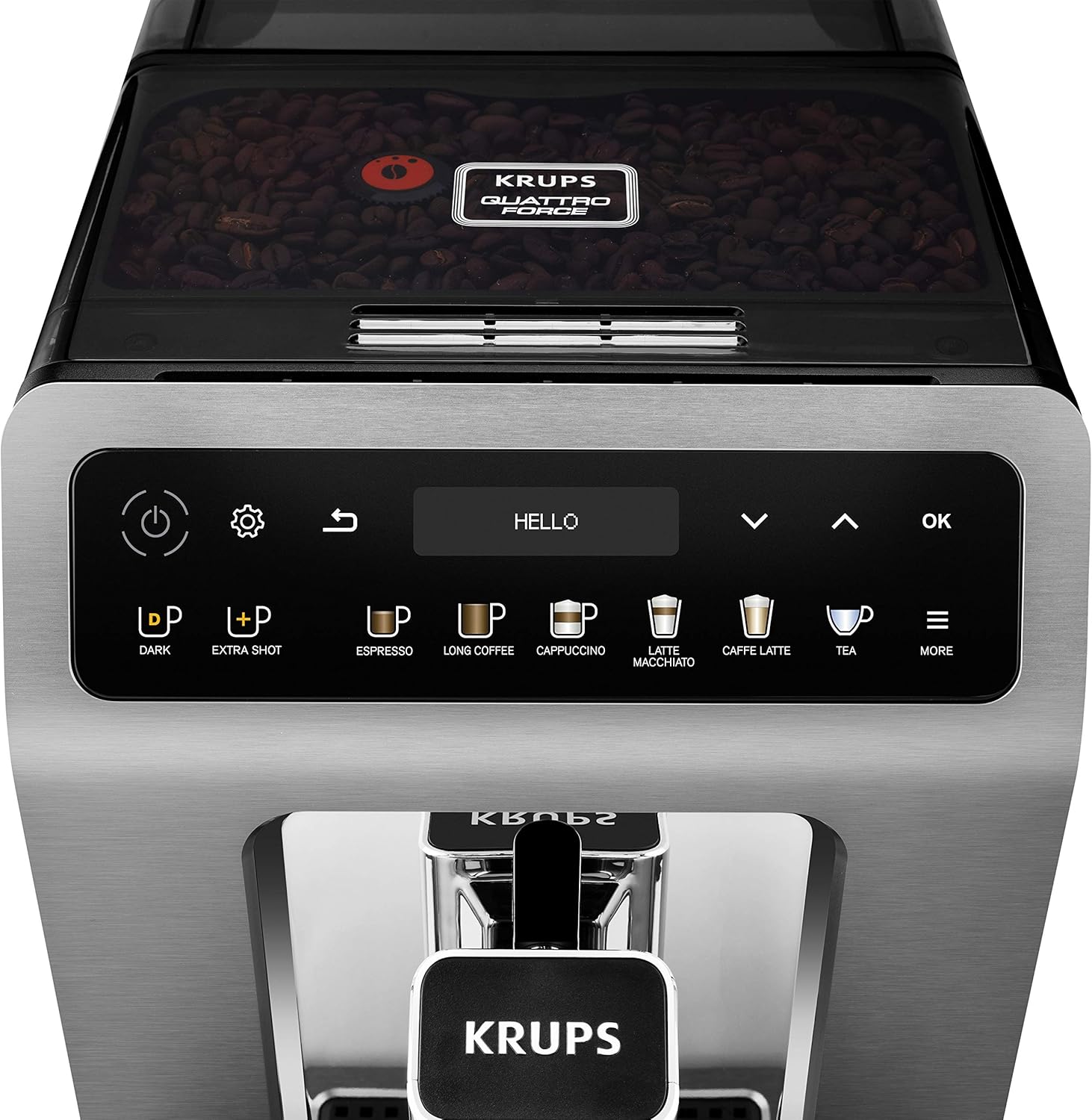
The KRUPS Evidence Plus EA894T10 is a compact and advanced fully automatic coffee machine. Key components include:
- Control Panel: Intuitive OLED display with touch-sensitive buttons for drink selection and settings.
- Coffee Bean Container: Located at the top, for whole coffee beans.
- Water Tank: Removable, located at the rear, with a capacity of 2.3 liters.
- Coffee Outlet: Adjustable height for various cup sizes.
- Drip Tray & Coffee Grounds Container: Collects excess water and used coffee grounds.
- Milk Hose System: For preparing milk-based beverages.


Setup and First Use
1. Unpacking and Initial Placement
- Carefully remove all packaging materials.
- Place the machine on a stable, flat, heat-resistant surface, away from water splashes and heat sources.
- Ensure adequate space around the machine for ventilation and access to the water tank and bean container.
2. Initial Cleaning
- Wash the water tank, drip tray, and coffee grounds container with warm water and mild detergent. Rinse thoroughly.
- Wipe the exterior of the machine with a damp cloth.
3. Filling the Water Tank
- Remove the water tank from the back of the machine.
- Fill the tank with fresh, cold drinking water up to the MAX level indicator.
- Reinsert the water tank securely into the machine.

4. Filling the Coffee Bean Container
- Open the lid of the coffee bean container on top of the machine.
- Pour fresh whole coffee beans into the container. Do not use ground coffee, instant coffee, or caramelized beans.
- Close the lid.
5. Power On and Initial Settings
- Plug the power cord into a suitable wall outlet.
- Press the power button (⏻) to turn on the machine.
- The display will guide you through initial setup steps, including language selection, date, time, and water hardness. Follow the on-screen instructions.
- The machine will perform an automatic rinsing cycle. Place a container under the coffee outlets to collect the water.
Operating Instructions
1. Control Panel Overview
The intuitive OLED display and touch buttons allow for easy selection and customization of beverages.

- Power Button: Turns the machine on/off.
- Settings Button: Accesses machine settings (water hardness, auto-off, etc.).
- Back Button: Returns to the previous menu.
- Drink Selection Buttons: Direct access to Espresso, Long Coffee, Cappuccino, Latte Macchiato, Caffe Latte, Tea, and More options.
- Dark Button: Increases coffee strength.
- Extra Shot Button: Adds an additional espresso shot to your drink.
- OK Button: Confirms selections.
- Navigation Arrows: Scroll through menus and adjust settings.
2. Preparing Coffee (e.g., Espresso, Long Coffee)
- Place one or two cups under the coffee outlets. Adjust the height of the coffee outlet if necessary.
- Select your desired coffee drink (e.g., "Espresso" or "Long Coffee") from the control panel.
- Optionally, press the "Dark" or "Extra Shot" buttons to customize strength.
- The machine will automatically grind the beans and brew your coffee.

3. Preparing Milk-Based Beverages (e.g., Cappuccino, Latte Macchiato)
- Connect the milk hose to the machine's milk system connector and immerse the other end into a container of fresh, cold milk (or use the provided milk carafe).
- Place a suitable cup under the coffee outlets.
- Select your desired milk-based drink (e.g., "Cappuccino" or "Latte Macchiato").
- The machine will automatically froth the milk and then brew the coffee.
- After preparation, the machine may prompt for a milk system rinse.


4. Preparing Tea
- Place a cup under the hot water outlet.
- Select "Tea" from the menu. You can choose between different tea types (e.g., Black, Green, Herbal) which will adjust the water temperature accordingly.
- The machine will dispense hot water.
Maintenance and Cleaning
Regular cleaning and maintenance are crucial for the longevity and optimal performance of your coffee machine.
1. Daily Cleaning
- Drip Tray and Coffee Grounds Container: Empty and rinse daily. The machine will prompt you when the coffee grounds container needs emptying (approximately every 7-8 cycles).
- Water Tank: Rinse daily and refill with fresh water.
- Coffee Outlets: Wipe with a damp cloth.
2. Milk System Cleaning
- After each milk-based drink, perform the automatic milk system rinse if prompted.
- Regularly clean the milk hose and any milk containers with warm soapy water. Ensure no milk residue remains.
3. Automatic Cleaning Programs
The KRUPS Evidence Plus EA894T10 features an Auto-Clean system and a unique non-removable metal brew group, simplifying maintenance. The machine will prompt you when specific cleaning cycles are required.
- Cleaning Cycle: Use KRUPS cleaning tablets as instructed by the machine's display. This cycle cleans the internal coffee circuits.
- Descaling Cycle: Use KRUPS descaling solution as instructed by the machine's display. The frequency depends on your water hardness and usage.
The unique metal brew group is designed for long life and perfect coffee results, and its integrated design means it does not require manual removal for cleaning, relying instead on the automatic cleaning programs.

4. Water Filter Replacement
If you are using a water filter, replace it regularly as indicated by the machine or every two to three months, depending on usage and water quality.
Troubleshooting
This section addresses common issues you might encounter. For more detailed troubleshooting, refer to the full product manual or contact customer support.
| Problem | Possible Cause | Solution |
|---|---|---|
| No coffee is dispensed. | Water tank empty, coffee beans empty, machine needs descaling. | Fill water tank, fill bean container, perform descaling cycle. |
| Coffee is too weak. | Grind setting too coarse, insufficient coffee dose, "Dark" setting not activated. | Adjust grind setting finer, ensure sufficient beans, use "Dark" function. |
| Milk does not froth properly. | Milk hose or system blocked, milk not cold enough, incorrect milk type. | Clean milk system thoroughly, use fresh cold milk (preferably semi-skimmed), ensure hose is correctly connected. |
| Machine displays an error message. | Specific internal issue. | Refer to the machine's display for the specific error code and consult the full manual or contact customer support. |
Specifications
| Feature | Detail |
|---|---|
| Brand | KRUPS |
| Model Number | EA894T10 |
| Color | Titanium Metallic |
| Product Dimensions (L x W x H) | 37.2 x 24 x 36.3 cm |
| Weight | 8 kg |
| Water Tank Capacity | 2.3 Litres |
| Power / Wattage | 1450 watts |
| Voltage | 220 Volts |
| Material | Metal |
| Special Features | Auto Clean Function, Integrated Coffee Grinder, Milk Frother, Programmable, Removable Tank |

Warranty and Support
Your KRUPS Evidence Plus EA894T10 Fully Automatic Coffee Machine comes with a manufacturer's warranty. Please refer to the warranty card included in your product packaging for specific terms and conditions, including the duration and coverage.
For technical assistance, spare parts, or service, please contact KRUPS customer support. Contact details can typically be found on the KRUPS official website or in the warranty documentation provided with your appliance.
When contacting support, please have your model number (EA894T10) and purchase date ready.


