
Boytone BT-38SM
Boytone BT-38SM Bluetooth Classic Turntable Record Player System
User Manual
1. Product Overview
The Boytone BT-38SM is a versatile multi-audio system designed to bring your music to life from various sources. It features a classic turntable for vinyl records, an AM/FM radio, a CD player, and a cassette player. With 2 built-in stereo speakers, it offers a complete audio experience. Additionally, it supports recording from vinyl, radio, and cassette directly to MP3 format via its SD slot and USB port, and includes an AUX input for external devices.

Figure 1.1: Boytone BT-38SM Multi-Audio System. This image displays the complete unit with its turntable, control panel, and integrated speakers.
2. Important Safety Information
Please read all safety and operating instructions carefully before using this product. Keep these instructions for future reference.
- Power Source: Operate this product only from the type of power source indicated on the marking label.
- Ventilation: Ensure proper ventilation. Do not block any ventilation openings.
- Water and Moisture: Do not use this product near water or in excessively humid environments.
- Heat: Keep the product away from heat sources such as radiators, heat registers, stoves, or other appliances that produce heat.
- Cleaning: Unplug this product from the wall outlet before cleaning. Use a dry cloth for cleaning.
- Servicing: Do not attempt to service this product yourself. Refer all servicing to qualified service personnel.
- Object and Liquid Entry: Never push objects of any kind into this product through openings as they may touch dangerous voltage points or short-out parts that could result in a fire or electric shock. Never spill liquid of any kind on the product.
3. Package Contents
Please check that all items listed below are included in your package:
- Boytone BT-38SM Multi-Audio System
- Power Adapter/Cord
- Remote Control
- User Manual
- 45 RPM Adapter (for turntable)
4. Product Components and Controls
4.1 Turntable Section

Figure 4.1: Turntable Components. This image highlights the key parts of the turntable, including the tone arm, stylus, and speed selector.
- Transit Screw: Secures the turntable platter during transport. Loosen before use.
- 33/45/78 RPM Fixator: Speed selector for different record types.
- Tone Arm Raise Lever: Lifts and lowers the tone arm.
- Tone Arm Placement: Rest for the tone arm when not in use.
- Tone Arm: Holds the cartridge and stylus.
- Stylus: The needle that reads the record grooves.
4.2 Front Panel Controls

Figure 4.2: Front Control Panel. This image shows the various buttons, knobs, and display on the front of the unit.
- Function Knob: Selects between Turntable, CD, Cassette, Radio, Bluetooth, USB/SD, and AUX modes.
- Volume/Standby Knob: Controls volume and powers the unit on/off.
- Tuning Knob: Adjusts radio frequency.
- Display Screen: Shows current mode, track number, radio frequency, etc.
- Play/Pause, Stop, Skip Buttons: Control playback for CD, USB/SD, and Cassette.
- Record Button: Initiates recording to USB/SD.
- CD Tray: For inserting compact discs.
- Cassette Deck: For inserting audio cassettes.
- USB Port: For USB flash drives.
- SD Card Slot: For SD memory cards.
- AUX IN Jack: 3.5mm input for external audio devices.
- Headphone Jack: 3.5mm output for private listening.
5. Initial Setup
5.1 Unpacking and Placement
- Carefully remove the unit from its packaging.
- Place the unit on a flat, stable surface away from direct sunlight, heat sources, and excessive dust or moisture.
- Remove any protective films or packing materials from the unit, especially from the turntable platter and stylus.
- Loosen the transit screw located on the turntable deck (if present) to free the platter.
5.2 Power Connection
- Ensure the unit's power switch is in the OFF position.
- Connect the power cord to the AC IN jack on the back of the unit.
- Plug the other end of the power cord into a standard AC wall outlet (120V/60Hz or as specified).
6. Operating Instructions
6.1 General Operation
- Turn the Volume/Standby knob clockwise to power on the unit. The display will light up.
- Rotate the Function knob to select your desired audio source (e.g., PHONO, CD, TAPE, RADIO, BT, USB/SD, AUX).
- Adjust the Volume/Standby knob to control the listening volume.
6.2 Turntable Operation (PHONO Mode)
- Select PHONO mode using the Function knob.
- Place a record on the turntable platter.
- Select the appropriate speed (33, 45, or 78 RPM) using the speed selector. Use the 45 RPM adapter for singles.
- Lift the tone arm using the tone arm raise lever.
- Carefully move the tone arm over the desired starting track of the record.
- Gently lower the tone arm using the lever. The stylus will make contact with the record, and playback will begin.
- To stop playback, lift the tone arm, return it to its rest, and lower the lever.
6.3 CD Player Operation (CD Mode)
- Select CD mode using the Function knob.
- Press the EJECT button (if present) or gently push the CD tray to open it.
- Place a CD with the label side facing up into the tray.
- Gently push the CD tray to close it. The unit will read the disc.
- Press the PLAY/PAUSE button to start or pause playback.
- Use the SKIP buttons to navigate between tracks.
- Press the STOP button to end playback.
6.4 Cassette Player Operation (TAPE Mode)
- Select TAPE mode using the Function knob.
- Insert a cassette tape into the cassette deck.
- Press the PLAY button to start playback.
- Use the FAST FORWARD and REWIND buttons to navigate the tape.
- Press the STOP/EJECT button to stop playback and eject the tape.
6.5 AM/FM Radio Operation (RADIO Mode)
- Select RADIO mode using the Function knob.
- Rotate the Tuning knob to manually tune to your desired radio station.
- Extend the FM antenna (if applicable) for better reception.
6.6 Bluetooth Connection (BT Mode)
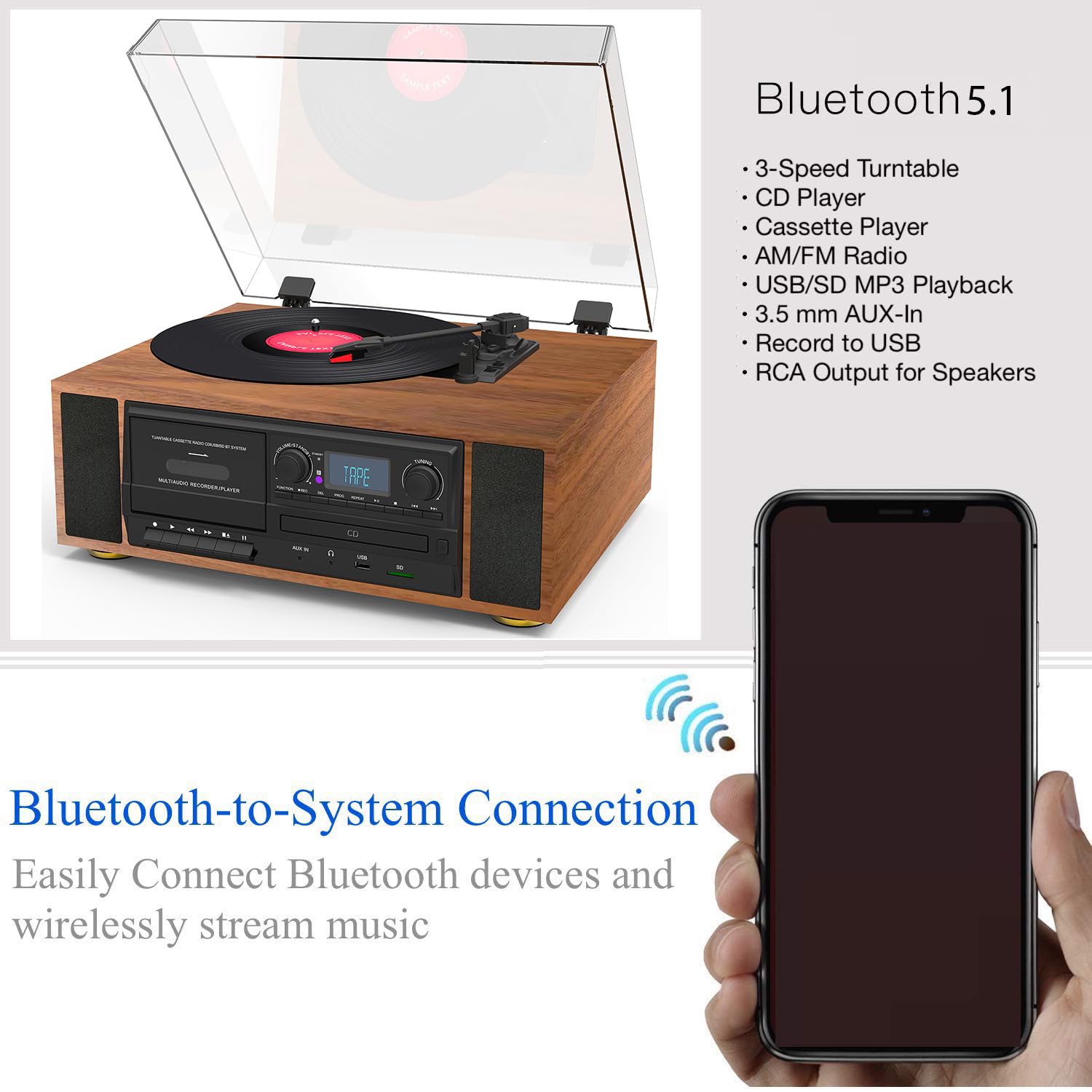
Figure 6.1: Bluetooth Connectivity. This image illustrates the wireless connection between the Boytone BT-38SM and a Bluetooth-enabled device.
- Select BT mode using the Function knob. The display will show "BT" or "PAIRING" and an indicator will flash, indicating it's ready to pair.
- On your Bluetooth-enabled device (e.g., smartphone, tablet), turn on Bluetooth and search for available devices.
- Select "Boytone BT-38SM" (or similar name) from the list of devices.
- Once connected, the indicator will stop flashing, and you can play audio from your device through the BT-38SM.
6.7 USB/SD Playback (USB/SD Mode)
- Insert a USB flash drive into the USB port or an SD card into the SD card slot.
- Select USB/SD mode using the Function knob. The unit will automatically detect and begin playing compatible audio files (e.g., MP3).
- Use the PLAY/PAUSE, STOP, and SKIP buttons to control playback.
6.8 Recording to MP3 (USB/SD)
The BT-38SM allows you to record audio from Vinyl, Radio, or Cassette directly to MP3 files on a USB flash drive or SD card.
- Insert a USB flash drive or SD card into the respective slot.
- Select the desired source for recording (PHONO, RADIO, or TAPE) using the Function knob.
- Start playback of the source (e.g., start playing a record, tune to a radio station, or play a cassette).
- Press the RECORD button. The display will indicate that recording has started.
- To stop recording, press the RECORD button again or the STOP button. The recorded file will be saved to your USB/SD device.
6.9 AUX Input (AUX Mode)
- Connect an external audio device (e.g., smartphone, MP3 player) to the AUX IN jack using a 3.5mm audio cable (not included).
- Select AUX mode using the Function knob.
- Play audio from your external device. The sound will be output through the BT-38SM's speakers.
7. Maintenance and Care
- Cleaning the Unit: Use a soft, dry cloth to wipe the exterior of the unit. Do not use abrasive cleaners, waxes, or solvents.
- Cleaning the Stylus: Gently brush the stylus from back to front with a soft brush to remove dust. Do not touch the stylus with your fingers.
- Record Care: Keep records clean and free of dust. Store them vertically in their sleeves.
- CD/Cassette Care: Handle CDs by their edges. Keep cassettes in their cases when not in use.
- Dust Cover: Keep the dust cover closed when the unit is not in use to protect the turntable.
8. Troubleshooting
If you experience problems with your unit, please check the following points before contacting support.
| Problem | Possible Cause | Solution |
|---|---|---|
| No power | Power cord not connected; Power outlet not active; Unit not turned on. | Ensure power cord is securely plugged in; Test outlet with another device; Turn the Volume/Standby knob clockwise. |
| No sound | Volume too low; Incorrect function mode selected; Headphones connected. | Increase volume; Select the correct function mode (e.g., PHONO, CD); Disconnect headphones. |
| Turntable not spinning or playing | Transit screw not loosened; Incorrect speed selected; Stylus damaged. | Loosen the transit screw; Select correct RPM; Inspect stylus for damage, replace if necessary. |
| Bluetooth not connecting | Unit not in BT mode; Device too far; Device already connected to another unit. | Select BT mode; Move device closer to the unit; Disconnect device from other Bluetooth connections and try again. |
| Poor radio reception | Antenna not extended; Interference. | Extend and adjust the FM antenna; Move unit away from other electronic devices. |
9. Specifications
| Feature | Detail |
|---|---|
| Brand | Boytone |
| Model Name | BT-38SM |
| Product Dimensions | 43.18 x 35.56 x 22.86 cm |
| Item Weight | 7.26 kg (16 Pounds) |
| Compatible Devices | Speaker |
| Special Features | Built In Speaker, Portable |
| Standing screen display size | 4 Inches |
| Voltage | 120 Volts (AC) |
| Power Source | Corded Electric |
| Signal-to-noise ratio (dB) | 60 dB |
| Connector Type | Bluetooth, USB |
| Material | Plastic |
10. Warranty and Customer Support
Boytone products are designed and manufactured to the highest quality standards. For warranty information or technical support, please refer to the warranty card included with your product or visit the official Boytone website. Please have your model number (BT-38SM) and purchase date ready when contacting support.
Related documentsBT-38SM


Ask a question about this manual
Ask about setup, troubleshooting, compatibility, parts, safety, or missing instructions. Manuals+ will review the question and use this page’s manual context to help answer it.