
Blackweb 8541666919
Blackweb Gaming Mechanical Keyboard User Manual
Model: 8541666919
Introduction
This manual provides comprehensive instructions for the Blackweb Gaming Mechanical Keyboard. Designed for advanced gaming and everyday computer use, this keyboard features vibrant backlit keys, anti-ghosting capabilities, and a durable mechanical design. Please read this manual thoroughly to ensure proper setup, operation, and maintenance of your device.
Safety Information
- Keep the keyboard away from liquids and excessive moisture.
- Avoid extreme temperatures.
- Do not attempt to disassemble or repair the keyboard yourself. Refer to qualified service personnel.
- Use only with compatible computer systems.
Package Contents
Ensure all items are present in the package:
- Blackweb Gaming Mechanical Keyboard
- Accessories (as supplied)
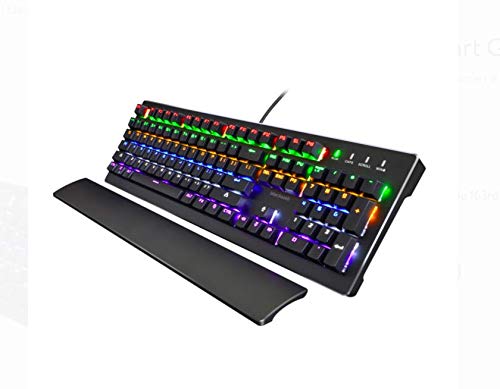
Image: The Blackweb Gaming Mechanical Keyboard, featuring its full-size layout, vibrant RGB backlighting, and an included detachable wrist rest. The keyboard is black with illuminated keys displaying a spectrum of colors.
Setup
- Unpack the Keyboard: Carefully remove the keyboard and any accessories from its packaging.
- Connect to Computer: Plug the USB connector of the keyboard into an available USB port on your computer. The keyboard is compatible with various computer systems.
- Driver Installation: The keyboard is typically plug-and-play and does not require additional driver installation. Your operating system should automatically detect and configure the device.
- Optional Wrist Rest: If included, attach the wrist rest to the designated area at the bottom front of the keyboard for enhanced ergonomic comfort during use.
Operating Instructions
Backlighting Control
The Blackweb Gaming Mechanical Keyboard features vibrant backlit keys with multiple lighting modes and color-changing effects. Specific key combinations (often involving the "Fn" key and other function keys like Insert, Home, Delete, etc.) are used to cycle through these modes and adjust brightness. Refer to the keyboard's keycap legends for exact combinations.
- 7 Flash Modes: Cycle through various dynamic lighting patterns.
- LED Color-Changing Lights: Experience a spectrum of colors across the keys.
- Brightness Adjustment: Increase or decrease the intensity of the backlighting.
Anti-Ghosting and N-Key Rollover
This keyboard is designed with full anti-ghosting and unlimited simultaneous keystrokes (N-Key Rollover). This ensures that every key press is registered accurately, even when multiple keys are pressed at the same time, which is crucial for fast-paced gaming.
Swappable Keycap Design
The keyboard features a swappable keycap design, allowing for customization or replacement of individual keycaps. Use a keycap puller (if supplied) to carefully remove and install keycaps.
Maintenance
- Cleaning: Regularly clean the keyboard to prevent dust and debris buildup. Use a soft, dry cloth for general cleaning. For deeper cleaning, a can of compressed air can be used to remove particles from between the keys. Avoid using harsh chemicals or abrasive materials.
- Storage: When not in use for extended periods, store the keyboard in a clean, dry environment.
Troubleshooting
- Keyboard Not Responding:
- Ensure the USB cable is securely plugged into both the keyboard and the computer.
- Try plugging the keyboard into a different USB port on your computer.
- Restart your computer.
- Backlighting Not Working:
- Check if the backlighting has been turned off using the keyboard's function keys.
- Adjust brightness settings using the appropriate key combinations.
- Keys Not Registering:
- Ensure the keyboard is clean and free of debris that might obstruct key presses.
- If specific keys are not working, and the keyboard has swappable switches (not explicitly stated but implied by "swappable keycap design" and "clicky and tactile keyboard"), consider if a switch might be faulty. However, user repair is not recommended.
Specifications
| Feature | Detail |
|---|---|
| Brand | Blackweb |
| Model Number | 8541666919 |
| Product Dimensions | 17.6 x 6.7 x 1.6 inches |
| Item Weight | 2.6 pounds |
| Connectivity Technology | USB |
| Keyboard Description | Gaming |
| Recommended Uses | Gaming |
| Special Feature | Backlit |
| Color | Black |
| Number of Keys | 104 |
| Keyboard Backlighting Color Support | RGB |
| Compatible Devices | Gaming Console (and PC, implied) |
| First Available Date | August 14, 2018 |
Warranty and Support
For warranty information or technical support, please refer to the documentation provided with your purchase or visit the official Blackweb website. Keep your proof of purchase for warranty claims.
Related documents8541666919


Ask a question about this manual
Ask about setup, troubleshooting, compatibility, parts, safety, or missing instructions. Manuals+ will review the question and use this page’s manual context to help answer it.