
1. Product Overview
The SINOX 12V DC BLDC Ceiling Fan is an energy-efficient ceiling fan designed for operation with a 12-volt DC power source, such as a battery or solar panel. It features a Brushless Direct Current (BLDC) motor, remote control functionality, and a 1200mm blade sweep, providing high airflow and quiet operation.
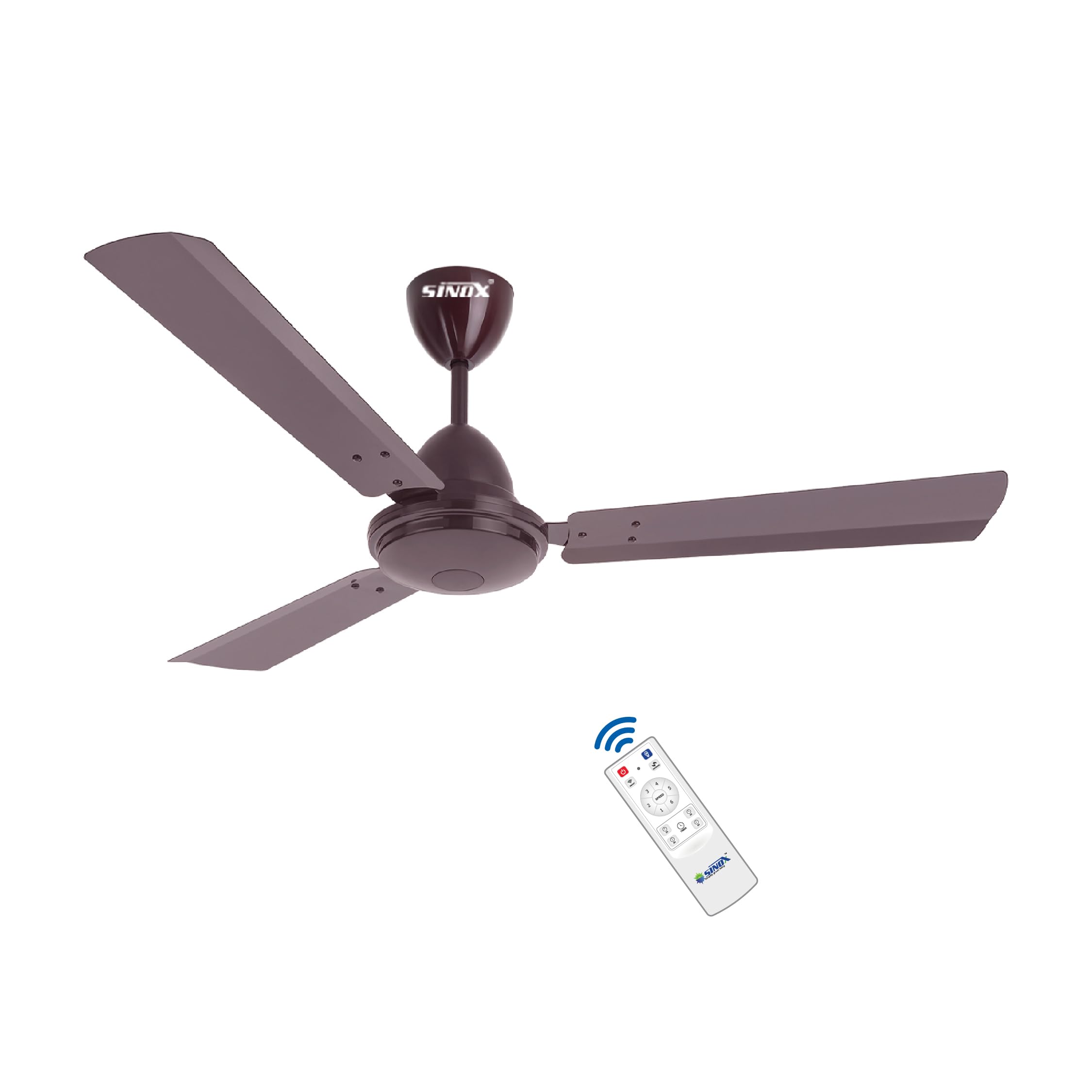
Image 1.1: SINOX 12V DC BLDC Ceiling Fan (Brown)
2. Safety Information
Please read all safety instructions before installation and use. Failure to follow these instructions may result in electric shock, fire, or serious personal injury.
- Power Source: This fan is designed for 12V DC operation only. Do not connect directly to AC mains (230 Volt) or any power source outside the 10V-19V DC range. Connecting to an incorrect power source will void the warranty and can cause severe damage.
- Wiring: Use 2.5 square mm wire for DC side connections to ensure optimal performance and safety.
- Installation: Installation should be performed by a qualified electrician in accordance with local electrical codes. Ensure the mounting structure can support the fan's weight.
- Motor Integrity: Do not open the motor housing. Opening the motor will void the warranty.
- Blade Clearance: Ensure adequate clearance between the fan blades and any surrounding objects or walls.
- Children and Pets: Keep children and pets away from the fan during operation and installation.
3. Package Contents
Verify that all components are present and undamaged before proceeding with installation.
- 1 x Motor Box
- 1 x Blade Set (3 blades)
- 1 x Remote Control
- 2 x Canopies
- 1 x Down Rod
- 1 x Shackle Kit
- 1 x Warranty Card
4. Specifications
| Feature | Specification |
|---|---|
| Brand | SINOX |
| Model Name | Premium |
| Colour | BROWN |
| Electric Fan Design | Ceiling Fan |
| Power Source | Battery-Powered, Solar Powered |
| Operating Voltage Range | 10V-19V DC |
| Wattage | 32 Watts |
| Motor Type | BLDC (Brushless Direct Current) |
| Speed | 375 RPM |
| Air Flow Capacity | 230 CMM (Cubic Meters per Minute) |
| Number of Blades | 3 |
| Blade Length | 1200 Millimeters (48 Inch) |
| Control Method | Remote Controlled |
| Number of Power Levels | 5 |
| Special Feature | Remote Controlled, 0.5 Watt LED Light, Reverse Polarity Protection, Short Circuit Protection |
| Mounting Type | Downrod Mount |
| Product Dimensions | 61D x 137.2W x 58.4H Centimeters |
| Item Weight | 4.8 Kilograms |
| Material Type | Aluminium |
| Finish Type | Powder Coated |
5. Setup and Installation
This section provides general guidelines for installing your SINOX BLDC Ceiling Fan. Professional installation is recommended.
5.1. Pre-Installation Checks
- Ensure the power source is disconnected before starting installation.
- Confirm that the ceiling junction box or mounting bracket is securely fastened and can support the fan's weight (approx. 4.8 kg).
- Verify that you have all components listed in Section 3.
5.2. Wiring Diagram (Example for Solar/Battery Connection)
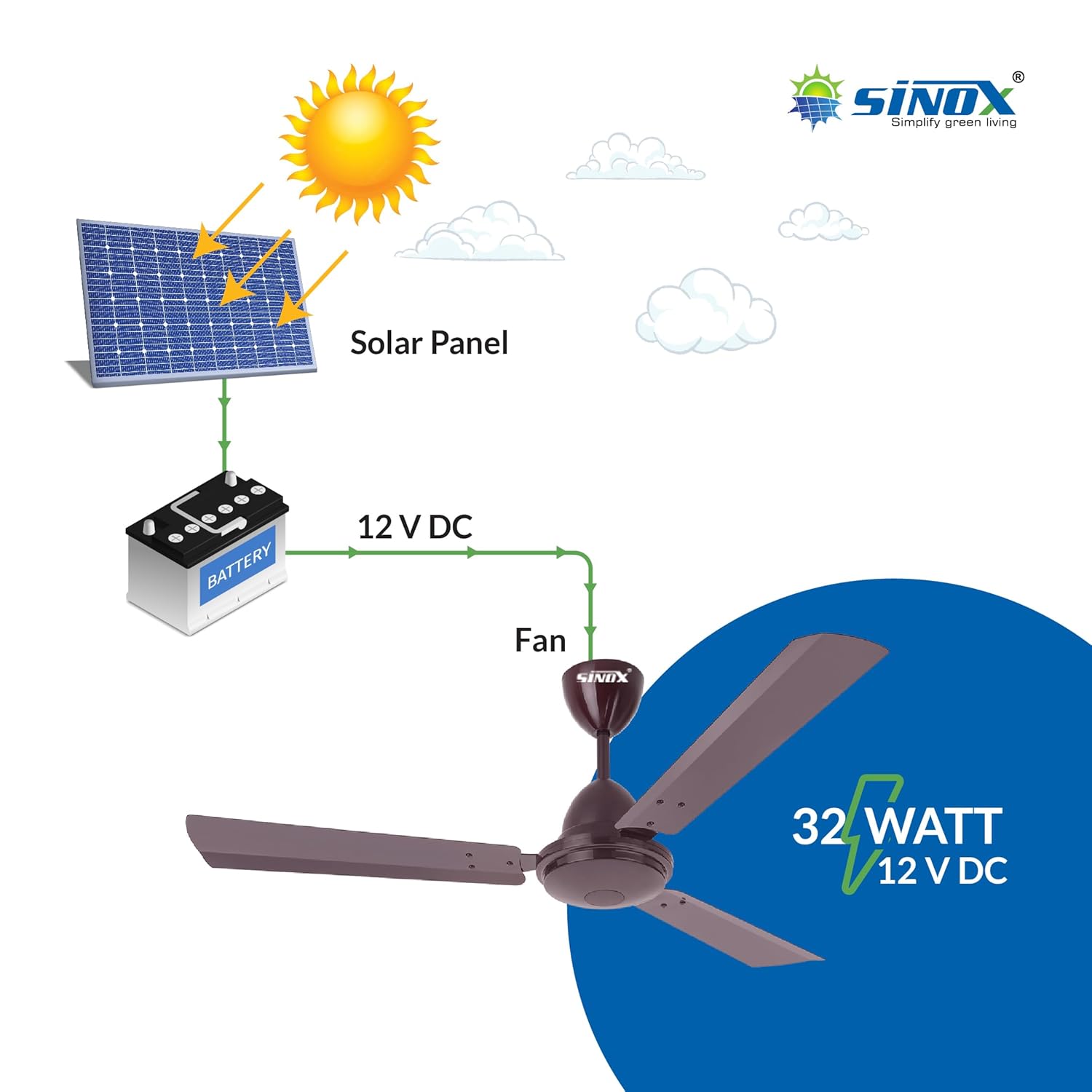
Image 5.1: Example wiring for 12V DC BLDC fan with solar panel and battery.
The fan operates on 12V DC. It can be connected to a 12V battery or directly to a 12V solar panel (60 Watts to 100 Watts recommended). Ensure correct polarity when connecting to the DC power source. Use 2.5 square mm wire for the DC side for optimal performance.
5.3. Mounting the Fan
- Attach the mounting bracket securely to the ceiling junction box.
- Assemble the downrod and canopy components.
- Carefully lift the motor assembly and attach it to the downrod.
- Connect the fan's electrical wires to the 12V DC power supply, ensuring correct polarity (positive to positive, negative to negative). The fan includes reverse polarity protection.
- Secure the canopy to cover the wiring connections.
- Attach the fan blades to the motor housing using the provided screws. Ensure all blades are securely fastened.
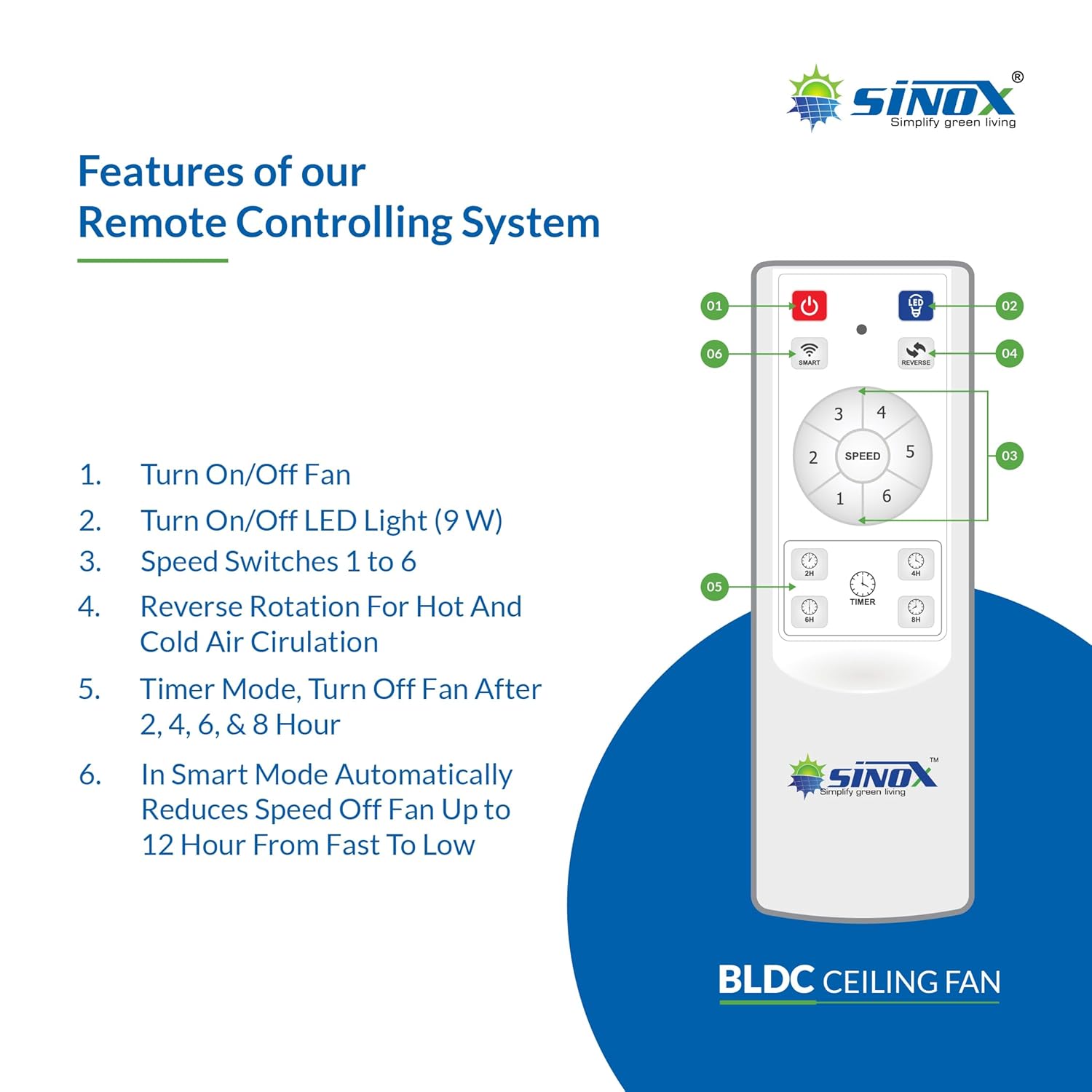
Image 5.2: BLDC motor technology components.
6. Operating Instructions
Your SINOX BLDC Ceiling Fan is operated using the included remote control.
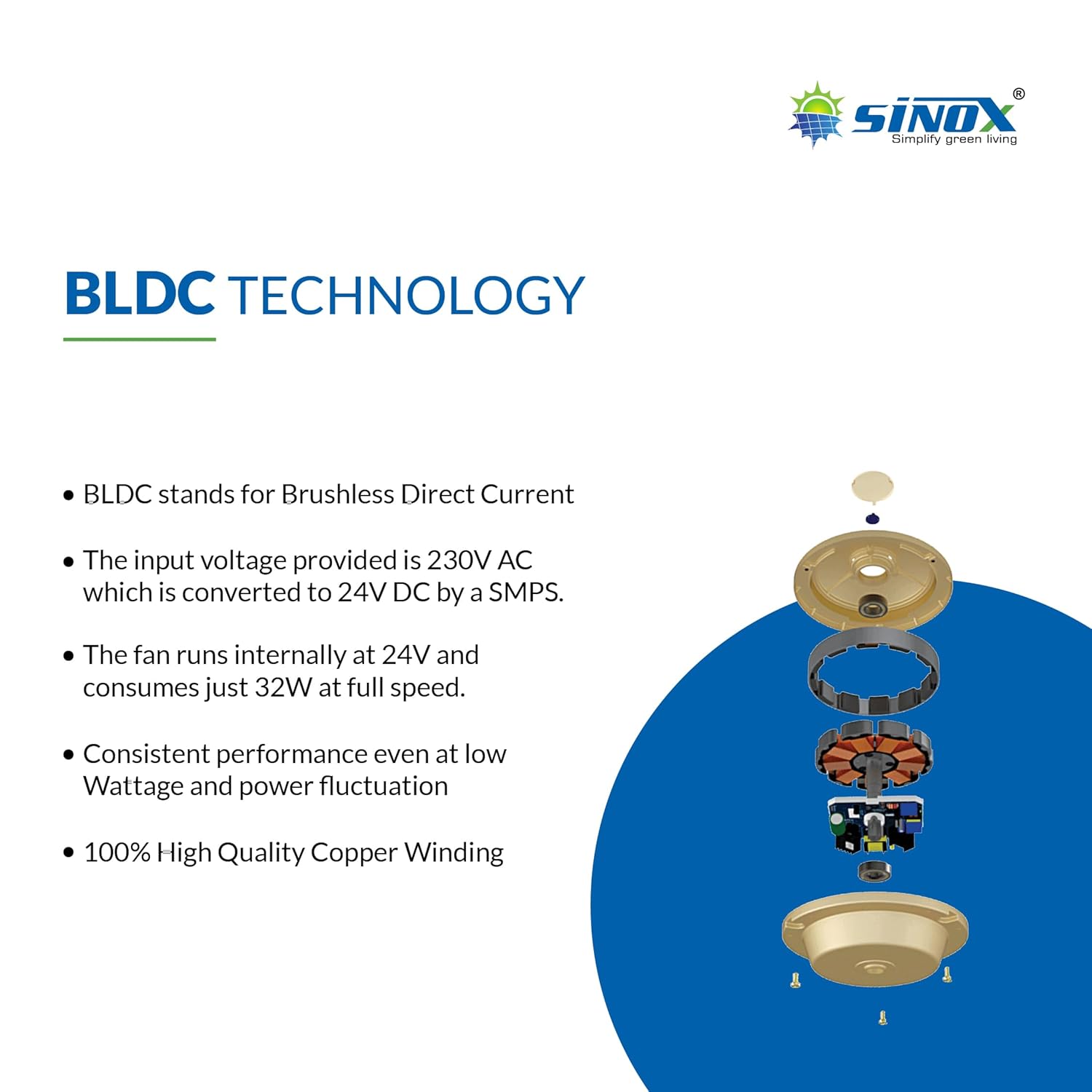
Image 6.1: Remote Control Functions.
6.1. Remote Control Functions
- Power On/Off: Press the red power button (01) to turn the fan on or off.
- LED Light On/Off: Press the light bulb button (02) to turn the integrated 0.5 Watt LED light on or off.
- Speed Control: Use the speed buttons (03) (numbered 1 to 6) to adjust the fan speed. Speed 1 is the lowest, and Speed 6 is the highest.
- Reverse Rotation: Press the reverse button (04) to change the direction of blade rotation. This feature is useful for circulating hot air in winter or enhancing cooling in summer.
- Timer Mode: Use the timer buttons (05) (2H, 4H, 6H, 8H) to set the fan to automatically turn off after 2, 4, 6, or 8 hours.
- Smart Mode: Press the Smart button (06) to activate Smart Mode. In this mode, the fan automatically reduces its speed over a period of up to 12 hours, from fast to low.

Image 6.2: Fan with integrated 0.5 Watt LED light.
7. Maintenance
Regular maintenance ensures optimal performance and longevity of your SINOX BLDC Ceiling Fan.
- Cleaning: Dust the fan blades and motor housing regularly with a soft, damp cloth. Do not use abrasive cleaners or solvents. Ensure the fan is turned off and power is disconnected before cleaning.
- Blade Fasteners: Periodically check that all blade screws are tight. Loose screws can cause wobbling and noise.
- Motor: The BLDC motor is designed for maintenance-free operation. Do not attempt to lubricate or open the motor housing.
- Wiring: Inspect wiring connections periodically for any signs of wear or damage.
8. Troubleshooting
If you encounter issues with your fan, refer to the following common problems and solutions.
| Problem | Possible Cause | Solution |
|---|---|---|
| Fan does not turn on | No power supply; Incorrect wiring; Remote control battery low. | Check 12V DC power connection; Verify wiring polarity; Replace remote control batteries. |
| Fan wobbles | Loose blade screws; Unbalanced blades; Loose mounting. | Tighten all blade screws; Ensure blades are balanced; Check mounting bracket security. |
| Remote control not working | Low battery; Obstruction between remote and fan sensor. | Replace remote control batteries; Ensure clear line of sight to fan sensor. |
| Fan makes unusual noise | Loose components; Obstruction. | Check for loose screws or parts; Ensure nothing is obstructing the fan blades. |
9. Warranty and Support
9.1. Limited Warranty
This SINOX BLDC Ceiling Fan comes with a 2-Year Limited Warranty. The warranty is void if the product is connected directly to AC Mains (230 Volt) or if the motor is opened. This warranty covers manufacturing defects only.

Image 9.1: Key features including 2-year motor warranty.
9.2. Customer Support
For technical assistance, warranty claims, or any other inquiries, please contact SINOX customer support:
- Manufacturer: SINOX POWER PVT.LTD.
- Contact Number: 8000061200