
1. Important Safety Information
Please read all instructions carefully before using your Nuwave Infinity Moxie Blender. Failure to follow these instructions may result in electric shock, fire, or serious injury.
- Always unplug the blender from the outlet when not in use, before assembling or disassembling parts, and before cleaning.
- Do not immerse the motor base in water or other liquids.
- Keep hands and utensils out of the container while blending to reduce the risk of severe injury to persons or damage to the blender. A scraper or plunger may be used only when the blender is not running.
- Blades are sharp. Handle with extreme care when cleaning the container.
- Do not operate any appliance with a damaged cord or plug, or after the appliance malfunctions or has been dropped or damaged in any manner.
- Ensure the lid is securely locked in place before operating the blender.
- Do not blend hot liquids in a sealed container as pressure buildup can cause the lid to eject and result in burns.
2. Product Overview and Components
The Nuwave Infinity Moxie Blender is designed for versatile and efficient blending. Familiarize yourself with its main components:

The Nuwave Infinity Moxie 64oz Blender, shown with its main unit, 64oz Tritan jar, plunger, and blade scraper.
Included Components:
- Infinity Power Base
- 64 oz Tritan Jar (BPA-Free, stain-resistant)
- 1 Plunger (blender stick)
- 1 Blade Scraper
- Owner's Manual (this document)
- Recipe Book (separate)

All components included with your Nuwave Infinity Moxie Blender.

The 64oz Tritan jar is made from professional-grade, BPA-free, and stain-resistant material, built for durability.
3. Setup and First Use
Before using your blender for the first time, follow these steps:
- Unpack all components and remove any packaging materials.
- Wash the 64 oz Tritan jar, lid, and plunger with warm, soapy water. Rinse thoroughly and dry.
- Place the power base on a clean, dry, and stable surface.
- Ensure the blender jar is properly seated on the power base. The jar should click into place.
- Plug the power cord into a standard 120V AC electrical outlet.
4. Operating Instructions
The Nuwave Infinity Moxie Blender features intuitive digital controls, 6 pre-programmed settings, and 10 manual speed options for versatile blending.
Control Panel Overview:
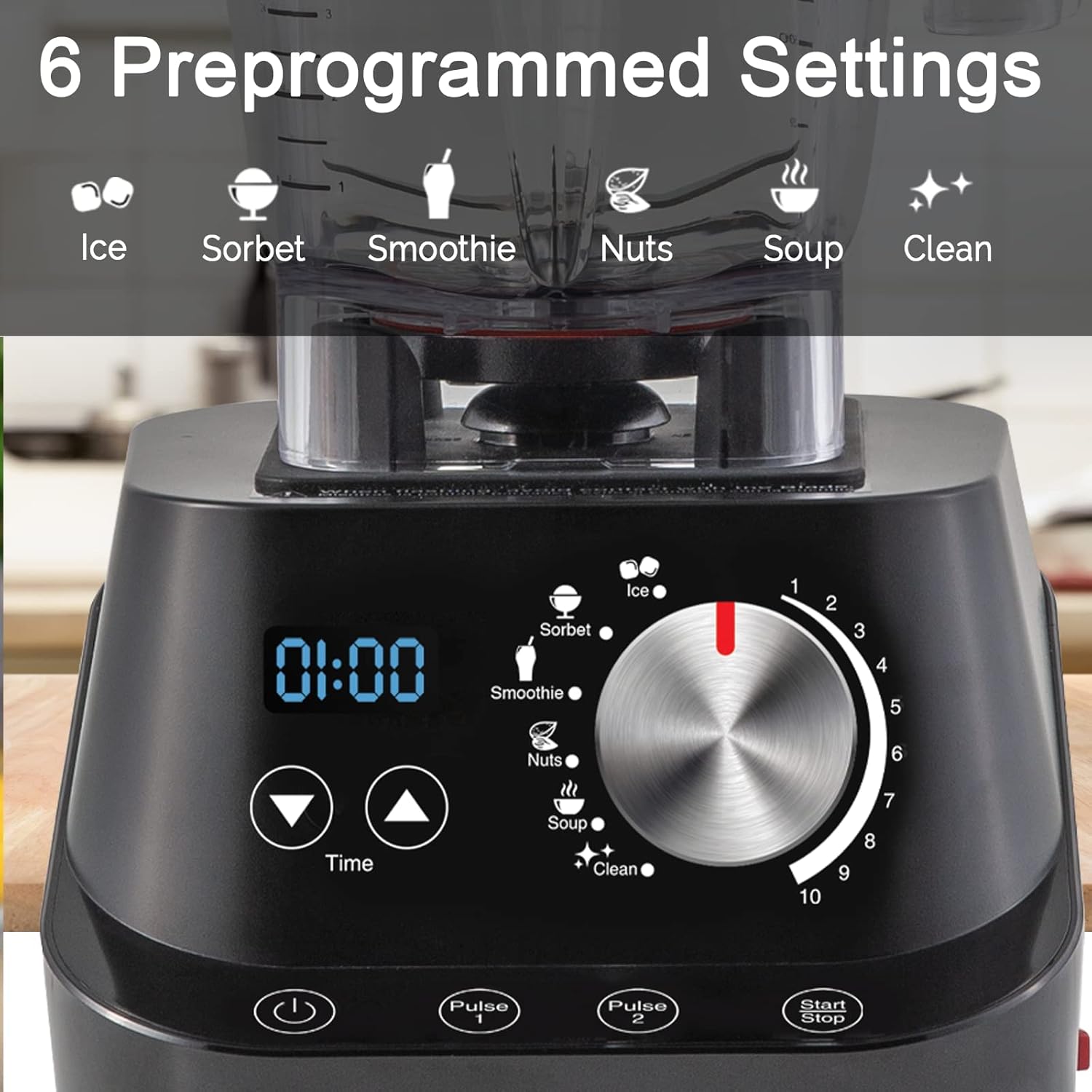
The control panel features a digital display, time controls, 6 automatic presets (Ice, Sorbet, Smoothie, Nuts, Soup, Clean), a speed dial (1-10), and Pulse buttons.
Blending Functions:
- Powerful Motor: Equipped with a 1500-watt (2.5 horsepower) motor, the blender can reach speeds as high as 17,000 RPM, handling tough ingredients without overheating.
- Laser-Cut Stainless Steel Blades: The sharp, thin, and strong blades efficiently slice foods, creating smoother blends with less oxidation. They can even generate friction heat to cook hot soups directly in the blender.
- Versatility: Ideal for smoothies, protein shakes, hot soups, nut butters, sorbets, juices, cocktails, chopping ingredients, and grinding meats.

The powerful 2.5 HP motor ensures efficient blending even with a full load.

The laser-cut stainless steel blades are designed for optimal blending performance.

The Nuwave Infinity Moxie Blender can be used for a wide variety of preparations, from smoothies to grinding meat.
Using Pre-programmed Settings:
Select one of the 6 pre-programmed settings (Ice, Sorbet, Smoothie, Nuts, Soup, Clean) by turning the dial. The blender will automatically adjust speed and time for optimal results.
Manual Speed Control:
For custom blending, use the speed dial to select from 10 manual speeds. The digital display shows the current speed and remaining time. You can adjust time on-the-fly during the blending cycle.
Pulse Function:
Use the Pulse buttons for short bursts of power, ideal for chopping or achieving desired texture.
Official Product Video:
This video demonstrates the powerful high-performance blending capabilities of the Nuwave Infinity Moxie Blender, showcasing its ability to emulsify ingredients for smooth results without seeds, pulps, chunks, or separation.
5. Maintenance and Cleaning
Proper maintenance ensures the longevity and optimal performance of your blender.
Self-Cleaning Function:
The Nuwave Infinity Moxie Blender features a convenient self-clean mode. Simply add a small amount of dish soap and water to the jar, select the 'Clean' preset, and let the blender do the work. Rinse thoroughly after the cycle is complete.

The self-cleaning function simplifies cleanup, requiring only soap and water.
Manual Cleaning:
- Blender Jar, Lid, and Plunger: These parts are dishwasher safe (top rack recommended) or can be hand-washed with warm, soapy water. Use the included blade scraper to safely remove any residue from around the blades.
- Power Base: Wipe the power base with a damp cloth. Do not immerse the power base in water or any other liquid.
6. Troubleshooting
If you encounter issues with your Nuwave Infinity Moxie Blender, refer to the following common problems and solutions:
| Problem | Possible Cause | Solution |
|---|---|---|
| Blender does not turn on. | Not plugged in; power outage; jar not properly seated. | Ensure power cord is securely plugged in. Check circuit breaker. Verify jar is correctly placed on the base. |
| Ingredients are not blending smoothly. | Too little liquid; ingredients too large; overfilling. | Add more liquid. Cut ingredients into smaller pieces. Do not exceed the MAX fill line. Use the plunger to push ingredients towards the blades. |
| Blender stops during operation. | Overload protection activated. | Unplug the blender, remove some ingredients, and let it cool for 15-20 minutes before restarting. |
| Loud noise or burning smell. | Motor strain; foreign object in jar. | Turn off and unplug immediately. Check for foreign objects. If smell persists, contact customer support. |
7. Specifications
| Feature | Detail |
|---|---|
| Brand | Nuwave |
| Model Number | 28202 |
| Color | Black |
| Capacity | 64 Fluid Ounces |
| Product Dimensions | 8"D x 7.75"W x 18.19"H |
| Item Weight | 11.8 pounds |
| Power Source | Corded Electric |
| Voltage | 120V |
| Number of Speeds | 10 |
| Controls Type | Digital |
| Blade Material | Stainless Steel |
| Material Type Free | BPA Free |
| UPC | 652185280014 |
| Country of Origin | USA |
8. Warranty and Support
Nuwave stands behind the quality of its products. The Nuwave Infinity Moxie Blender comes with a 5-year warranty, as noted by customer reviews, and is supported by 10-year customer support.
For further assistance, please refer to the official user manual PDF available online or contact Nuwave customer support.
Official User Manual (PDF): Download PDF


