
1. Introduction
This manual provides detailed instructions for the setup, operation, and maintenance of your OWLENZ SD60 Wi-Fi Mini Projector. Please read this manual thoroughly before using the product to ensure proper functionality and safety. The SD60 features advanced LED light technology with 1500 lumens brightness, Wi-Fi screen sharing capabilities (Miracast/Airplay), and multiple media playback options for a versatile home theater experience. Its portable and compact design allows for easy installation and use.
2. Important Safety Information
- Do not look directly into the projector lens when the lamp is on.
- Ensure proper ventilation around the projector to prevent overheating.
- Keep the projector away from water or other liquids.
- Use only the power adapter supplied with the projector.
- Avoid placing the projector on unstable surfaces.
- The LED light technology is designed to be gentle on the eyes and has no radiation.
3. Package Contents
Verify that all items listed below are included in your package. If any items are missing or damaged, please contact customer support.
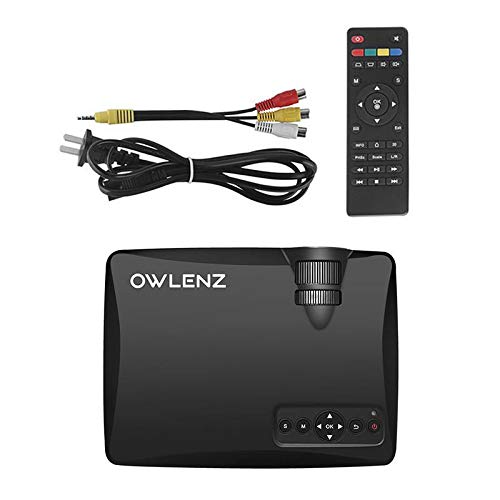
Image: OWLENZ SD60 Projector, remote control, power cable, and AV cables.
- OWLENZ SD60 Mini Projector
- Remote Control
- Power Cable
- AV Cable
- User Manual (this document)
4. Product Overview
Familiarize yourself with the various parts and controls of your OWLENZ SD60 projector.
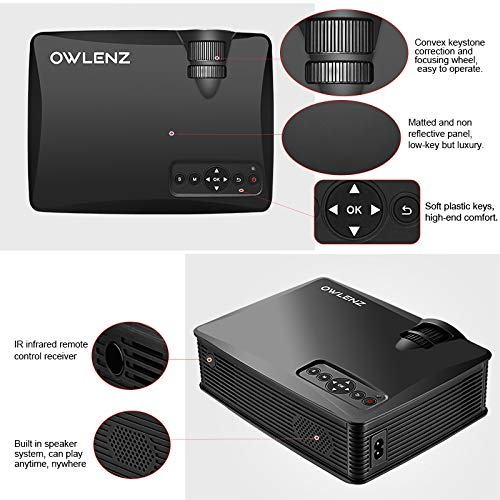
Image: Key features of the OWLENZ SD60 projector, including the focusing wheel, keystone correction, control panel, IR receiver, and built-in speaker.
- Convex Keystone Correction and Focusing Wheel: Located on the top, these allow for easy image adjustment.
- Matted and Non-Reflective Panel: Provides a sleek, low-key appearance.
- Soft Plastic Keys: For comfortable and responsive control.
- IR Infrared Remote Control Receiver: For remote operation.
- Built-in Speaker System: A 3W speaker for integrated audio playback.
- Input Ports: HDMI, USB, AV, SD Card slot (located on the side/rear).
5. Setup
5.1 Power Connection
- Connect the power cable to the projector's power input port.
- Plug the other end of the power cable into a suitable electrical outlet.
- Press the power button on the projector or remote control to turn it on.
5.2 Connecting Input Sources
The projector supports various input options:
- HDMI: Connect an HDMI cable from your device (laptop, gaming console, etc.) to the projector's HDMI port.
- USB: Insert a USB drive into the USB port for direct media playback.
- AV: Use the provided AV cable to connect to devices with AV output.
- SD Card: Insert an SD card into the SD card slot for media playback.
After connecting, select the appropriate input source from the projector's menu using the remote or control panel.
5.3 Wi-Fi Screen Sharing (Miracast / Airplay)
The SD60 supports wireless screen sharing from compatible smartphones and tablets.
- Ensure your mobile device and the projector are connected to the same Wi-Fi network.
- On the projector, navigate to the "Screen Share" or "Miracast/Airplay" option in the main menu.
- On your mobile device, activate the screen mirroring function (e.g., "Smart View" on Android, "Screen Mirroring" on iOS).
- Select the projector's name from the list of available devices to establish the connection.
5.4 Focus and Keystone Adjustment
- Focus: Rotate the focusing wheel near the lens until the projected image is clear and sharp.
- Keystone Correction: Use the keystone correction wheel to adjust the image shape if it appears trapezoidal (wider at the top or bottom).
6. Operation
6.1 Basic Controls
Use the control panel on the projector or the remote control to navigate menus and adjust settings.
- Power Button: Turns the projector on/off.
- Navigation Buttons (Arrows/OK): For menu navigation and selection.
- Source Button: Switches between input sources (HDMI, USB, AV, SD Card, Wi-Fi).
- Menu Button: Accesses the projector's settings menu.
6.2 Media Playback
Once an input source is selected, the projector will display content. For USB/SD card playback, navigate through the file browser to select your desired media.
6.3 Audio Output
- Built-in Speaker: The projector has a built-in 3W speaker suitable for small viewing areas.
- External Speaker: For a better listening experience, connect external speakers or headphones to the 3.5mm audio port.
6.4 Projection Size
The projector supports projection sizes ranging from 40 to 150 inches, offering a large screen experience.
7. Maintenance
7.1 Cleaning
- Use a soft, dry cloth to clean the projector's exterior.
- For the lens, use a lens cleaning cloth and specialized lens cleaning solution. Do not use abrasive materials.
- Regularly clean the ventilation openings to ensure proper airflow and prevent dust buildup.
7.2 LED Bulb Lifespan
The OWLENZ SD60 features an LED bulb with a lifespan of up to 30,000+ hours, significantly longer than traditional projector lamps. No regular bulb replacement is typically required under normal usage conditions.
8. Use Cases
The OWLENZ SD60 Mini Projector is versatile and suitable for various applications:
- Home Theater: Enjoy movies, TV shows, and sports on a large screen.
- Gaming: Connect gaming consoles for an immersive gaming experience.
- Educational Purposes: Project educational content, videos, and presentations.
- Children's Entertainment: Ideal for playing videos and cartoons for children.
- Small Viewing Areas: Its compact design and built-in speaker make it perfect for use in smaller rooms or spaces.
9. Troubleshooting
| Problem | Possible Cause | Solution |
|---|---|---|
| No image displayed | Incorrect input source selected; loose cable connection; source device not powered on. | Select the correct input source. Check all cable connections. Ensure the source device is powered on. |
| Image is blurry | Focus not adjusted correctly. | Adjust the focusing wheel until the image is clear. |
| Image is trapezoidal | Keystone not adjusted correctly. | Adjust the keystone correction wheel. |
| No sound | Volume too low; external speakers not connected properly; audio format not supported. | Increase volume. Check external speaker connection or use built-in speaker. Ensure audio format is compatible. |
| Wi-Fi screen sharing not working | Devices not on the same Wi-Fi network; screen mirroring function not activated on mobile device. | Ensure both devices are on the same Wi-Fi. Activate screen mirroring on your mobile device and select the projector. |
10. Specifications
| Feature | Detail |
|---|---|
| Brand | OWLENZ |
| Model | SD60 |
| Product Dimensions (LxWxH) | 20.8 x 16.5 x 8 cm |
| Item Weight | 949 g |
| Hardware Interface | HDMI, USB |
| Connectivity Technology | HDMI, USB, Wi-Fi |
| Compatible Devices | Smartphones, Tablets, Laptops |
| Special Features | Built-In Speaker, Portable |
| Display Technology | LCD |
| Brightness | 1500 Lumens |
| LED Bulb Lifespan | Up to 30,000+ hours |
| Projection Size | 40 to 150 inches |
| Built-in Speaker Power | 3W |
| Form Factor | Portable |
| Mounting Type | Tabletop Mount |
| Wattage | 24 Watts |
| Batteries Required | Yes (for remote control, not included) |
11. Product Video Overview
Watch this short video for a quick overview of the OWLENZ SD60 Mini Projector's features and capabilities.
Video: A brief overview highlighting the OWLENZ SD60 projector's display, sound, smart features, other features, portability, and use cases.
12. Warranty and Support
The OWLENZ SD60 Mini Projector comes with a standard brand warranty. For detailed warranty information, technical support, or service inquiries, please refer to the product detail page on Amazon.in or contact OWLENZ customer service directly.
For further information, visit the product detail page: Amazon Product Page
