Introduction
Thank you for choosing Adorrgon 12x42 HD Binoculars. This manual provides essential information for setting up, operating, and maintaining your new binoculars. Designed for clarity and versatility, these binoculars are perfect for a wide range of activities including bird watching, hunting, sports events, and travel. Please read this manual thoroughly before use to ensure optimal performance and longevity of your device.
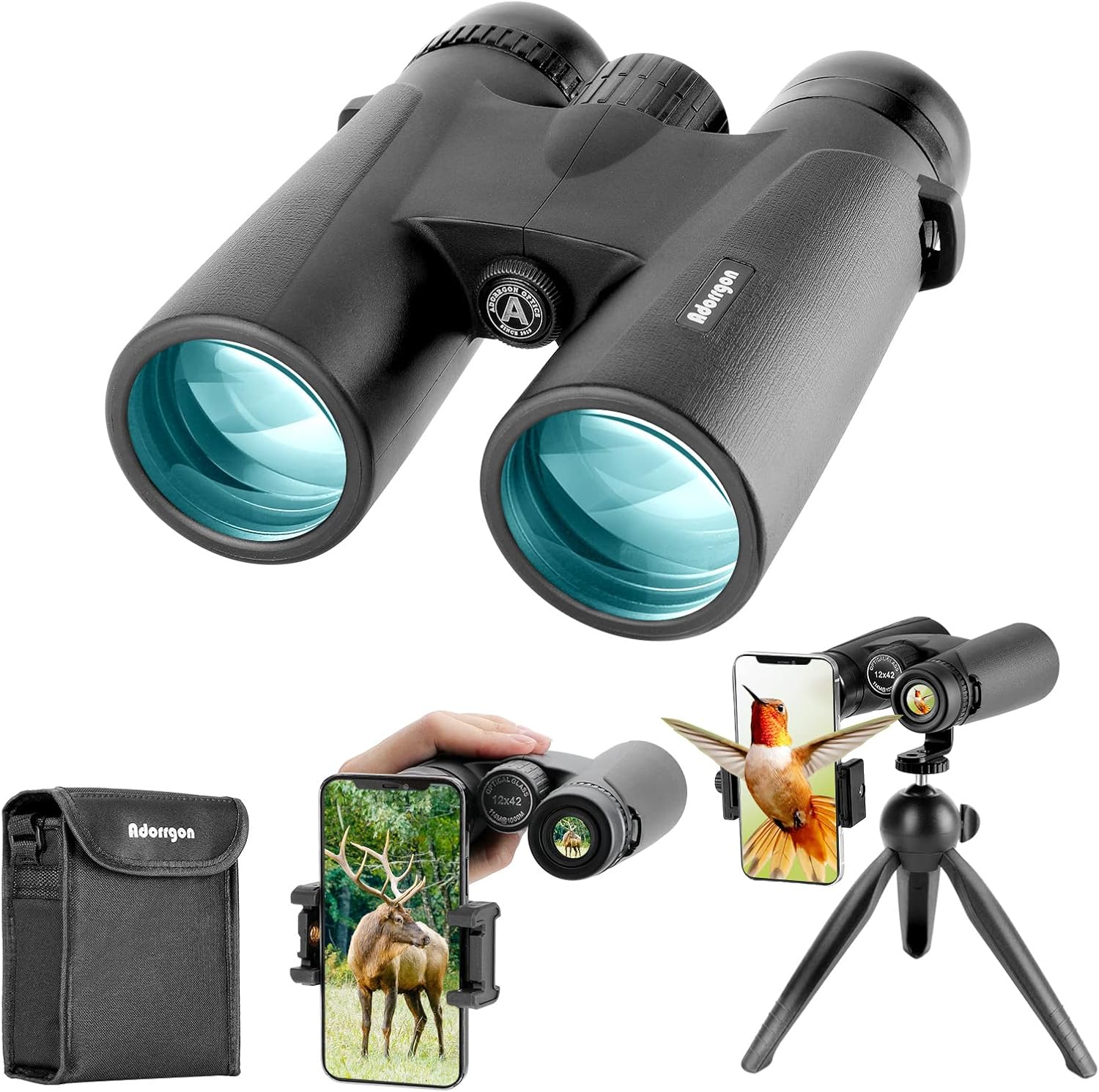
The Adorrgon 12x42 HD Binoculars, complete with accessories.
What's in the Box
Your Adorrgon 12x42 HD Binoculars package includes the following items:
- Adorrgon 12x42 HD Binoculars
- Phone Adapter
- Tripod
- Carrying Case
- Neck Strap
- Lens Cleaning Cloth
- Instruction Manual
All components included in your Adorrgon Binoculars package.
Key Features
- Powerful 12x42 Magnification: Delivers a 367ft/1000yds large field of view, capable of clear images from over 650 feet away.
- Lightweight Design: Weighs only 1.1 pounds, making it highly portable.
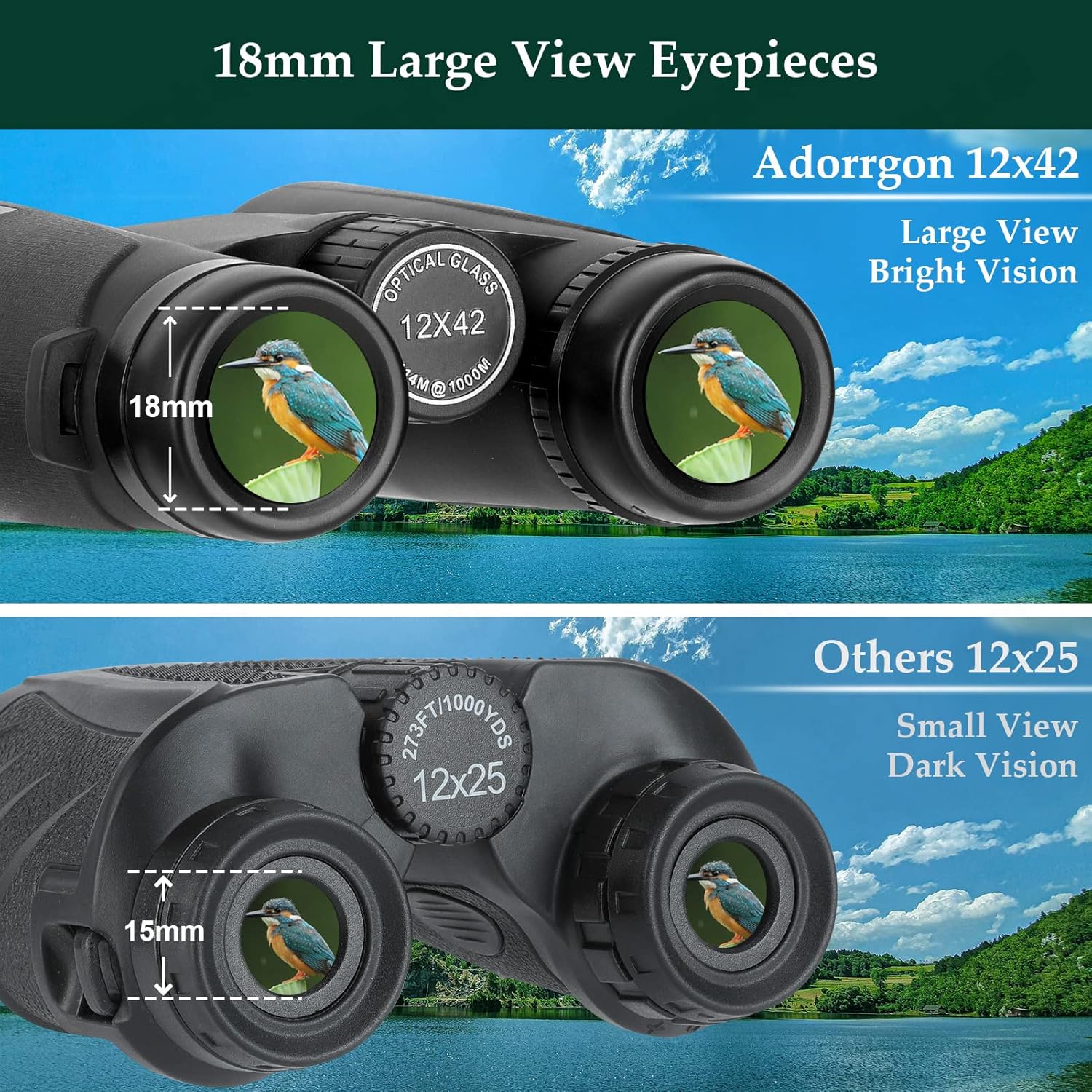
- Clear Low Light Vision: Advanced Fully Multi-coated Binoculars with large 16.5mm BAK4 prism lens for brighter vision in weak light conditions.
- 18.5mm Large Eyepieces: Provides a larger and brighter image for clearer details, 2.25 times the image size of 14mm eyepieces.
- 2025 Upgraded Phone Adapter: Easy and quick setup, compatible with all types of smartphones (with or without cases) for stable photography.
- 360 Degrees Rotatable and Stable Tripod: Unique ball head design allows 360-degree rotation, with thicker leg tubes and non-slip rubber feet for stability.

The binoculars are designed to be lightweight, compact, and portable for easy carrying.
Setup
1. Adjusting Interpupillary Distance
Hold the binoculars with both hands and bend the body until you see a single, clear circular field of view. This adjusts the distance between the eyepieces to match your eyes.
2. Adjusting Eyecups
If you wear eyeglasses, twist the eyecups down to their lowest position. If you do not wear eyeglasses, twist the eyecups up to their highest position for comfortable viewing.
3. Attaching the Phone Adapter
- Secure your smartphone into the phone adapter. Ensure the phone's camera lens is aligned with the adapter's viewing hole.
- Carefully slide the phone adapter onto one of the binocular's eyepieces. Adjust its position until the phone's screen displays a clear, circular image from the binoculars.

The universal smartphone adapter allows you to capture magnified views directly with your phone.
4. Attaching the Tripod
- Locate the tripod mounting screw on the front of the binoculars (usually covered by a small cap). Remove the cap.
- Screw the binoculars onto the tripod's mounting plate. Tighten securely but do not overtighten.
- Adjust the tripod legs and ball head for desired height and angle.

The sturdy tripod provides stability for long-distance viewing and photography.
Operating Instructions
1. Focusing
- Close your right eye and focus on a distant object using the central focus wheel until the image in your left eye is clear and sharp.
- Open your right eye and close your left eye. Adjust the diopter ring (usually on the right eyepiece) until the image in your right eye is clear and sharp.
- With both eyes open, use only the central focus wheel for subsequent focusing on objects at varying distances.
2. Low Light Vision
These binoculars are designed with advanced multi-coated lenses and a large BAK4 prism to enhance vision in low light conditions. While they do not provide night vision, they significantly improve brightness and clarity in dim environments, making them suitable for dawn, dusk, or concert viewing.

Experience clear vision even in low light with advanced optical features.
3. Versatile Use
Your Adorrgon binoculars are versatile tools for various outdoor and indoor activities:
- Bird Watching: Observe distant birds with exceptional detail.
- Hunting: Spot game from afar with enhanced clarity.
- Sports Events: Get closer to the action at games and races.
- Concerts: Enjoy a magnified view of performers from any seat.
- Travel & Sightseeing: Explore landscapes and landmarks in detail.

The binoculars are suitable for a wide range of activities, allowing you to enjoy anytime, anywhere.
4. Official Product Video
Watch this official video for an overview of the Adorrgon 12x42 HD Binoculars and their features.
Maintenance and Care
- Cleaning Lenses: Use the provided lens cleaning cloth to gently wipe away dust or smudges. For stubborn marks, use a lens cleaning solution specifically designed for optics. Avoid using abrasive cloths or harsh chemicals.
- Cleaning Body: Wipe the body of the binoculars with a soft, damp cloth.
- Storage: Store the binoculars in their carrying case in a cool, dry place when not in use. Avoid extreme temperatures and high humidity. Ensure lens caps are on to protect the lenses from dust and scratches.
- Water Resistance: While designed for durability, avoid submerging the binoculars in water. They are built to withstand light rain and splashes, but are not fully waterproof.
Troubleshooting
1. Blurry Image
- Ensure the interpupillary distance is correctly adjusted for your eyes.
- Adjust the central focus wheel and diopter ring as described in the Operating Instructions.
- Check if the lenses are clean and free from smudges or dust.
2. Difficulty Attaching Phone Adapter
- Ensure your phone is securely seated in the adapter and the camera lens is aligned.
- Verify the adapter is correctly positioned on the binocular eyepiece. Some phone cases might interfere with proper alignment.
3. Unstable Tripod
- Ensure the binoculars are securely screwed onto the tripod mount.
- Check that the tripod legs are fully extended and locked into place on a stable surface.
- Adjust the ball head tension for desired stability.
Specifications
| Feature | Detail |
|---|---|
| Brand | Adorrgon |
| Model Number | 889268 |
| Magnification Maximum | 12x |
| Objective Lens Diameter | 42 Millimeters |
| Item Weight | 1.1 pounds |
| Product Dimensions | 5.75 x 4.95 x 2.1 inches |
| Special Feature | Lightweight, High Magnification |
| Age Range (Description) | Adult |
| Country of Origin | China |
Warranty and Support
Adorrgon products are manufactured to high-quality standards and are backed by a manufacturer's warranty. For specific warranty details, product support, or any inquiries, please refer to the contact information provided on the product packaging or visit the official Adorrgon website. Our customer service team is ready to assist you with any questions or concerns.
