
1. Introduction
This manual provides essential information for the installation, operation, and maintenance of your Pureit Classic G2 Mineral RO + UV 6 Stage Water Purifier. Please read these instructions carefully before using the appliance to ensure safe and efficient operation. Keep this manual for future reference.

Figure 1: Front view of the Pureit Classic G2 Mineral RO + UV Water Purifier.
2. Product Features
The Pureit Classic G2 Mineral RO + UV Water Purifier incorporates advanced technology for effective water purification:
- 6-Stage Purification: Advanced purification process ensures safe drinking water.
- Mineral Cartridge: Adds essential minerals like calcium and magnesium to purified water.
- 100% RO Purified Water: All water passes through RO, preventing mixing of purified and impure water.
- Long Filter Life: Features a 6000-litre filter life, reducing frequency of replacements.
- Advanced Alert System: Notifies users when filter changes are due.
- Auto Shut-off: Automatically stops purification if filters are exhausted, ensuring no impure water is dispensed.
- Table Top/Wall Mountable Design: Flexible installation options to suit your kitchen space.

Figure 2: Key features highlighting filter life and maintenance benefits.
3. Setup and Installation
3.1 Unpacking the Unit
Carefully remove the water purifier from its packaging. Inspect for any damage during transit. Retain packaging materials for future transport or service needs.
3.2 Included Components
- Water Purifier Unit
- Installation Kit
- External Pre-Sediment Filter
3.3 Site Selection
Choose a location that is clean, dry, and away from direct sunlight or heat sources. Ensure easy access to a water inlet and a power outlet. The unit can be placed on a countertop or mounted on a wall.

Figure 3: Example of a suitable kitchen installation for the water purifier.
3.4 Professional Installation
It is highly recommended to arrange for professional installation by an authorized service technician. This ensures correct setup and optimal performance. The installation kit is provided for this purpose.
3.5 Pre-Installation Considerations
- Water Pressure: If water pressure is too low, a booster pump may be required (not included).
- Water Hardness/TDS: For TDS levels up to 2000 ppm. Use a TDS meter to verify your water source.
- Iron Cartridge: May be needed based on water conditions (not included).

Figure 4: Safety measures observed during professional installation and service.
4. Operating Instructions
4.1 Initial Use
- After professional installation, ensure the water supply valve is open.
- Plug the power cord into a suitable electrical outlet.
- The purifier will begin filling its internal tank. The 'Tank Full' indicator will illuminate when the tank is full.
- For the first use, dispense and discard the first two tanks of purified water to flush the system.
4.2 Dispensing Water
Place a clean container under the tap and turn the tap handle to dispense purified water.
4.3 Indicators
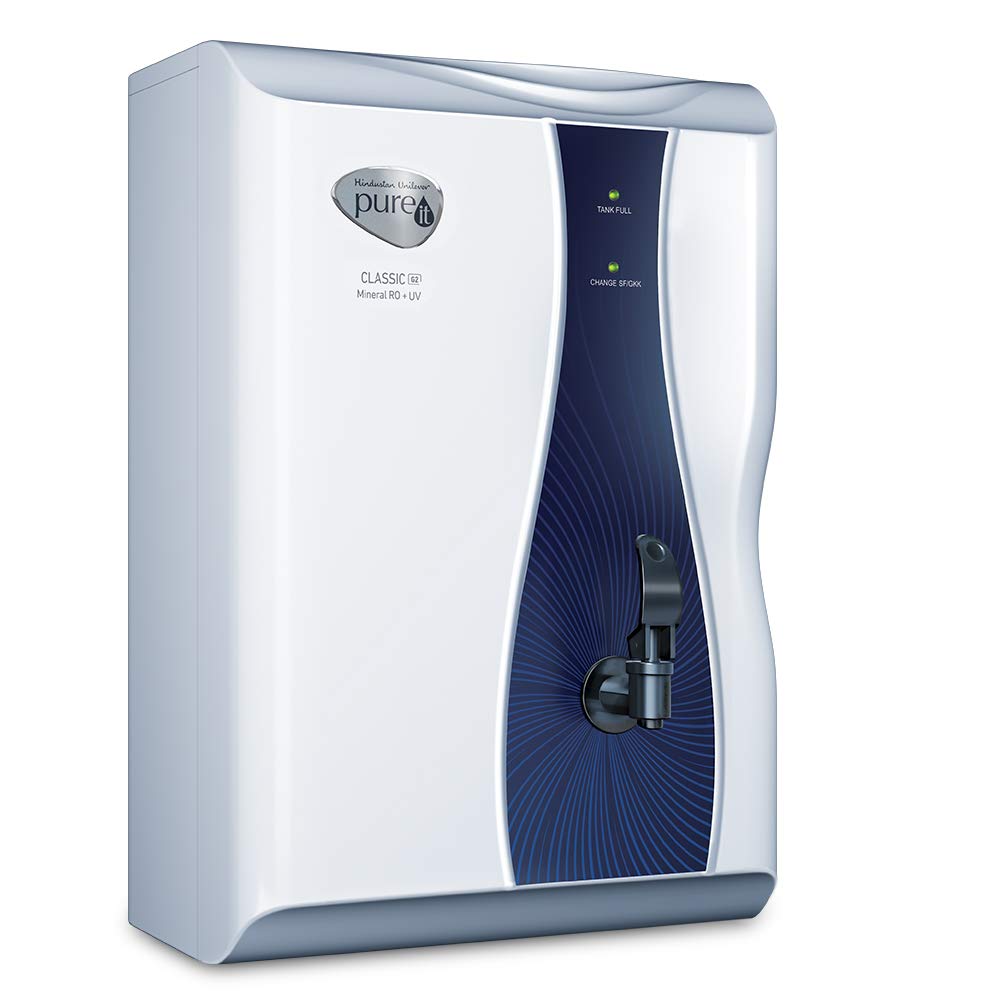
Figure 5: LED indicators and water level indicator for easy monitoring.
- Tank Full Indicator: Illuminates when the purified water storage tank is full. The purification process will automatically stop.
- Change SF/GKK Indicator: An advanced alert system that indicates when the sediment filter (SF) or Germkill Kit (GKK) needs replacement. The purifier will automatically shut off if these are not replaced, preventing the dispensing of impure water.
- Water Level Indicator: A transparent strip on the side of the unit allows visual monitoring of the water level in the storage tank.
5. Maintenance
5.1 Filter Replacement
The purifier features a long filter life of 6000 litres. The 'Change SF/GKK' indicator will alert you when filter replacement is necessary. It is crucial to replace filters promptly to maintain water quality and purifier efficiency. Contact authorized service personnel for filter replacement.
5.2 Cleaning the Unit
- Wipe the exterior of the purifier with a soft, damp cloth. Do not use harsh chemicals or abrasive cleaners.
- Regularly clean the water dispensing tap.
- Do not attempt to open the purifier for internal cleaning; this should only be done by a qualified technician during service.
5.3 Annual Maintenance
Regular annual maintenance by an authorized service technician is recommended to ensure the long-term performance and safety of your water purifier.
6. Troubleshooting
If you encounter any issues with your Pureit Classic G2, refer to the following common troubleshooting steps. For problems not listed here or if issues persist, contact customer support.
| Problem | Possible Cause | Solution |
|---|---|---|
| No water dispensed | Power off, water supply off, tank empty, or filters exhausted. | Check power connection, ensure water supply is open, wait for tank to fill, or check 'Change SF/GKK' indicator. |
| Slow water flow | Clogged filters or low inlet water pressure. | Check 'Change SF/GKK' indicator for filter replacement. Ensure adequate inlet water pressure. |
| Unusual noise during operation | Normal pump operation or air in the system. | Some noise is normal during purification. If noise is excessive or persistent, contact service. |
| Water leakage | Loose connections or damaged components. | Immediately turn off water supply and power. Contact authorized service technician. |
7. Specifications
| Specification | Value |
|---|---|
| Brand | Pureit |
| Model Name | Classic G2 Mineral |
| Model Number | G2 |
| Capacity | 6 Liters |
| Purification Method | Reverse Osmosis, Ultraviolet |
| Stages of Purification | 6 Stage |
| Material | Food grade engineered plastic |
| Installation Type | Countertop / Wall Mountable |
| Power Source Type | Corded Electric |
| Power Consumption | 55 watts |
| Input Water Temperature | 10°C to 40°C |
| Operative Input Voltage | 100 - 300V AC; 50Hz |
| Supported Water TDS Level Maximum | 2000 ppm |
| Item Weight | 7300 Grams |
| Product Dimensions (L x W x H) | 19.9 cm x 29.7 cm x 43.5 cm |
| Included Components | Water Purifier, External Pre-Sediment Filter |

Figure 6: Dimensions of the Pureit Classic G2 Water Purifier.
8. Warranty and Support
8.1 Warranty Information
The Pureit Classic G2 Mineral RO + UV Water Purifier comes with a 1-year warranty provided by the manufacturer from the date of purchase. Please note that consumables and additional accessories are not covered under this warranty.
8.2 Customer Support
For installation requests, service, or any product-related queries, please contact Pureit customer support. Refer to the contact information provided in your product packaging or visit the official Pureit website.
You can also visit the Pureit Store on Amazon for more product information and support resources.


