Introduction
Thank you for choosing the VIVOHOME 14 FT Inflatable Projector Screen. This manual provides essential information for the safe and efficient setup, operation, and maintenance of your inflatable projector screen. Please read these instructions thoroughly before use and retain them for future reference.
Safety Instructions
- Ensure the inflatable screen is placed on a flat, clear surface, free from sharp objects or debris that could puncture the material.
- Always secure the screen with the provided ground stakes and ropes, especially in outdoor environments, to prevent tipping due to wind.
- Keep the built-in air blower away from water and moisture. Do not operate the blower in wet conditions or during rain.
- Verify that the power supply for the blower matches the specified voltage and current requirements.
- Do not obstruct the air intake or exhaust of the blower during operation.
- Supervise children around the inflatable screen to prevent accidents.
- In case of strong winds, deflate the screen immediately to prevent damage.
Package Contents
Please check to ensure all items are present in the package:
- 1 x Inflatable Projector Screen Frame (with built-in 120W blower)
- 1 x Detachable Projection Screen Surface
- 10 x Ground Stakes
- 4 x Ropes
- 1 x 420D Oxford Storage Bag
- 1 x Repair Patch Kit
Setup Instructions
Follow these steps to set up your VIVOHOME inflatable projector screen:
- Unpack and Position: Remove the inflatable screen from its storage bag and lay it flat on a clean, level surface in your desired viewing area. Ensure the zipper on the inflatable frame is fully closed before inflation.
- Attach Projection Surface: Secure the white projection screen surface to the inflatable frame using the integrated buckles and straps. Ensure the screen is taut and evenly distributed. Adjust the tightness of the straps after inflation for optimal flatness.
- Inflate the Screen: Connect the built-in 120W air blower to a suitable power outlet. The screen will begin to inflate automatically. It typically takes approximately 40 seconds to fully inflate. Ensure the blower's air intake is not obstructed during this process.
- Secure the Screen: Once fully inflated, use the provided ground stakes and ropes to anchor the screen firmly to the ground. Attach the ropes to the designated loops on the inflatable frame and secure them with the stakes. This enhances stability, especially in outdoor conditions.

Image: The VIVOHOME 14 FT Inflatable Projector Screen, showcasing its large viewing area and stable design. The screen is black with a white projection surface, displaying a vibrant image of a football game.

Image: A family gathered in a backyard, watching a movie on the VIVOHOME inflatable projector screen. Text overlays indicate '40S Fast Setup' and 'Noise level: 60 dB, Built-in 120W Blower', emphasizing ease of use and quiet operation.

Image: An illustration demonstrating the double-sided projection feature of the VIVOHOME screen, with projectors positioned for both front and rear projection. The screen displays a clear image, and text highlights '16:9 Screen Ratio' and 'Projection Area Size: 102" x 57.5"'.

Image: A detailed view of the screen's stability features, including wider feet for enhanced balance, screen locking clips for secure attachment of the projection surface, and ground nails and ropes for anchoring the screen.
Operating Instructions
Once the screen is fully set up and secured:
- Projector Placement: Position your projector in front of the screen for front projection, or behind the screen for rear projection, depending on your setup preference. The screen supports both methods.
- Adjust Image: Power on your projector and adjust its settings (focus, keystone correction, zoom) to fit the image perfectly onto the white projection surface.
- Audio Setup: Connect your audio system to your projector or media player for sound. The built-in blower operates at approximately 60dB, which is generally quiet enough not to interfere with typical movie audio.
- Enjoy: Ensure all connections are secure and enjoy your viewing experience.
Maintenance
Proper maintenance ensures the longevity of your inflatable projector screen:
- Cleaning the Screen Surface: The projection surface is removable. If it becomes dirty, gently wipe it with a damp cloth. Avoid harsh chemicals or abrasive cleaners. Ensure the screen is completely dry before reattaching or storing.
- Cleaning the Inflatable Frame: The Oxford cloth frame can be wiped clean with a damp cloth. For stubborn dirt, a mild soap solution can be used, followed by rinsing with a clean damp cloth. Ensure the frame is completely dry before deflating and storing.
- Storage: Before storing, ensure the screen and frame are completely dry to prevent mold or mildew. Deflate the screen by opening the zipper on the frame. Fold it neatly and place it back into the provided 420D Oxford storage bag. Store in a cool, dry place away from direct sunlight and extreme temperatures.
- Repair: In case of small punctures, use the included repair patch kit according to its instructions.

Image: A person detaching and cleaning the removable projection surface of the VIVOHOME inflatable screen. Another image shows a person carrying the compact 420D Oxford storage bag, illustrating the product's portability and ease of maintenance.

Image: A magnified view of the 210D Oxford fabric, emphasizing its texture and quality. Accompanying text describes its key attributes: 'Wrinkle-Free', 'Weather-resistant', and 'Long-lasting', indicating the durability of the material.
Troubleshooting
Refer to the table below for common issues and their solutions:
| Problem | Possible Cause | Solution |
|---|---|---|
| Screen does not inflate or inflates slowly. | Zipper not fully closed; Blower obstructed; Power issue. | Ensure zipper is completely closed. Check blower for obstructions. Verify power connection and outlet functionality. |
| Screen is unstable or tips over. | Insufficient anchoring; Strong winds. | Ensure all ground stakes and ropes are properly installed and taut. Deflate screen in strong wind conditions. |
| Projection surface has wrinkles. | Screen not stretched tautly; Improper folding during storage. | Adjust the screen locking clips and straps to pull the surface tighter. Wrinkles may lessen with use. Store by rolling rather than folding if possible. |
| Blower is loud. | Normal operation; Obstruction in blower. | The blower operates at approximately 60dB, which is normal. Ensure no debris is in the blower. Position external speakers to compensate for blower noise. |
| Image is blurry or distorted. | Projector focus/keystone; Screen not flat. | Adjust projector focus and keystone correction. Ensure the projection surface is flat and taut. |
Specifications
- Model: VH275
- Product Dimensions: 128.4 x 46.8 x 100.8 inches (L x W x H)
- Item Weight: 13.2 pounds
- Display Dimensions: 8.5ft x 4.8ft (102" x 57.5")
- Screen Aspect Ratio: 16:9
- Material: 210D Oxford Cloth (frame), Matte White Fabric (screen surface)
- Blower Power: 120W (built-in)
- Blower Noise Level: Approximately 60dB
- Projection Type: Front and Rear Projection
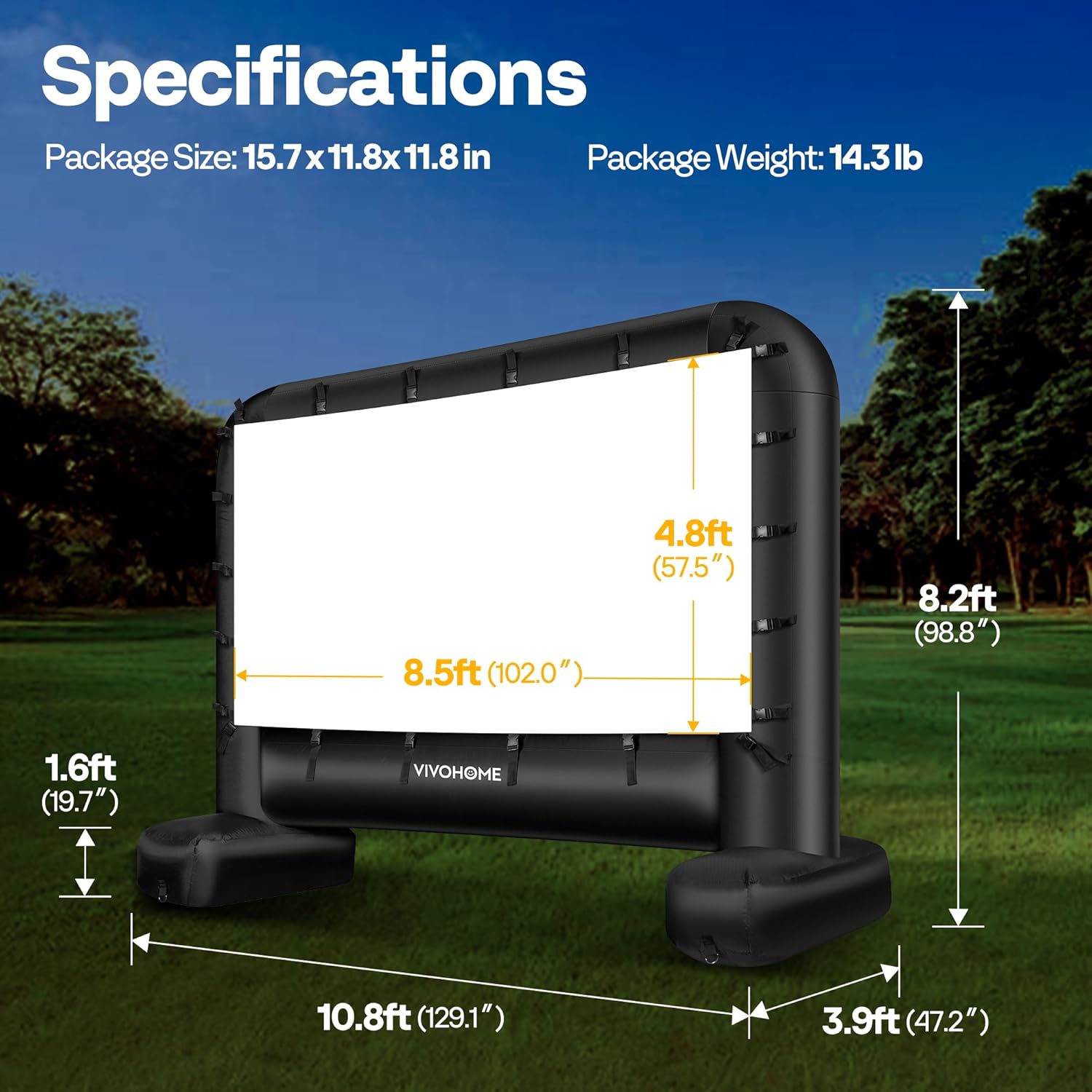
Image: A visual representation of the VIVOHOME inflatable screen with key dimensions labeled, including overall height (8.2ft), width (10.8ft), depth (3.9ft), and projection area (8.5ft x 4.8ft or 102" x 57.5").
Warranty and Support
VIVOHOME products are designed for quality and durability. For specific warranty information or technical support, please refer to the product packaging or contact VIVOHOME customer service directly. Keep your purchase receipt as proof of purchase.


