
1. Introduction
This manual provides comprehensive instructions for the installation, operation, and maintenance of your ALERTCAM Power Adapter for Blink XT/XT2 and Blink Outdoor (3rd Gen) Cameras. This product is designed to provide continuous power to your compatible Blink camera, eliminating the need for frequent battery changes. Please read this manual thoroughly before use to ensure proper functionality and longevity of the product.

Figure 1: ALERTCAM Power Adapter for Blink Cameras. This image displays the power adapter, the 25-foot weatherproof cable, and a Blink camera, illustrating how the adapter connects to the camera to provide continuous power.
2. Product Overview
2.1 Key Features
- Continuous Power Supply: Provides constant 5V/1A power to your Blink camera, eliminating the need for battery replacement.
- Extended Cable Length: Features a 25 ft (7.5 m) long cable, allowing flexible placement of your camera both indoors and outdoors, even at a distance from a power outlet.
- Weatherproof Design: The Micro-USB head includes a waterproof cap that ensures a tight seal with the camera's charging port, protecting it from rain and environmental elements.
- Flat Cable Design: The flat cable can be easily routed through narrow spaces like door or window frames without causing damage or obstruction.
2.2 What's in the Box
- 1 x Power Adapter (5V/1A)
- 1 x 25 ft (7.5 m) Weatherproof Micro-USB Cable

Figure 2: Package Contents. This image shows the power adapter and the coiled 25-foot flat cable, which are the primary components included in the product package.
3. Compatibility
The ALERTCAM Power Adapter is specifically designed for the following Blink camera models:
- Blink XT Camera
- Blink XT2 Camera
- Blink Outdoor (3rd Gen) Camera
Note: This power adapter is NOT compatible with All-new Blink Outdoor (4th Gen) or Blink Mini cameras.
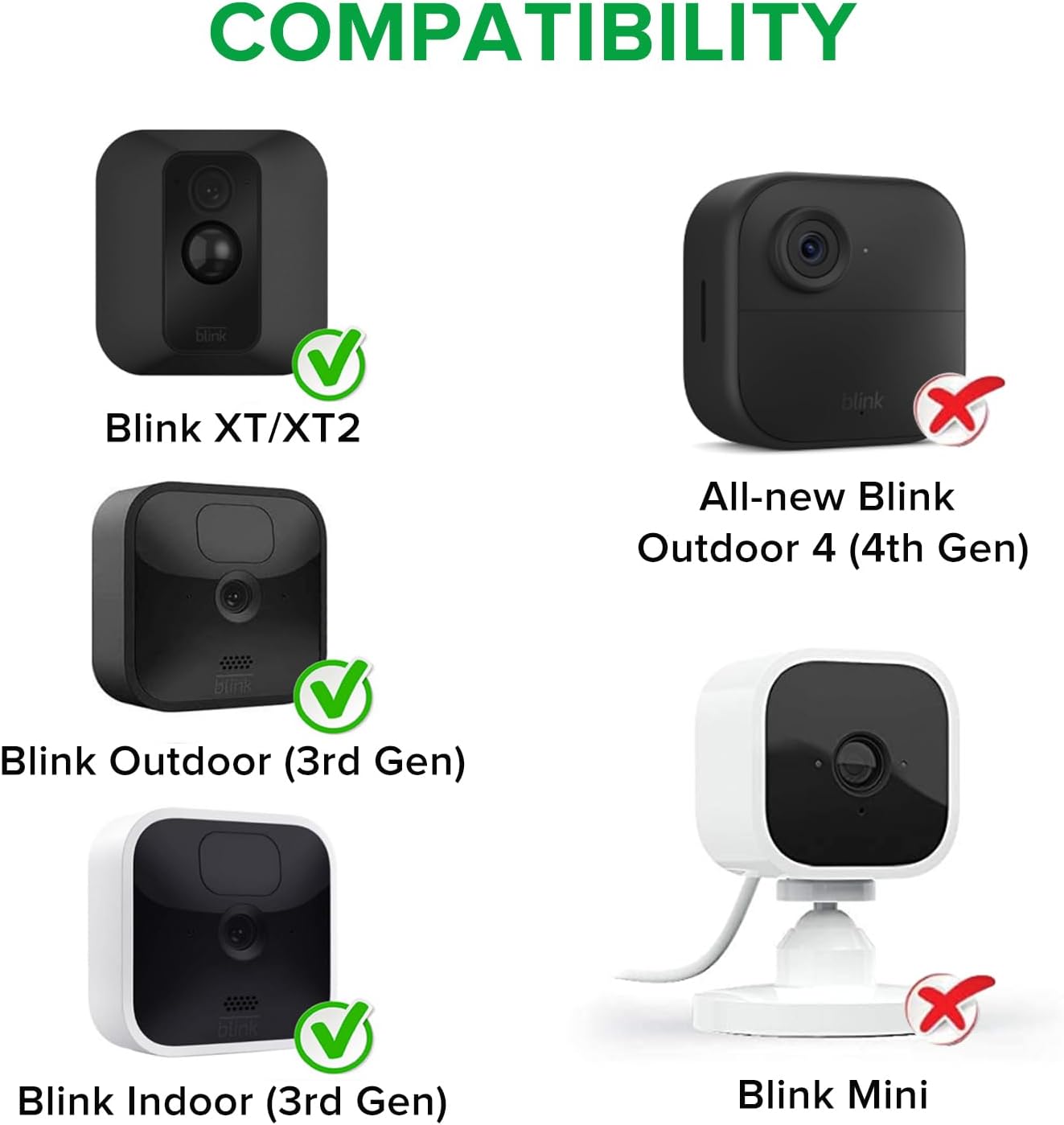
Figure 3: Product Compatibility. This chart visually indicates which Blink camera models are compatible (Blink XT/XT2, Blink Outdoor 3rd Gen, Blink Indoor 3rd Gen) and which are not (All-new Blink Outdoor 4th Gen, Blink Mini).
4. Installation Guide
Follow these steps to install your ALERTCAM Power Adapter and provide continuous power to your Blink camera:
- Prepare the Camera: Ensure your Blink camera is powered off or remove its batteries if it's currently running on them.
- Access Charging Port: Locate the Micro-USB charging port on the back of your Blink camera. Gently open the protective cover if present.
- Connect the Cable: Insert the Micro-USB end of the 25 ft (7.5 m) cable firmly into the camera's charging port. Ensure the waterproof cap fits snugly to prevent moisture ingress.
- Route the Cable: Carefully route the flat cable from the camera to your desired power outlet. The flat design allows it to pass through small gaps, such as window or door frames, without requiring drilling.
- Connect to Power: Plug the power adapter into a standard 110V AC electrical outlet.
- Verify Power: Once connected, your Blink camera should power on and indicate a continuous power supply.

Figure 4: Outdoor Installation Example. This image demonstrates a Blink camera mounted on the exterior of a house, with the power cable discreetly routed downwards, showcasing a typical outdoor setup.

Figure 5: No Drilling Required. This illustration highlights the advantage of the flat cable design, which allows for easy routing through narrow gaps like window frames, eliminating the need for drilling holes in walls.
5. Operating Instructions
Once installed, the ALERTCAM Power Adapter provides continuous power to your Blink camera. There are no specific operating controls on the adapter itself. The camera will draw power as needed, ensuring uninterrupted surveillance.
5.1 Benefits of Continuous Power
- Eliminates Battery Changes: No more climbing ladders or frequent trips to replace batteries, especially for cameras in high-traffic areas.
- Uninterrupted Operation: Ensures your camera remains active and recording without downtime due to depleted batteries.
- Cost Savings: Reduces the ongoing expense of purchasing replacement batteries.
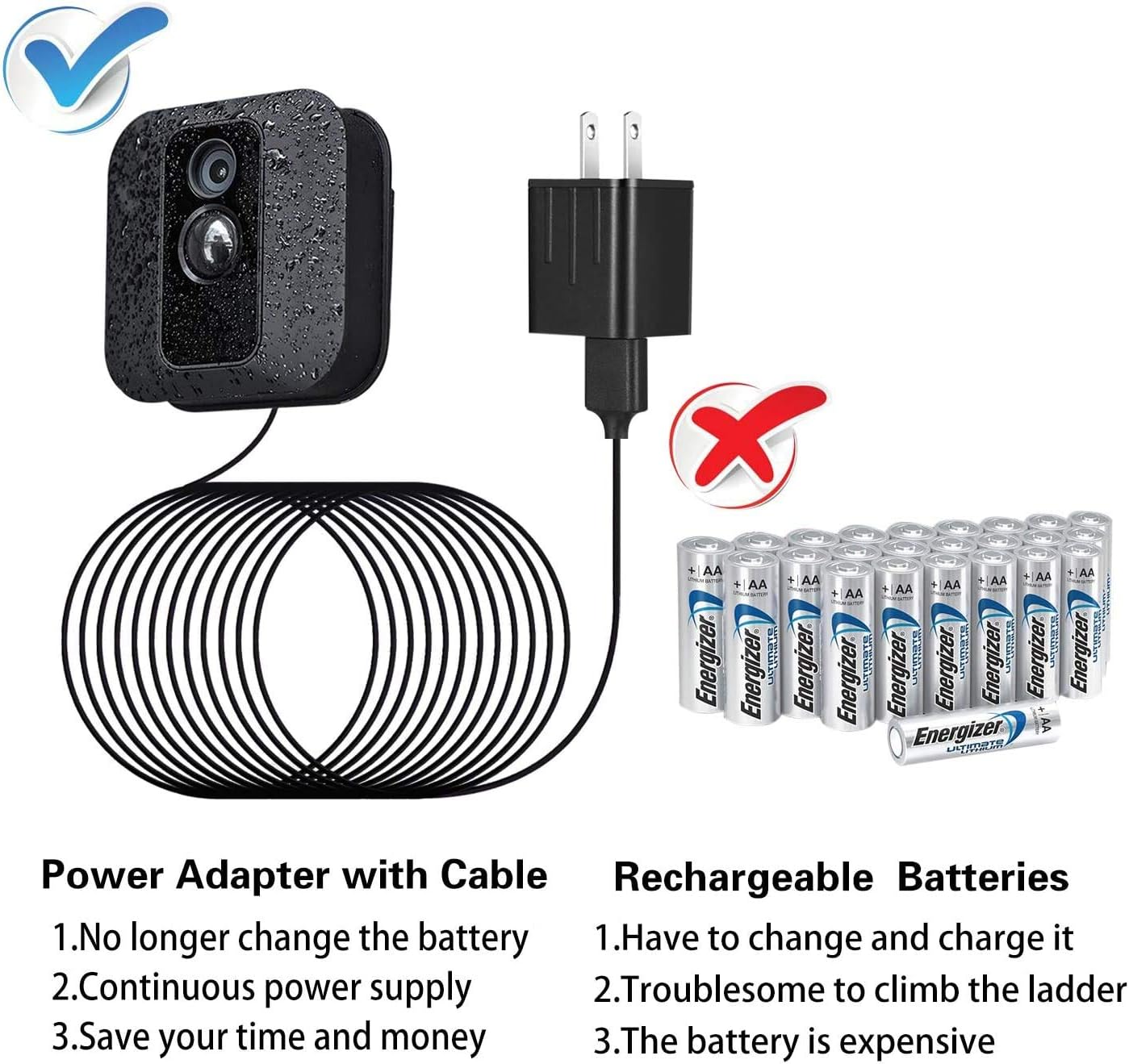
Figure 6: Power Adapter vs. Batteries. This image visually contrasts the convenience of the power adapter, which provides continuous power, with the inconvenience of frequently replacing expensive rechargeable batteries.

Figure 7: Extended Cable Reach. This illustration demonstrates the significant reach of the 25-foot (7.5-meter) cable, allowing the camera to be positioned far from the power source, such as from a high wall to a floor outlet.
6. Maintenance
The ALERTCAM Power Adapter requires minimal maintenance. To ensure optimal performance and longevity:
- Regular Inspection: Periodically check the cable and connections for any signs of wear, damage, or fraying.
- Cleanliness: Keep the power adapter and cable free from excessive dust or debris. Use a soft, dry cloth for cleaning. Do not use liquid cleaners directly on the adapter.
- Waterproof Seal: Ensure the waterproof cap on the Micro-USB connector remains securely fitted into the camera's port, especially if the camera is exposed to outdoor elements.
- Environmental Protection: While the cable and connector are weatherproof, avoid submerging the adapter or exposing it to extreme conditions beyond its intended use.

Figure 8: Weatherproof Operation. This image shows a Blink camera and its connected power cable with water droplets, demonstrating the product's ability to withstand outdoor weather conditions like rain.

Figure 9: Flat Cable Advantage. This image illustrates the difference between a flat cable, which can be easily concealed or routed without obstruction, and a round cable, which is more prone to being squashed or creating bumps.
7. Troubleshooting
If you encounter issues with your ALERTCAM Power Adapter, refer to the following common problems and solutions:
| Problem | Possible Cause | Solution |
|---|---|---|
| Camera not receiving power. |
|
|
| Water ingress around camera port. |
|
|
| Cable appears kinked or damaged after routing. |
|
|
8. Specifications
| Feature | Detail |
|---|---|
| Model Number | BC004 |
| Input Voltage | 110 Volts (AC) |
| Output Voltage/Current | 5V/1A |
| Cable Length | 25 ft (7.5 m) |
| Connector Type | Micro USB with Waterproof Cap |
| Cable Type | Flat |
| Color | Black |
| Product Dimensions | 8.7 x 2 x 2 inches |
| Item Weight | 8.1 ounces |
9. Warranty and Support
ALERTCAM is dedicated to providing high-quality and long-lasting security camera accessories. We stand behind the quality of our products.
If you encounter any problems or have questions regarding your ALERTCAM Power Adapter, please do not hesitate to contact our customer support team for assistance. We are committed to addressing your concerns and ensuring your satisfaction.
For support, please refer to the contact information provided with your product packaging or visit the official ALERTCAM website.