
1. Introduction
This manual provides essential information for the safe and efficient use of your TCL 32S325 32 Inch 720p Roku Smart LED TV. It covers unpacking, assembly, connections, initial setup, daily operation, maintenance, and troubleshooting. Please read this manual thoroughly before operating your television and retain it for future reference.
The TCL 32S325 features a 720p HD display, advanced refresh rate, and dual-band Wi-Fi, offering access to a vast library of content through the integrated Roku TV platform. Its sleek, modern design complements any living space.
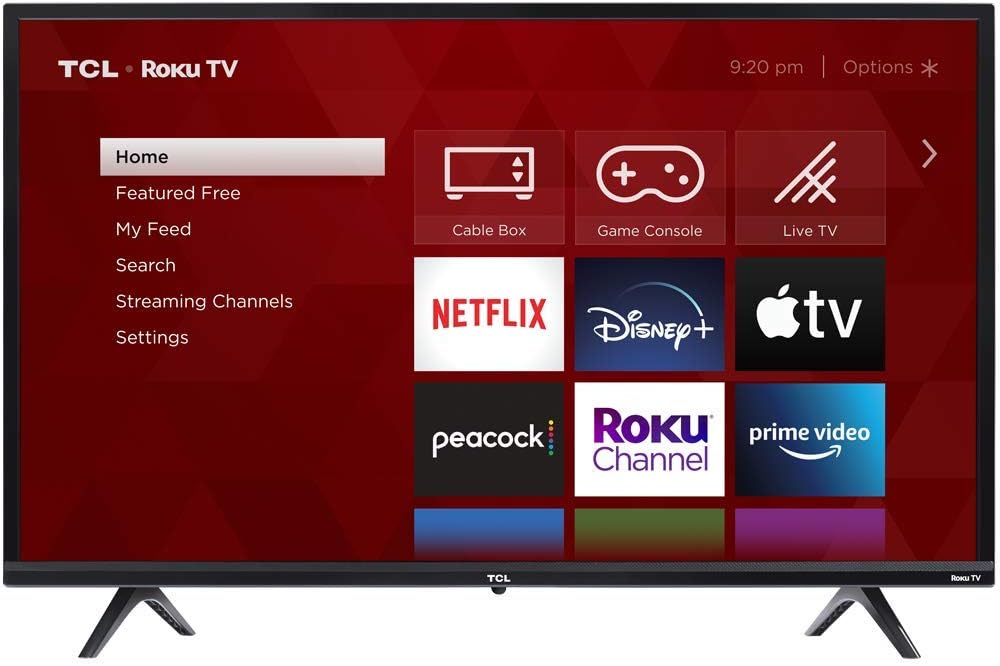
Figure 1.1: Front view of the TCL 32S325 TV with Roku interface.
2. Unpacking and Assembly
2.1 What's in the Box
Carefully remove all items from the packaging. Ensure all components are present before discarding packing materials.
- TCL 32S325 32 Inch 720p Roku Smart LED TV
- TV Stand (2 pieces)
- Screws for TV Stand
- Power Cable
- Roku TV Remote Control
- AAA Batteries (2) for Remote Control
- Quick Start Guide (not included in this manual)
2.2 Attaching the TV Stand
To attach the TV stand, place the TV face down on a soft, clean surface to prevent scratches. Align each stand piece with the corresponding slots on the bottom of the TV and secure them with the provided screws. Ensure the stands are firmly attached before placing the TV upright.
The TV dimensions without the stand are approximately 28.8 x 17.1 x 3.1 inches (W x H x D). With the stand, the dimensions are approximately 28.8 x 19 x 6.8 inches (W x H x D). The stand separation distance is 21.3 inches.

Figure 2.1: TV Dimensions.
3. Connections
Your TCL 32S325 TV offers various input and output ports for connecting external devices. Ensure the TV is powered off before making any connections.
3.1 Available Ports
- HDMI Inputs (3): Version 2.0 with HDCP 2.2 support. One HDMI port supports Audio Return Channel (ARC) for simplified audio connections to soundbars or AV receivers.
- USB Input (1): For media playback from USB storage devices.
- RF Input (1): For connecting an antenna or cable TV.
- Composite Video Input (1): For older devices using RCA connectors (yellow for video, red/white for audio).
- Headphone Jack (1): 3.5mm output for private listening.
- Optical Audio Output (1): For high-quality digital audio connection to sound systems.

Figure 3.1: Rear view with input/output ports.
3.2 Connecting Devices
- Cable Box/Satellite Receiver: Connect via HDMI for best picture quality.
- Gaming Console: Connect via HDMI.
- Soundbar/Audio System: Use the HDMI ARC port (if supported by your soundbar) or the Optical Audio Output.
- USB Drive: Insert into the USB port for viewing photos, playing music, or watching videos.
4. Initial Setup
After connecting all necessary cables and powering on your TV for the first time, the Roku TV guided setup will begin.
4.1 Powering On and Remote Control
Insert the two AAA batteries into the remote control. Point the remote at the TV and press the power button (U). The TV will display the TCL Roku TV logo.

Figure 4.1: Roku TV Remote Control.
4.2 Guided Setup
Follow the on-screen instructions to:
- Select your language.
- Connect to your wireless network (Wi-Fi). The TV supports dual-band Wi-Fi.
- Activate your Roku account.
4.3 Important Note on Roku Account Activation
During the Roku account activation process, you will be prompted to visit roku.com/activate on a computer or mobile device and enter a code displayed on your TV screen. It is crucial to ensure you are on the official Roku website to avoid fraudulent sites. Roku will never ask for payment information to activate a new device or for phone support during activation. If you encounter any suspicious requests for credit card details or personal information, discontinue the process and verify the website's authenticity.
5. Operation
Your TCL Roku TV provides a simple and intuitive interface for accessing content.
5.1 Roku TV Home Screen
The home screen provides quick access to streaming channels, input selections (Cable Box, Game Console, Live TV), and settings. Use the directional pad on your remote to navigate and the OK button to select.
5.2 Streaming Channels
Access thousands of streaming channels offering movies, TV episodes, live sports, news, music, and more. Popular channels like Netflix, Disney+, Apple TV, Peacock, The Roku Channel, and Prime Video are readily available.
5.3 Input Selection
To switch between connected devices (e.g., a cable box or game console), select the corresponding input tile on the Roku TV home screen.
5.4 USB Media Playback
The TV supports playback of various media formats from a USB drive:
- Video: MKV (H.264), MP4, MOV (H.264), TS (H.264)
- Music: AAC, MP3, WMA, WAV (PCM), AIFF, FLAC, AC3
- Photo: JPG, PNG, GIF
5.5 Voice Control Compatibility
Your TCL Roku TV is compatible with Alexa and Google Assistant devices, allowing for voice commands to control basic TV functions (e.g., power on/off, volume, channel changes).
6. Maintenance
Proper care and maintenance will extend the life of your television.
6.1 Cleaning the Screen
Gently wipe the screen with a soft, lint-free cloth. For stubborn marks, lightly dampen the cloth with water or a specialized screen cleaner. Never spray liquid directly onto the screen.
6.2 Cleaning the Cabinet
Wipe the TV cabinet and stand with a soft, dry cloth. Avoid using abrasive cleaners or solvents.
6.3 Ventilation
Ensure adequate ventilation around the TV to prevent overheating. Do not block ventilation openings on the back or sides of the TV.
7. Troubleshooting
This section addresses common issues you might encounter with your TCL 32S325 TV.
| Problem | Possible Cause | Solution |
|---|---|---|
| No power | Power cable disconnected; outlet issue | Ensure power cable is securely connected to TV and a working outlet. Try a different outlet. |
| No picture, but sound is present | Incorrect input selected; external device issue | Verify correct input is selected on the Roku TV home screen. Check connections to external devices. |
| No sound, but picture is present | Volume too low/muted; audio settings issue; external audio system issue | Increase volume. Check if TV is muted. Verify audio output settings. If using external audio, check its connections and power. |
| Remote control not working | Dead batteries; obstruction; remote not paired | Replace batteries. Remove any obstructions between remote and TV. Ensure remote is pointed at the TV's IR sensor. |
| Cannot connect to Wi-Fi | Incorrect password; router issue; signal interference | Double-check Wi-Fi password. Restart your router. Move TV closer to router or reduce interference. |
| Picture quality is not clear (720p) | Source resolution; TV resolution limit | Ensure your content source is providing the best possible resolution. Note that this TV has a native 720p resolution, which is standard definition for some content. |
| Audio sounds distorted or unbalanced | Audio settings; source audio issue | Check audio settings on the TV (e.g., sound mode, volume leveling). If streaming, check internet connection stability. |
8. Specifications
Detailed technical specifications for the TCL 32S325 TV.
| Feature | Detail |
|---|---|
| Brand | TCL |
| Model Number | 32S325 |
| Screen Size | 32 Inches |
| Display Technology | LED |
| Resolution | 720p |
| Refresh Rate | 60 Hz |
| Product Dimensions (without stand) | 28.8"W x 17.1"H x 3.1"D |
| Product Dimensions (with stand) | 28.8"W x 19"H x 6.8"D |
| Item Weight | 8.6 Pounds |
| Connectivity Technology | HDMI, USB, Wi-Fi |
| HDMI Inputs | 3 (HDMI 2.0 with HDCP 2.2, one with ARC) |
| USB Inputs | 1 |
| Audio Output | Optical, Headphone Jack |
| Aspect Ratio | 1.78:1 |
| Voltage | 120 Volts |
| Output Wattage | 5 Watts |
| Included Components | Remote |
| Special Feature | Flat Screen, Roku Smart TV, Alexa/Google Assistant Compatible |
9. Warranty and Support
For warranty information, technical support, or service inquiries, please contact TCL customer support. Refer to the official TCL website or the documentation included with your product for the most current warranty terms and contact details.
An official User Guide (PDF) for this product is available online. You can access it via this link: TCL 32S325 User Guide (PDF).


