
Introduction
Thank you for purchasing the Altec Lansing LifeJacket H2O 4 Waterproof Bluetooth Speaker. This manual provides essential information for setting up, operating, maintaining, and troubleshooting your speaker to ensure optimal performance and longevity.

Image: The Altec Lansing LifeJacket H2O 4 speaker, black in color, surrounded by water splashes, highlighting its waterproof capabilities.
What's in the Box
- Altec Lansing LifeJacket H2O 4 Portable Bluetooth Speaker
- USB Charging Cable
- Quick Start Guide
Key Features
- Everything Proof: Certified IP67 rating ensures the speaker is waterproof, shockproof, snowproof, and dustproof.
- Extended Battery Life: Enjoy up to 10 hours of continuous music playback on a single charge.
- Impressive Bluetooth Range: Connect and play music from up to 100 feet away with Bluetooth 4.2 technology.
- Voice Assistant Integration: Seamlessly use Siri or Google Assistant through the speakerphone.
- Durable Design: Rugged construction built to withstand various outdoor and indoor environments.
- Clear Audio: Delivers breathtaking stereo sound with deep bass and exceptional clarity.
Setup
1. Charging the Speaker
Before first use, fully charge your LifeJacket H2O 4 speaker.
- Locate the charging port on the speaker, usually protected by a rubber flap.
- Open the rubber flap and insert the small end of the provided USB charging cable into the speaker's charging port.
- Connect the larger end of the USB cable to a USB power adapter (not included) or a computer's USB port.
- The charging indicator light will illuminate. Once fully charged, the light will change or turn off (refer to specific light behavior in the Quick Start Guide).
2. Powering On/Off
- To power on, press and hold the Power button until you hear an audible prompt and the indicator light turns on.
- To power off, press and hold the Power button again until you hear an audible prompt and the indicator light turns off.
Operating the Speaker
1. Bluetooth Pairing
Pair your speaker with a Bluetooth-enabled device (smartphone, tablet, laptop) to stream audio wirelessly.
- Ensure the speaker is powered on and within 100 feet of your device.
- The speaker will automatically enter pairing mode when powered on for the first time, or if no device is connected. The Bluetooth indicator light will flash.
- On your device, go to Bluetooth settings and search for available devices.
- Select "LifeJacket H2O 4" from the list.
- Once paired, the Bluetooth indicator light on the speaker will become solid, and you will hear a confirmation tone.
- If prompted for a password, enter "0000".

Image: The Altec Lansing LifeJacket H2O 4 speaker resting on a wooden bench, demonstrating its portability and suitability for outdoor use.
2. Volume Control
- Press the + button to increase volume.
- Press the - button to decrease volume.
3. Playback Control
- Press the Play/Pause button to play or pause audio.
- Double-press the Play/Pause button to skip to the next track.
- Triple-press the Play/Pause button to go to the previous track.
4. Voice Assistant
Activate your device's voice assistant (Siri or Google Assistant) through the speaker.
- Press the Voice Assistant button (often indicated by a microphone icon) to activate Siri or Google Assistant on your paired device.
- Speak your command clearly into the speaker's microphone.
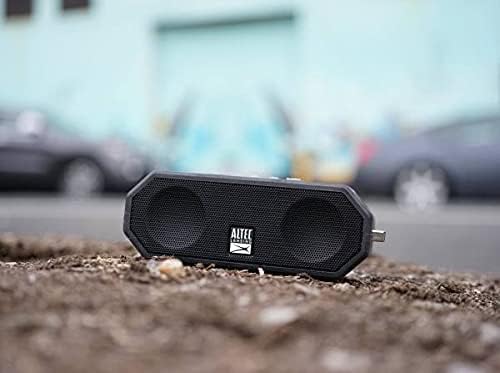
Image: The Altec Lansing LifeJacket H2O 4 speaker placed on rough ground, showcasing its durable and rugged design suitable for various environments.
Maintenance
- Cleaning: Use a soft, damp cloth to clean the speaker. Avoid harsh chemicals or abrasive cleaners.
- Water Exposure: While waterproof, ensure the charging port cover is securely closed before exposing the speaker to water. After water exposure, dry the speaker thoroughly, especially the charging port, before charging.
- Storage: Store the speaker in a cool, dry place when not in use. Avoid extreme temperatures.
- Battery Care: To prolong battery life, avoid fully discharging the battery frequently. Charge the speaker regularly, even if not in constant use.
Troubleshooting
| Problem | Solution |
|---|---|
| Speaker won't turn on. | Ensure the battery is charged. Connect the speaker to a power source using the USB cable. |
| Cannot pair with Bluetooth device. |
|
| No sound or low volume. |
|
| Audio cutting out or distorted. |
|
Specifications
| Feature | Detail |
|---|---|
| Model Name | Jacket H2O 4 Rugged Floating Ultra Portable Bluetooth |
| Model Number | IMW449-BLKC |
| Speaker Type | Outdoor, Portable |
| Connectivity | Bluetooth 4.2 |
| Bluetooth Range | Up to 100 feet (30 meters) |
| Water Resistance | IP67 (Waterproof, Shockproof, Snowproof, Dustproof) |
| Battery Life | Up to 10 hours |
| Power Output | 10 Watts |
| Dimensions (L x W x H) | 7.1" x 2.9" x 4.2" (18.03 cm x 7.37 cm x 10.67 cm) |
| Weight | 1.3 pounds (0.59 kg) |
| Compatible Voice Assistants | Siri, Google Assistant |

Image: The Altec Lansing LifeJacket H2O 4 speaker shown with its approximate dimensions: 7.1 inches in length, 2.9 inches in width, and 4.2 inches in height.
Warranty and Support
Your Altec Lansing LifeJacket H2O 4 speaker comes with a limited warranty. For detailed warranty information, product registration, and technical support, please visit the official Altec Lansing website or contact their customer service.
Official Website: www.alteclansing.com


