
1. Introduction
Thank you for purchasing the LE-JX 36 Inch Yellow Flashing Safety Warning Emergency Strobe Light Bar. This user manual provides essential information for the safe and effective operation, installation, and maintenance of your new strobe light bar. Please read this manual thoroughly before use and retain it for future reference.
2. Product Overview
The LE-JX 36-inch Yellow Flashing Safety Warning Emergency Strobe Light Bar is designed for enhanced visibility and safety on various vehicles. It features high-intensity LEDs and multiple flash patterns for effective warning and directional signaling.

Figure 2.1: Overview of the LE-JX 36-inch Yellow Strobe Light Bar.
3. Features
- 32 High Intensity LEDs: Provides superior brightness and effectiveness, even in daylight conditions.
- Waterproof Shell: Designed for all-weather use, suitable for rain, snow, or fog.
- Universal Compatibility: Fits all vehicles with a 12V power source.
- 13 Flash Modes: Offers various strobing and flashing patterns, including directional options (Left, Right, Center Out).
- Mode Memory Function: Recalls the last selected flash pattern.
- Integrated Control: Includes an on/off switch and mode change button.
- Extended Cable: Comes with an 11-foot (3.5 meters) extension cable for flexible installation.
4. Package Contents
Verify that all items are present and in good condition upon opening the package.
- 1 x LE-JX 36-inch Yellow Strobe Light Bar
- 1 x Control Box with On/Off Switch and Mode Change Button
- 1 x 11-foot (3.5 meters) Extension Cable
- 1 x User Manual (this document)
5. Specifications
| Attribute | Value |
|---|---|
| Brand | LE-JX |
| Model Number | LJX GROUP85475 |
| Color | Amber |
| LED Quantity | 32 High Intensity LEDs |
| Dimensions (L x W x H) | 35.5 x 2.5 x 2.5 inches |
| Weight | 2.4 pounds |
| Wattage | 19.2 watts |
| Voltage | 12V DC |
| Lens Material | Polycarbonate |
| Special Features | Submersible, Waterproof |
6. Setup and Installation
6.1 Safety Precautions
- Ensure the vehicle's power is off before beginning installation.
- Always connect the red wire to the positive (+) terminal and the black wire to the negative (-) terminal. Incorrect wiring can damage the unit or vehicle electrical system.
- Mount the light bar securely to prevent movement during vehicle operation.
- Consult a professional if you are unsure about any part of the installation process.
6.2 Mounting the Light Bar
The light bar can be mounted on the rear window or other suitable flat surfaces of your vehicle. Use the included mounting brackets and hardware to secure the light bar firmly.

Figure 6.1: Product dimensions for mounting reference (35.5 inches long, 2.5 inches wide, 2.5 inches high).

Figure 6.2: Detailed measurements of the light bar and mounting brackets.
6.3 Wiring Instructions
- Identify the red and black wires from the light bar's control unit.
- Connect the red wire to the vehicle's positive (+) 12V power source. This can often be a fuse box or an existing accessory power line.
- Connect the black wire to the vehicle's negative (-) ground point. This can be a chassis ground or the negative terminal of the battery.
- Ensure all connections are secure and insulated to prevent short circuits.
- The included 11-foot (3.5 meters) extension cable can be used if the standard wiring is not long enough for your desired installation location.
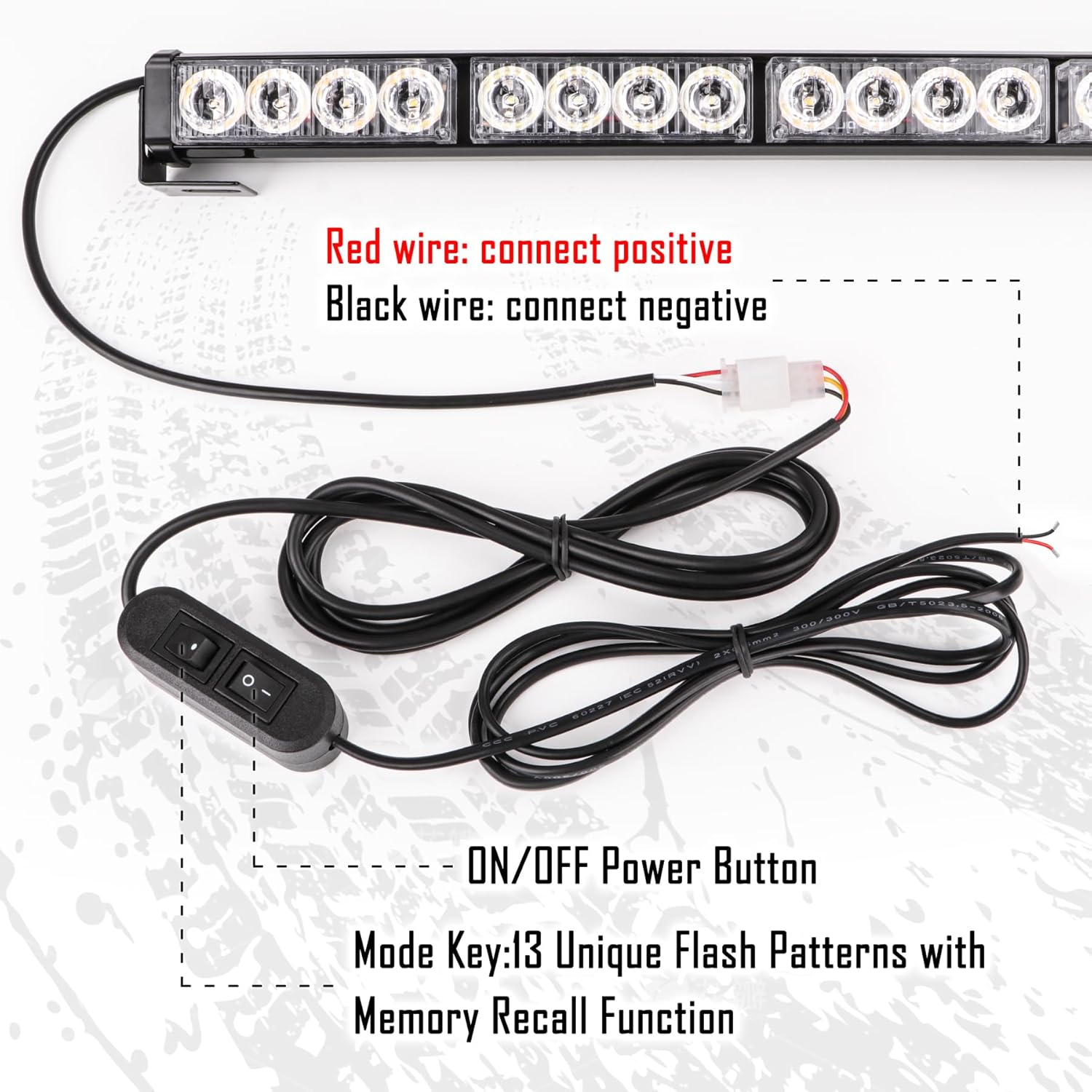
Figure 6.3: Illustration of power wire connections. Red wire connects to positive, black wire connects to negative.

Figure 6.4: Close-up of the control box showing the ON/OFF power button and Mode Key for changing flash patterns.

Figure 6.5: Schematic diagram showing the light bar, control unit, and wiring connections.
7. Operating Instructions
7.1 Powering On/Off
Locate the control box connected to the light bar. The control box features an ON/OFF switch.
- To turn the light bar ON, slide the switch to the 'ON' position.
- To turn the light bar OFF, slide the switch to the 'OFF' position.
7.2 Changing Flash Patterns
The control box also includes a 'Mode Key' button to cycle through the 13 available flash patterns.
- Press the 'Mode Key' button repeatedly to cycle through the different flash patterns.
- The unit features a memory function that will recall the last selected flash pattern when powered off and on again.

Figure 7.1: Example of the strobe light bar installed and operating on a vehicle.
8. Maintenance
Proper maintenance ensures the longevity and optimal performance of your strobe light bar.
- Cleaning: Clean the lens and housing regularly with a soft, damp cloth. Avoid abrasive cleaners or solvents that could damage the polycarbonate lens.
- Inspections: Periodically check all wiring connections for tightness and signs of wear or corrosion. Ensure the mounting hardware remains secure.
- Waterproof Feature: While the unit is waterproof, avoid submerging it for extended periods or using high-pressure washers directly on the light bar, which could compromise seals over time.

Figure 8.1: The light bar is designed to be weatherproof, suitable for various conditions including rain and snow.
9. Troubleshooting
| Problem | Possible Cause | Solution |
|---|---|---|
| Light bar does not turn on. | No power supply; Loose wiring connection; Blown fuse in vehicle. | Check power source (12V DC); Verify all wire connections are secure; Check vehicle's fuse box and replace any blown fuses. |
| Lights flicker or are dim. | Insufficient power; Loose connection; Damaged wiring. | Ensure stable 12V power supply; Tighten all connections; Inspect wiring for damage and repair/replace if necessary. |
| Cannot change flash patterns. | Faulty mode button; Control box malfunction. | Ensure the light bar is powered on; Press the mode button firmly; If problem persists, contact customer support. |
10. Warranty and Support
For warranty information or technical support, please contact LE-JX customer service through the retailer where you purchased the product or visit the official LE-JX store on Amazon:
Please have your product model number (LJX GROUP85475) and purchase date available when contacting support.