
Introduction
Thank you for choosing the iTouchless 13 Gallon Sensor Kitchen Trash Can. This automatic trash can is designed for convenience and hygiene, featuring a touchless motion sensor lid, an AbsorbX Odor Filter, and durable stainless steel construction. This manual provides essential information for the proper setup, operation, and maintenance of your new trash can. Please read it thoroughly before use.

Figure 1: iTouchless 13 Gallon Sensor Kitchen Trash Can
What's in the Box
- 1 x Trash Can Body
- 1 x Sensor Lid
- 1 x Retainer Ring
- 1 x AbsorbX Odor Filter
- 1 x Filter Gate
- 1 x User Manual (this document)
Setup
1. Battery Installation
Your iTouchless trash can requires 4 D-size batteries (not included) for operation.
- Locate the battery compartment on the underside of the sensor lid.
- Open the battery compartment cover.
- Insert 4 D-size batteries, ensuring correct polarity (+/-).
- Close the battery compartment cover securely.
Note: An optional AC Adapter (sold separately) can be used for continuous power. Refer to the AC Adapter's instructions for installation.
2. AbsorbX Odor Filter Installation
The included AbsorbX Odor Filter helps neutralize garbage smells.
- Open the filter gate located on the underside of the sensor lid.
- Insert the AbsorbX Odor Filter into the filter gate.
- Close the filter gate securely.

Figure 2: Installation of AbsorbX Odor Filter
3. Trash Bag Installation
Use standard 13-gallon trash bags.
- Lift the retainer ring from the top of the trash can body.
- Place the trash bag inside the can, wrapping the top edge of the bag over the retainer ring.
- Lower the retainer ring with the bag into the trash can, ensuring the bag is securely held and hidden from view.
4. Placement
Position the trash can in your desired location. Its oval shape is designed to fit snugly against walls or in corners, optimizing space. Ensure there is clear space above the sensor for proper lid operation.
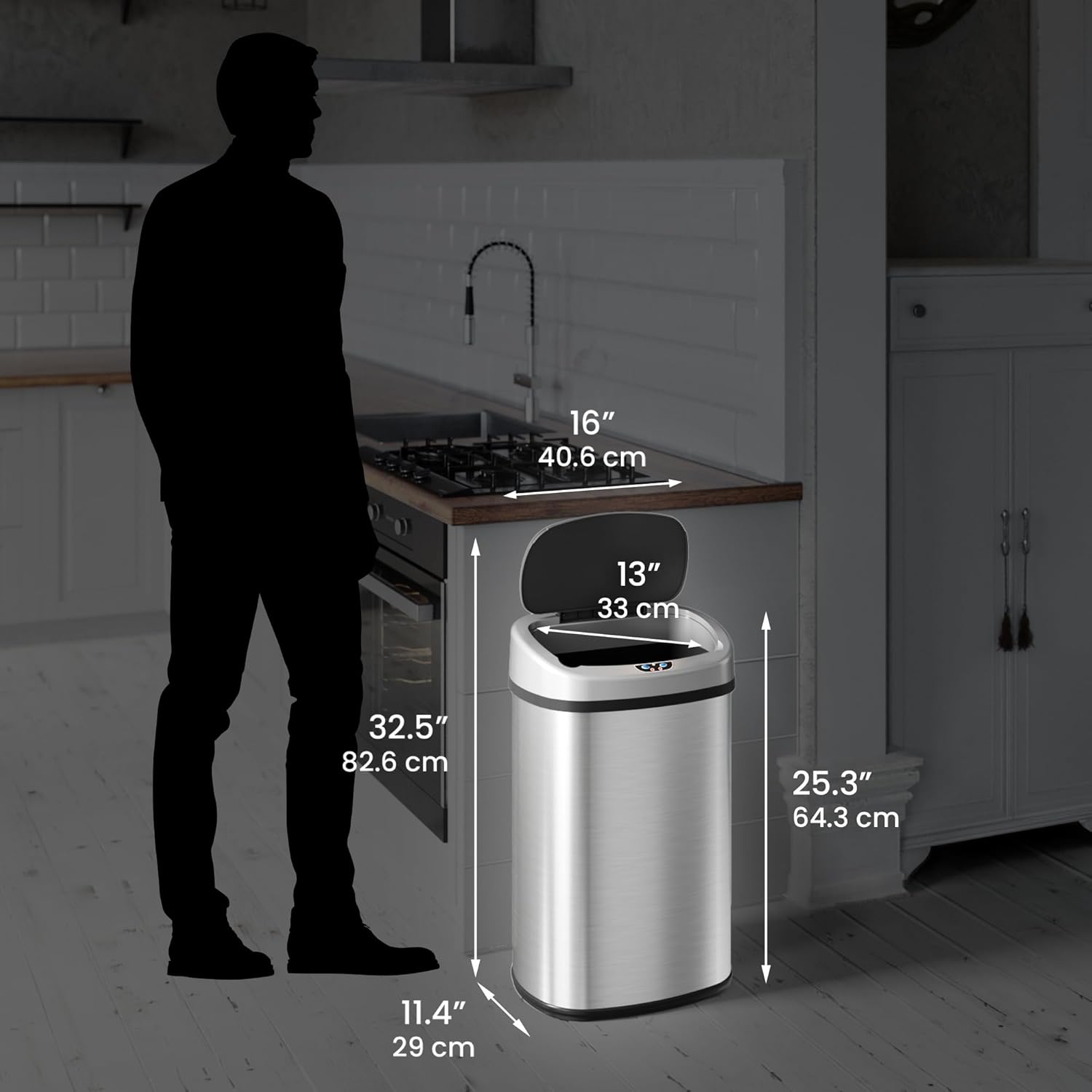
Figure 3: Optimal Placement for Space-Saving Design
Operating Instructions
1. Touchless Operation (Motion Sensor)
The primary method of operation is touchless.
- Simply wave your hand or an object within 6 inches (15 cm) above the sensor eye on the lid.
- The lid will open automatically.
- Once you are finished, the lid will close automatically after a few seconds of inactivity.

Figure 4: Automatic Lid Opening via Motion Sensor

Figure 5: Hands-Free Disposal
2. Manual Operation
For extended open time or manual control, use the buttons on the lid.
- Press the OPEN button to keep the lid open indefinitely.
- Press the CLOSE button to close the lid manually.
- The sensor features VisioSense technology, which signals the lid to remain open for longer clean-ups, and Reflix Technology, which prevents the lid from closing on your hand.
3. Video Demonstration
Currently, there are no official seller videos available for direct embedding in this manual. For visual demonstrations, please refer to the product page or the manufacturer's website.
Maintenance
1. Cleaning
The stainless steel body is fingerprint-proof and rust-resistant, making it easy to clean.
- Wipe the exterior with a damp cloth and mild detergent.
- Avoid using abrasive cleaners or harsh chemicals, as these may damage the finish.
- Ensure the sensor area on the lid remains clean and free of obstructions for optimal performance.
2. Odor Filter Replacement
The AbsorbX Odor Filter should be replaced periodically to maintain effective odor control.
- Replace the filter every 3 months, or sooner if odors persist.
- You can sign up for free text message reminders from iTouchless to know when it's time to replace your filter.
- Replacement filters are available for purchase from the manufacturer's website or authorized retailers.

Figure 6: AbsorbX Odor Filter System for Odor Elimination
3. Battery Replacement
When the lid's operation becomes slow or inconsistent, it's time to replace the batteries.
- Follow the battery installation steps outlined in the Setup section.
- The energy-efficient design allows batteries to last up to 1.5 years.
Troubleshooting
If you encounter any issues with your iTouchless trash can, please refer to the official Troubleshooting Guide for detailed solutions.
Common Issues:
- Lid not opening/closing: Check battery level, ensure sensor is clean and unobstructed, or try manual open/close buttons.
- Persistent odors: Replace the AbsorbX Odor Filter.
- Lid closing too quickly: Ensure no objects are near the sensor after disposal.
For a comprehensive guide, download the official Troubleshooting Guide (PDF) here.
Specifications
| Feature | Detail |
|---|---|
| Brand | iTouchless |
| Model Number | ITOS13B-1 |
| Capacity | 13 Gallons |
| Product Dimensions | 16 x 11.4 x 25.3 inches |
| Weight | 10.8 Pounds |
| Material | Stainless Steel (with ABS plastic lid) |
| Color | Light Silver |
| Opening Mechanism | Motion-Sensor, Manual Buttons |
| Power Options | 4 D-size batteries (not included) or AC Adapter (sold separately) |
| Special Features | AbsorbX Odor Filter, Fingerprint-Proof, Rust-Resistant, Space-Saving Oval Shape, Quiet Close, VisioSense, Reflix Technology |
Warranty and Support
iTouchless is committed to ensuring your satisfaction. For any questions, feedback, or warranty inquiries, please reach out to our dedicated U.S.-based Customer Service Team.
- Customer Support: Refer to the manufacturer's website for the most current contact information.
- Official User Manual (PDF): For additional details and diagrams, you can download the full User Manual (PDF) here.
- Warranty Information: Specific warranty terms and conditions are available on the iTouchless official website. Please retain your proof of purchase.


