
1. Introduction and Overview
This manual provides essential information for the safe and efficient operation, installation, and maintenance of your Xiltek XDC-120-HC 48-inch Deli Display Case. Please read all instructions carefully before use to ensure proper functioning and to prevent damage or injury.
The Xiltek XDC-120-HC is a commercial refrigerated display case designed for showcasing deli meats, cheeses, seafood, and bakery items. It features a curved glass front, LED interior lighting, and a durable stainless steel construction.

Figure 1.1: Front view of the Xiltek XDC-120-HC Deli Display Case, showcasing its curved glass design and interior shelving.

Figure 1.2: Side view of the Xiltek XDC-120-HC Deli Display Case, illustrating the elegant curved glass panel.
2. Safety Information
Always adhere to the following safety guidelines to prevent personal injury or damage to the unit.
- Inspection Upon Delivery: It is critical to inspect the unit for any carrier damage immediately upon delivery. Cut the white box straps and lift the box to check for potential damage. If any damage is found, refuse the unit and do not sign the delivery paperwork. Appliances are non-returnable if damage is not noted upon receipt.
- Indoor Use Only: This appliance is rated for indoor usage only. Do not operate outdoors.
- Moving the Unit: The unit weighs approximately 395 pounds. Due to its weight, it requires multiple people for safe movement and placement. The carrier is only responsible for curbside delivery and cannot assist with moving the unit inside.
- Electrical Requirements: Ensure the unit is connected to a dedicated 115 Volt electrical outlet with a NEMA 5-15P configuration. Do not use extension cords or adapters.
- Ventilation: Ensure adequate clearance around the unit for proper ventilation of the refrigeration system.
- Cleaning: Disconnect power before cleaning or performing any maintenance.
- Children: Keep children away from the appliance.
3. Setup and Installation
Follow these steps for proper setup of your deli display case.
- Unpacking: Carefully remove all packaging materials. Retain packaging for future transport if needed. Inspect the unit thoroughly for any concealed damage.
- Placement: Position the unit on a level, stable surface in an indoor environment. Ensure there is sufficient space for air circulation around the condenser coil, typically at the rear of the unit. Avoid direct sunlight or heat sources.
- Caster Wheels: The unit comes with pre-installed caster wheels for easy movement. Ensure all casters are locked once the unit is in its final position to prevent accidental movement.
- Shelf Installation: The unit includes three epoxy-coated shelves. Install them at desired heights using the shelf supports inside the cabinet. Ensure shelves are securely seated before loading products. Each shelf has a capacity of 90 lbs.
- Electrical Connection: Plug the unit into a grounded 115V, 60Hz, 1-phase dedicated electrical outlet. The unit draws approximately 3.2 Amps.
- Initial Cleaning: Before first use, clean the interior and exterior of the unit with a mild detergent and warm water. Rinse thoroughly and dry.
- Initial Cool Down: Allow the unit to operate empty for at least 2-4 hours to reach the desired temperature before loading products.
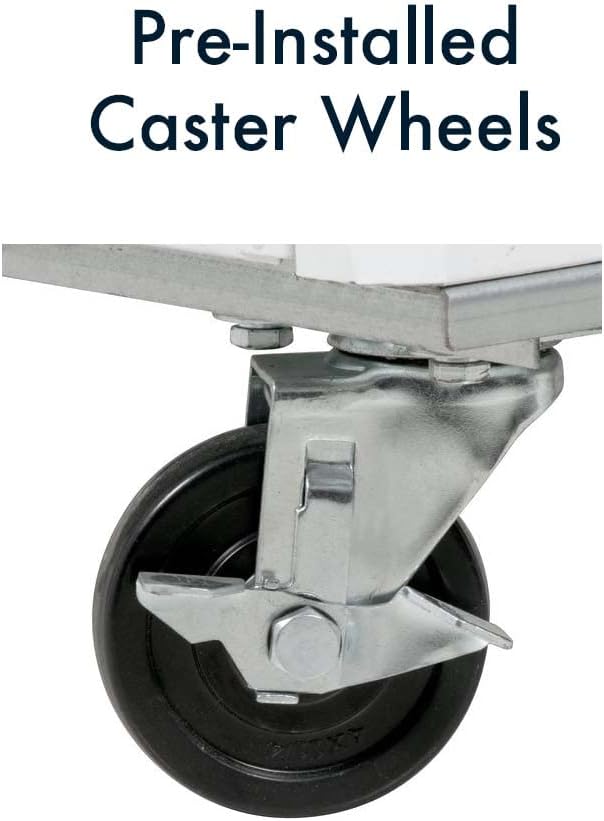
Figure 3.1: Pre-installed caster wheels facilitate easy positioning and cleaning underneath the unit.

Figure 3.2: Interior view displaying the adjustable, epoxy-coated wire shelves.
4. Operating Instructions
This section details how to operate your Xiltek Deli Display Case.
4.1. Power On/Off
To turn the unit on, plug it into the appropriate electrical outlet. To turn it off, unplug the unit.
4.2. Temperature Control
The unit features an electronic control system for precise temperature management. The recommended operating temperature range is 33°F to 40°F (0°C to 6°C).
- Adjusting Temperature: Refer to the digital controller on the back of the unit. Consult the controller's specific instructions for setting the desired temperature.
- Temperature Display: The digital display shows the current internal temperature.

Figure 4.1: Rear view of the unit, highlighting the digital temperature controller and power connection.
4.3. LED Lighting
The interior LED lighting provides clear visibility of your products. The lighting is typically controlled by a switch located near the digital controller or on the front panel.
4.4. Loading Products
- Ensure products are pre-chilled before placing them in the display case to maintain stable internal temperatures.
- Do not overload shelves beyond their 90 lb capacity.
- Arrange products to allow for proper air circulation within the cabinet.
5. Maintenance
Regular maintenance ensures optimal performance and longevity of your display case.
5.1. Cleaning
- Daily Cleaning: Wipe down interior and exterior surfaces with a soft cloth and mild, non-abrasive cleaner. Clean glass surfaces with a glass cleaner.
- Interior: The interior features an aluminum liner with a stainless steel floor and rounded corners for easy cleaning.
- Shelves: Remove and clean epoxy-coated shelves as needed.
- Condenser Coil: The condenser coil is easily accessible for cleaning. Periodically clean the coil to remove dust and debris, which can impede cooling efficiency. Use a brush or vacuum cleaner. Always disconnect power before cleaning the condenser.
5.2. Defrost System
The unit features an automatic defrost system. No manual defrosting is typically required. Ensure the drain pan is clear and functioning correctly.
5.3. Gasket Maintenance
Inspect door gaskets regularly for tears or damage. Clean gaskets to ensure a tight seal, which is crucial for maintaining temperature and energy efficiency.
6. Troubleshooting
This section provides solutions to common operational issues. For problems not listed here, contact Xiltek customer support.
| Problem | Possible Cause | Solution |
|---|---|---|
| Unit not cooling | No power; Temperature set too high; Dirty condenser coil; Door left open; Excessive product loading. | Check power supply and circuit breaker; Adjust temperature setting; Clean condenser coil; Ensure doors are closed; Reduce product load. |
| Excessive noise | Unit not level; Loose components; Fan obstruction; Compressor issue. | Level the unit; Check for and tighten loose parts; Clear any obstructions from fans; Contact service if compressor noise is unusual. |
| Water on floor/inside unit | Clogged drain line; Damaged door gasket. | Clear drain line; Inspect and replace damaged door gasket. |
| Digital display shows error code | Sensor fault; Refrigeration system issue. | Note the error code and consult the electronic control system manual or contact Xiltek support. |
7. Specifications
Detailed technical specifications for the Xiltek XDC-120-HC Deli Display Case.
| Feature | Specification |
|---|---|
| Model | XDC-120-HC |
| Dimensions (D x W x H) | 32.5" x 47.3" x 42.9" |
| Item Weight | 395 pounds |
| Capacity | 18 Cubic Feet |
| Temperature Range | 33°F to 40°F (0°C to 6°C) |
| Refrigerant | R290 |
| Compressor | 1/4 hp |
| Voltage | 115 Volts |
| Wattage | 340.00 Watts |
| Amperage | 3.2 Amps |
| NEMA Configuration | 5-15P |
| Shelves | 3, Epoxy-coated wire, 90 lbs capacity each |
| Exterior Material | 430 Stainless Steel |
| Interior Material | Painted Aluminum liner with 304 Stainless Steel floor |
| Insulation Material | Foamed-in-place Polyurethane |
| Defrost System | Automatic |
| Special Features | Adjustable Shelves, LED Lighting, Pre-installed Caster Wheels |
| Certifications | ETL, UL |

Figure 7.1: Product dimensions for the Xiltek XDC-120-HC Deli Display Case.

Figure 7.2: Technical data and plan views of the XDC Series Deli Case.
8. Warranty and Support
Xiltek provides the following warranty for the XDC-120-HC Deli Display Case:
- Compressor Warranty: 5 Years
- Parts and Labor Warranty: 1 Year
For full warranty details, please refer to the official Xiltek website. For technical support, service inquiries, or to report issues, please contact Xiltek customer service directly.