
1. Product Overview
The Walker Edison Malcomb Industrial Metal Mesh 2-Door Storage Cabinet is a versatile furniture piece designed for various home environments. It features a durable construction of laminate, metal, and high-grade certified MDF, offering both aesthetic appeal and functional storage.

Image: Front view of the Walker Edison Malcomb Industrial Metal Mesh 2-Door Storage Cabinet, showcasing its reclaimed barnwood finish and metal mesh doors.
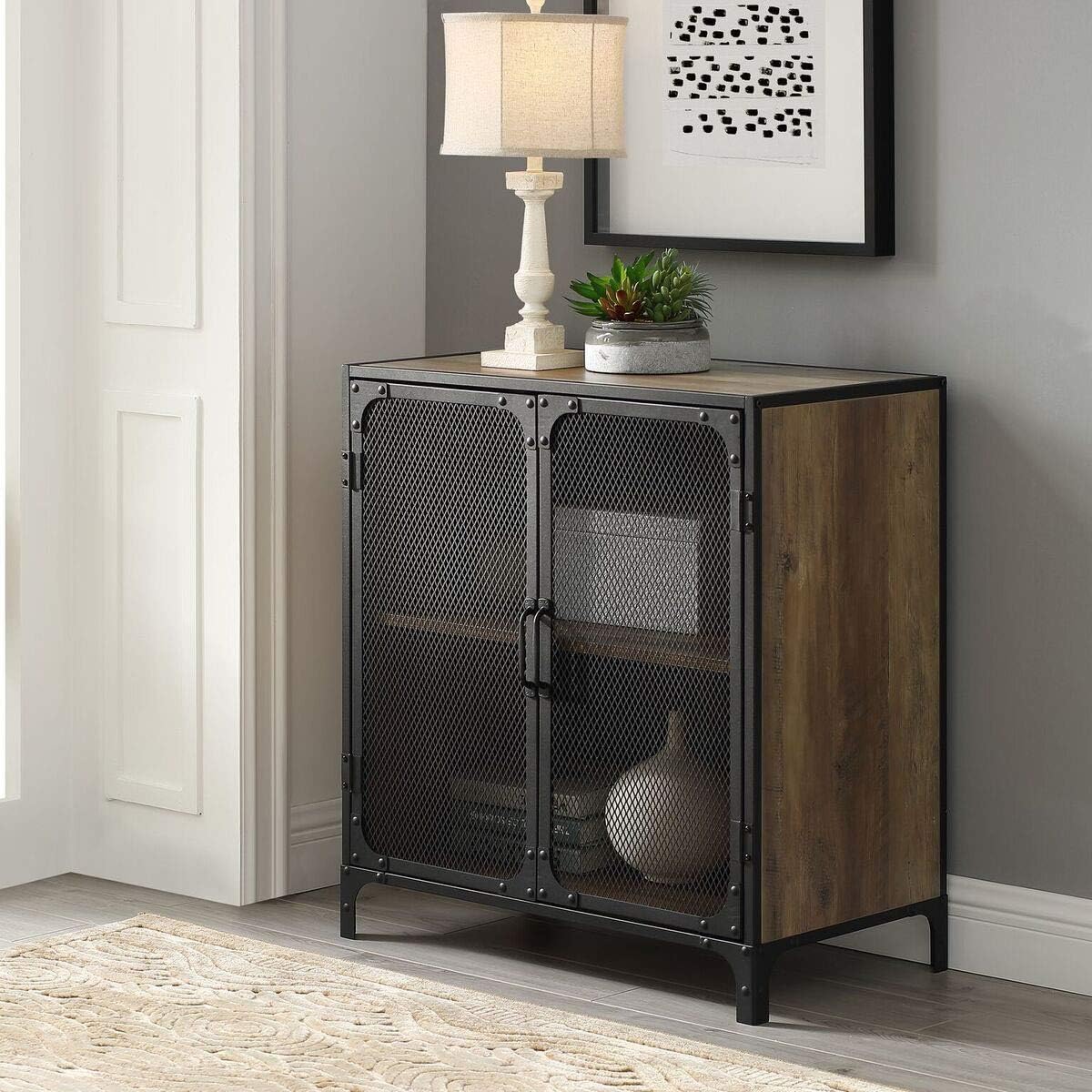
Image: The cabinet positioned in a room, demonstrating its use as an accent piece with a lamp and decorative items on top.
Key Features:
- Dimensions: 30" H x 29" L x 16" W (79.05cm H x 73.97cm L x 40.64cm W)
- Constructed from durable laminate, metal, and high-grade certified MDF.
- Features adjustable shelving for customized storage.
- Designed to support up to 250 lbs (113 kg).
- Suitable for TVs up to 32 inches.
- Industrial design with metal edges, mesh metal doors, and hardware detailing.
2. Safety Information
Adhering to safety guidelines is crucial for preventing injury and ensuring the longevity of your cabinet. Please read and understand all safety instructions before assembly and use.
- Always ensure the cabinet is stable and level before use.
- Do not overload shelves. The maximum recommended load is 250 lbs (113 kg).
- Use appropriate safety gear, such as gloves, during assembly to prevent injury.
- Keep small parts and hardware away from children to avoid choking hazards.
- If using as a TV console, ensure the television's weight and dimensions are within the cabinet's capacity (up to 32" TV).
- Periodically check all connections and fasteners to ensure they remain tight.
3. Assembly Instructions
Assembly is required for this product. It is recommended to have two people for assembly. Please ensure all parts are present before beginning.

Image: Diagram showing the dimensions of the cabinet: 79.05cm height, 73.97cm length, and 40.64cm width.
Required Tools (Not Included):
- Phillips head screwdriver
- Hammer (optional, for dowels)
Assembly Steps:
- Unpack and Identify Parts: Carefully unpack all components and hardware. Refer to the included parts list to ensure all items are present and undamaged.
- Assemble the Base: Attach the cabinet legs to the bottom panel using the provided hardware. Ensure all screws are tightened securely.
- Construct the Side Panels: Connect the side panels to the base and back panel. Pay attention to the orientation of the panels.
- Install the Top Panel: Secure the top panel to the assembled frame.
- Insert Adjustable Shelf: Place the shelf pins at the desired height within the cabinet. Carefully slide the adjustable shelf onto the pins.
- Attach Doors: Mount the metal mesh doors to the cabinet frame using the hinges. Adjust hinges as necessary to ensure doors close properly and are aligned.
- Install Door Handles: Attach the handles to the doors.
- Final Inspection: Verify that all connections are secure and the cabinet is stable.
For detailed visual instructions, refer to the assembly manual included in the product packaging.
4. Operating Instructions
This storage cabinet is designed for straightforward use. Follow these guidelines for optimal functionality.
Opening and Closing Doors:
- Grasp the door handles firmly to open or close the metal mesh doors.
- Ensure doors are fully closed to protect contents and maintain the cabinet's appearance.
Adjusting Shelves:
- Empty the shelf of all contents.
- Carefully lift the shelf to remove it from the shelf pins.
- Relocate the shelf pins to the desired height. Ensure pins are level on both sides.
- Reinsert the shelf onto the pins, ensuring it is stable before placing items on it.

Image: Front view of the cabinet, highlighting the metal mesh doors and circular cutouts for cable management on the back panel, suitable for electronics.
Cable Management:
The cabinet features integrated cable management holes on the back panel, allowing for neat organization of electronic device wires if used as a media console.
5. Maintenance and Care
Proper care will help maintain the appearance and extend the life of your Walker Edison cabinet.
- Cleaning: Wipe surfaces with a soft, damp cloth. Avoid harsh chemicals or abrasive cleaners, as these can damage the laminate finish and metal components.
- Spills: Clean spills immediately to prevent staining or damage to the wood-look laminate.
- Dusting: Regularly dust the cabinet with a dry, soft cloth.
- Hardware: Periodically check and tighten all screws and fasteners to ensure structural integrity.
- Avoid Direct Sunlight: Prolonged exposure to direct sunlight can cause fading or discoloration of the finish.
- Heat and Moisture: Avoid placing hot items directly on the surface. Use coasters or protective pads. Protect from excessive moisture.

Image: Close-up view of the cabinet's top corner, illustrating the texture of the reclaimed barnwood laminate and the sturdy black metal frame.
6. Troubleshooting
If you encounter any issues with your cabinet, refer to the following common troubleshooting tips:
- Wobbly Cabinet:
- Ensure the cabinet is placed on a level surface.
- Check that all assembly screws and fasteners are securely tightened.
- Adjust any leveling feet if present (not explicitly mentioned but common).
- Doors Not Closing Properly:
- Verify that the hinges are correctly installed and tightened.
- Adjust the hinge screws to align the doors.
- Ensure no items inside the cabinet are obstructing the doors.
- Shelf Not Level:
- Remove the shelf and re-insert the shelf pins, ensuring they are at the same height on both sides.
- Confirm the shelf is fully seated on all pins.
- Missing or Damaged Parts:
- Contact Walker Edison customer support with your product model and part number for assistance.
7. Specifications
| Feature | Detail |
|---|---|
| Brand | Walker Edison |
| Model | Malcomb Industrial Metal Mesh 2-Door Storage Cabinet |
| ASIN | B07G5P42QJ |
| Dimensions (H x L x W) | 79.05 cm x 73.97 cm x 40.64 cm (30" H x 29" L x 16" W) |
| Item Weight | 56 Pounds (approx. 25.4 kg) |
| Maximum Recommended Load | 250 Pounds (approx. 113 kg) |
| Material | Metal, Wood (Laminate, High-Grade Certified MDF) |
| Finish Type | Painted (Reclaimed Barnwood Brown) |
| Number of Shelves | 1 (Adjustable) |
| Assembly Required | Yes |
| Included Components | Cabinet, Hardware Pack, Legs, Shelves |
| Recommended Uses | TV console, Storage console, Accent cabinet |
8. Warranty and Support
This Walker Edison product comes with a 30 Day Limited Manufacturer Warranty from the date of purchase. This warranty covers manufacturing defects under normal use.
What the Warranty Covers:
- Defects in materials and workmanship.
What the Warranty Does Not Cover:
- Damage caused by improper assembly or installation.
- Damage from misuse, abuse, accidents, or neglect.
- Normal wear and tear.
- Damage from unauthorized repairs or modifications.
Customer Support:
For warranty claims, missing parts, or any other product-related inquiries, please contact Walker Edison customer service. Have your model number (B07G5P42QJ) and purchase information ready.
Walker Edison Contact Information:
- Website: walkeredison.com/contact-us (Please visit the official website for the most current contact details.)
- Phone: Refer to the official website or product packaging for phone support.


