
1. Introduction
Thank you for choosing the ToughTested 24,000 mAh Solar Power Bank. This device is designed to provide reliable portable power for your electronic devices, especially in outdoor and emergency situations. This manual contains important information regarding the safe and efficient use, maintenance, and troubleshooting of your power bank. Please read it thoroughly before use and retain it for future reference.
2. Product Overview
2.1 Key Features
- Massive 24,000 mAh Capacity: Provides multiple charges for smartphones, tablets, and other USB-powered devices.
- High-Efficiency Solar Panels: Supplementary charging via sunlight, converting solar energy efficiently.
- Multiple Charging Ports: Includes 2 USB-A ports and 1 fast-charging USB-C port for simultaneous device charging.
- Durable and Rugged Design: IP67 rated for water, dust, and shock resistance, suitable for harsh environments.
- Smart Charging Technology: Instasense Power Sharing detects and delivers optimal charge for connected devices.
- Integrated LED Flashlight: Features a 4-mode LED flashlight for emergency lighting.
2.2 Package Contents
- ToughTested 24,000 mAh Solar Power Bank
- USB-C to USB-C Cable
- USB-A to Micro-USB Cable
- Instruction Manual
2.3 Product Diagram

Figure 1: Front view of the ToughTested Solar Power Bank, showing the solar panel and rugged casing.
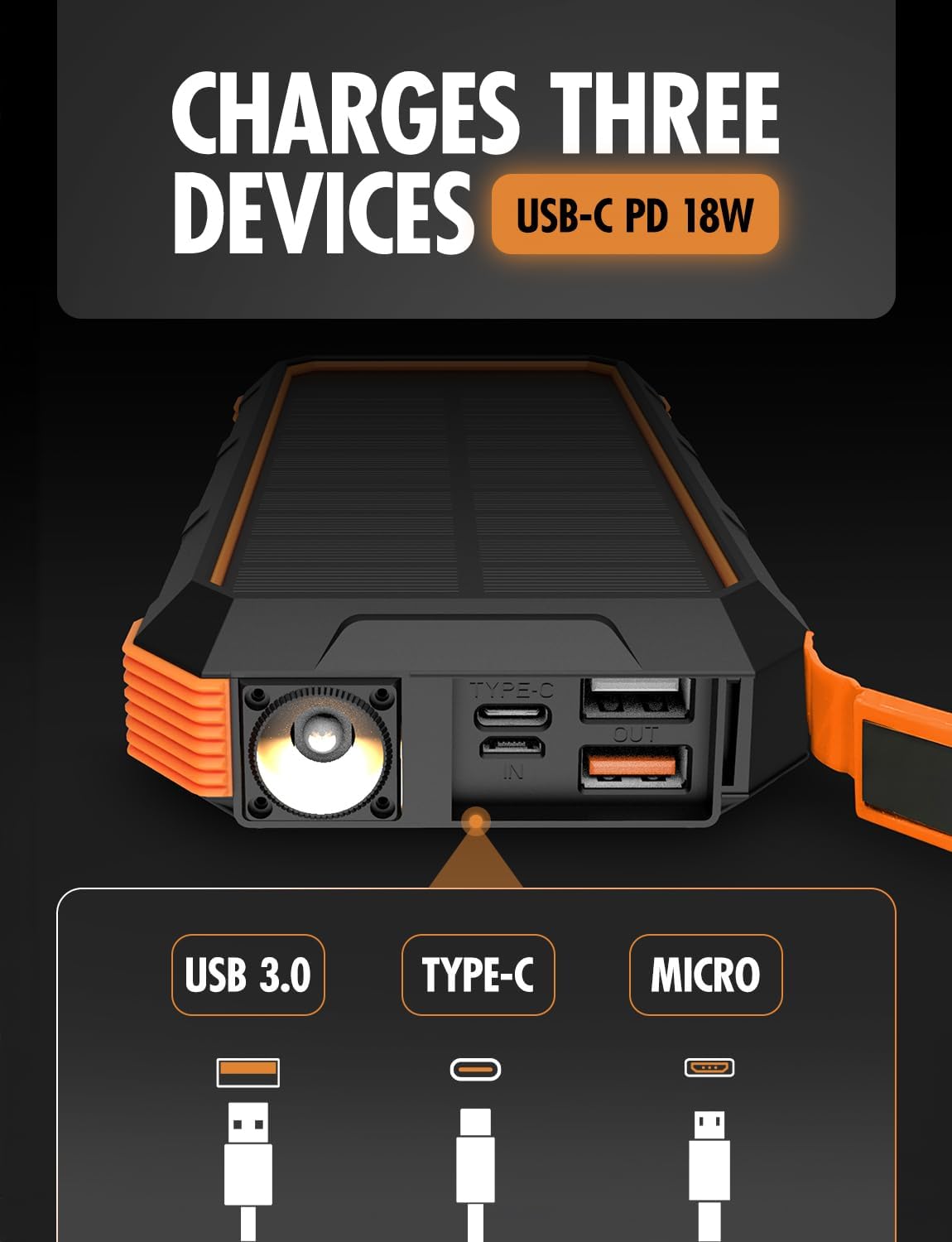
Figure 2: Side view of the power bank, highlighting the USB-C (input/output), USB 3.0 (output), and Micro-USB (input) ports, along with the LED flashlight.
3. Setup
3.1 Initial Charging of the Power Bank
Before first use, fully charge the power bank using a wall adapter. This ensures the internal battery is conditioned for optimal performance.
- Connect the provided USB-C cable to the USB-C port on the power bank.
- Connect the other end of the USB-C cable to a compatible USB wall adapter (not included).
- Allow the power bank to charge until all battery indicator lights are solid, indicating a full charge.
The USB-C port supports 18W Power Delivery (PD) for faster charging of the power bank itself.

Figure 3: Illustration of the power bank's PD fast charging capability, indicating 18W power delivery.
4. Operating Instructions
4.1 Charging the Power Bank
Your ToughTested Solar Power Bank can be charged via two methods:
- Wall Adapter (Recommended for primary charging): Use the USB-C port with a wall adapter for the fastest and most efficient charge.
- Solar Panel (Supplementary charging): Place the power bank in direct sunlight. The solar panel will convert sunlight into energy to charge the internal battery. Note that solar charging is slower and intended for emergency or supplementary power, not as a primary charging method.
4.2 Charging Your Devices
The power bank features multiple output ports to charge various devices simultaneously.
- Connect your device's charging cable to one of the available output ports (USB-A or USB-C) on the power bank.
- Connect the other end of the cable to your device.
- The power bank will automatically begin charging your device. The Instasense Power Sharing Technology will detect your device's charging requirements and deliver the optimal current.
- Monitor your device's charging status. Disconnect once fully charged.
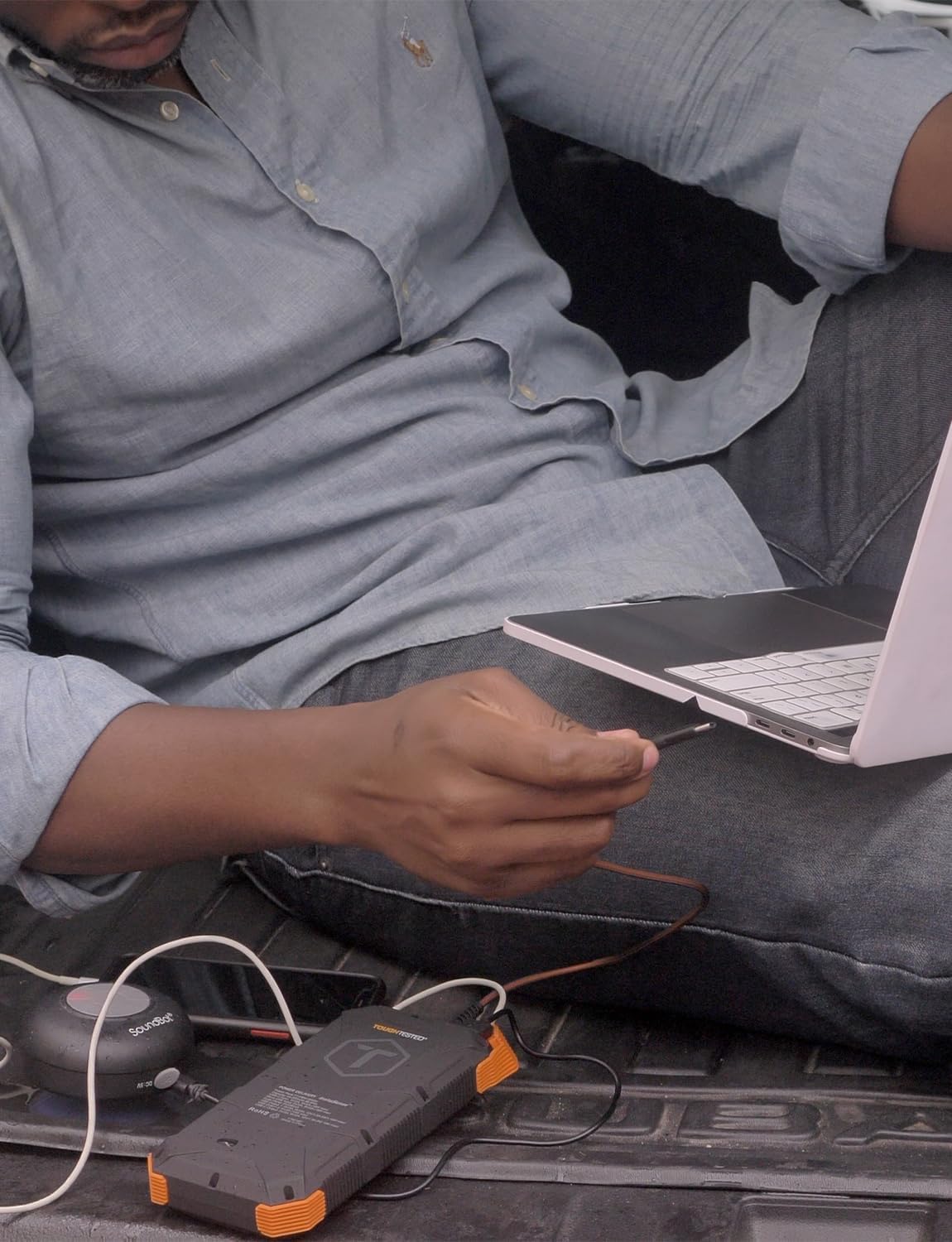
Figure 4: A user charging a laptop using the ToughTested Solar Power Bank, demonstrating its multi-device charging capability.
4.3 LED Flashlight Operation
The integrated LED flashlight has four modes: Standard, SOS, Strobe, and Off.
- To turn on: Press and hold the power button for approximately 3 seconds. The flashlight will turn on in Standard mode.
- To cycle modes: Briefly press the power button to switch between Standard, SOS, and Strobe modes.
- To turn off: Press and hold the power button for approximately 3 seconds.

Figure 5: The power bank with its ultra-bright LED flashlight activated.
5. Maintenance
5.1 Cleaning
Wipe the power bank with a soft, dry cloth. For stubborn dirt, a slightly damp cloth can be used. Ensure all ports are dry before use. Do not use harsh chemicals or abrasive cleaners.
5.2 Storage
Store the power bank in a cool, dry place away from direct sunlight and extreme temperatures. For long-term storage, it is recommended to charge the power bank to approximately 50-75% every 3-6 months to maintain battery health.
5.3 Durability
The power bank is IP67 rated, meaning it is protected against dust ingress and can withstand immersion in water up to 1 meter for 30 minutes. While rugged, avoid intentional submersion or exposing it to high-pressure water jets.

Figure 6: The power bank's weather-proof housing, showing its resistance to water and dust. Note: Product is IP67 rated, image may show IP66.
6. Troubleshooting
- Power bank not charging:
- Ensure the charging cable is securely connected to both the power bank's input port and the power source.
- Verify the wall adapter or USB port is functional.
- If using solar charging, ensure the solar panel is exposed to direct sunlight and is clean. Solar charging is slow and primarily supplementary.
- Device not charging from power bank:
- Check if the power bank has sufficient charge.
- Ensure the charging cable between the power bank and your device is functional and securely connected.
- Try a different output port on the power bank.
- Some devices may require the power button on the power bank to be pressed to initiate charging.
- Flashlight not working:
- Ensure the power bank has charge.
- Press and hold the power button for 3 seconds to activate the flashlight.
7. Specifications
| Feature | Detail |
|---|---|
| Model Number | TT-PBW-SW24 |
| Battery Capacity | 24,000 mAh |
| Input (USB-C) | 5V/3A (15W), Power Delivery (PD) |
| Output (USB-C) | 5V/3A (15W), Power Delivery (PD) |
| Output (USB-A) | 5V/3A (15W) |
| Solar Panel | High-efficiency 400mAh |
| Waterproof/Dustproof Rating | IP67 |
| Dimensions | 2 x 4 x 8 inches |
| Weight | 1 pound |
| Special Features | 4-Mode LED Flashlight, Instasense Power Sharing |
8. Safety Information
- Do not disassemble, open, or shred the battery pack.
- Do not expose the power bank to heat or fire. Avoid storage in direct sunlight.
- Do not short-circuit the battery pack. Do not store battery packs haphazardly in a box or drawer where they may short-circuit each other or be short-circuited by conductive materials.
- In the event of a battery leak, do not allow the liquid to come into contact with the skin or eyes. If contact has been made, wash the affected area with copious amounts of water and seek medical advice.
- Keep the power bank clean and dry.
- Do not leave a battery on prolonged charge when not in use.
- Do not subject the power bank to mechanical shock.
- Dispose of the power bank according to local regulations. Do not dispose of as household waste.
- California Proposition 65 Warning: This product may contain chemicals known to the State of California to cause cancer and birth defects or other reproductive harm.
9. Warranty and Support
The ToughTested 24,000 mAh Solar Power Bank is backed by a 5-Year ToughCare Warranty, ensuring durability and performance. For warranty claims, technical support, or any questions regarding your product, please contact ToughTested customer service through their official website or the retailer where the product was purchased.

Figure 7: Product packaging indicating the 5-Year Warranty and key features.


