
2gig DW30
2GIG Wireless Outdoor Contact Sensor
Model: DW30
Brand: 2gig
Introduction
The 2GIG DW30 Wireless Outdoor Contact Sensor is designed to provide reliable security monitoring for outdoor applications such as gates, sheds, and other entry points. This weatherproof sensor communicates wirelessly with compatible 2GIG security systems, alerting you to open or closed states. Its robust design ensures durability in various outdoor environments.

Image: The 2GIG DW30 Wireless Outdoor Contact Sensor, showing both the main sensor unit and the accompanying magnet.
Package Contents
- 1 x 2GIG DW30 Wireless Outdoor Contact Sensor (Transmitter Unit)
- 1 x Rare Earth Magnet
- Mounting Screws
- 2 x AA Lithium Batteries
Specifications
| Feature | Detail |
|---|---|
| Model Number | DW30 |
| Color | Black |
| Power Source | 2 x AA Lithium Batteries |
| Battery Life | Up to 5 years |
| Maximum Wireless Range | 100 Feet (approx. 30 meters) |
| Frequency | 345 MHz |
| Mounting Type | Wall or Surface Mount |
| Product Dimensions | 1 x 1 x 1 inches (approximate, compact design) |
| Item Weight | 9.2 ounces |
| Compatible Devices | 2GIG security devices and systems |
| Recommended Uses | Garden gates, terraces, garages, driveways, sheds, fences |
Setup and Installation
Proper installation is crucial for optimal performance and reliable operation of your outdoor contact sensor.
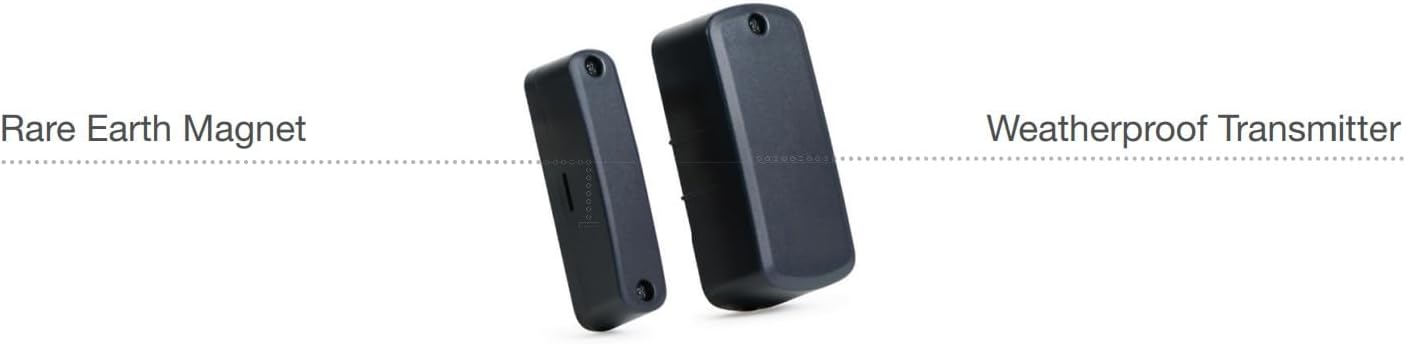
Image: The sensor unit labeled 'Weatherproof Transmitter' and the magnet labeled 'Rare Earth Magnet', illustrating their distinct components.
Installation Steps:
- Battery Installation: Open the sensor unit's casing. Insert the two provided AA lithium batteries, ensuring correct polarity. Close the casing securely.
- Mounting Location: Choose a flat, stable surface for mounting the sensor and magnet. Ensure the location is clean and dry. The sensor is weatherproof, but direct exposure to extreme conditions should be considered.
- Mounting the Sensor Unit: Position the main sensor unit on the stationary part of the door, gate, or window frame. Use the provided screws to securely fasten the unit. The sensor housing includes a tamper switch; ensure the cover is properly seated to prevent false tamper alarms.
- Mounting the Magnet: Position the rare earth magnet on the moving part of the door, gate, or window, directly adjacent to the sensor unit. The optimal gap between the sensor and the magnet is approximately 1/4 inch (0.6 cm). However, the sensor can tolerate a gap of up to two inches (5 cm) on wooden surfaces, and it can also function effectively when mounted on metal posts. Use the provided screws to secure the magnet.
- Programming to 2GIG Panel: Refer to your 2GIG control panel's user manual for specific instructions on how to enroll new wireless sensors. The DW30 sensor is designed for easy integration with 2GIG systems. Follow the panel's prompts to add the sensor to your security system.

Image: An example installation of the 2GIG DW30 sensor on an outdoor security gate, demonstrating its application in a typical environment.
Operating Instructions
Once installed and programmed, the 2GIG DW30 sensor operates by detecting the presence or absence of its magnet. When the magnet is in close proximity to the sensor, the contact is considered closed. When the magnet moves away from the sensor (e.g., a gate opens), the contact opens, and the sensor transmits a signal to your 2GIG control panel.
- Normal Operation: The sensor will silently monitor the open/closed status of the protected entry point.
- Alarm Trigger: If the system is armed and the sensor detects an open state, it will trigger an alarm according to your panel's programming.
- Tamper Detection: The sensor includes a tamper switch. If the sensor's cover is removed or tampered with while the system is armed, it will trigger a tamper alarm.
Maintenance
Regular maintenance ensures the longevity and reliability of your sensor.
- Battery Replacement: The sensor is designed for long battery life (up to 5 years). Your 2GIG control panel will typically indicate a low battery condition for the sensor. When this occurs, replace both AA lithium batteries promptly. Use only high-quality lithium or alkaline AA batteries.
- Cleaning: Periodically clean the exterior of the sensor and magnet with a soft, damp cloth. Avoid using abrasive cleaners or solvents, as these can damage the housing.
- Inspection: Regularly inspect the sensor and magnet for any signs of physical damage, loose mounting, or obstruction. Ensure the gap between the sensor and magnet remains consistent.
Troubleshooting
If you encounter issues with your 2GIG DW30 sensor, consider the following:
- Sensor Not Reporting:
- Check battery levels. Replace batteries if low.
- Ensure the sensor and magnet are properly aligned and within the recommended gap.
- Verify the sensor is correctly enrolled in your 2GIG control panel. Refer to your panel's manual for re-enrollment steps if necessary.
- Check for any physical obstructions or interference between the sensor and the control panel.
- False Tamper Alarms:
- Ensure the sensor's cover is securely closed and latched.
- Check for any movement or vibration of the mounting surface that might cause the cover to shift.
- Limited Range:
- While the sensor has a good range, large metal objects, thick walls, or other wireless devices can cause interference. Try repositioning the sensor or the control panel if possible.
- Ensure there are no other strong radio frequency sources nearby.
For persistent issues, consult your 2GIG control panel's manual or contact 2GIG technical support.
Warranty Information
For detailed warranty information regarding your 2GIG DW30 Wireless Outdoor Contact Sensor, please refer to the official 2GIG website or the warranty documentation included with your purchase. Warranty terms typically cover defects in materials and workmanship under normal use.
Support
If you require further assistance with installation, operation, or troubleshooting, please contact 2GIG customer support or your authorized security system installer. Support contact details can usually be found on the official 2GIG website or within your security system's documentation.
Related documentsDW30


Ask a question about this manual
Ask about setup, troubleshooting, compatibility, parts, safety, or missing instructions. Manuals+ will review the question and use this page’s manual context to help answer it.